启动#
自动启动评估#
systemd provides support for automatically reverting back to the previous version of the OS or kernel in case the system consistently fails to boot. The UAPI.1 Boot Loader Specification describes how to annotate boot loader entries with a counter that specifies how many attempts should be made to boot it. This document describes how systemd implements this scheme.
The many different components involved in the implementation may be used independently and in combination with other software to, for example, support other boot loaders or take actions outside of the boot loader.
Here’s a brief overview of the complete set of components:
The
kernel-install(8)script can optionally create boot loader entries that carry an initial boot counter (the initial counter is configurable in/etc/kernel/tries).The
systemd-boot(7)boot loader optionally maintains a per-boot-loader-entry counter described by the UAPI.1 Boot Loader Specification that is decreased by one on each attempt to boot the entry, prioritizing entries that have non-zero counters over those which already reached a counter of zero when choosing the entry to boot.The
boot-complete.targettarget unit (seesystemd.special(7)) serves as a generic extension point both for units that are necessary to consider a boot successful (e.g.systemd-boot-check-no-failures.servicedescribed below), and units that want to act only if the boot is successful (e.g.systemd-bless-boot.servicedescribed below).The
systemd-boot-check-no-failures.service(8)service is a simple service health check tool. When enabled it becomes an indirect dependency ofsystemd-bless-boot.service(by means ofboot-complete.target, see below), ensuring that the boot will not be considered successful if there are any failed services.The
systemd-bless-boot.service(8)service automatically marks a boot loader entry, for which boot counting as mentioned above is enabled, as “good” when a boot has been determined to be successful, thus turning off boot counting for it.The
systemd-bless-boot-generator(8)generator automatically pulls insystemd-bless-boot.servicewhen use ofsystemd-bootwith boot counting enabled is detected.
Details#
As described in the
UAPI.1 Boot Loader Specification,
the boot counting data is stored in the file name of the boot loader entries as
a plus (+), followed by a number, optionally followed by - and another
number, right before the file name suffix (.conf or .efi).
The first number is the “tries left” counter encoding how many attempts to boot this entry shall still be made. The second number is the “tries done” counter, encoding how many failed attempts to boot it have already been made. Each time a boot loader entry marked this way is booted the first counter is decremented, and the second one incremented. (If the second counter is missing, then it is assumed to be equivalent to zero.) If the boot attempt completed successfully the entry’s counters are removed from the name (entry state “good”), thus turning off boot counting for the future.
Walkthrough#
Here’s an example walkthrough of how this all fits together.
The user runs
echo 3 >/etc/kernel/triesto enable boot counting.A new kernel is installed.
kernel-installis used to generate a new boot loader entry file for it. Let’s say the version string for the new kernel is4.14.11-300.fc27.x86_64, a new boot loader entry/boot/loader/entries/4.14.11-300.fc27.x86_64+3.confis hence created.The system is booted for the first time after the new kernel has been installed. The boot loader now sees the
+3counter in the entry file name. It hence renames the file to4.14.11-300.fc27.x86_64+2-1.confindicating that at this point one attempt has started. After the rename completed, the entry is booted as usual.Let’s say this attempt to boot fails. On the following boot the boot loader will hence see the
+2-1tag in the name, and will hence rename the entry file to4.14.11-300.fc27.x86_64+1-2.conf, and boot it.Let’s say the boot fails again. On the subsequent boot the loader will hence see the
+1-2tag, and rename the file to4.14.11-300.fc27.x86_64+0-3.confand boot it.If this boot also fails, on the next boot the boot loader will see the tag
+0-3, i.e. the counter reached zero. At this point the entry will be considered “bad”, and ordered after all non-bad entries. The next newest boot entry is now tried, i.e. the system automatically reverted to an earlier version.
The above describes the walkthrough when the selected boot entry continuously fails. Let’s have a look at an alternative ending to this walkthrough. In this scenario the first 4 steps are the same as above:
as above
as above
as above
as above
Let’s say the second boot succeeds. The kernel initializes properly, systemd is started and invokes all generators.
One of the generators started is
systemd-bless-boot-generatorwhich detects that boot counting is used. It hence pullssystemd-bless-boot.serviceinto the initial transaction.systemd-bless-boot.serviceis ordered after andRequires=the genericboot-complete.targetunit. This unit is hence also pulled into the initial transaction.The
boot-complete.targetunit is ordered after and pulls in various units that are required to succeed for the boot process to be considered successful. One such unit issystemd-boot-check-no-failures.service.The graphical desktop environment installed on the machine starts a service called
graphical-session-good.service, which is also ordered beforeboot-complete.target, that registers a D-Bus endpoint.systemd-boot-check-no-failures.serviceis run after all its own dependencies completed, and assesses that the boot completed successfully. It hence exits cleanly.graphical-session-good.servicewaits for a user to log in. In the user desktop environment, one minute after the user has logged in and started the first program, a user service is invoked which makes a D-Bus call tographical-session-good.service. Upon receiving that call,graphical-session-good.serviceexits cleanly.This allows
boot-complete.targetto be reached. This signifies to the system that this boot attempt shall be considered successful.Which in turn permits
systemd-bless-boot.serviceto run. It now determines which boot loader entry file was used to boot the system, and renames it dropping the counter tag. Thus4.14.11-300.fc27.x86_64+1-2.confis renamed to4.14.11-300.fc27.x86_64.conf. From this moment boot counting is turned off for this entry.On the following boot (and all subsequent boots after that) the entry is now seen with boot counting turned off, no further renaming takes place.
How to adapt this scheme to other setups#
Of the stack described above many components may be replaced or augmented. Here are a couple of recommendations.
To support alternative boot loaders in place of
systemd-boottwo scenarios are recommended:a. Boot loaders already implementing the Boot Loader Specification can simply implement the same rename logic, and thus integrate fully with the rest of the stack.
b. Boot loaders that want to implement boot counting and store the counters elsewhere can provide their own replacements for
systemd-bless-boot.serviceandsystemd-bless-boot-generator, but should continue to useboot-complete.targetand thus support any services ordered before that.To support additional components that shall succeed before the boot is considered successful, simply place them in units (if they aren’t already) and order them before the generic
boot-complete.targettarget unit, combined withRequires=dependencies from the target, so that the target cannot be reached when any of the units fail. You may add any number of units like this, and only if they all succeed the boot entry is marked as good. Note that the target unit shall pull in these boot checking units, not the other way around.Depending on the setup, it may be most convenient to pull in such units through normal enablement symlinks, or during early boot using a
generator, or even during later boot. In the last case, care must be taken to ensure that the start job is created beforeboot-complete.targethas been reached.To support additional components that shall only run on boot success, simply wrap them in a unit and order them after
boot-complete.target, pulling it in.Such unit would be typically wanted (or required) by one of the
bootuptargets, for example,multi-user.target. To avoid potential loops due to conflicting default dependencies ordering, it is recommended to also add an explicit dependency (e.g.After=multi-user.target) to the unit. This overrides the implicit ordering and allowsboot-complete.targetto start after the given bootup target.
FAQ#
I have a service which — when it fails — should immediately cause a reboot. How does that fit in with the above? — That’s orthogonal to the above, please use
FailureAction=in the unit file for this.Under some condition I want to mark the current boot loader entry as bad right-away, so that it never is tried again, how do I do that? — You may invoke
/usr/lib/systemd/systemd-bless-boot badat any time to mark the current boot loader entry as “bad” right-away so that it isn’t tried again on later boots.
启动组件和根文件系统探测#
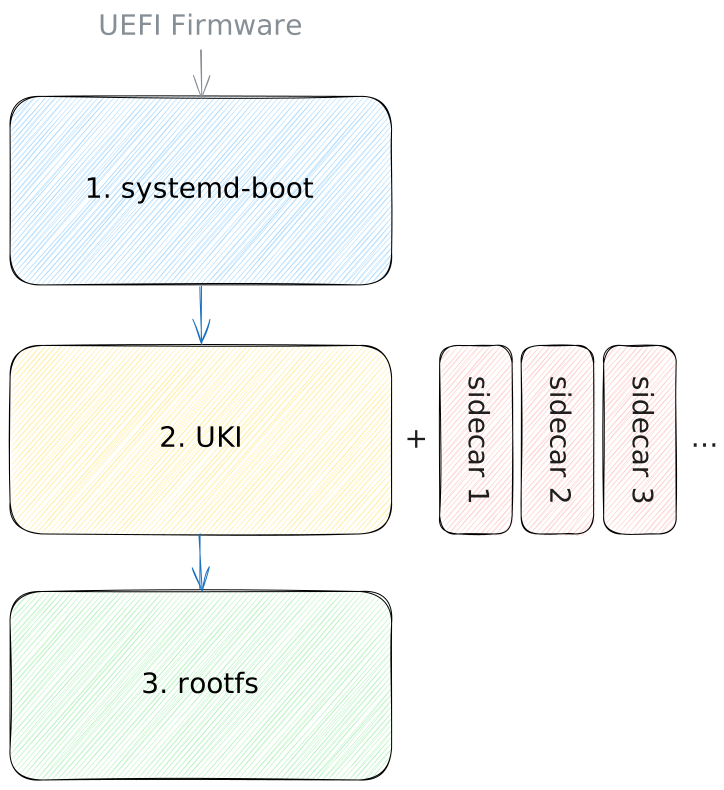
The recommended way to boot a systemd based
UEFI system consists primarily of three
components:
A boot loader, i.e.
systemd-bootthat provides interactive and programmatic control of what precisely to boot. It takes care of enumerating all possible boot targets (implementing the UAPI.1 Boot Loader Specification), potentially presenting it to the user in a menu, but otherwise picking an item automatically, implementing boot counting and automatic rollback if desired.A UAPI.5 Unified Kernel Image (“UKI”), i.e. an UEFI PE executable that combines
systemd-stub, a Linux kernel, and an initial RAM disk ("initrd") into one. UKIs are self-descriptive: the aforementioned boot loader enumerates these UKIs and automatically extracts all information necessary to determine which menu entries to generate for them. Within the UKI runtime (very early during kernel initialization) the transition from the UEFI firmware code to the Linux code takes place, i.e. it executes the fundamentalExitBootServices()UEFI call that ends PC firmware control, and lets the Linux kernel take over.A root file system ("
rootfs"): this is where the regular OS is located. The primary job of the early userspace that is contained in theinitrdthat itself is part of the UKI, is to find, set up, and pivot into therootfs.
The above is how
systemdupstream recommends a system is put together. However, distributions differ from this, sometimes massively – in particular when their focus is on supporting legacy (i.e. non-UEFI) hardware platforms. We believe the above three components are all that’s really necessary for a robust, simple and comprehensive system, but downstreams might see things differently. The above however is supposed to be a guideline for distribution developers.
Execution Environments#
Note that these three components are executed within very distinct execution environments, with very different APIs, drivers and file system access:
| Component | Environment |
|---|---|
Boot Loader: systemd-boot | UEFI APIs, simple VFAT file system access |
UKI initially: systemd-stub | UEFI APIs, simple VFAT file system access |
UKI finally: initrd | Linux APIs, complex storage and file systems |
Root File System: rootfs | Linux APIs, full OS functionality |
Structure & Auxiliary Resources#
Each of the three components is primarily encapsulated in a single object each:
The boot loader is primarily a single PE UEFI binary, called either
systemd-boot.efiorBOOTX64.EFIdepending on context (the latter name contains an architecture identifier, and is different for non-x86-64 architectures).The UKI is primarily a single PE UEFI binary (i.e. a
.efifile).The
rootfsis typically a Linux file system, on a GPT partition table disk. Typically, therootfsis placed within some form of container that ensures security of the file system, i.e. authenticity, confidentiality and integrity viadm-verity,dm-crypt,dm-integrityor a combination thereof.
While these three objects are generally enough to boot an OS successfully, in many cases some parameterization and modularization of the boot is necessary, hence each of these components is often combined with certain optional, auxiliary resources:
The boot loader can read a configuration file
loader.conf, find additional drivers, or key material for SecureBoot enrollment in the same file system it itself is placed in.systemd-stubcan find additional parameters (“system credentials”), configuration ("confext"), drivers/firmware ("sysext") and other resources (“EFI Addons”) placed next to the location it itself is placed in. We typically call these companion resources “sidecars”.The
rootfsoften is a combination of one file system for/usr/("usrfs") and one for the actual root/, and possibly further, auxiliary file systems, for example/home/or/srv/.
Depending on the execution environment the first component (the boot loader) might be dispensable. Specifically, on disk images intended solely for use in VMs, it might make sense to tell the firmware to directly boot a UKI, letting the VMM’s image selection functionality play the role of the boot loader.
Depending on the execution environment the last component (the
rootfs) might also be dispensable. Specifically, for simpler fixed-purpose, stateless applications it might be sufficient to run everything needed directly from theinitrdfile system embedded in the UKI, and never transition out of this. In this case, conceptually theinitrdis only aninitrdfrom kernel PoV, but is already therootfsfrom a userspace PoV. We usually call these types of setups Unified System Image (“USI”), as opposed to UKI.
Automatic Discovery on Disks#
In the most common case all three components and their sidecars are placed on the same disk. Specifically:
The boot loader is placed in the “EFI System Partition” (ESP), typically at the paths
/EFI/BOOT/BOOTX64.EFI(this is a generic entrypoint binary that the firmware executes when you just point it to a disk to boot without any further details) and/EFI/systemd/systemd-bootx64.efi(this is a more specific entrypoint that can be registered persistently in the firmware, to give it an explicit starting point). The ESP is a concept defined by the UEFI specification and is what the firmware initially looks for and mounts. Since VFAT is the only relevant file system type UEFI firmwares have to support the ESP is generally a VFAT file system. The aforementioned auxiliary, optional resources the boot loader may consume are placed in the ESP as well, in particular below the/loader/subdirectory.The UKIs may either be placed in the ESP (below the
/EFI/Linux/subdirectory), or in the UAPI.1 Extended Boot Loader Partition (“XBOOTLDR”), which can be placed on the same disk as the ESP and is also VFAT. XBOOTLDR is an optional concept and it’s only raison d’être is that ESPs sometimes are sized too small by vendors, and do not have enough space for multiple UKIs. XBOOTLDR hence serves as a conceptual extension of the size-constrained ESP. Sidecars for the UKIs are typically placed in a directory next to the UKI they are for, whose name however is suffixed by.d/, i.e. a UKIfoo.efihas its sidecars infoo.efi.d/.The
rootfsis placed on the same disk as the ESP/XBOOTLDR, in a partition marked with a special GPT partition type. Various other well-known types of partitions can be placed next to therootfsand are automatically discovered and mounted, see the UAPI.2 Discoverable Partitions Specification for details.
In this common case, discovery of all three components and their sidecars is fully automatic. Each component derives automatically where to find its auxiliary resources as well as the next step to transition to, entirely based on the place itself is running from. There’s a full chain of automatic discovery in place:
The firmware picks the disk to boot from (possibly by interactive choice of the user), accesses the ESP on it, and invokes the boot loader from it.
The boot loader then looks for UKIs, both on the ESP it was invoked from, and in the XBOOTLDR partition next to it on the same disk.
The UKI’s initrd then looks for the
rootfs, on the same disk the UKI was invoked from, i.e. it looks for a partition marked as root next to the ESP/XBOOTLDR partition. (This information is passed from UKI to userspace via theLoaderDevicePartUUIDEFI variable.)
In more complex setups it is possible to specify in more detail where to find each of these resources:
Firmware typically provides a basic boot menu which may be used to choose between various relevant boot loaders/entrypoints on multiple disks. This is sometimes configurable from the firmware setup tool, as well as from userspace via tools such as
bootctl,efibootmgrorkernel-bootcfg.The
systemd-bootboot loader may be configured via UAPI.1 Boot Loader Specification Type #1 entries to acquire UKIs or similar from other locations.The
initrdpart of the UKI understands theroot=(andmount.usr=) kernel command line switches to look for therootfs/usrfsat a particular place.
While it is recommended to keep all three components closely together it is possible via these mechanisms to place all three at completely disparate locations, too.
Network Boot#
In many cases it is essential to boot an OS from the network instead of a local disk. This can happen at each of these three components:
Many UEFI firmwares support HTTP(S) network boot (usually requires enabling in firmware setup). If this is available, it permits downloading a disk image from an HTTP server (the URL can either be configured in the firmware setup, or be acquired in a DHCP lease). The disk image is then set up as a RAM disk, and then processed much like a regular disk: an ESP is searched for and the
/EFI/BOOT/BOOTX64.EFIentrypoint binary is invoked.UKIs can be placed on the same downloaded disk image, within the ESP. If multiple different UKIs shall be made accessible from the same boot menu this would potentially increase the size of the disk image to prohibitive sizes. In order to address this, it is possible to embed Boot Loader Specification Type #1 entry files in the ESP instead, which may carry references to the UKIs to download and invoke once a choice is made. These references can either be full URLs or alternatively simple filenames which are then automatically appended to the URL that was used by the firmware to acquire the initial boot disk.
The
rootfscan be acquired automatically from a networked source too in a flexible fashion. For example, theinitrdcontained in the UKI might support NVMe-over-TCP or iSCSI block devices to boot from, supporting the whole Linux storage stack.systemdalso natively supports downloading therootfsfrom HTTP sources, either in a GPT disk image (specifically: UAPI.3 DDIs, with.rawsuffix) or in a.tarfile, which are placed in system RAM and then booted into (these downloads can be downloaded in compressed form and are automatically decompressed on-the-fly). This of course requires sufficient RAM to be available on the target system, and also means that persistency of modifications of the file system is not possible. If this mode is used, the URL to acquire therootfsdisk image from can be derived automatically from the URL that was used to acquire the UKI itself. (This information is passed from UKI to userspace via theLoaderDevicePartURLEFI variable.)
Similarly to the disk-based boot scheme described in the previous section,
discovery of the boot source can be fully automatic, with each
component taking the source of the preceding component into account:
the boot loader can automatically download UKIs from the same source
it itself was downloaded from. Moreover the initrd of the UKI can
automatically downloads the rootfs from the same source it itself was
downloaded from.
Also, much like in the disk-based boot scheme, it is possible to
specify a different source for a component to replace the automatically-derived URL.
On top of that it is of course possible to mix disk-based and network-based boot:
for example place the boot loader on the local disk,
but use UKIs and rootfs from networked sources;
or alternatively place both boot loader and UKIs on the local disk,
and only the rootfs on the network.
Trust & Security#
In a modern world of boot integrity, all three of the relevant components as well as (most of) their sidecars require cryptographic protection. Specifically:
The boot loader is typically authenticated by the firmware before invocation via UEFI Secure Boot, i.e. checked against a cryptographic certificate list persistently stored in the firmware. Note that the various auxiliary resources the
systemd-bootboot loader reads are not individually authenticated (i.e.loader.confas well as Type #1 Boot Loader Specification entries). Because of this they can typically only be used in a very restricted fashion, i.e. configure some UI details as well as menu entries. Some options available are ignored if Secure Boot mode is enabled. Moreover, even if the text strings shown in the menu entries might not be authenticated, the binaries that are invoked once they are selected are, as are all their parameters.The UKIs are also authenticated by the firmware via UEFI Secure Boot, and so are EFI Addons.
confextandsysextsidecars are protected viadm-verityand a signature of the root hash is validated against keys in the kernel’s keyrings. System credentials are authenticated via secrets stored in the TPM.Authentication of the
rootfsandusrfsis more variable: depending on setup this is either done viadm-verity(either pinned by root hash from the UKI, or authenticated by signature provided to the kernel, checked against the kernel’s built-in keyring) ordm-crypt+dm-integrity(protected by TPM or user provided password/FIDO/PKCS#11), or in the network case at download time via detached signatures (currently only GPG) or via HTTPS certificate validation. Note that by default the automatic discovery mechanism of therootfsand its auxiliary file systems does not insist on cryptographic protection and authentication before use. However, thesystemd.image_policy=kernel command line switch may be used to control precisely what kind of protection to require for each such partition.
Note that UEFI Secure Boot is problematic in various ways: it is generally bound to a certificate list maintained centrally by Microsoft, and thus implies a complex (and expensive) code signing bureaucracy, that in many cases is undesirable, particularly in a community Linux world. Moreover, because the certificate list managed by Microsoft is very large, its security value is limited: it mostly acts more as denylist of known-bad software rather than as allowlist of known-good. (If you enroll your own list, things are much better, but see below.)
Shim#
To make the code signing more palatable to the Linux world the shim project
has been developed, which is often used as initial component of the OS boot
(i.e. the firmware would invoke shim as component 0, before the components 1,
2, 3 described above). shim is primarily relevant for two reasons: it adds
a second set of certificates on top of the UEFI Secure Boot list, maintained by
the OS vendor, and it optionally provides functionality to maintain a local set
of keys (“MOK”) in addition to the Microsoft and OS vendor keys.
Automatic Enrollment of Secure Boot Certificates#
The systemd-boot boot loader also supports automatic enrollment of
alternative SecureBoot certificates: if the system is booted in the
firmware-provided Secure Boot “Setup Mode”, it can automatically enroll
certificates placed inside the ESP into the firmware, replacing any existing
ones if there are any. This mechanism massively enhances the security value of
Secure Boot: you can enroll your own certificates, ensuring that only the
software you want shall be allowed to be run on the system, in a very focused
way. However, do note that this mechanism is only suitable if the hardware
supports it properly, because the Secure Boot certificate
list is also used to authenticate firmware extensions provided by certain
extension boards of PCs (for example graphics cards). Or in other words:
replacing the certificate list with your own might result in unbootable and even
bricked systems. Automatic enrolling of Secure Boot certificates is however a
really good option if the targeted hardware is known to be compatible,
which is in particular the case in VMs.
Measured Boot and TPMs#
Secure Boot is not the only mechanism that can provide boot time integrity guarantees of the OS. Most modern systems are equipped with a TPM security chip. It allows components of the boot to issue “measurements” (i.e. submit a cryptographic hash) of the next step of the boot process as well as of all inputs they consume to the device, in a fashion that cannot be undone (except if the system is rebooted). The combination of measurements of all such boot components can then later be used to protect secrets the TPM can manage: only if the system is booted in a very specific way such secrets (such as a disk encryption key) can be revealed to the OS. This hence provides a different form of protection: instead of making it a-priori impossible to boot or consume untrusted components (as Secure Boot would do it), anything is permitted, however the TPM would never reveal protected secrets to the OS unless the components are trusted, in a a-posteriori fashion. This generally provides a more focused security model (as the list of allowed components and the policies derived thereof are locally maintained instead of world-wide by Microsoft), however, requires more careful management of OS and firmware updates. Moreover, it’s more compatible with a TOFU security model (“Trust on first use”) rather than a universal trust model.
systemd-stub will measure the sidecars it picks up as well as the individual
parts that make up a UKI that are used for boot. systemd userspace will also
measure various parts of its resources as does the kernel.
systemd-pcrlock,
systemd-measure,
systemd-cryptenroll,
systemd-cryptsetup
can be used to manage Measured Boot policies for disk encryption.
Note that Secure Boot and Measured Boot are not exclusive to each other, they are often used in combination, and can interact (e.g. the Secure Boot certificate lists are measured as part of the boot process).
Security of Network Boot#
UEFI HTTP boot comes in two flavours: plain HTTP and HTTPS. The latter typically requires enrolment of TLS server certificates in the system firmware, but provides transport integrity, authenticity and confidentiality. Acquiring the various resources via plain HTTP should generally be sufficient too, as the key resources acquired this way area generally authenticated before use via other mechanisms, see above.
Building#
The systemd project provides various tools to build the various components
necessary to implement the aforementioned boot process:
The
systemd-boot,systemd-stubcomponents are part of thesystemdsource tree.The
ukifytool provided bysystemdcan be used to build UKIs, USIs and EFI Addons.The
bootctltool provided bysystemdcan be used to install thesystemd-bootboot loader to the ESP.The
kernel-installtool provided bysystemdcan be used to install UKIs to the ESP or XBOOTLDR.The
systemd-reparttool can be used to generateconfextandsysextimages, as well asrootfsandusrfsimages. It can also be used install such images on other disks, or to augment minimal disk images on boot with additional partitions, or grow them.The
systemd-credstool can be used to generate system credential files.The
systemd-cryptsetup,systemd-veritysetupandsystemd-integritysetuptools can be used to set up cryptographically protected disks at boot.mkosiis a higher level tool that combines all of the above to build and sign complete OS images from distribution packages, as needed:initrdtrees, UKIs, USIs,rootfs/usrfs, whole DDIs,sysextimages,.tarfiles to boot into and more.
引导加载程序接口#
systemd can interface with the boot loader
to receive performance data and other information,
and pass control information.
This is only supported on EFI systems.
Data is transferred between the boot loader and systemd in EFI variables.
All EFI variables use the vendor UUID 4a67b082-0a4c-41cf-b6c7-440b29bb8c4f.
Variables will be listed below using the Linux efivarfs naming,
<name>-<vendoruuid>.
The EFI Variable
LoaderTimeInitUSec-4a67b082-0a4c-41cf-b6c7-440b29bb8c4fcontains the timestamp in microseconds when the loader was initialized. This value is the time spent in the firmware for initialization. It is formatted as numeric, NUL-terminated, decimal string, in UTF-16.The EFI Variable
LoaderTimeExecUSec-4a67b082-0a4c-41cf-b6c7-440b29bb8c4fcontains the timestamp in microseconds when the loader finished its work and is about to execute the kernel. The time spent in the loader is the difference betweenLoaderTimeExecUSecandLoaderTimeInitUSec. This value is formatted the same way asLoaderTimeInitUSec.The EFI variable
LoaderDevicePartUUID-4a67b082-0a4c-41cf-b6c7-440b29bb8c4fcontains the partition GUID of the ESP the boot loader was run from formatted as NUL-terminated UTF16 string, in normal GUID syntax.The EFI variable
LoaderConfigTimeout-4a67b082-0a4c-41cf-b6c7-440b29bb8c4fcontains the boot menu timeout currently in use. It may be modified both by the boot loader and by the host. The value should be formatted as numeric, NUL-terminated, decimal string, in UTF-16. The time is specified in seconds. In addition some non-numeric string values are also accepted. A value ofmenu-forcewill disable the timeout and show the menu indefinitely. If set to0ormenu-hiddenthe default entry is booted immediately without showing a menu. Unless a value ofmenu-disabledis set, the boot loader should provide a way to interrupt this by for example listening for key presses for a brief moment before booting.Similarly, the EFI variable
LoaderConfigTimeoutOneShot-4a67b082-0a4c-41cf-b6c7-440b29bb8c4fcontains a boot menu timeout for a single following boot. It is set by the OS in order to request display of the boot menu on the following boot. When set overridesLoaderConfigTimeout. It is removed automatically after being read by the boot loader, to ensure it only takes effect a single time. This value is formatted the same way asLoaderConfigTimeout. If set to0the boot menu timeout is turned off, and the menu is shown indefinitely.The EFI variable
LoaderEntries-4a67b082-0a4c-41cf-b6c7-440b29bb8c4fmay contain a series of boot loader entry identifiers, one after the other, each individually NUL terminated. This may be used to let the OS know which boot menu entries were discovered by the boot loader. A boot loader entry identifier should be a short, non-empty alphanumeric string (possibly containing-, too). The list should be in the order the entries are shown on screen during boot. See below regarding the recommended vocabulary for boot loader entry identifiers.The EFI variable
LoaderEntryPreferred-4a67b082-0a4c-41cf-b6c7-440b29bb8c4fcontains the preferred boot loader entry to use. This takes boot assessment into account by not selecting boot entries that have been marked as bad, seeAutomatic Boot Assessment for more details on boot assessment. If no entry was selected by the preferred setting (from either the EFI var or the config file), then the boot loader will look at the default setting, which does not skip entries that were marked as bad. It contains a NUL-terminated boot loader entry identifier.The EFI variable
LoaderEntryDefault-4a67b082-0a4c-41cf-b6c7-440b29bb8c4fcontains the default boot loader entry to use. This ignores boot assessment and can select boot entries that have been marked as bad by boot assessment, seeAutomatic Boot Assessment for more details on boot assessment as well as the documentation on theLoaderEntryPreferredEFI var. It contains a NUL-terminated boot loader entry identifier.The EFI variable
LoaderEntrySysFail-4a67b082-0a4c-41cf-b6c7-440b29bb8c4fspecifies the boot loader entry to be used in case of a system failure. System failure (SysFail) boot entries can optionally modify the automatic selection order in the event of a failure, such as a boot firmware update failure with the failure status recorded in the EFI system table. If a system failure occurs andLoaderEntrySysFailis set, systemd-boot will use this boot entry, and store the actual SysFail reason in theLoaderSysFailReasonEFI variable.The EFI variable
LoaderSysFailReason-4a67b082-0a4c-41cf-b6c7-440b29bb8c4fcontains the system failure reason. This variable is used in cooperation withLoaderEntrySysFailboot entry. If system failure doesn’t occur,LoaderSysFailReasonis not set.Similarly, the EFI variable
LoaderEntryOneShot-4a67b082-0a4c-41cf-b6c7-440b29bb8c4fcontains the default boot loader entry to use for a single following boot. It is set by the OS in order to request booting into a specific menu entry on the following boot. When set overridesLoaderEntryPreferredandLoaderEntryDefault. It is removed automatically after being read by the boot loader, to ensure it only takes effect a single time. This value is formatted the same way asLoaderEntryDefaultandLoaderEntryPreferred.The EFI variable
LoaderEntrySelected-4a67b082-0a4c-41cf-b6c7-440b29bb8c4fcontains the boot loader entry identifier that was booted. It is set by the boot loader and read by the OS in order to identify which entry has been used for the current boot.The EFI variable
LoaderFeatures-4a67b082-0a4c-41cf-b6c7-440b29bb8c4fcontains a 64-bit unsigned integer with a number of flags bits that are set by the boot loader and passed to the OS and indicate the features the boot loader supports. Specifically, the following bits are defined:1 << 0→ The boot loader honoursLoaderConfigTimeoutwhen set.1 << 1→ The boot loader honoursLoaderConfigTimeoutOneShotwhen set.1 << 2→ The boot loader honoursLoaderEntryDefaultwhen set.1 << 3→ The boot loader honoursLoaderEntryOneShotwhen set.1 << 4→ The boot loader supports boot counting as described in Automatic Boot Assessment.1 << 5→ The boot loader supports looking for boot menu entries in the Extended Boot Loader Partition.1 << 6→ The boot loader supports passing a random seed to the OS.1 << 7→ The boot loader supports loading of drop-in drivers from the/EFI/systemd/drivers/directory on the ESP, seesystemd-boot(7).1 << 8→ The boot loader supports thesort-keyfield defined by the Boot Loader Specification.1 << 9→ The boot loader supports the@savedpseudo-entry1 << 10→ The boot loader supports thedevicetreefield defined by the Boot Loader Specification.1 << 11→ The boot loader support automatic enrollment of SecureBoot keys, seesystemd-boot(7).1 << 12→ The boot loader will set EFI variableShimRetainProtocol-605dab50-e046-4300-abb6-3dd810dd8b23forshimto make its protocol available to the booted binary.1 << 13→ The boot loader honoursmenu-disabledoption when set.1 << 14→ The boot loader supports multi-profile Unified Kernel Images (UKIs)1 << 15→ The boot loader sets theLoaderDeviceURLvariable when appropriate.1 << 16→ The boot loader supports theukifield defined by the Boot Loader Specification.1 << 17→ The boot loader supports theuki-urlfield defined by the Boot Loader Specification.1 << 18→ The boot loader reports active TPM2 PCR banks in the EFI variableLoaderTpm2ActivePcrBanks-4a67b082-0a4c-41cf-b6c7-440b29bb8c4f.1 << 19→ The boot loader supports theLoaderEntryPreferredvariable when set.1 << 20→ The boot loader reports the firmware-configured keyboard layout in the EFI variableLoaderKeyboardLayout-4a67b082-0a4c-41cf-b6c7-440b29bb8c4f.1 << 21→ The boot loader measures SMBIOS information into a TPM2 PCR and reports the PCR index in the EFI variableLoaderPcrSMBIOS-4a67b082-0a4c-41cf-b6c7-440b29bb8c4f.
The EFI variable
LoaderSystemToken-4a67b082-0a4c-41cf-b6c7-440b29bb8c4fcontains binary random data, persistently set by the OS installer. Boot loaders that support passing random seeds to the OS should use this data and combine it with the random seed file read from the ESP. By combining this random data with the random seed read off the disk before generating a seed to pass to the OS and a new seed to store in the ESP the boot loader can protect itself from situations where “golden” OS images that include a random seed are replicated and used on multiple systems. Since the EFI variable storage is usually independent (i.e. in physical NVRAM) of the ESP file system storage, and only the latter is part of “golden” OS images, this ensures that different systems still come up with different random seeds. Note that theLoaderSystemTokenis generally only written once, by the OS installer, and is usually not touched after that.The EFI variable
LoaderDeviceURL-4a67b082-0a4c-41cf-b6c7-440b29bb8c4fcontains the URL the boot loader was downloaded from, in UTF-16 format. Only set in case of network boots.The EFI variable
LoaderTpm2ActivePcrBanks-4a67b082-0a4c-41cf-b6c7-440b29bb8c4fcontains a hexadecimal string representation of a bitmask with values defined by the TCG EFI ProtocolSpecification for TPM 2.0 asEFI_TCG2_BOOT_HASH_ALG_*. If no TPM2 support or no active banks were detected, will be set to0.The EFI variable
LoaderKeyboardLayout-4a67b082-0a4c-41cf-b6c7-440b29bb8c4fcontains the RFC 4646 (BCP 47) language tag of the currently-active keyboard layout as reported by the UEFI HII database (e.g.en-US,de-DE). It is formatted as a NUL-terminated UTF-16 string. The boot loader sets this variable from the layout returned byEFI_HII_DATABASE_PROTOCOL.GetKeyboardLayout(), if that protocol is implemented by the firmware. Userspace (notablysystemd-vconsole-setup) uses this as a lowest-priority fallback keyboard layout when no explicit configuration is provided.The EFI variable
LoaderPcrSMBIOS-4a67b082-0a4c-41cf-b6c7-440b29bb8c4fcontains the index of the TPM2 PCR (as a decimal ASCII string formatted as a NUL-terminated UTF-16 string, e.g.1) into which the boot loader measured select SMBIOS structures: type 1 (system information, with the volatile “Wake-up Type” field zeroed out), type 2 (baseboard information) and type 11 (OEM strings). This is a volatile (non-persistent) variable, set only if a measurement was successfully completed, and remains unset otherwise. Bothsystemd-bootandsystemd-stubperform this measurement; whichever runs first sets the variable, and its presence suppresses a second measurement of the same data into the same PCR during the same boot.
If LoaderTimeInitUSec and LoaderTimeExecUSec are set, systemd-analyze
will include them in its boot-time analysis. If LoaderDevicePartUUID is set,
systemd will mount the ESP that was used for the boot to /boot, but only if
that directory is empty, and only if no other file systems are mounted
there. The systemctl reboot --boot-loader-entry=… and systemctl reboot --boot-loader-menu=… commands rely on the LoaderFeatures ,
LoaderConfigTimeoutOneShot, LoaderEntries, LoaderEntryOneShot
variables.
Boot Loader Entry Identifiers#
While boot loader entries may be named relatively freely,
it’s highly recommended to follow these rules when picking identifiers for the entries,
so that programs (and users) can derive basic context and meaning from the identifiers
as passed in LoaderEntries, LoaderEntryPreferred, LoaderEntryDefault,
LoaderEntryOneShot, LoaderEntrySelected,
and possibly show nicely localized names for them in UIs.
When boot loader entries are defined through the BOOT.1 Boot Loader Specification files, the identifier should be derived directly from the file name, but with the
.conf(Type #1 snippets) or.efi(Type #2 images) suffix removed.Entries automatically discovered by the boot loader (as opposed to being configured in configuration files) should generally have an identifier prefixed with
auto-.Boot menu entries referring to Microsoft Windows installations should either use the identifier
windowsor use thewindows-prefix for the identifier. If a menu entry is automatically discovered, it should be prefixed withauto-, see above. (Example: this means an automatically discovered Windows installation might have the identifierauto-windowsorauto-windows-10or so.).Similarly, boot menu entries referring to Apple macOS installations should use the identifier
osxor one that is prefixed withosx-. If such an entry is automatically discovered by the boot loader useauto-osxas identifier, orauto-osx-as prefix for the identifier, see above.If a boot menu entry encapsulates the EFI shell program, it should use the identifier
efi-shell(or when automatically discovered:auto-efi-shell, see above).If a boot menu entry encapsulates a reboot into EFI firmware setup feature, it should use the identifier
reboot-to-firmware-setup(orauto-reboot-to-firmware-setupin case it is automatically discovered).
Links#
UAPI.1 Boot Loader Specification
UAPI.2 Discoverable Partitions Specificationsystemd-boot(7)bootctl(1)systemd-gpt-auto-generator(8)
恢复出厂设置#
In various scenarios it is important to be able to reset operating systems back into a “factory state”, i.e. where all state, user data and configuration is reset so that it resembles the system state when it was originally shipped.
systemd natively supports a concept of factory reset, that can both act as a specific implementation for UEFI based systems, as well as a series of hook points and a template for implementations on other systems.
Factory reset always takes place during early boot, i.e. from a well-defined “clean” state. Factory reset operations may be requested from one boot to be executed on the next.
Specifically, the following concepts are available:
The
factory-reset.targetunit may be used to request a factory reset operation and trigger a reboot in order to execute it. It by default executes three services:systemd-factory-reset-request.service,systemd-tpm2-clear.serviceandsystemd-factory-reset-reboot.service.The
systemd-factory-reset-request.serviceunit is typically invoked viafactory-reset.target. It requests a factory reset operation for the next boot by setting theFactoryResetRequestEFI variable. The EFI variable contains information about the requesting OS, so that multi-boot scenarios are somewhat covered.The
systemd-tpm2-clear.serviceunit can request a TPM2 clear operation from the firmware on the next boot. It is also invoked viafactory-reset.target. UEFI firmwares that support TPMs will ask the user for confirmation and then reset the TPM, invalidating all prior keys associated with the security chip and generating a new seed key.The
systemd-factory-reset-reboot.serviceunit automatically reboots the system as part offactory-reset.target. It is ordered aftersystemd-tpm2-clear.serviceandsystemd-factory-reset-request.servicein order to initiate the reboot that is supposed to execute the factory reset operations.The
factory-reset-now.targetunit is started at boot whenever a factory reset is requested for the boot. A factory reset may be requested via a kernel command line option (systemd.factory_reset=1) or via the UEFI variableFactoryResetRequest(see above). Thesystemd-factory-reset-generatorunit generator checks both these conditions and addsfactory-reset-now.targetto the boot transaction, already in the initial RAM disk (initrd).The
systemd-factory-reset-complete.serviceunit is invoked afterfactory-reset-now.targetand marks the factory reset operation as complete. The boot process then may continue.The
systemd-reparttool can take the factory reset logic into account. Either on explicit request via the--factory-reset=logic, or automatically derived from the aforementioned kernel command line switch and EFI variable. When invoked for factory reset it will securely erase all partitions marked for that via theFactoryReset=setting in its partition definition files. Once that is complete it will execute the usual setup operation, i.e. format new partitions again.The
systemd-logind.service(8)unit supports automatically binding factory reset to special keypresses (typically long presses), see thelogind.conf(5)man page.The
systemd-factory-resettool can be used to query the current state of the factory request mechanism, i.e. whether a factory reset is currently being executed, or if one has been requested for the next boot.The
/run/systemd/io.systemd.FactoryResetVarlink service provides two IPC APIs for working with factory reset: it permits querying whether the local system supports requesting a factory reset by startingfactory-reset.target. This may be used by UIs to hide or show in the UI an interface to request a factory reset. The Varlink IPC service also reports the current factory reset state, much like thesystemd-factory-resettool mentioned above. This may be used by various early boot services that potentially intent to reset system state during a factory reset operation.
Exposure in the UI#
If a graphical UI shall expose a factory reset operation it should first check
if requesting a factory reset is supported at all via the Varlink service
mentioned above. Once a factory reset shall be executed it shall ask for
activation of the factory-reset.target unit.
Alternatively, systemd-logind.service’s hotkey support may be used, for
example to request factory reset if the reboot button is pressed for a long
time.
Support for non-UEFI Systems#
The above is a relatively bespoke solution for EFI systems. It uses EFI variables as stateful memory to request the factory reset on the next boot.
On non-EFI systems, a different mechanism should be devised. A service
requesting the factory request can then be plugged into
factory-reset.target. At boot the request should then be fed back to the
booted kernel via the systemd.factory_reset=1 kernel command line option, in
order to execute the reset operation.
Support for Resetting other Resources than Partitions + TPM#
By default a factory reset implemented with systemd’s tools can reset/erase
partitions (via systemd-repart, see above) and reset the TPM (via
systemd-tpm2-clear.service, see above).
In some cases other resources shall be reset/erased too. To support that,
define your own service and plug it into factory-reset-now.target, ensuring
it is ordered before that.
Factory Reset via Boot Menu#
Factory reset can also be requested via the boot menu. A simple factory reset
(that does not touch the TPM) at boot can be requested via a boot menu item
containing the systemd.factory_reset=1 kernel command line option. A more
comprehensive factory reset operation (that also erases the TPM) can be
requested by booting with rd.systemd.unit=factory-reset.target. Note that the
latter will require one reboot (required since that’s how TPM resets work),
while the former will reset state and continue running without an additional
reboot.
挂载点可用性要求#
This document describes the requirements placed by systemd on the time when various parts of the file system hierarchy must be available and mounted during boot. This document should be read in conjunction with UAPI.9 Linux File System Hierarchy, which describes the role of the mount points discussed here.
If the file system backing a mount point is located on external or remote media that require special drivers, infrastructure or networking to be set up, then this implies that this functionality must be started and running at the point in the boot sequence when that mount point is required.
There are three general categories of mount points:
🌥️ initrd: File system mounts that must be established before the OS transitions into the root file system. (I.e., must be mounted in the initrd before the initrd→host transition takes place.)
🌤️ early: File system mounts that must be established before the end of “early boot”, i.e. before
local-fs.targetis reached. All services that do not explicitly opt-out of the dependency are ordered after that point.☀️ regular: File system mounts that can be mounted later. Individual services might pull in specific mount points and be ordered after them. Mount points that require network to be available are typically ordered before
remote-fs.target. Those mount points may be established as automount points.
Mounts in the later categories may be established earlier, i.e. mounts that fall into category 2/early may also be mounted in the initrd, and mounts in category 3/regular may also be mounted in the initrd or early boot. Since mount points that are lower in the hierarchy are mounted later, if a mount point is not split out, but a given subtree is part of the parent mount, the requirements for that subtree are trivially satisfied by the parent.
A “mount point” in this document means the whole subtree of the hierarchy,
until a mountpoint lower in the hierarchy which is conceptually separate.
For example, on a system with a custom mount point located below /var/spool/,
most of /var/ would be in category 2/early,
but the additional mount would be in category 3/regular.
Conversely, if some part of /usr/ that is normally part of that subtree
was split out to a separate mount,
this mount point would fall into category 1/initrd
and configuration would need to be provided for it to be mounted in the initrd.
Here’s a table with relevant mounts and to which category they belong:
| Mount | Category |
|---|---|
/ (root fs) | 1/initrd |
/usr/ | 1/initrd |
/etc/ | 1/initrd |
/var/ | 2/early |
/var/tmp/ | 2/early |
/tmp/ | 2/early |
/home/ | 3/regular |
/srv/ | 3/regular |
| XBOOTLDR | 3/regular |
| ESP | 3/regular |
Or in other words: the root file system (obviously…), /usr/ and /etc/ (if
these are split off) must be mounted at the moment the initrd transitions into
the host. Then, /var/ (with /var/tmp/) and /tmp/ (if split off) must be
mounted before the host reaches local-fs.target (and then basic.target),
after which any remaining mounts may be established.
If mounts such as /var/ are not mounted during early boot (or from the
initrd), and require some late boot service (for example a network manager
implementation) to operate this will likely result in cyclic ordering
dependencies, and will result in various forms of boot failures.
Also note that the whole of /var/ (including /var/tmp/), and /tmp/ must
be writable at the moment indicated above. It’s OK if they are mounted
read-only at an earlier time as long as they are remounted writable by the
indicated point in time. Systems where these three hierarchies remain read-only
during regular operation are not supported by systemd.
An exception to the rules described above are ephemeral systems,
where the root file system is initially an empty tmpfs mount point
and parts of the file system hierarchy are populated by systemd during early boot.
If you intend to use network-backed mounts (NFS, SMB, iSCSI, NVME-TCP and
similar, including anything you add the _netdev pseudo mount option to) for
any of the mounts from category 1/initrd or 2/early,
make sure to use a network manager that is capable of running in the initrd or early boot.
systemd-networkd(8)
for example works well in such scenarios.
systemd-homed.service(8)
is an example of a regular service from category 3/regular.
It runs after basic.target and requires /home/ to be mounted.
TPM2 PCR测量#
Various systemd components issue TPM2 PCR measurements during the boot process,
both in UEFI mode and from userspace. The following lists all measurements
done, and describes (in case done before ExitBootServices()) how they appear
in the TPM2 Event Log, maintained by the PC firmware. Note that the userspace
measurements listed below are (by default) only done if a system is booted with
systemd-stub — or in other words: systemd’s userspace measurements are linked
to systemd’s UEFI-mode measurements, and if the latter are not done the former
aren’t made either.
See UAPI.7 Linux TPM PCR Registry for an overview of PCRs.
systemd will measure to PCRs 5 (boot-loader-config), 11 (kernel-boot),
12 (kernel-config), 13 (sysexts), 15 (system-identity).
Currently, four components will issue TPM2 PCR measurements:
- The
systemd-bootboot menu (UEFI) - The
systemd-stubboot stub (UEFI) - The
systemd-pcrextendmeasurement tool (userspace) - The
systemd-cryptsetupdisk encryption tool (userspace)
A userspace measurement event log in a format close to TCG CEL-JSON is
maintained in /run/log/systemd/tpm2-measure.log.
Measurements Added in Future#
We expect that we’ll add further PCR extensions in future (both in firmware and
user mode), which also will be documented here. When executed from firmware
mode future additions are expected to be recorded as EV_EVENT_TAG
measurements in the event log, in order to make them robustly
recognizable. Measurements currently recorded as EV_IPL will continue to be
recorded as EV_IPL, for compatibility reasons. However, EV_IPL will not be
used for new, additional measurements.
NvPCR Measurements#
Since the PCR number space is very small, systemd userspace supports additional
PCRs implemented via TPM2 NV Indexes (here called NvPCRs, even though they
are no less volatile than classic PCRs), using the TPM2_NT_EXTEND type. These
mostly behave like real PCRs, but we can allocate them relatively freely from
the NV index handle space.
The NV index range to use for this is configurable at build time, so that downstreams have some flexibility to change this if they want. This uses the 0x01d10200 NV index as base by default. To abstract the actual nvindex number away there’s a naming concept, so that nvindexes are referenced by name string rather than number.
NvPCRs are defined in little JSON snippets in /usr/lib/nvpcr/*.nvpcr, that
match up index number and name, as well as pick a hash algorithm. The recognized
fields are:
name— the NvPCR name (string), which must match the file name (without the.nvpcrsuffix). Mandatory.nvIndex— the fixed TPM2 NV index handle (number) to allocate for this NvPCR. Mandatory.algorithm— the hash algorithm to use (string), e.g.sha256(the default).priority— an unsigned integer allocation priority, defaulting to1000. Lower values are considered more important and are allocated first. This only affects the order in whichsystemd-tpm2-setup.serviceattempts allocation at boot: if the TPM’s NV index space is too small to fit all NvPCRs, the most important ones (lowestpriorityvalue) win the available space, and the least important ones are skipped gracefully rather than the allocation failing arbitrarily. Ties are broken by name. Priority does not affect the NV index, the algorithm, or anything measured into the NvPCR.orderly— a boolean, defaulting totrue. It controls whether the NV index is allocated with theTPMA_NV_ORDERLYattribute set, which selects whether the TPM keeps the NV index in RAM or in persistent memory (NVRAM). On physical TPMs RAM is typically much more constrained than persistent memory, but persistent memory is subject to wear. We hence preferTPMA_NV_ORDERLYdisabled (i.e. NVRAM) for NvPCRs that are written only once each boot — which translates into a conservative number of write cycles over the lifetime of a TPM — but enabled (i.e. RAM) for NvPCRs we expect to be written many times during runtime, so that we minimize wear. This reflects real-life experience where the RAM in TPMs is so constrained that allocating many NvPCRs in TPM RAM simply doesn’t work. For now, only thehardwareNvPCR (which is written just once, early at boot) sets this flag to false.
There’s one complication: these NV indexes (like any NV indexes) can be deleted by anyone with access to the TPM, and then be recreated. This could be used to reset the NvPCRs to zero during runtime, which defeats the whole point of them. To prevent this, we extend the name of each NvPCR to PCR 9 (the name in this context is a cryptographic hash of the public attributes of the NV index), and we only permit the first extend (write) to an NvPCR to be performed from the initrd. If a NvPCR is recreated later on during runtime, it is not possible to reinitialize it by performing the first write in order to replay arbitrary measurements. This is achieved by using a write policy on the NV index with 2 branches. One of these branches permits writing without any further authorization if the NV index has previously been written to. The other branch has to be satisfied in order to perform the first write, and this other branch is bound to a signed PCR policy that can only be satisfied from the initrd, using the kernel boot PCR (11). This works because booting an operating system that doesn’t correctly extend this PCR can be detected via changes to other PCRs, and recreating a NvPCR with a different write policy or different attributes that permit initialization during runtime can be detected because the name of the NV index will not match the name that was previously measured to PCR 9.
PCR Measurements Made by systemd-boot (UEFI)#
PCR 1, EV_EVENT_TAG, SMBIOS information#
Select SMBIOS structures provided by the firmware are measured into PCR 1 (the TCG-defined register for platform configuration data), one tagged event per structure:
- SMBIOS type 1 (system information). The volatile “Wake-up Type” field is zeroed before measuring, since it varies depending on how the machine was powered on (cold boot, resume from sleep, AC restore, …) and would otherwise make the measurement non-reproducible.
- SMBIOS type 2 (baseboard information).
- SMBIOS type 11 (OEM strings). There may be more than one such structure; all are measured.
Note that these measurements are – strictly speaking – redundant, since firmwares are supposed to measure SMBIOS data anyway on their own. However, it has been found this is not the case on many real-life implementations. Since in particular SMBIOS type 11 may carry highly relevant input for the OS (e.g. system credentials), an explicit measurement is made here to ensure all parameters for the OS are comprehensively measured even on flaky firmwares.
→ Event Tag 0xd5cb7cbc for type 1, 0xe0d47bc8 for type 2, 0xc0b3bd23
for type 11.
→ Description in the event log record is smbios:type1, smbios:type2 or
smbios:type11 respectively, in UTF-16.
→ Measured hash covers the raw bytes of the SMBIOS structure (formatted area plus trailing string set), with the type 1 “Wake-up Type” field zeroed out as described above.
This measurement is also performed by systemd-stub (see below), so that systems
that boot a UKI directly, bypassing systemd-boot, still get it. Whichever
component runs first performs the measurement and sets the volatile
LoaderPcrSMBIOS EFI variable to the PCR index used; its presence suppresses a
second measurement of the same data into the same PCR during the same boot. Note
that the firmware itself typically also extends PCR 1, so its final value is not
solely determined by this measurement.
PCR 5, EV_EVENT_TAG, loader.conf#
The content of systemd-boot’s configuration file, loader/loader.conf, is
measured as a tagged event.
→ Event Tag 0xf5bc582a
→ Description in the event log record is the file name, loader.conf.
→ Measured hash covers the content of loader.conf as it is read from the ESP.
PCR 12, EV_IPL, kernel command line#
If the kernel command line was specified explicitly (by the user or in a Boot
Loader Specification Type #1 file), the kernel command line passed to the
invoked kernel is measured before it is executed. (In case an UKI/Boot Loader
Specification Type #2 entry is booted, the built-in kernel command line is
implicitly measured as part of the PE sections, because it is embedded in the
.cmdline PE section, hence doesn’t need to be measured by systemd-boot; see
below for details on PE section measurements done by systemd-stub.)
→ Description in the event log record is the literal kernel command line in UTF-16.
→ Measured hash covers the literal kernel command line in UTF-16 (without any trailing NUL bytes).
PCR Measurements Made by systemd-stub (UEFI)#
PCR 1, EV_EVENT_TAG, SMBIOS information#
Identical to the SMBIOS measurement described above for systemd-boot. When
systemd-stub is invoked by systemd-boot, the measurement has typically already
been made (tracked via the LoaderPcrSMBIOS EFI variable) and is not repeated;
when the UKI is booted directly by the firmware, systemd-stub performs it
itself.
PCR 11, EV_IPL, PE section name#
A measurement is made for each PE section of the UKI that is defined by the UAPI.5 UKI Specification, in the canonical order described in the specification.
Happens once for each UKI-defined PE section of the UKI, in the canonical UKI PE section order, as per the UKI specification. For each record a pair of records is written, first one that covers the PE section name (described here), and the second one that covers the PE section data (described below), so that both types of records appear interleaved in the event log.
→ Description in the event log record is the PE section name in UTF-16.
→ Measured hash covers the PE section name in ASCII (including a trailing NUL byte!).
PCR 11, EV_IPL, PE section data#
Happens once for each UKI-defined PE section of the UKI, in the canonical UKI PE section order, as per the UKI specification, see above.
→ Description in the event log record is the PE section name in UTF-16.
→ Measured hash covers the (binary) PE section contents.
PCR 12, EV_IPL, kernel command line#
Might happen up to three times, for kernel command lines from:
- Passed cmdline
- System and per-UKI cmdline add-ons (one measurement covering all add-ons combined)
- SMBIOS cmdline
→ Description in the event log record is the literal kernel command line in UTF-16.
→ Measured hash covers the literal kernel command line in UTF-16 (without any trailing NUL bytes).
PCR 12, EV_EVENT_TAG, DeviceTrees#
DeviceTree addons are measured individually as a tagged event.
→ Event Tag 0x6c46f751
→ Description is the addon filename.
→ Measured hash covers the content of the DeviceTree.
PCR 12, EV_EVENT_TAG, initrd addons#
Initrd addons are measured individually as a tagged event.
→ Event Tag 0x49dffe0f
→ Description is the addon filename.
→ Measured hash covers the contents of the initrd.
PCR 12, EV_EVENT_TAG, ucode addons#
Ucode addons are measured individually as a tagged event.
→ Event Tag 0xdac08e1a
→ Description is the addon filename.
→ Measured hash covers the contents of the ucode initrd.
PCR 12, EV_IPL, per-uki credentials initrd#
→ Description in the event log record is the constant string “Credentials initrd” in UTF-16.
→ Measured hash covers the per-UKI credentials cpio archive (which is generated
on-the-fly by systemd-stub).
PCR 12, EV_IPL, global credentials initrd#
→ Description in the event log record is the constant string “Global credentials initrd” in UTF-16.
→ Measured hash covers the global credentials cpio archive (which is generated
on-the-fly by systemd-stub).
PCR 13, EV_IPL, sysext initrd#
→ Description in the event log record is the constant string “System extension initrd” in UTF-16.
→ Measured hash covers the per-UKI sysext cpio archive (which is generated
on-the-fly by systemd-stub).
PCR Measurements Made by systemd-tpm2-setup (Userspace)#
PCR 9, NvPCR Initializations#
The systemd-tpm2-setup-early.service service initializes any NvPCRs defined via
*.nvpcr files. For each initialized NvPCR it will measure an event into PCR
9.
→ Measured hash covers the string nvpcr-init:, suffixed by the NvPCR
readable name, suffixed by :0x, suffixed by the NV Index handle (formatted in
hexadecimal), suffixed by a colon, and finally suffixed by the TPM name of the
NvPCR in hexadecimal (where the TPM name is the cryptographic hash of the NV
index public attributes, prefixed by the name algorithm - eg, 000b for
sha256). Example:
nvpcr-init:hardware:0x1d10200:000bff27bc66b6eda11bccd3a0ca07664ae4c360bcc3d7ef019d0b19cb5fa4067541
PCR/NvPCR Measurements Made by systemd-pcrextend (Userspace)#
PCR 11, boot phases#
The systemd-pcrphase.service, systemd-pcrphase-initrd.service,
systemd-pcrphase-sysinit.service services will measure the boot phase reached
during various times of the boot process. Specifically, the strings
“enter-initrd”, “leave-initrd”, “sysinit”, “ready”, “shutdown”, “final” are
measured, in this order. (These are regular units, and administrators may
choose to define additional/different phases.)
→ Measured hash covers the phase string (in UTF-8, without trailing NUL bytes).
PCR 15, machine ID#
The systemd-pcrmachine.service service will measure the machine ID (as read
from /etc/machine-id) during boot.
→ Measured hash covers the string “machine-id:” suffixed by the machine ID formatted in hexadecimal lowercase characters (in UTF-8, without trailing NUL bytes).
NvPCR hardware (base+0), product UUID#
The systemd-pcrproduct.service service will measure the product UUID (as
available from SMBIOS or Devicetree) of the host system, once at boot.
→ Measured hash covers the string “product-id:” suffixed by the product
UUID formatted in hexadecimal lowercase characters, without separators. If no
product UUID of the local system could be determined the string
“product-id:missing” is measured instead. Example string:
product-id:4691595be6a345f1833cc75fab63e475.
PCR 15, file system#
The systemd-pcrfs-root.service and systemd-pcrfs@.service services will
measure a string identifying a specific file system, typically covering the
root file system and /var/ (if it is its own file system).
→ Measured hash covers the string “file-system:” suffixed by a series of six colon-separated strings, identifying the file system type, UUID, label as well as the GPT partition entry UUID, entry type UUID and entry label (in UTF-8, without trailing NUL bytes).
NvPCR login (base+3), user logins#
The systemd-pcrlogin@.service service (a per-UID template unit started by
systemd-logind.service on a user’s first login of the current boot) will
measure that user’s record into the login NvPCR. Each user is measured exactly
once per boot (the unit is Type=oneshot/RemainAfterExit=yes and is never
stopped again), so the NvPCR forms an append-only record of which user
identities were activated during the current boot. Note that its value is
inherently dynamic: it depends on which users log in and in which order.
→ Measured hash covers the string “login:”, suffixed by the (escaped)
user name, a colon, and the user’s record reduced to its regular, perMachine
and binding sections (i.e. with the privileged, secret, status and
signature sections stripped), normalized and serialized to canonical,
single-line JSON. Example string:
login:lennart:{"userName":"lennart","uid":1000,…}.
PCR 9, NvPCR initialization separator#
After completion of systemd-tpm2-setup-early.service (which initializes all NvPCRs
and measures their initial state) at early boot the systemd-pcrnvdone.service
service will measure a separator event into PCR 9, isolating the early-boot
NvPCR initializations from any later additions.
→ Measured hash covers the string nvpcr-separator.
PCR/NvPCR Measurements Made by systemd-cryptsetup (Userspace)#
PCR 15, volume key#
The systemd-cryptsetup@.service service will measure a key derived from the
LUKS volume key of a specific encrypted volume, typically covering the backing
encryption device of the root file system and /var/ (if it is its own file
system).
→ Measured hash covers the (binary) result of the HMAC(V,S) calculation where V is the LUKS volume key, and S is the string “cryptsetup:” followed by the LUKS volume name and the UUID of the LUKS superblock.
NvPCR cryptsetup (base+1), LUKS unlock mechanism/key slot#
The systemd-cryptsetup@.service service will measure information about the
used LUKS keyslot, and in particular include the used unlock mechanism (pkcs11,
tpm2, fido2, …) in it.
→ Measured hash covers the string “cryptsetup-keyslot:”, suffixed by the DM
volume name, a “:” separator, the UUID of the LUKS superblock, a “:” separator,
a brief string identifying the unlock mechanism, a “:” separator, and finally
the LUKS slot number used. Example string:
cryptsetup-keyslot:root:1e023a55-60f9-4b6b-9b80-67438dc5f065:tpm2:1
PCR/NvPCR Measurements Made by systemd-veritysetup + image dissection logic (Userspace)#
NvPCR verity (base+2), Verity root hash + signature info of activated Verity images#
The systemd-veritysetup@.service service as well as any component using the
image dissection logic (i.e. RootImage= in unit files, or systemd-nspawn --image=, systemd-tmpfiles --image= and similar) will measure information
about activated Verity images before they are activated.
→ Measured hash covers the string verity:, followed by the Verity device
name, followed by :, followed by a hexadecimal formatted string indicating
the root hash of the Verity image, followed by :, followed by a comma
separatec list of PKCS#7 signature key’s serial (formatted in hexadecimal), /, and
key issuer (formatted in Base64).
API File Systems#
So you are seeing all kinds of weird file systems in the output of mount(8) that are not listed in /etc/fstab, and you wonder what those are, how you can get rid of them, or at least change their mount options.
The Linux kernel provides a number of different ways for userspace to communicate with it.
For many facilities there are system calls, others are hidden behind Netlink interfaces, and even others are exposed via virtual file systems such as /proc or /sys.
These file systems are programming interfaces, they are not actually backed by real, persistent storage.
They simply use the file system interface of the kernel as interface to various unrelated mechanisms.
Similarly, there are file systems that userspace uses for its own API purposes, to store shared memory segments, shared temporary files or sockets.
In this article we want to discuss all these kind of API file systems.
More specifically, here’s a list of these file systems typical Linux systems currently have:
/sysfor exposing kernel devices, drivers and other kernel information to userspace/procfor exposing kernel settings, processes and other kernel information to userspace/devfor exposing kernel device nodes to userspace/runas location for userspace sockets and files/tmpas location for volatile, temporary userspace file system objects (X)/sys/fs/cgroup(and file systems below that) for exposing the kernel control group hierarchy/sys/kernel/security,/sys/kernel/debug(X),/sys/kernel/config(X) for exposing special purpose kernel objects to userspace/sys/fs/selinuxfor exposing SELinux security data to userspace/dev/shmas location for userspace shared memory objects/dev/ptsfor exposing kernel pseudo TTY device nodes to userspace/proc/sys/fs/binfmt_miscfor registering additional binary formats in the kernel (X)/dev/mqueuefor exposing mqueue IPC objects to userspace (X)/dev/hugepagesas a userspace API for allocating “huge” memory pages (X)/sys/fs/fuse/connectionsfor exposing kernel FUSE connections to userspace (X)/sys/firmware/efi/efivarsfor exposing firmware variables to userspace
All these API file systems are mounted during very early boot-up of systemd and are generally not listed in /etc/fstab.
Depending on the used kernel configuration some of these API file systems might not be available and others might exist instead.
As these interfaces are important for kernel-to-userspace and userspace-to-userspace communication they are mounted automatically and without configuration or interference by the user.
Disabling or changing their parameters might hence result in applications breaking as they can no longer access the interfaces they need.
Even though the default settings of these file systems should normally be suitable for most setups, in some cases it might make sense to change the mount options, or possibly even disable some of these file systems.
Even though normally none of these API file systems are listed in /etc/fstab they may be added there.
If so, any options specified therein will be applied to that specific API file system.
Hence: to alter the mount options or other parameters of these file systems, simply add them to /etc/fstab with the appropriate settings and you are done.
Using this technique it is possible to change the source, type of a file system in addition to simply changing mount options.
That is useful to turn /tmp to a true file system backed by a physical disk.
It is possible to disable the automatic mounting of some (but not all) of these file systems, if that is required. These are marked with (X) in the list above. You may disable them simply by masking them:
systemctl mask dev-hugepages.mountThis has the effect that the huge memory page API FS is not mounted by default, starting with the next boot. See Three Levels of Off for more information on masking.
The systemd service systemd-remount-fs.service
is responsible for applying mount parameters from /etc/fstab to the actual mounts.
Why are you telling me all this? I just want to get rid of the tmpfs backed /tmp!#
You have three options:
- Disable any mounting on
/tmpso that it resides on the same physical file system as the root directory. For that, executesystemctl mask tmp.mount - Mount a different, physical file system to
/tmp. For that, simply create an entry for it in/etc/fstabas you would do for any other file system. - Keep
/tmpbut increase/decrease the size of it. For that, also just create an entry for it in/etc/fstabas you would do for any othertmpfsfile system, and use the rightsize=option.
Appstream Bundle#
NOTE: This document is a work-in-progress.
NOTE: This isn’t yet implemented in libappstream and the software centers.
Appstream catalogs
are a standardized way to expose metadata about system components, apps, and updates to software
centers (i.e. GNOME Software and KDE Discover). The <bundle/> tag links an appstream component
to a packaging format. This is used by the software centers to decide which code path (or plugin)
should handle the component. For instance: components with a <bundle type="package">...</bundle>
will be handled by PackageKit, and components
with a <bundle type="flatpak">...</bundle> will be handled by libflatpak.
This document will define how to format an appstream component’s <bundle> tag such that software
centers will know to manage it using systemd. The following syntax will be supported:
A type="systemd" attribute. This tells the software center that it should treat the bundle tag
as described in this document.
A class="" attribute, with the following possible values: sysupdate, extension, confext,
or portable. These correspond to sysupdate components, sysexts, confexts, and portable services
respectively.
The value of the tag will be used as the name of the image (corresponding to the class= attribute).
So for instance, <bundle type="systemd" class="extension">foobar</bundle> corresponds to a sysext
named “foobar”. For class="sysupdate", there is a special case: if the value is empty, then the
bundle actually refers to the host system.
Examples#
<component type="addon">
	<id>com.example.Devel</id>
	<extends>com.example.OS</extends>
	<name>Development Tools</name>
	<summary>Tools essential to develop Example OS</summary>
	<provides>
		<binary>gcc</binary>
		<binary>g++</binary>
		<binary>make</binary>
		<binary>autoconf</binary>
		<binary>cmake</binary>
		<binary>meson</binary>
		<binary>ninja</binary>
	</provides>
	<developer_name>Example, inc.</developer_name>
	<releases>
		<release version="45" date="2024-01-15" />
		<release version="44" date="2023-12-08" />
		<release version="43" date="2023-11-10" />
	</releases>
	<bundle type="systemd" class="extension">devel</bundle>
</component>
defines a sysext named devel to be presented by the software center. It will be
updated via systemd-sysupdated’s extension:devel target. It will be treated
as a plugin for the operating system itself.
<component merge="append">
	<id>com.example.OS</id>
	<releases>
		<release version="45" date="2024-01-15" urgency="high">
			<description>
				<p>This release includes various bug fixes and performance improvements</p>
			</description>
		</release>
	</releases>
	<bundle type="systemd" class="sysupdate" />
</component>
extends existing appstream metadata for the host OS with a changelog. It also tells the software
center that the host OS should be updated using the host target for systemd-sysupdated.
<component type="service">
	<id>com.example.Foobar</id>
	<name>Foobar Service</name>
	<summary>Service that does foo to bar</summary>
	<icon type="remote">https://example.com/products/foobar/logo.svg</icon>
	<url type="homepage">https://example.com/products/foobar</url>
	<provides>
		<dbus type="system">com.example.Foobar</dbus>
	</provides>
	<developer_name>Example, inc.</developer_name>
	<releases>
		<release version="1.0.1" date="2024-02-16" urgency="critical">
			<description>
				<p>This release fixes a major security vulnerability. Please update ASAP.</p>
			</description>
			<issues>
				<issue type="cve">CVE-2024-28153</issue>
			</issues>
		</release>
		<release version="1.1-beta" date="2024-01-08" type="development" />
		<release version="1.0" date="2023-11-23">
			<description>
				<p>Initial release!</p>
			</description>
		</release>
	</releases>
	<bundle type="systemd" class="portable">foobar</bundle>
</component>
defines a portable service named foobar to be presented by the software center. It will be
updated via systemd-sysupdated’s portable:foobar target. It will be marked as an
urgent update. It will be presented to the user with a display name, a description, and
a custom icon.
Backports#
The upstream systemd git repo at https://github.com/systemd/systemd
contains the main branch that progresses at a quick pace,
continuously bringing both bugfixes and new features.
New releases are tagged as vNNN on this branch.
In addition to the main branch,
the repo contains a number of branches for stable point updates for a given release,
called vNNN-stable.
Stable releases are tagged as vNNN.X on those branches.
See list of branches
and pull requests for stable branches.
Distributions usually prefer basing their releases on those stable branches. Stable branches are typically managed by distribution maintainers on an as-needed basis.
Stable Branch Repository for older releases#
Stable branches for releases up to 255 are available from https://github.com/systemd/systemd-stable.
Policy for backports into stable branches#
If you are using a particular version and find yourself backporting several patches, consider pushing a stable branch here for that version so others can benefit.
Please contact us if you are interested.
The following types of commits are cherry-picked onto those branches:
- bugfixes
- documentation updates, when relevant to this version
- hardware database additions, especially the keymap updates
- small non-conflicting features deemed safe to add in a stable release
Please try to ensure that anything backported to the stable repository is done
with the git cherry-pick -x option such that text stating the original SHA1 is added into the commit message.
This makes it easier to check where the code came from
(as sometimes it is necessary to add small fixes as new code due to the upstream refactors)
that are deemed too invasive to backport as a stable patch.
Pull requests for the stable branches should be tagged with stable-branch.
Pull requests that shall be backported to stable releases,
should be tagged with needs-stable-backport.
See pull requests marked for backporting.
If only some commits should be backported, this should be mentioned in the pull request.
If the backport is not obvious, additional justification can also be provided in the pull request.
Booting Without /usr is Broken#
You probably discovered this page because your shiny new systemd system referred you here during boot time,
when it warned you that booting without /usr pre-mounted wasn’t supported anymore.
And now you wonder what this all is about.
Here’s an attempt of an explanation:
One thing in advance:
systemd itself is actually mostly fine with /usr on a separate file system that is not pre-mounted at boot time.
However, the common basic set of OS components of modern Linux machines is not, and has not been in quite some time.
And it is unlikely that this is going to be fixed any time soon, or even ever.
Most of the failures you will experience with /usr split off and not pre-mounted in the initramfs are graceful failures:
they won’t become directly visible, however certain features become unavailable due to these failures.
Quite a number of programs these days hook themselves into the early boot process at various stages.
A popular way to do this is for example via udev rules.
The binaries called from these rules are sometimes located on /usr/bin, or link against libraries in /usr/lib,
or use data files from /usr/share.
If these rules fail udev will proceed with the next one,
however later on applications will then not properly detect these udev devices or features of these devices.
Here’s a short, very in-comprehensive list of software we are aware of that currently are not able to provide the full set of functionality when /usr is split off and not pre-mounted at boot:
udev-pci-db/udev-usb-db and all rules depending on this
(using the PCI/USB database in /usr/share),
PulseAudio, NetworkManager, ModemManager, udisks, libatasmart, usb_modeswitch,
gnome-color-manager, usbmuxd, ALSA, D-Bus, CUPS, Plymouth, LVM, hplip, multipath, Argyll, VMWare,
the locale logic of most programs and a lot of other stuff.
You don’t believe us?
Well, here’s a command line that reveals a few obvious cases of udev rules that will silently fail to work if /usr is split off and not pre-mounted:
egrep 'usb-db|pci-db|FROM_DATABASE|/usr' /*/udev/rules.d/*
– and you find a lot more if you actually look for it.
On my fresh Fedora 15 install that’s 23 obvious cases.
The Status Quo#
Due to this, many upstream developers have decided to consider the problem of a separate
/usr that is not mounted during early boot an outdated question,
and started to close bugs regarding these issues as WONTFIX.
We certainly cannot blame them, as the benefit of supporting this is questionable and brings a lot of additional work with it.
And let’s clarify a few things:
- It isn’t systemd’s fault. systemd mostly works fine with
/usron a separate file system that is not pre-mounted at boot. - systemd is merely the messenger. Don’t shoot the messenger.
- There’s no news in all of this. The message you saw is just a statement of fact, describing the status quo. Things have been this way since a while.
- The message is merely a warning. You can choose to ignore it.
- Don’t blame us, don’t abuse us, it’s not our fault.
We have been working on the Linux userspace since quite some time,
and simply have enough of the constant bug reports regarding these issues,
since they are actually very hard to track down because the failures are mostly graceful.
Hence we placed this warning into the early boot process of every systemd Linux system with a split off and not pre-mounted
/usr, so that people understand what is going on.
Going Forward#
/usr on its own filesystem is useful in some custom setups.
But instead of expecting the traditional Unix way to (sometimes mindlessly) distributing tools between /usr and /,
and require more and more tools to move to /,
we now just expect /usr to be pre-mounted from inside the initramfs, to be available before ‘init’ starts.
The duty of the minimal boot system that consisted of /bin, /sbin and /lib on traditional Unix,
has been taken over by the initramfs of modern Linux.
An initramfs that supports mounting /usr on top of / before it starts ‘init’, makes all existing setups work properly.
There is no way to reliably bring up a modern system with an empty /usr.
There are two alternatives to fix it: move /usr back to the rootfs or use an initramfs which can hide the split-off from the system.
On the Fedora distribution we have succeeded to clean up the situation and the confusion the current split between / and /usr has created.
We have moved all tools that over time have been moved to / back to /usr (where they belong),
and the root file system only contains compatibility symlinks for /bin and /sbin into /usr.
All binaries of the system are exclusively located within the /usr hierarchy.
In this new definition of /usr, the directory can be mounted read-only by default,
while the rootfs may be either read-write or read-only (for stateless systems) and contains only the empty mount point directories,
compat-symlinks to /usr and the host-specific data like /etc, /root, /srv.
In comparison to today’s setups, the rootfs will be very small.
The host-specific data will be properly separated from the installed operating system.
The new /usr could also easily be shared read-only across several systems.
Such a setup would be more efficient, can provide additional security, is more flexible to use,
provides saner options for custom setups, and is much simpler to setup and maintain.
For more information on this please continue to The Case for the /usr Merge.
Code Quality Tools#
The systemd project has a number of code quality tools set up in the source tree and on the github infrastructure. Here’s an incomprehensive list of the available functionality:
Use
meson test -C buildto run the unit tests. Some tests are skipped if no privileges are available, hence consider also running them withsudo meson test -C build. A couple of unit tests are considered “unsafe” (as they change system state); to run those too, build withmeson setup -Dtests=unsafe. Finally, some unit tests are considered to be very slow, build them too withmeson setup -Dslow-tests=true. (Note that there are a couple of manual tests in addition to these unit tests.) (Also note: you can change these flags for an already set up build tree, too, with “meson configure -C build -D…”.)Run the full integration test suite as described in
test/integration-tests/README.md. This will build OS images with a number of integration tests and run them usingsystemd-nspawnandqemu. Requires root.Use
./coccinelle/run-coccinelle.shto run all Coccinelle semantic patch scripts we ship. The output will show false positives, hence take it with a pinch of salt.Use
./tools/find-double-newline.sh recdiffto find double newlines. Use./tools/find-double-newline.sh recpatchto fix them. Take this with a grain of salt, in particular as we generally leave foreign header files we include in our tree unmodified, if possible.Similar use
./tools/find-tabs.sh recdiffto find TABs, and./tools/find-tabs.sh recpatchto fix them. (Again, grain of salt, foreign headers should usually be left unmodified.)Use
ninja -C build check-api-docsto compare the list of exported symbols oflibsystemd.soandlibudev.sowith the list of man pages. Symbols lacking documentation are highlighted.Use
ninja -C build update-hwdbandninja -C build update-hwdb-autosuspendto automatically download and import the PCI, USB, and OUI databases and the autosuspend quirks into the hwdb.Use
ninja -C build update-man-rulesto update the meson rules for building man pages automatically from the docbook XML files included inman/.There are multiple CI systems in use that run on every github pull request submission or update.
Coverity is analyzing systemd
mainbranch in regular intervals. The reports are available online.OSS-Fuzz is continuously fuzzing the codebase. Reports are available online. It also builds coverage reports daily.
Our tree includes
.editorconfig,.dir-locals.eland.vimrcfiles, to ensure that editors follow the right indentiation styles automatically.When building systemd from a git checkout the build scripts will automatically enable a git commit hook that ensures whitespace cleanliness.
Each PR is automatically tested with Address Sanitizer and Undefined Behavior Sanitizer. See Testing systemd using sanitizers for more information.
Fossies provides source code misspelling reports. The systemd report can be found here.
Access to Coverity and oss-fuzz reports is limited. Please reach out to the maintainers if you need access.
Coding Style#
Formatting#
8ch indent, no tabs, except for files in
man/which are 2ch indent, and still no tabs, and shell scripts, which are 4ch indent, and no tabs either.We prefer
/* comments */over// commentsin code you commit, please. This way// commentsare left for developers to use for local, temporary commenting of code for debug purposes (i.e. uncommittable stuff), making such comments easily discernible from explanatory, documenting code comments (i.e. committable stuff).Don’t break code lines too eagerly. We do not force line breaks at 80ch, all of today’s screens should be much larger than that. But then again, don’t overdo it, ~109ch should be enough really. The
.editorconfig,.vimrcand.dir-locals.elfiles contained in the repository will set this limit up for you automatically, if you let them (as well as a few other things). Please note that emacs loads.dir-locals.elautomatically, but vim needs to be configured to load.vimrc, see that file for instructions.If you break a function declaration over multiple lines, do it like this:
void some_function(
                int foo,
                bool bar,
                char baz) {

        int a, b, c;
(i.e. use double indentation — 16 spaces — for the parameter list and leave a newline between the function declaration and the first variable declaration.)
Try to write this:
void foo() {
}
instead of this:
void foo()
{
}
Function return types should be seen/written as whole, i.e. write this:
const char* foo(const char *input);instead of this:
const char *foo(const char *input);Casts should be written like this:
(const char*) s;instead of this:
(const char *)s;Single-line
ifblocks should not be enclosed in{}. Write this:if (foobar) waldo();instead of this:
if (foobar) {
        waldo();
}
Braces in
ifblocks are not required to be symmetric. Write this:if (foobar) waldo(); else { foo(); bar(); }instead of this:
if (foobar) {
        waldo();
} else {
        foo();
        bar();
}
Do not write
foo (), writefoo().elseblocks should generally start on the same line as the closing}:if (foobar) { find(); waldo(); } else dont_find_waldo();Please define flags types like this:
typedef enum FoobarFlags {
        FOOBAR_QUUX  = 1 << 0,
        FOOBAR_WALDO = 1 << 1,
        FOOBAR_XOXO  = 1 << 2,
        …
} FoobarFlags;
i.e. use an enum for it, if possible. Indicate bit values via
1 <<expressions, and align them vertically. Define both an enum and a type for it.If you define (non-flags) enums, follow this template:
typedef enum FoobarMode {
        FOOBAR_AAA,
        FOOBAR_BBB,
        FOOBAR_CCC,
        …
        _FOOBAR_MAX,
        _FOOBAR_INVALID = -EINVAL,
} FoobarMode;
i.e. define a
_MAXenum for the largest defined enum value, plus one. Since this is not a regular enum value, prefix it with_. Also, define a special “invalid” enum value, and set it to-EINVAL. That way the enum type can safely be used to propagate conversion errors.If you define an enum in a public API, be extra careful, as the size of the enum might change when new values are added, which would break ABI compatibility. Since we typically want to allow adding new enum values to an existing enum type with later API versions, please use the
_SD_ENUM_FORCE_S64()macro in the enum definition, which forces the size of the enum to be signed 64-bit wide.Empty lines to separate code blocks are a good thing, please add them abundantly. However, please stick to one at a time, i.e. multiple empty lines immediately following each other are not OK. Also, we try to keep function calls and their immediate error handling together. Hence:
/* → empty line here is good */
r = some_function(…);
/* → empty line here would be bad */
if (r < 0)
        return log_error_errno(r, "Some function failed: %m");
/* → empty line here is good */
In shell scripts, do not use whitespace after the redirection operator (
>some/fileinstead of> some/file,<<EOFinstead of<< EOF).
Code Organization and Semantics#
For our codebase we intend to use ISO C17 with GNU extensions (aka “gnu17”). Public APIs (i.e. those we expose via
libsystemd.soi.e.systemd/sd-*.h) should only use ISO C89 however (with a very limited set of conservative and common extensions, such as fixed size integer types from<inttypes.h>), so that we don’t force consuming programs into C17 mode. (This discrepancy in particular means one thing: internally we use C99boolbooleans, externally C89-compatibleintbooleans which generally have different size in memory and slightly different semantics, also see below.) Both for internal and external code it’s OK to use even newer features and GCC extension than “gnu17”, as long as there’s reasonable fallback #ifdeffery in place to ensure compatibility is retained with older compilers.Please name structures in
PascalCase(with exceptions, such as public API structs), variables and functions insnake_case.Avoid static variables, except for caches and very few other cases. Think about thread-safety! While most of our code is never used in threaded environments, at least the library code should make sure it works correctly in them. Instead of doing a lot of locking for that, we tend to prefer using TLS to do per-thread caching (which only works for small, fixed-size cache objects), or we disable caching for any thread that is not the main thread. Use
is_main_thread()to detect whether the calling thread is the main thread.Typically, function parameters fit into four categories: input parameters, mutable objects, call-by-reference return parameters that are initialized on success, and call-by-reference return parameters that are initialized on failure. Input parameters should always carry suitable
constdeclarators if they are pointers, to indicate they are input-only and not changed by the function. The name of return parameters that are initialized on success should be prefixed withret_, to clarify they are return parameters. The name of return parameters that are initialized on failure should be prefixed withreterr_. (Examples of such parameters: those which carry additional error information, such as the row/column of parse errors or so). – Conversely, please do not prefix parameters that aren’t output-only withret_orreterr_, in particular not mutable parameters that are both input as well as output.Example:
static int foobar_frobnicate(
                Foobar *object,            /* the associated mutable object */
                const char *input,         /* immutable input parameter */
                char **ret_frobnicated,    /* return parameter on success */
                unsigned *reterr_line,     /* return parameter on failure */
                unsigned *reterr_column) { /* ditto */
        …
        return 0;
}
Do not write functions that clobber call-by-reference success return parameters on failure (i.e.
ret_xyz, see above), or that clobber call-by-reference failure return parameters on success (i.e.reterr_xyz). Use temporary variables for these cases and change the passed in variables only in the right condition. The rule is: never clobber success return parameters on failure, always initialize success return parameters on success (and the reverse for failure return parameters, of course).Please put
reterr_return parameters in the function parameter list last, andret_return parameters immediately before that.Good:
static int do_something(
                const char *input,
                const char *ret_on_success,
                const char *reterr_on_failure);
Not good:
static int do_something(
                const char *reterr_on_failure,
                const char *ret_on_success,
                const char *input);
When passing
NULLor another value meaning “unset” to a function, use a comment to indicate the argument name to make it more clear where we’re passing an “unset” value.Bad:
myfunction(NULL, NULL, NULL);Good:
myfunction(/* a= */ NULL, /* b= */ NULL, /* c= */ NULL);This guidance should be applied tree-wide, including in test files.
Please do not introduce new circular dependencies between header files. Effectively this means that if a.h includes b.h, then b.h cannot include a.h, directly or transitively via another header. Circular header dependencies can make for extremely confusing errors when modifying the headers, which can be easily avoided by getting rid of the circular dependency. To get rid of a circular header dependency, there are a few possible techniques:
- Introduce a new common header with the declarations that need to be shared by both headers and include only this header in the other headers.
- Move declarations around between the two headers so one header doesn’t need to include the other header anymore.
- Use forward declarations if possible to remove the need for one header to include the other. To make this possible, you can move the body of static inline functions that require the full definition of a struct into the implementation file so that only a forward declaration of the struct is required and not the full definition.
src/basic/forward.hcontains forward declarations for common types. If possible, only includeforward.hin header files which makes circular header dependencies a non-issue.
Bad:
// manager.h

typedef struct Manager Manager;

#include "unit.h"

struct Manager {
        Unit *unit;
};

// unit.h

typedef struct Unit Unit;

#include "manager.h"

struct Unit {
        Manager *manager;
};
Good:
// manager.h

typedef struct Unit Unit;

typedef struct Manager {
        Unit *unit;
} Manager;

// manager.c

#include "unit.h"

// unit.h

typedef struct Manager Manager;

typedef struct Unit {
        Manager *manager;
} Unit;

// unit.c

#include "manager.h"
Please keep header files as lean as possible. Prefer implementing functions in the implementation (.c) file over implementing them in the corresponding header file. Inline functions in the header are allowed if they are just a few lines and don’t require including any extra header files that would otherwise not have to be included. Keeping header files as lean as possible speeds up incremental builds when header files are changed (either by yourself when working on a pull request or as part of rebasing onto the main branch) as each file that (transitively) includes a header that was changed needs to be recompiled. By keeping the number of header files included by other header files low, we reduce the impact of modifying header files on incremental builds as much as possible.
To avoid having to include other headers in header files, always include the corresponding forward declaration header in each header file and then add other required includes as needed. The forward declaration header already includes generic headers and contains forward declarations for common types which should be sufficient for most header files. For each extra include you add on top of, check if it can be replaced by adding another forward declaration to the forward declaration header. Depending on the daemon, there might be a specific forward header to include (e.g.
resolved-forward.hfor systemd-resolved header files).For common code, there are three different forward declaration headers:
src/basic/forward.hsrc/libsystemd/forward.hsrc/shared/forward.h
Header files that extend other header files can include the original header file. For example,
iovec-util.hincludessys/uio.h. To identify headers that are exported from other headers, add aIWYU pragma: exportcomment to the includes so that these exports are recognized by clang static analysis tooling.Bad:
// source.h

#include <stddef.h>

#include "log.h"

static inline void my_function_that_logs(size_t sz) {
        log_error("oops: %zu", sz);
}
Good:
// source.h

#include "forward.h"

void my_function_that_logs(size_t sz);

// source.c

#include "source.h"
#include "log.h"

void my_function_that_logs(size_t sz) {
        log_error("oops: %zu", sz);
}
The order in which header files are included doesn’t matter too much. systemd-internal headers must not rely on an include order, so it is safe to include them in any order possible. However, to not clutter global includes, and to make sure internal definitions will not affect global headers, please always include the headers of external components first (these are all headers enclosed in <>), followed by our own exported headers (usually everything that’s prefixed by
sd-), and then followed by internal headers. Furthermore, in all three groups, order all includes alphabetically so duplicate includes can easily be detected.Please avoid using global variables as much as you can. And if you do use them make sure they are static at least, instead of exported. Especially in library-like code it is important to avoid global variables. Why are global variables bad? They usually hinder generic reusability of code (since they break in threaded programs, and usually would require locking there), and as the code using them has side-effects make programs non-transparent. That said, there are many cases where they explicitly make a lot of sense, and are OK to use. For example, the log level and target in
log.cis stored in a global variable, and that’s OK and probably expected by most. Also in many cases we cache data in global variables. If you add more caches like this, please be careful however, and think about threading. Only use static variables if you are sure that thread-safety doesn’t matter in your case. Alternatively, consider using TLS, which is pretty easy to use with gcc’sthread_localconcept. It’s also OK to store data that is inherently global in global variables, for example, data parsed from command lines, see below.Our focus is on the GNU libc (glibc), not any other libcs. If other libcs are incompatible with glibc it’s on them. However, if there are equivalent POSIX and Linux/GNU-specific APIs, we generally prefer the POSIX APIs. If there aren’t, we are happy to use GNU or Linux APIs, and expect non-GNU implementations of libc to catch up with glibc.
Very often we pass a pair of file descriptor and a path to functions, which are to be understood in combination. For example
openat()style functions typically take a directory fd and a filename relative to that as argument. In other cases where operations operate relative to a root directory it makes sense to have a pair of root path and root fd. Whenever possible the function arguments should be in the order “fd first, path second” when the path shall be understood relative to the fd. And an order “path first, fd second” shall be used when the root path is the path of the referenced fd, i.e. two references to the same object.
Using C Constructs#
Allocate local variables where it makes sense: at the top of the block, or at the point where they can be initialized. Avoid huge variable declaration lists at the top of the function.
As an exception,
int ris typically used for a local state variable, but should almost always be declared as the last variable at the top of the function.{ uint64_t a; int r; r = frobnicate(&a); if (r < 0) … uint64_t b = a + 1, c; r = foobarify(a, b, &c); if (r < 0) … const char *pretty = prettify(a, b, c); … }Do not mix multiple variable definitions with function invocations or complicated expressions:
{
        uint64_t x = 7;
        int a;

        a = foobar();
}
instead of:
{
        int a = foobar();
        uint64_t x = 7;
}
Use
gotofor cleaning up, and only use it for that. I.e. you may only jump to the end of a function, and little else. Never jump backwards!To minimize strict aliasing violations, we prefer unions over casting.
Instead of using
memzero()/memset()to initialize structs allocated on the stack, please try to use c99 structure initializers. It’s short, prettier and actually even faster at execution. Hence:struct foobar t = { .foo = 7, .bar = "bazz", };instead of:
struct foobar t;
zero(t);
t.foo = 7;
t.bar = "bazz";
To implement an endless loop, use
for (;;)rather thanwhile (1). The latter is a bit ugly anyway, since you probably really meantwhile (true). To avoid the discussion what the right always-true expression for an infinite while loop is, our recommendation is to simply write it without any such expression by usingfor (;;).To determine the length of a constant string
"foo", don’t bother withsizeof("foo")-1, please usestrlen()instead (both gcc and clang optimize the call away for fixed strings). The only exception is when declaring an array. In that case useSTRLEN(), which evaluates to a static constant and doesn’t force the compiler to create a VLA.Please use C’s downgrade-to-bool feature only for expressions that are actually booleans (or “boolean-like”), and not for variables that are really numeric. Specifically, if you have an
int band it’s only used in a boolean sense, by all means check its state withif (b) …— but ifbcan actually have more than two semantic values, and you want to compare for non-zero, then please write that explicitly withif (b != 0) …. This helps readability as the value range and semantical behaviour is directly clear from the condition check. As a special addition: when dealing with pointers which you want to check for non-NULL-ness, you may also use downgrade-to-bool feature.Please do not use yoda comparisons, i.e. please prefer the more readable
if (a == 7)over the less readableif (7 == a).
Destructors#
The destructors always deregister the object from the next bigger object, not the other way around.
For robustness reasons, destructors should be able to destruct half-initialized objects, too.
When you define a destructor or
unref()call for an object, please accept aNULLobject and simply treat this as NOP. This is similar to how libcfree()works, which acceptsNULLpointers and becomes a NOP for them. By following this scheme a lot ofifchecks can be removed before invoking your destructor, which makes the code substantially more readable and robust.Related to this: when you define a destructor or
unref()call for an object, please make it return the same type it takes and always returnNULLfrom it. This allows writing code like this:p = foobar_unref(p);which will always work regardless if
pis initialized or not, and guarantees thatpisNULLafterwards, all in just one line.
Common Function Naming#
Name destructor functions that destroy an object in full freeing all its memory and associated resources (and thus invalidating the pointer to it)
xyz_free(). Example:strv_free().Name destructor functions that destroy only the referenced content of an object but leave the object itself allocated
xyz_done(). If it resets all fields so that the object can be reused later call itxyz_clear().Functions that decrease the reference counter of an object by one should be called
xyz_unref(). Example:json_variant_unref(). Functions that increase the reference counter by one should be calledxyz_ref(). Example:json_variant_ref()
Error Handling#
Error codes are returned as negative
Exxx. e.g.return -EINVAL. There are some exceptions: for constructors, it is OK to returnNULLon OOM. For lookup functions,NULLis fine too for “not found”.Be strict with this. When you write a function that can fail due to more than one cause, it really should have an
intas the return value for the error code.libc system calls typically return -1 on error (with the error code in
errno), and >= 0 on success. Use the RET_NERRNO() helper if you are looking for a simple way to convert this libc style error returning into systemd style error returning. e.g.… r = RET_NERRNO(unlink(t)); …or
…
r = RET_NERRNO(open("/some/file", O_RDONLY|O_CLOEXEC));
…
Do not bother with error checking whether writing to stdout/stderr worked.
Do not log errors from “library” code, only do so from “main program” code. (With one exception: it is OK to log with DEBUG level from any code, with the exception of maybe inner loops).
In libsystemd public API calls, you must validate all your input arguments for programming error with
assert_return()and return a sensible return code. In all other calls, it is recommended to check for programming errors with a more brutalassert(). We are more forgiving to public users than for ourselves! Note thatassert()andassert_return()really only should be used for detecting programming errors, not for runtime errors.assert()andassert_return()by usage of_likely_()inform the compiler that it should not expect these checks to fail, and they inform fellow programmers about the expected validity and range of parameters.When you invoke certain calls like
unlink(), ormkdir_p()and you know it is safe to ignore the error it might return (because a later call would detect the failure anyway, or because the error is in an error path and you thus couldn’t do anything about it anyway), then make this clear by casting the invocation explicitly to(void). Code checks like Coverity understand that, and will not complain about ignored error codes. Hence, please use this:(void) unlink("/foo/bar/baz");instead of just this:
unlink("/foo/bar/baz");When returning from a
voidfunction, you may also want to shorten the error path boilerplate by returning a function invocation cast to(void)like so:if (condition_not_met) return (void) log_tests_skipped("Cannot run ...");Don’t cast function calls to
(void)that return no error conditions. Specifically, the variousxyz_unref()calls that return aNULLobject shouldn’t be cast to(void), since not using the return value does not hide any errors.When returning a return code from
main(), please preferably useEXIT_FAILUREandEXIT_SUCCESSas defined by libc.
Logging#
For every function you add, think about whether it is a “logging” function or a “non-logging” function. “Logging” functions do (non-debug) logging on their own, “non-logging” functions never log on their own (except at debug level) and expect their callers to log. All functions in “library” code, i.e. in
src/shared/and suchlike must be “non-logging”. Every time a “logging” function calls a “non-logging” function, it should log about the resulting errors. If a “logging” function calls another “logging” function, then it should not generate log messages, so that log messages are not generated twice for the same errors. (Note that debug level logging — at syslog levelLOG_DEBUG— is not considered logging in this context, debug logging is generally always fine and welcome.)If possible, do a combined log & return operation:
r = operation(...);
if (r < 0)
        return log_(error|warning|notice|...)_errno(r, "Failed to ...: %m");
If the error value is “synthetic”, i.e. it was not received from the called function, use
SYNTHETIC_ERRNOwrapper to tell the logging system to not log the errno value, but still return it:n = read(..., s, sizeof s); if (n != sizeof s) return log_error_errno(SYNTHETIC_ERRNO(EIO), "Failed to read ...");When generating log messages that contain filenames, user controlled strings, or similar, please enclose them in single ticks.
Think about the log level you choose: for functions that are of the “logging” kind (see above), please ensure that failures we propagate should be logged about at
LOG_ERRlevel. Failures that are noteworthy, but we proceed anyway, should be logged atLOG_WARNlevel. Important informational messages should useLOG_NOTICEand regular informational messages should useLOG_INFO. Note that the latter is the default maximum log level, i.e. onlyLOG_DEBUGmessages are hidden by default.All log messages that show some failure which is not fatal for the immediate operation (i.e. generally those you’d log at
LOG_WARNlevel, as described above) should be suffixed with a…, ignoring: %m"or similar. Or in other words, they should make clear not only in log level but also in English language that the issue is not fatal, but ignored. Depending on context you can also use…, proceeding anyway: %m",…, skipping: %mor other language that makes clear that the failure is not actionable and doesn’t strictly require immediate administrator attention.
Memory Allocation#
Always check OOM. There is no excuse. In program code, you can use
log_oom()for then printing a short message, but not in “library” code.Avoid fixed-size string buffers, unless you really know the maximum size and that maximum size is small. It is often nicer to use dynamic memory,
alloca_safe()or VLAs. If you do allocate fixed-size strings on the stack, then it is probably only OK if you either use a maximum size such asLINE_MAX, or count in detail the maximum size a string can have. (DECIMAL_STR_MAXandDECIMAL_STR_WIDTHmacros are your friends for this!)Or in other words, if you use
char buf[256]then you are likely doing something wrong!Make use of
_cleanup_free_and friends. It makes your code much nicer to read (and shorter)!Do not use
alloca(),strdupa()orstrndupa()directly. Usealloca_safe(),strdupa_safe()orstrndupa_safe()instead. (The difference is that the latter include an assertion that the specified size is below a safety threshold, so that the program rather aborts than runs into possible stack overruns.)Use
alloca_safe(), but never forget that it is not OK to invokealloca_safe()within a loop or within function call parameters.alloca_safe()memory is released at the end of a function, and not at the end of a{}block. Thus, if you invoke it in a loop, you keep increasing the stack pointer without ever releasing memory again. (VLAs have better behavior in this case, so consider using them as an alternative.) Regarding not usingalloca_safe()within function parameters, see the BUGS section of thealloca(3)man page.If you want to concatenate two or more strings, consider using
strjoina()orstrjoin()rather thanasprintf()orasprintf_safe, as the latter is a lot slower. This matters particularly in inner loops (but note thatstrjoina()cannot be used there).
Runtime Behaviour#
Avoid leaving long-running child processes around, i.e.
fork()s that are not followed quickly by anexecv()in the child. Resource management is unclear in this case, and memory CoW will result in unexpected penalties in the parent much, much later on.Don’t block execution for arbitrary amounts of time using
usleep()or a similar call, unless you really know what you do. Just “giving something some time”, or so is a lazy excuse. Always wait for the proper event, instead of doing time-based poll loops.Whenever installing a signal handler, make sure to set
SA_RESTARTfor it, so that interrupted system calls are automatically restarted, and we minimize hassles with handlingEINTR(in particular asEINTRhandling is pretty broken on Linux).When applying C-style unescaping as well as specifier expansion on the same string, always apply the C-style unescaping first, followed by the specifier expansion. When doing the reverse, make sure to escape
%in specifier-style first (i.e.%→%%), and then do C-style escaping where necessary.Be exceptionally careful when formatting and parsing floating point numbers. Their syntax is locale dependent (i.e.
5.000in en_US is generally understood as 5, while in de_DE as 5000.).Make sure to enforce limits on every user controllable resource. If the user can allocate resources in your code, your code must enforce some form of limits after which it will refuse operation. It’s fine if it is hard-coded (at least initially), but it needs to be there. This is particularly important for objects that unprivileged users may allocate, but also matters for everything else any user may allocate.
Please use
secure_getenv()for all environment variable accesses, unless it’s clear thatgetenv()would be the better choice. This matters in particular insrc/basic/andsrc/shared/(i.e. library code that might end up in unexpected processes), but should be followed everywhere else too (in order to make it unproblematic to move code around). To say this clearly: the default should besecure_getenv(), the exception should be regulargetenv().
Types#
Think about the types you use. If a value cannot sensibly be negative, do not use
int, but useunsigned. We preferunsignedform tounsigned int.Use
charonly for actual characters. Useuint8_torint8_twhen you actually mean a byte-sized signed or unsigned integers. When referring to a generic byte, we generally prefer the unsigned variantuint8_t. Do not use types based onshort. They never make sense. Useint,long,long long, all in unsigned and signed fashion, and the fixed-size typesuint8_t,uint16_t,uint32_t,uint64_t,int8_t,int16_t,int32_tand so on, as well assize_t, but nothing else. Do not use kernel types likeu32and so on, leave that to the kernel.Stay uniform. For example, always use
usec_tfor time values. Do not mixusecandmsec, andusecand whatnot.Never use the
off_ttype, and particularly avoid it in public APIs. It’s really weirdly defined, as it usually is 64-bit and we don’t support it any other way, but it could in theory also be 32-bit. Which one it is depends on a compiler switch chosen by the compiled program, which hence corrupts APIs using it unless they can also follow the program’s choice. Moreover, in systemd we should parse values the same way on all architectures and cannot exposeoff_tvalues over D-Bus. To avoid any confusion regarding conversion and ABIs, always use simplyuint64_tdirectly.Unless you allocate an array,
doubleis always a better choice thanfloat. Processors speakdoublenatively anyway, so there is no speed benefit, and on calls likeprintf()floats get promoted todoubles anyway, so there is no point.Use the bool type for booleans, not integers. One exception: in public headers (i.e those in
src/systemd/sd-*.h) use integers after all, asboolis C99 and in our public APIs we try to stick to C89 (with a few extensions; also see above).
Deadlocks#
Do not issue NSS requests (that includes user name and hostname lookups) from PID 1 as this might trigger deadlocks when those lookups involve synchronously talking to services that we would need to start up.
Do not synchronously talk to any other service from PID 1, due to risk of deadlocks.
File Descriptors#
When you allocate a file descriptor, it should be made
O_CLOEXECright from the beginning, as none of our files should leak to forked binaries by default. Hence, whenever you open a file,O_CLOEXECmust be specified, right from the beginning. This also applies to sockets. Effectively, this means that all invocations to:open()must getO_CLOEXECpassed,socket()andsocketpair()must getSOCK_CLOEXECpassed,recvmsg()must getMSG_CMSG_CLOEXECset,F_DUPFD_CLOEXECshould be used instead ofF_DUPFD, and so on,- invocations of
fopen()should takee.
It’s a good idea to use
O_NONBLOCKwhen opening ‘foreign’ regular files, i.e. file system objects that are supposed to be regular files whose paths were specified by the user and hence might actually refer to other types of file system objects. This is a good idea so that we don’t end up blocking on ‘strange’ file nodes, for example, if the user pointed us to a FIFO or device node which may block when opening. Moreover even for actual regular filesO_NONBLOCKhas a benefit: it bypasses any mandatory lock that might be in effect on the regular file. If in doubt consider turning offO_NONBLOCKagain after opening.These days we generally prefer
openat()-style file APIs, i.e. APIs that accept a combination of file descriptor and path string, and where the path (if not absolute) is considered relative to the specified file descriptor. When implementing library calls in similar style, please make sure to implyAT_EMPTY_PATHif an empty orNULLpath argument is specified (and convert that latter to an empty string). This differs from the underlying kernel semantics, whereAT_EMPTY_PATHmust always be specified explicitly, andNULLis not accepted as path.
Command Line#
If you parse a command line, and want to store the parsed parameters in global variables, please consider prefixing their names with
arg_. We have been following this naming rule in most of our tools, and we should continue to do so, as it makes it easy to identify command line parameter variables, and makes it clear why it is OK that they are global variables.Command line option parsing:
- Do not print full
help()on error, be specific about the error. - Do not print messages to stdout on error.
- Do not POSIX_ME_HARDER unless necessary, i.e. avoid
+in option string.
- Do not print full
Exporting Symbols#
Variables and functions must be static, unless they have a prototype, and are supposed to be exported.
Public API calls (i.e. functions exported by our shared libraries) must be marked
_public_and need to be prefixed withsd_. No other functions should be prefixed like that.When exposing public C APIs, be careful what function parameters you make
const. For example, a parameter taking a context object should probably not beconst, even if you are writing an otherwise read-only accessor function for it. The reason is that making itconstfixates the contract that your call won’t alter the object ever, as part of the API. However, that’s often quite a promise, given that this even prohibits object-internal caching or lazy initialization of object variables. Moreover, it’s usually not too useful for client applications. Hence, please be careful and avoidconston object parameters, unless you are very sureconstis appropriate.
Referencing Concepts#
When referring to a configuration file option in the documentation and such, please always suffix it with
=, to indicate that it is a configuration file setting.When referring to a command line option in the documentation and such, please always prefix with
--or-(as appropriate), to indicate that it is a command line option.When referring to a file system path that is a directory, please always suffix it with
/, to indicate that it is a directory, not a regular file (or other file system object).
Functions to Avoid#
Use
memzero()or even betterzero()instead ofmemset(..., 0, ...)Please use
streq()andstrneq()instead ofstrcmp(),strncmp()where applicable (i.e. wherever you just care about equality/inequality, not about the sorting order).Never use
strtol(),atoi()and similar calls. Usesafe_atoli(),safe_atou32()and suchlike instead. They are much nicer to use in most cases and correctly check for parsing errors.htonl()/ntohl()andhtons()/ntohs()are weird. Please usehtobe32()andhtobe16()instead, it’s much more descriptive, and actually says what really is happening, after allhtonl()andhtons()don’t operate onlongs andshorts as their name would suggest, but onuint32_tanduint16_t. Also, “network byte order” is just a weird name for “big endian”, hence we might want to call it “big endian” right-away.Use
typesafe_inet_ntop(),typesafe_inet_ntop4(), andtypesafe_inet_ntop6()instead ofinet_ntop(). But better yet, use theIN_ADDR_TO_STRING(),IN4_ADDR_TO_STRING(), andIN6_ADDR_TO_STRING()macros which allocate an anonymous buffer internally.Please never use
dup(). Usefcntl(fd, F_DUPFD_CLOEXEC, 3)instead. For two reasons: first, you wantO_CLOEXECset on the newfd(see above). Second,dup()will happily duplicate yourfdas 0, 1, 2, i.e. stdin, stdout, stderr, should thosefds be closed. Given the special semantics of thosefds, it’s probably a good idea to avoid them.F_DUPFD_CLOEXECwith3as parameter avoids them.Don’t use
fgets(), it’s too hard to properly handle errors such as overly long lines. Useread_line()instead, which is our own function that handles this much more nicely.Don’t invoke
exit(), ever. It is not replacement for proper error handling. Please escalate errors up your call chain, and use normalreturnto exit from the main function of a process. If youfork()ed off a child process, please use_exit()instead ofexit(), so that the exit handlers are not run.Do not use
basename()ordirname(). The semantics in corner cases are full of pitfalls, and the fact that there are two quite different versions ofbasename()(one POSIX and one GNU, of which the latter is much more useful) doesn’t make it better either. Use path_extract_filename() and path_extract_directory() instead.Never use
FILENAME_MAX. UsePATH_MAXinstead (for checking maximum size of paths) andNAME_MAX(for checking maximum size of filenames).FILENAME_MAXis not POSIX, and is a confusingly named alias forPATH_MAXon Linux. Note thatNAME_MAXdoes not include space for a trailingNUL, butPATH_MAXdoes. UNIX FTW!
Committing to git#
Commit message subject lines should be prefixed with an appropriate component name of some kind. For example, “journal: “, “nspawn: " and so on.
Do not use “Signed-Off-By:” in your commit messages. That’s a kernel thing we don’t do in the systemd project.
Commenting#
The best place for code comments and explanations is in the code itself. Only the second best is in git commit messages. The worst place is in the GitHub PR cover letter. Hence, whenever you type a commit message consider for a moment if what you are typing there wouldn’t be a better fit for an in-code comment. And if you type the cover letter of a PR, think hard if this wouldn’t be better as a commit message or even code comment. Comments are supposed to be useful for somebody who reviews the code, and hence hiding comments in git commits or PR cover letters makes reviews unnecessarily hard. Moreover, while we rely heavily on GitHub’s project management infrastructure we’d like to keep everything that can reasonably be kept in the git repository itself in the git repository, so that we can theoretically move things elsewhere with the least effort possible.
It’s OK to reference GitHub PRs, GitHub issues and git commits from code comments. Cross-referencing code, issues, and documentation is a good thing.
Reasonable use of non-ASCII Unicode UTF-8 characters in code comments is welcome. If your code comment contains an emoji or two this will certainly brighten the day of the occasional reviewer of your code. Really! 😊
Threading#
We generally avoid using threads, to the level this is possible. In particular in the service manager/PID 1 threads are not OK to use. This is because you cannot mix memory allocation in threads with use of glibc’s
clone()call, or manualclone()/clone3()system call wrappers. Only glibc’s ownfork()call will properly synchronize the memory allocation locks around the process clone operation. This means that if a process is cloned viaclone()/clone3()and another thread currently has themalloc()lock taken, it will be cloned in locked state to the child, and thus can never be acquired in the child, leading to deadlocks. Hence, when usingclone()/clone3()there are only two ways out: never use threads in the parent, or never do memory allocation in the child. For our uses we needclone()/clone3()and hence decided to avoid threads. Of course, sometimes the concurrency threads allow is beneficial, however we suggest forking off worker processes rather than worker threads for this purpose, ideally even with anexecve()to remove the CoW trap situationfork()easily triggers.A corollary of the above is: never use
clone()where afork()would do too. Also consider usingposix_spawn()which combinesclone()+execve()into one and has nice properties since it avoids becoming a CoW trap by usingCLONE_VFORKandCLONE_VMtogether.While we avoid forking off threads on our own, writing thread-safe code is a good idea where it might end up running inside of libsystemd.so or similar. Hence, use TLS (i.e.
thread_local) where appropriate, and maybe the occasionalpthread_once().
Tests#
Use the assertion macros from
tests.h(ASSERT_GE(),ASSERT_OK(), …) to make sure a descriptive error is logged when an assertion fails. If no assertion macro exists for your specific use case, please add a new assertion macro in a separate commit.Use
ASSERT_OK_ERRNO()and similar macros instead ofASSERT_OK()when calling glibc APIs that return the error inerrno.When modifying existing tests, please convert the test to use the new assertion macros from
tests.hif it is not already using those.
Integration Tests#
- Never use
grep -qin a pipeline, usegrep >/dev/nullinstead. The former will generateSIGPIPEfor the previous command in the pipeline when it finds a match which will cause the test to fail unexpectedly.
Kernel Version Dependencies#
For entirely new functionality it’s fine to rely on features of very recent (released!) kernel versions. If a feature is added to the upstream kernel, and a stable release is made, then it’s immediately OK to merge new functionality into systemd relying on it, as long as that functionality is optional. (In some cases, it might be OK to merge a feature into systemd slightly before the final kernel release that it is based on, as long as the kernel development cycle has already progressed far enough that the feature is unlikely to be still reverted – for example once RC2 of the kernel release has been released.)
For components that already have been released in a stable version compatibility with older kernels must be retained, down to the “minimum baseline” version as listed in the README, or the version current when the component was added to our tree, whichever is newer.
When adding a fallback path, please avoid checking for kernel versions, as downstream distributions tend to backport features, and version checks are not great replacements for feature checks hence.
When adding a compatibility code path for an older kernel version, please add a comment in the following style to the relevant codepath:
        // FIXME: This compatibility code path shall be removed once kernel X.Y
        //        becomes the new minimal baseline
When this syntax is followed we’ll have an easier time tracking down these codepaths and removing them when bumping baselines.
- Whenever support for a new kernel API feature is added, please update the kernel feature/version list in README as well (as part of the same PR).
Compatibility with SysV#
Since systemd v260, support for SysV functionality has been removed. The documentation below is preserved for historical reference only.
A few interfaces are optionally kept for backward compatibility.
When systemd is compiled with the -Dcompat-sysv-interfaces=true setting,
legacy interfaces are provided,
e.g. the runlevelX.target aliases,
and lock directories under /var and /run.
This option may be extended to cover other deprecated interfaces in the future.
Pre v260 state#
systemd provides a fair degree of compatibility with the behavior exposed by the SysV init system as implemented by many distributions. Compatibility is provided both for the user experience and the SysV scripting APIs. However, there are some areas where compatibility is limited due to technical reasons or design decisions of systemd and the distributions. All of the following applies to SysV init scripts handled by systemd, however a number of them matter only on specific distributions. Many of the incompatibilities are specific to distribution-specific extensions of LSB/SysV init.
- If your distribution removes SysV init scripts in favor of systemd unit files typing “/etc/init.d/foobar start” to start a service will not work, since the script will not be available. Use the more correct “/sbin/service foobar start” instead, and your command will be forwarded to systemd. Note that invoking the init script directly has always been suboptimal since too much of the caller’s execution context (environment block, umask, resource limits, audit trails, …) ended up being inherited by the service, and invocation via “/sbin/service” used to clean this up at least partially. Invocation via /sbin/service works on both SysV and systemd systems. Also, LSB only standardizes invocation via “/sbin/service” anyway. (Note that some distributions ship both systemd unit files and SysV scripts for the services. For these invoking the init scripts will work as expected and the request be forwarded to systemd in any case.)
- LSB header dependency information matters. The SysV implementations on many distributions did not use the dependency information encoded in LSB init script headers, or used them only in very limited ways. Due to that they are often incorrect or incomplete. systemd however fully interprets these headers and follows them closely at runtime (and not at installation time like some implementations).
- Timeouts apply to all init script operations in systemd. While on SysV systems a hanging init script could freeze the system on systemd all init script operations are subject to a timeout of 5min.
- Services are executed in completely clean execution contexts, no context of the invoking user session is inherited. Not even $HOME or similar are set. Init scripts depending on these will not work correctly.
- Services cannot read from stdin, as this will be connected to /dev/null. That means interactive init scripts are not supported (i.e. Debian’s X-Interactive in the LSB header is not supported either.) Thankfully most distributions do not support interaction in init scripts anyway. If you need interaction to ask disk or SSL passphrases please consider using the minimal password querying framework systemd supports. (details, manual page)
- Additional verbs for init scripts are not supported. If your init script traditionally supported additional verbs for your init script simply move them to an auxiliary script.
- Additional parameters to the standard verbs (i.e. to “start”, “stop” and “status”) are not supported. This was an extension of SysV that never was standardized officially, and is not supported in systemd.
- Overriding the “restart” verb is not supported. This verb is always implemented by systemd itself, and consists of a “stop” followed by a “start”.
- systemd only stops running services. On traditional SysV a K link installed for shutdown was executed when going down regardless whether the service was started before or not. systemd is more strict here and does not stop service that weren’t started in the first place.
- Note that neither S nor K links for runlevels 0 and 6 have any effect. Running services will be terminated anyway when shutting down, and no new SysV services are started at shut down.
- If systemd doesn’t know which PID is the main PID of a service, it will not be able to track its runtime, and hence a service exiting on its own will not make systemd consider it stopped. Use the Red Hat “pidfile:” syntax in the SysV script header comment block to let systemd know which PID file (and hence PID) belongs to your service. Note that systemd cannot know if a SysV service is one of the kind where the runtime is defined by a specific process or whether it is one where there is none, hence the requirement of explicit configuration of a PID file in order to make systemd track the process lifetime. (Note that the Red Hat “pidfile:” stanza may only appear once in init scripts.)
- Runlevels are supported in a limited fashion only. SysV runlevels are mapped to systemd target units, however not all systemd target units map back to SysV runlevels. This is due to the fact that systemd targets are a lot more flexible and expressive than SysV runlevels. That means that checks for the current runlevel (with /sbin/runlevel or so) may well return “N” (i.e. unknown runlevel) during normal operation. Scripts that rely on explicit runlevel checks are incompatible with many setups. Avoid runlevel checks like these.
- Tools like /sbin/chkconfig might return misleading information when used to list enablement status of services. First of all, the tool will only see SysV services, not native units. Secondly, it will only show runlevel-related information (which does not fully map to systemd targets). Finally, the information shown might be overridden by a native unit file.
- By default runlevels 2,3,4 are all aliases for “multi-user.target”. If a service is enabled in one of these runlevels, they’ll be enabled in all of these. This is only a default however, and users can easily override the mappings, and split them up into individual runlevels if they want. However, we recommend moving on from runlevels and using the much more expressive target units of systemd.
- Early boot runlevels as they are used by some distributions are no longer supported. i.e. “fake”, distribution-specific runlevels such as “S” or “b” cannot be used with systemd.
- On SysV systems changes to init scripts or any other files that define the boot process (such as /etc/fstab) usually had an immediate effect on everything started later. This is different on systemd-based systems where init script information and other boot-time configuration files are only reread when “systemctl daemon-reload” is issued. (Note that some commands, notably “systemctl enable”/“systemctl disable” do this implicitly however.) This is by design, and a safety feature, since it ensures that half-completed changes are not read at the wrong time.
- Multiple entries for the same mount path in /etc/fstab are not supported. In systemd there’s only a single unit definition for each mount path read at any time. Also the listing order of mounts in /etc/fstab has no effect, mounts are executed in parallel and dependencies between them generated automatically depending on path prefixes and source paths.
- systemd’s handling of the existing “nofail” mount option in /etc/fstab is stricter than it used to be on some sysvinit distributions: mount points that fail and are not listed as “nofail” will cause the boot to be stopped, for security reasons, as we should not permit unprivileged code to run without everything listed — and not expressly exempted through “nofail” — being around. Hence, please mark all mounts where booting shall proceed regardless whether they succeeded or not with “nofail”
- Some SysV systems support an “rc.local” script that is supposed to be called “last” during boot. In systemd, the script is supported, but the semantics are less strict, as there is simply no concept of “last service”, as the boot process is event- and request-based, parallelized and compositive. In general, it’s a good idea to write proper unit files with properly defined dependencies, and avoid making use of rc.local.
- systemd assumes that the UID boundary between system and regular users is a choice the distribution makes, and not the administrator. Hence it expects this setting as compile-time option to be picked by the distribution. It will not check /etc/login.defs during runtime.
The Container Interface#
Also consult Writing Virtual Machine or Container Managers.
systemd has a number of interfaces for interacting with container managers, when systemd is used inside of an OS container. If you work on a container manager, please consider supporting the following interfaces.
Execution Environment#
If the container manager wants to control the hostname for a container running systemd it may just set it before invoking systemd, and systemd will leave it unmodified when there is no hostname configured in
/etc/hostname(that file overrides whatever is pre-initialized by the container manager).Make sure to pre-mount
/proc/,/sys/, and/sys/fs/selinux/before invoking systemd, and mount/sys/,/sys/fs/selinux/and/proc/sys/read-only (the latter via e.g. a read-only bind mount on itself) in order to prevent the container from altering the host kernel’s configuration settings. As a special exception, if your container has network namespaces enabled, feel free to make/proc/sys/net/writable. If it also has user, ipc, uts and pid namespaces enabled, the entire/proc/syscan be left writable. However, in the latter case, an appropriate userns mapping should exist to map the root user inside the container to an unprivileged user on the host. Otherwise, the root user inside the container could modify the host’s kernel settings. systemd and various other subsystems (such as the SELinux userspace) have been modified to behave accordingly when these file systems are read-only. (It’s OK to mount/sys/astmpfsbtw, and only mount a subset of its sub-trees from the realsysfsto hide/sys/firmware/,/sys/kernel/and so on. If you do that, make sure to mark/sys/read-only, as that condition is what systemd looks for, and is what is considered to be the API in this context.)Pre-mount
/dev/as (container private)tmpfsfor the container and bind mount some suitable TTY to/dev/console. If this is a pty, make sure to not close the controlling pty during systemd’s lifetime. PID 1 will close ttys, to avoid being killed by SAK. It only opens ttys for the time it actually needs to print something. Also, make sure to create device nodes for/dev/null,/dev/zero,/dev/full,/dev/random,/dev/urandom,/dev/tty,/dev/ptmxin/dev/. It is not necessary to create/dev/fdor/dev/stdout, as systemd will do that on its own. Make sure to set up aBPF_PROG_TYPE_CGROUP_DEVICEBPF program on cgroupv2, so that no other devices but these may be created in the container. Note that many systemd services usePrivateDevices=, which means that systemd will set up a private/dev/for them for which it needs to be able to create these device nodes. DroppingCAP_MKNODfor containers is hence generally not advisable, but see below.systemd-udevdis not available in containers (and refuses to start), and hence device dependencies are unavailable. Thesystemd-udevdunit files will check for/sys/being read-only, as an indication whether device management can work. Therefore make sure to mount/sys/read-only in the container (see above). Various clients ofsystemd-udevdalso check the read-only state of/sys/, including PID 1 itself andsystemd-networkd.If systemd detects it is run in a container it will spawn a single shell on
/dev/console, and not care about VTs or multiple gettys on VTs. (But see$container_ttysbelow.)Either pre-mount all cgroup hierarchies in full into the container, or leave that to systemd which will do so if they are missing. Note that it is explicitly not OK to just mount a sub-hierarchy into the container as that is incompatible with
/proc/$PID/cgroup(which lists full paths). Also the root-level cgroup directories tend to be quite different from inner directories, and that distinction matters. It is OK however, to mount the “upper” parts read-only of the hierarchies, and only allow write-access to the cgroup sub-tree the container runs in.Create the control group root of your container by either running your container as a service (in case you have one container manager instance per container instance) or creating one scope unit for each container instance via systemd’s transient unit API (in case you have one container manager that manages all instances. Either way, make sure to set
Delegate=yesin it. This ensures that the unit you created will be part of all cgroup controllers (or at least the ones systemd understands). The latter may also be done viasystemd-machined’sCreateMachine()API. Make sure to use the cgroup path systemd put your process in for all operations of the container. Do not add new cgroup directories to the top of the tree. This will not only confuse systemd and the admin, but also prevent your implementation from being “stackable”.The mount hierarchy of the container should be mounted
MS_SHAREDbefore invokingsystemdas PID 1. Things will break at various places if this is not done. Note that of course it’s OK if the mounts are first markedMS_PRIVATE/MS_SLAVE(to disconnect propagation at least partially) as long as they are remountedMS_SHAREDbeforesystemdis invoked.
Environment Variables#
To allow systemd (and other programs) to identify that it is executed within a container, please set the
$containerenvironment variable for PID 1 in the container to a short lowercase string identifying your implementation. With this in place theConditionVirtualization=setting in unit files will work properly. Example:container=lxc-libvirtsystemd has special support for allowing container managers to initialize the UUID for
/etc/machine-idto some manager supplied value. This is only enabled if/etc/machine-idis empty (i.e. not yet set) at boot time of the container. The container manager should set$container_uuidas environment variable for the container’s PID 1 to the container UUID. (This is similar to the effect ofqemu’s-uuidswitch). Note that you should pass only a UUID here that is actually unique (i.e. only one running container should have a specific UUID), and gets changed when a container gets duplicated. Also note that systemd will try to persistently store the UUID in/etc/machine-id(if writable) when this option is used, hence you should always pass the same UUID here. Keeping the externally used UUID for a container and the internal one in sync is hopefully useful to minimize surprise for the administrator.systemd can automatically spawn login gettys on additional ptys. A container manager can set the
$container_ttysenvironment variable for the container’s PID 1 to tell it on which ptys to spawn gettys. The variable should take a space separated list of pty names, without the leading/dev/prefix, but with thepts/prefix included. Note that despite the variable’s name you may only specify ptys, and not other types of ttys. Also you need to specify the pty itself, a symlink will not suffice. This is implemented in systemd-getty-generator(8). Note that this variable should not include the pty that/dev/consolemaps to if it maps to one (see below). Example: if the container receivescontainer_ttys=pts/7 pts/8 pts/14it will spawn three additional login gettys on ptys 7, 8, and 14.To allow applications to detect the OS version and other metadata of the host running the container manager, if this is considered desirable, please parse the host’s
/etc/os-releaseand set a$container_host_<key>=<VALUE>environment variable for the ID fields described by the os-release interface, eg:$container_host_id=debian$container_host_build_id=2020-06-15$container_host_variant_id=server$container_host_version_id=10systemd supports passing immutable binary data blobs with limited size and restricted access to services via the
ImportCredential=,LoadCredential=andSetCredential=settings. The same protocol may be used to pass credentials from the container manager to systemd itself. The credential data should be placed in some location (ideally a read-only and non-swappable file system, like ‘ramfs’), and the absolute path to this directory exported in the$CREDENTIALS_DIRECTORYenvironment variable. If the container managers does this, the credentials passed to the service manager can be propagated to services viaLoadCredential=orImportCredential=(see …). The container manager can choose any path, but/run/host/credentialsis recommended.
Advanced Integration#
Consider syncing
/etc/localtimefrom the host file system into the container. Make it a relative symlink to the containers’s zoneinfo dir, as usual. Tools rely on being able to determine the timezone setting from the symlink value, and making it relative looks nice even if people list the container’s/etc/from the host.Make the container journal available in the host, by automatically symlinking the container journal directory into the host journal directory. More precisely, link
/var/log/journal/<container-machine-id>of the container into the same dir of the host. Administrators can then automatically browse all container journals (correctly interleaved) by issuingjournalctl -m. The container machine ID can be determined from/etc/machine-idin the container.If the container manager wants to cleanly shut down the container, it might be a good idea to send
SIGRTMIN+3to its init process. systemd will then do a clean shutdown. Note however, that since only systemd understandsSIGRTMIN+3like this, this might confuse other init systems. A container manager may implement the$NOTIFY_SOCKETprotocol mentioned below in which case it will receive a notification messageX_SYSTEMD_SIGNALS_LEVEL=2that indicates if and when these additional signal handlers are installed. If these signals are sent to the container’s PID 1 before this notification message is sent they might not be handled correctly yet.To support Socket Activated Containers the container manager should be capable of being run as a systemd service. It will then receive the sockets starting with FD 3, the number of passed FDs in
$LISTEN_FDSand its PID as$LISTEN_PID. It should take these and pass them on to the container’s init process, also setting $LISTEN_FDS and$LISTEN_PID(basically, it can just leave the FDs and$LISTEN_FDSuntouched, but it needs to adjust$LISTEN_PIDto the container init process). That’s all that’s necessary to make socket activation work. The protocol to hand sockets from systemd to services is hence the same as from the container manager to the container systemd. For further details see the explanations of sd_listen_fds(1) and the blog story for service developers.Container managers should stay away from the cgroup hierarchy outside of the unit they created for their container. That’s private property of systemd, and no other code should modify it.
systemd running inside the container can report when boot-up is complete, boot progress and functionality as well as various other bits of system information using the
sd_notify()protocol that is also used when a service wants to tell the service manager about readiness. A container manager can set the$NOTIFY_SOCKETenvironment variable to a suitable socket path to make use of this functionality. (Also see information about/run/host/notifybelow, as well as the Readiness Protocol section on systemd(1)
Networking#
Inside of a container, if a
vethlink is namedhost0,systemd-networkdrunning inside of the container will by default run DHCPv4, DHCPv6, and IPv4LL clients on it. It is thus recommended that container managers that add avethlink to a container name ithost0, to get an automatically configured network, with no manual setup.Outside of a container, if a
vethlink is prefixed “ve-”,systemd-networkdwill by default run DHCPv4 and DHCPv6 servers on it, as well as IPv4LL. It is thus recommended that container managers that add avethlink to a container name the external sideve-+ the container name.It is recommended to configure stable MAC addresses for container
vethdevices, for example, hashed out of the container names. That way it is more likely that DHCP and IPv4LL will acquire stable addresses.
The /run/host/ Hierarchy#
Container managers may place certain resources the manager wants to provide to
the container payload below the /run/host/ hierarchy. This hierarchy should
be mostly immutable (possibly some subdirs might be writable, but the top-level
hierarchy — and probably most subdirs should be read-only to the
container). Note that this hierarchy is used by various container managers, and
care should be taken to avoid naming conflicts. systemd (and in particular
systemd-nspawn) use the hierarchy for the following resources:
The
/run/host/incoming/directory mount point is configured forMS_SLAVEmount propagation with the host, and is used as intermediary location for mounts to establish in the container, for the implementation ofmachinectl bind. Container payload should usually not directly interact with this directory: it’s used by code outside the container to insert mounts inside it only, and is mostly an internal vehicle to achieve this. Other container managers that want to implement similar functionality might consider using the same directory. Alternatively, the new mount API may be used by the container manager to establish new mounts in the container without the need for the/run/host/incoming/directory.The
/run/host/inaccessible/directory may be set up by the container manager to include six file nodes:reg,dir,fifo,sock,chr,blk. These nodes correspond with the six types of file nodes Linux knows (with the exceptions of symlinks). Each node should be of the specific type and have an all zero access mode, i.e. be inaccessible. The two device node types should have major and minor of zero (which are unallocated devices on Linux). These nodes are used as mount source for implementing theInaccessiblePath=setting of unit files, i.e. file nodes to mask this way are overmounted with these “inaccessible” inodes, guaranteeing that the file node type does not change this way but the nodes still become inaccessible. Note that systemd when run as PID 1 in the container payload will create these nodes on its own if not passed in by the container manager. However, in that case it likely lacks the privileges to create the character and block devices nodes (there are fallbacks for this case).The
/run/host/notifypath is a good choice to place thesd_notify()socket in, that may be used for the container’s PID 1 to report to the container manager when boot-up is complete. The path used for this doesn’t matter much as it is communicated via the$NOTIFY_SOCKETenvironment variable, following the usual protocol for this, however it’s suitable, and recommended place for this socket in case ready notification is desired.The
/run/host/os-releasefile contains the/etc/os-releasefile of the host, i.e. may be used by the container payload to gather limited information about the host environment, on top of whatuname -areports.The
/run/host/container-managerfile may be used to pass the same information as the$containerenvironment variable (see above), i.e. a short string identifying the container manager implementation. This file should be newline terminated. Passing this information via this file has the benefit that payload code can easily access it, even when running unprivileged without access to the container PID 1’s environment block.The
/run/host/container-uuidfile may be used to pass the same information as the$container_uuidenvironment variable (see above). This file should be newline terminated.The
/run/host/credentials/directory is a good place to pass credentials into the container, using the$CREDENTIALS_DIRECTORYprotocol, see above.The
/run/host/unix-export/directory shall be writable from the container payload, and is where container payload can bindAF_UNIXsockets in that shall be exported to the host, so that the host can connect to them. The container manager should bind mount this directory on the host side (read-only ideally), so that the host can connect to contained sockets. This is most prominently used bysystemd-ssh-generatorwhen run in such a container to automatically bind an SSH socket into that directory, which then can be used to connect to the container.The
/run/host/unix-export/sshAF_UNIXsocket will be automatically bound bysystemd-ssh-generatorin the container if possible, and can be used to connect to the container.The
/run/host/userdb/directory may be used to drop-in additional JSON user records thatnss-systemdinside the container shall include in the system’s user database. This is useful to make host users and their home directories automatically accessible to containers in transitive fashion. Seenss-systemd(8)for details.The
/run/host/home/directory may be used to bind mount host home directories of users that shall be made available in the container to. This may be used in combination with/run/host/userdb/above: one defines the user record, the other contains the user’s home directory.The
/run/host/root/directory may be used to bind mount the host root filesystem. Binding the host’s root filesystem into the container is a major security hole: any container manager that maintains a security boundary should not use this; however, if having the root filesystem in the container is desired, this is a good place to mount it to.
What You Shouldn’t Do#
Do not drop
CAP_MKNODfrom the container.PrivateDevices=is a commonly used service setting that provides a service with its own, private, minimal version of/dev/. To set this up systemd in the container needs this capability. If you take away the capability, then all services that set this flag will cease to work. UseBPF_PROG_TYPE_CGROUP_DEVICEBPF programs — on cgroupv2 — or thedevicescontroller — on cgroupv1 — to restrict what device nodes the container can create instead of taking away the capability wholesale. (Also see the section about fully unprivileged containers below.)Do not drop
CAP_SYS_ADMINfrom the container. A number of the most commonly used file system namespacing related settings, such asPrivateDevices=,ProtectHome=,ProtectSystem=,MountFlags=,PrivateTmp=,ReadWriteDirectories=,ReadOnlyDirectories=,InaccessibleDirectories=, andMountFlags=need to be able to open new mount namespaces and the mount certain file systems into them. You break all services that make use of these options if you drop the capability. Also note that logind mountsXDG_RUNTIME_DIRastmpfsfor all logged in users and that won’t work either if you take away the capability. (Also see section about fully unprivileged containers below.)Do not cross-link
/dev/kmsgwith/dev/console. They are different things, you cannot link them to each other.Do not pretend that the real VTs are available in the container. The VT subsystem consists of all the devices
/dev/tty[0-9]*,/dev/vcs*,/dev/vcsa*plus theirsysfscounterparts. They speak specificioctl()s and understand specific escape sequences, that other ptys don’t understand. Hence, it is explicitly not OK to mount a pty to/dev/tty1,/dev/tty2,/dev/tty3. This is explicitly not supported.Don’t pretend that passing arbitrary devices to containers could really work well. For example, do not pass device nodes for block devices to the container. Device access (with the exception of network devices) is not virtualized on Linux. Enumeration and probing of meta information from
/sys/and elsewhere is not possible to do correctly in a container. Simply adding a specific device node to a container’s/dev/is not enough to do the job, assystemd-udevdand suchlike are not available at all, and no devices will appear available or enumerable, inside the container.Don’t mount only a sub-tree of the
cgroupfsinto the container. This will not work as/proc/$PID/cgrouplists full paths and cannot be matched up with the actualcgroupfstree visible, then. (You may “prune” some branches though, see above.)Do not make
/sys/writable in the container. If you do,systemd-udevd.serviceis started to manage your devices — inside the container, but that will cause conflicts and errors given that the Linux device model is not virtualized for containers on Linux and thus the containers and the host would try to manage the same devices, fighting for ownership. Multiple other subsystems of systemd similarly test for/sys/being writable to decide whether to usesystemd-udevdor assume that device management is properly available on the instance. Among themsystemd-networkdandsystemd-logind. The conditionalization on the read-only state of/sys/enables a nice automatism: as soon as/sys/and the Linux device model are changed to be virtualized properly the container payload can make use of that, simply by marking/sys/writable. (Note that as special exception, the devices in/sys/class/net/are virtualized already, if network namespacing is used. Thus it is OK to mount the relevant sub-directories of/sys/writable, but make sure to leave the root of/sys/read-only.)Do not pass the
CAP_AUDIT_CONTROL,CAP_AUDIT_READ,CAP_AUDIT_WRITEcapabilities to the container, in particular not to those making use of user namespaces. The kernel’s audit subsystem is still not virtualized for containers, and passing these credentials is pointless hence, given the actual attempt to make use of the audit subsystem will fail. Note that systemd’s audit support is partially conditioned on these capabilities, thus by dropping them you ensure that you get an entirely clean boot, as systemd will make no attempt to use it. If you pass the capabilities to the payload systemd will assume that audit is available and works, and some components will subsequently fail in various ways. Note that once the kernel learnt native support for container-virtualized audit, adding the capability to the container description will automatically make the container payload use it.
Fully Unprivileged Container Payload#
First things first, to make this clear: Linux containers are not a security technology right now. There are more holes in the model than in swiss cheese.
For example: if you do not use user namespacing, and share root and other users
between container and host, the struct user structures will be shared between
host and container, and hence RLIMIT_NPROC and so of the container users
affect the host and other containers, and vice versa. This is a major security
hole, and actually is a real-life problem: since Avahi sets RLIMIT_NPROC of
its user to 2 (to effectively disallow fork()ing) you cannot run more than
one Avahi instance on the entire system…
People have been asking to be able to run systemd without CAP_SYS_ADMIN and
CAP_MKNOD in the container. This is now supported to some level in
systemd, but we recommend against it (see above). If CAP_SYS_ADMIN and
CAP_MKNOD are missing from the container systemd will now gracefully turn
off PrivateTmp=, PrivateNetwork=, ProtectHome=, ProtectSystem= and
others, because those capabilities are required to implement these options. The
services using these settings (which include many of systemd’s own) will hence
run in a different, less secure environment when the capabilities are missing
than with them around.
With user namespacing in place things get much better. With user namespaces the
struct user issue described above goes away, and containers can keep
CAP_SYS_ADMIN safely for the user namespace, as capabilities are virtualized
and having capabilities inside a container doesn’t mean one also has them
outside.
Final Words#
If you write software that wants to detect whether it is run in a container,
please check /proc/1/environ and look for the container= environment
variable. Do not assume the environment variable is inherited down the process
tree. It generally is not. Hence check the environment block of PID 1, not your
own. Note though that this file is only accessible to root. systemd hence early
on also copies the value into /run/systemd/container, which is readable for
everybody. However, that’s a systemd-specific interface and other init systems
are unlikely to do the same.
Note that it is our intention to make systemd systems work flawlessly and out-of-the-box in containers. In fact, we are interested to ensure that the same OS image can be booted on a bare system, in a VM and in a container, and behave correctly each time. If you notice that some component in systemd does not work in a container as it should, even though the container manager implements everything documented above, please contact us.
Contributing#
We welcome contributions from everyone. However, please follow these guidelines when posting a GitHub Pull Request or filing a GitHub Issue on the systemd project:
Filing Issues#
- We use GitHub Issues exclusively for tracking bugs and feature requests (RFEs) of systemd. If you are looking for help, please try the forums of your distribution first, or systemd-devel mailing list for general questions about systemd.
- We only track bugs in the two most recently released (non-rc) versions of systemd in the GitHub Issue tracker. If you are using an older version of systemd, please contact your distribution’s bug tracker instead (see below). See GitHub Release Page for the list of most recent releases.
- When filing a feature request issue (RFE), please always check first if the newest upstream version of systemd already implements the feature, and whether there’s already an issue filed for your feature by someone else.
- When filing an issue, specify the systemd version you are experiencing the issue with. Also, indicate which distribution you are using.
- Please include an explanation how to reproduce the issue you are pointing out.
Following these guidelines makes it easier for us to process your issue, and ensures we won’t close your issue right-away for being misfiled.
Older downstream versions#
For older versions that are still supported by your distribution please use respective downstream tracker:
- Fedora - bugzilla
- RHEL/CentOS stream - Jira or contribute to systemd-rhel @GitHub
- Debian - bugs.debian.org
Security vulnerability reports#
See reporting of security vulnerabilities.
Posting Pull Requests#
- Make sure to post PRs only relative to a recent tip of the
mainbranch. - Follow our Coding Style when contributing code. This is a requirement for all code we merge.
- Please make sure to test your change before submitting the PR. See the Hacking guide for details on how to do this.
- Make sure to run the test suite locally, before posting your PR. We use a CI system, meaning we don’t even look at a PR if the build fails or the unit tests don’t pass.
- If you need to update the code in an existing PR, force-push into the same branch, overriding old commits with new versions.
- After you have pushed a new version, add a comment explaining the latest changes.
- If you are copying existing code from another source (eg: a compat header), please make sure the license is compatible with
LGPL-2.1-or-later. If the license is notLGPL-2.1-or-later, please add a note toLICENSES/README.md. - If the pull request stalls without review, post a ping in a comment after some time has passed. We are always short on reviewer time, and pull requests which haven’t seen any recent activity can be easily forgotten.
- Github will automatically add the
please-reviewlabel when a pull request is opened or updated. If you need more information after a review, you can comment/please-reviewon the pull request to have Github add theplease-reviewlabel to the pull request.
Policy on the use of Large Language Models (LLMs) and AI tooling#
We expect everyone contributing to systemd to fully own their
contribution, be able to reason about it, be able to explain why things
were done a particular way and act as the full owner of that code. AI
tools are treated the same as traditional tooling like sed, awk or
coccinelle.
For the purpose of this project, AI tools CANNOT be treated as author, co-author or be credited in any way that would suggest any ownership over the contribution.
The contributor should have done all the thinking, planning and understanding of the changes needed to resolve an issue or implement a new feature prior to using automated tooling to perform the grunt work.
Unguided use of those tools or the inability to prove understanding of the code contributed will result in a loss of trust in that contributor by project maintainers which can then lead to exclusion from any further contribution to the project.
As with any other submissions, authors are responsible for doing due diligence and ensuring their submissions are compatible with the project’s license as documented in LICENSES/README.md.
Reviewing Pull Requests#
See filtered list of pull requests for requests that are ready for review.
After performing a review, set
reviewed/needs-reworkif the pull request needs significant changesci-fails/needs-reworkif the automatic tests fail and the failure is relevant to the pull requestci-failure-appears-unrelatedif the test failures seem irrelevantneeds-rebaseif the pull request needs a rebase because of conflictsgood-to-merge/waiting-for-ciif the pull request should be merged without further reviewgood-to-merge/with-minor-suggestionsif the pull request should be merged after an update without going through another round of reviews
Unfortunately only members of the systemd organization on github can change labels.
If your pull request is mislabeled, make a comment in the pull request and somebody will fix it.
Reviews from non-members are still welcome.
Final Words#
We’d like to apologize in advance if we are not able to process and reply to your issue or PR right-away. We have a lot of work to do, but we are trying our best!
Thank you very much for your contributions!
Backward Compatibility And External Dependencies#
We strive to keep backward compatibility where possible and reasonable. The following are general guidelines, not hard rules, and case-by-case exceptions might be applied at the discretion of the maintainers. The current set of build-time and runtime dependencies are documented in the README.
New features#
It is fine for new features/functionality/tools/daemons to require bleeding edge external dependencies, provided there
are runtime and build-time graceful fallbacks (e.g.: a daemon will not be built, runtime functionality will be skipped with a clear log message).
In case a new feature is added to both systemd and one of its dependencies, we expect the corresponding feature code to
be merged upstream in the dependency before accepting our side of the implementation.
Making use of new kernel syscalls can be achieved through compat wrappers in our tree (see: src/basic/missing_syscall_def.h),
and does not need to wait for glibc support.
External Build/Runtime Dependencies#
It is often tempting to bump external dependencies’ minimum versions to cut cruft, and in general it’s an essential part of the maintenance process. But as a general rule, existing dependencies should not be bumped without strong reasons. When possible, we try to keep compatibility with the most recent LTS releases of each mainstream distribution for optional components, and with all currently maintained (i.e.: not EOL) LTS releases for core components. When in doubt, ask before committing time to work on contributions if it’s not clear that cutting support would be obviously acceptable.
Kernel Requirements#
Same principles as with other dependencies should be applied. It is fine to require newer kernel versions for additional functionality or optional features, but very strong reasons should be required for breaking compatibility for existing functionality, especially for core components. It is not uncommon, for example, for embedded systems to be stuck on older kernel versions due to hardware requirements, so do not assume everybody is running with latest and greatest at all times. In general, currently maintained LTS branches should keep being supported for existing functionality.
libsystemd.so#
libsystemd.so is a shared public library, so breaking ABI/API compatibility would create lot of work for everyone, and is not allowed.
Instead, always add a new interface instead of modifying the signature of an existing function.
It is fine to mark an interface as deprecated to gently nudge users toward a newer one, but support for the old one must be maintained.
Symbol versioning and the compiler’s deprecated attribute should be used when managing the lifetime of a public interface.
libudev.so#
libudev.so is a shared public library, and is still maintained, but should not gain new symbols at this point.
Control Group APIs and Delegation#
Intended audience: hackers working on userspace subsystems that require direct cgroup access, such as container managers and similar.
So you are wondering about resource management with systemd, you know Linux control groups (cgroups) a bit and are trying to integrate your software with what systemd has to offer there. Here’s a bit of documentation about the concepts and interfaces involved with this.
What’s described here has been part of systemd and documented since v205 times. However, it has been updated and improved substantially, even though the concepts stayed mostly the same. This is an attempt to provide more comprehensive up-to-date information about all this, particular in light of the poor implementations of the components interfacing with systemd of current container managers.
Before you read on, please make sure you read the low-level kernel documentation about the unified cgroup hierarchy. This document then adds in the higher-level view from systemd.
This document augments the existing documentation we already have:
These wiki documents are not as up to date as they should be, currently, but the basic concepts still fully apply. You should read them too, if you do something with cgroups and systemd, in particular as they shine more light on the various D-Bus APIs provided. (That said, sooner or later we should probably fold that wiki documentation into this very document, too.)
Two Key Design Rules#
Much of the philosophy behind these concepts is based on a couple of basic design ideas of cgroup v2. Specifically two cgroup v2 rules are the most relevant:
The no-processes-in-inner-nodes rule: this means that it’s not permitted to have processes directly attached to a cgroup that also has child cgroups and vice versa. A cgroup is either an inner node or a leaf node of the tree, and if it’s an inner node it may not contain processes directly, and if it’s a leaf node then it may not have child cgroups. (Note that there are some minor exceptions to this rule, though. E.g. the root cgroup is special and allows both processes and children — which is used in particular to maintain kernel threads.)
The single-writer rule: this means that each cgroup only has a single writer, i.e. a single process managing it. It’s OK if different cgroups have different processes managing them. However, only a single process should own a specific cgroup, and when it does that ownership is exclusive, and nothing else should manipulate it at the same time. This rule ensures that various pieces of software don’t step on each other’s toes constantly.
These two rules have various effects. For example, one corollary of this is: if your container manager creates and manages cgroups in the system’s root cgroup you violate rule #2, as the root cgroup is managed by systemd and hence off limits to everybody else.
Note that rule #1 is generally enforced by the kernel if cgroup v2 is used: as soon as you add a process to a cgroup it is ensured the rule is not violated. On cgroup v1 this rule didn’t exist, and hence isn’t enforced, even though it’s a good thing to follow it then too. Rule #2 is not enforced on either cgroup v1 nor cgroup v2 (this is UNIX after all, in the general case root can do anything, modulo SELinux and friends), but if you ignore it you’ll be in constant pain as various pieces of software will fight over cgroup ownership.
Note that cgroup v1 is semantically broken in many ways, and in many cases doesn’t actually do what people think it does. cgroup v2 is where things are going, and new kernel features in this area are only added to cgroup v2, and not cgroup v1 anymore. For example, cgroup v2 provides proper cgroup-empty notifications, has support for all kinds of per-cgroup BPF magic, supports secure delegation of cgroup trees to less privileged processes and so on, which all are not available on cgroup v1.
Hierarchy and Controller Support#
systemd supports what’s called unified hierarchy, which is a simply mode
that exposes a pure cgroup v2 logic. In this mode /sys/fs/cgroup/ is the only
mounted cgroup API file system and all available controllers are exclusively
exposed through it.
systemd supports a number of controllers (but not all). Specifically, supported
are: cpu, io, memory, pids. It is our intention to natively support all
cgroup v2 controllers as they are added to the kernel.
The following hierarchies were deprecated in v256, and eventually got removed in v258:
Legacy — this is the traditional cgroup v1 mode. In this mode the various controllers each get their own cgroup file system mounted to
/sys/fs/cgroup/<controller>/. On top of that systemd manages its own cgroup hierarchy for managing purposes as/sys/fs/cgroup/systemd/.Hybrid — this is a hybrid between the unified and legacy mode. It’s set up mostly like legacy, except that there’s also an additional hierarchy
/sys/fs/cgroup/unified/that contains the cgroup v2 hierarchy. (Note that in this mode the unified hierarchy won’t have controllers attached, the controllers are all mounted as separate hierarchies as in legacy mode, i.e./sys/fs/cgroup/unified/is purely and exclusively about core cgroup v2 functionality and not about resource management.) In this mode compatibility with cgroup v1 is retained while some cgroup v2 features are available too. This mode is a stopgap. Don’t bother with this too much unless you have too much free time.
systemd’s Unit Types#
The low-level kernel cgroups feature is exposed in systemd in three different “unit” types. Specifically:
💼 The
.serviceunit type. This unit type is for units encapsulating processes systemd itself starts. Units of these types have cgroups that are the leaves of the cgroup tree the systemd instance manages (though possibly they might contain a sub-tree of their own managed by something else, made possible by the concept of delegation, see below). Service units are usually instantiated based on a unit file on disk that describes the command line to invoke and other properties of the service. However, service units may also be declared and started programmatically at runtime through a D-Bus API (which is called transient services).👓 The
.scopeunit type. This is very similar to.service. The main difference: the processes the units of this type encapsulate are forked off by some unrelated manager process, and that manager asked systemd to expose them as a unit. Unlike services, scopes can only be declared and started programmatically, i.e. are always transient. That’s because they encapsulate processes forked off by something else, i.e. existing runtime objects, and hence cannot really be defined fully in ‘offline’ concepts such as unit files.🔪 The
.sliceunit type. Units of this type do not directly contain any processes. Units of this type are the inner nodes of part of the cgroup tree the systemd instance manages. Much like services, slices can be defined either on disk with unit files or programmatically as transient units.
Slices expose the trunk and branches of a tree, and scopes and services are attached to those branches as leaves. The idea is that scopes and services can be moved around though, i.e. assigned to a different slice if needed.
The naming of slice units directly maps to the cgroup tree path. This is not
the case for service and scope units however. A slice named foo-bar-baz.slice
maps to a cgroup /foo.slice/foo-bar.slice/foo-bar-baz.slice/. A service
quux.service which is attached to the slice foo-bar-baz.slice maps to the
cgroup /foo.slice/foo-bar.slice/foo-bar-baz.slice/quux.service/.
By default systemd sets up four slice units:
-.sliceis the root slice. i.e. the parent of everything else. On the host system it maps directly to the top-level directory of cgroup v2.system.sliceis where system services are by default placed, unless configured otherwise.user.sliceis where user sessions are placed. Each user gets a slice of its own below that.machines.sliceis where VMs and containers are supposed to be placed.systemd-nspawnmakes use of this by default, and you’re very welcome to place your containers and VMs there too if you hack on managers for those.
Users may define any amount of additional slices they like though, the four above are just the defaults.
Delegation#
Container managers and suchlike often want to control cgroups directly using the raw kernel APIs. That’s entirely fine and supported, as long as proper delegation is followed. Delegation is a concept we inherited from cgroup v2. It means that some parts of the cgroup tree may be managed by different managers than others. As long as it is clear which manager manages which part of the tree each one can do within its sub-graph of the tree whatever it wants.
Only sub-trees can be delegated (though whoever decides to request a sub-tree
can delegate sub-sub-trees further to somebody else if they like). Delegation
takes place at a specific cgroup: in systemd there’s a Delegate= property you
can set for a service or scope unit. If you do, it’s the cut-off point for
systemd’s cgroup management: the unit itself is managed by systemd, i.e. all
its attributes are managed exclusively by systemd, however your program may
create/remove sub-cgroups inside it freely, and those then become exclusive
property of your program, systemd won’t touch them — all attributes of those
sub-cgroups can be manipulated freely and exclusively by your program.
By turning on the Delegate= property for a scope or service you get a few
guarantees:
systemd won’t fiddle with your sub-tree of the cgroup tree anymore. It won’t change attributes of any cgroups below it, nor will it create or remove any cgroups thereunder, nor migrate processes across the boundaries of that sub-tree as it deems useful anymore.
If your service makes use of the
User=functionality, then the sub-tree will bechown()ed to the indicated user so that it can correctly create cgroups below it.Any BPF IP filter programs systemd installs will be installed with
BPF_F_ALLOW_MULTIso that your program can install additional ones.
In unit files the Delegate= property is superficially exposed as
boolean. However, since v236 it optionally takes a list of controller names
instead. If so, delegation is requested for listed controllers
specifically. Note that this only encodes a request. Depending on various
parameters it might happen that your service actually will get fewer
controllers delegated (for example, because the controller is not available on
the current kernel or was turned off) or more. If no list is specified
(i.e. the property simply set to yes) then all available controllers are
delegated.
Let’s stress one thing: delegation is available on scope and service units only. It’s expressly not available on slice units. Why? Because slice units are our inner nodes of the cgroup trees and we freely attach services and scopes to them. If we’d allow delegation on slice units then this would mean that both systemd and your own manager would create/delete cgroups below the slice unit and that conflicts with the single-writer rule.
So, if you want to do your own raw cgroups kernel level access, then allocate a scope unit, or a service unit (or just use the service unit you already have for your service code), and turn on delegation for it.
The service manager sets the user.delegate extended attribute (readable via
getxattr(2) and related calls) to the character 1 on cgroup directories
where delegation is enabled (and removes it on those cgroups where it is
not). This may be used by service programs to determine whether a cgroup tree
was delegated to them. Note that this is only supported on kernels 5.6 and
newer in combination with systemd 251 and newer.
(OK, here’s one caveat: if you turn on delegation for a service, and that
service has ExecStartPost=, ExecReload=, ExecStop= or ExecStopPost=
set, then these commands will be executed within the .control/ sub-cgroup of
your service’s cgroup. This is necessary because by turning on delegation we
have to assume that the cgroup delegated to your service is now an inner
cgroup, which means that it may not directly contain any processes. Hence, if
your service has any of these four settings set, you must be prepared that a
.control/ subcgroup might appear, managed by the service manager. This also
means that your service code should have moved itself further down the cgroup
tree by the time it notifies the service manager about start-up readiness, so
that the service’s main cgroup is definitely an inner node by the time the
service manager might start ExecStartPost=. Starting with systemd 254 you may
also use DelegateSubgroup= to let the service manager put your initial
service process into a subgroup right away.)
(Also note, if you intend to use “threaded” cgroups — as added in Linux 4.14 —,
then you should do that two levels down from the main service cgroup your
turned delegation on for. Why that? You need one level so that systemd can
properly create the .control subgroup, as described above. But that one
cannot be threaded, since that would mean .control has to be threaded too —
this is a requirement of threaded cgroups: either a cgroup and all its siblings
are threaded or none –, but systemd expects it to be a regular cgroup. Thus you
have to nest a second cgroup beneath it which then can be threaded.)
Finally, if you turn on cgroup delegation with Delegate=yes, systemd will make
the requested controllers available to your service or scope, but won’t actually
enable them. Currently you have to do that manually by writing to
cgroup.subtree_control within your delegated cgroup (e.g. write +memory to
enable the memory controller).
Three Scenarios#
Let’s say you write a container manager, and you wonder what to do regarding cgroups for it, as you want your manager to be able to run on systemd systems.
You basically have three options:
😊 The integration-is-good option. For this, you register each container you have either as a systemd service (i.e. let systemd invoke the executor binary for you) or a systemd scope (i.e. your manager executes the binary directly, but then tells systemd about it. In this mode the administrator can use the usual systemd resource management and reporting commands individually on those containers. By turning on
Delegate=for these scopes or services you make it possible to run cgroup-enabled programs in your containers, for example a nested systemd instance. This option has two sub-options:a. You transiently register the service or scope by directly contacting systemd via D-Bus. In this case systemd will just manage the unit for you and nothing else.
b. Instead you register the service or scope through
systemd-machined(also via D-Bus). This mini-daemon is basically just a proxy for the same operations as in a. The main benefit of this: this way you let the system know that what you are registering is a container, and this opens up certain additional integration points. For example,journalctl -Mcan then be used to directly look into any container’s journal logs (should the container run systemd inside), orsystemctl -Mcan be used to directly invoke systemd operations inside the containers. Moreover tools like “ps” can then show you to which container a process belongs (ps -eo pid,comm,machine), and even gnome-system-monitor supports it.🙁 The i-like-islands option. If all you care about is your own cgroup tree, and you want to have to do as little as possible with systemd and no interest in integration with the rest of the system, then this is a valid option. For this all you have to do is turn on
Delegate=for your main manager daemon. Then figure out the cgroup systemd placed your daemon in: you can now freely create sub-cgroups beneath it. Don’t forget the no-processes-in-inner-nodes rule however: you have to move your main daemon process out of that cgroup (and into a sub-cgroup) before you can start further processes in any of your sub-cgroups.🙁 The i-like-continents option. In this option you’d leave your manager daemon where it is, and would not turn on delegation on its unit. However, as you start your first managed process (a container, for example) you would register a new scope unit with systemd, and that scope unit would have
Delegate=turned on, and it would contain the PID of this process; all your managed processes subsequently created should also be moved into this scope. From systemd’s PoV there’d be two units: your manager service and the big scope that contains all your managed processes in one.
BTW: if for whatever reason you say “I hate D-Bus, I’ll never call any D-Bus
API, kthxbye”, then options #1 and #3 are not available, as they generally
involve talking to systemd from your program code, via D-Bus. You still have
option #2 in that case however, as you can simply set Delegate= in your
service’s unit file and you are done and have your own sub-tree. In fact, #2 is
the one option that allows you to completely ignore systemd’s existence: you
can entirely generically follow the single rule that you just use the cgroup
you are started in, and everything below it, whatever that might be. That said,
maybe if you dislike D-Bus and systemd that much, the better approach might be
to work on that, and widen your horizon a bit. You are welcome.
systemd as Container Payload#
systemd can happily run as a container payload’s PID 1. Note that systemd
unconditionally needs write access to the cgroup tree however, hence you need
to delegate a sub-tree to it. Note that there’s nothing too special you have to
do beyond that: just invoke systemd as PID 1 inside the root of the delegated
cgroup sub-tree, and it will figure out the rest: it will determine the cgroup
it is running in and take possession of it. It won’t interfere with any cgroup
outside of the sub-tree it was invoked in. Use of CLONE_NEWCGROUP is hence
optional (but of course wise).
Note one particular asymmetry here though: systemd will try to take possession of the root cgroup you pass to it in full, i.e. it will not only create/remove child cgroups below it, it will also attempt to manage the attributes of it. OTOH as mentioned above, when delegating a cgroup tree to somebody else it only passes the rights to create/remove sub-cgroups, but will insist on managing the delegated cgroup tree’s top-level attributes. Or in other words: systemd is greedy when accepting delegated cgroup trees and also greedy when delegating them to others: it insists on managing attributes on the specific cgroup in both cases. A container manager that is itself a payload of a host systemd which wants to run a systemd as its own container payload instead hence needs to insert an extra level in the hierarchy in between, so that the systemd on the host and the one in the container won’t fight for the attributes. That said, you likely should do that anyway, due to the no-processes-in-inner-cgroups rule, see below.
When systemd runs as container payload it will make use of all hierarchies it
has write access to. For legacy mode you need to make at least
/sys/fs/cgroup/systemd/ available, all other hierarchies are optional. For
hybrid mode you need to add /sys/fs/cgroup/unified/. Finally, for fully
unified you (of course, I guess) need to provide only /sys/fs/cgroup/ itself.
Some Dos#
⚡ If you go for implementation option 1a or 1b (as in the list above), then each of your containers will have its own systemd-managed unit and hence cgroup with possibly further sub-cgroups below. Typically the first process running in that unit will be some kind of executor program, which will in turn fork off the payload processes of the container. In this case don’t forget that there are two levels of delegation involved: first, systemd delegates a group sub-tree to your executor. And then your executor should delegate a sub-tree further down to the container payload. Oh, and because of the no-process-in-inner-nodes rule, your executor needs to migrate itself to a sub-cgroup of the cgroup it got delegated, too. Most likely you hence want a two-pronged approach: below the cgroup you got started in, you want one cgroup maybe called
supervisor/where your manager runs in and then for each container a sibling cgroup of that maybe calledpayload-xyz/.⚡ Don’t forget that the cgroups you create have to have names that are suitable as UNIX file names, and that they live in the same namespace as the various kernel attribute files. Hence, when you want to allow the user arbitrary naming, you might need to escape some of the names (for example, you really don’t want to create a cgroup named
tasks, just because the user created a container by that name, becausetasksafter all is a magic attribute in cgroup v1, and yourmkdir()will hence fail withEEXIST. In systemd we do escaping by prefixing names that might collide with a kernel attribute name with an underscore. You might want to do the same, but this is really up to you how you do it. Just do it, and be careful.
Some Don’ts#
🚫 Never create your own cgroups below arbitrary cgroups systemd manages, i.e cgroups you haven’t set
Delegate=in. Specifically: 🔥 don’t create your own cgroups below the root cgroup 🔥. That’s owned by systemd, and you will step on systemd’s toes if you ignore that, and systemd will step on yours. Get your own delegated sub-tree, you may create as many cgroups there as you like. Seriously, if you create cgroups directly in the cgroup root, then all you do is ask for trouble.🚫 Don’t attempt to set
Delegate=in slice units, and in particular not in-.slice. It’s not supported, and will generate an error.🚫 Never write to any of the attributes of a cgroup systemd created for you. It’s systemd’s private property. You are welcome to manipulate the attributes of cgroups you created in your own delegated sub-tree, but the cgroup tree of systemd itself is out of limits for you. It’s fine to read from any attribute you like however. That’s totally OK and welcome.
🚫 When not using
CLONE_NEWCGROUPwhen delegating a sub-tree to a container payload running systemd, then don’t get the idea that you can bind mount only a sub-tree of the host’s cgroup tree into the container. Part of the cgroup API is that/proc/$PID/cgroupreports the cgroup path of every process, and hence any path below/sys/fs/cgroup/needs to match what/proc/$PID/cgroupof the payload processes reports. What you can do safely however, is mount the upper parts of the cgroup tree read-only (or even replace the middle bits with an intermediarytmpfs— but be careful not to break thestatfs()detection logic discussed above), as long as the path to the delegated sub-tree remains accessible as-is.⚡ Currently, the algorithm for mapping between slice/scope/service unit naming and their cgroup paths is not considered public API of systemd, and may change in future versions. This means: it’s best to avoid implementing a local logic of translating cgroup paths to slice/scope/service names in your program, or vice versa — it’s likely going to break sooner or later. Use the appropriate D-Bus API calls for that instead, so that systemd translates this for you. (Specifically: each Unit object has a
ControlGroupproperty to get the cgroup for a unit. The methodGetUnitByControlGroup()may be used to get the unit for a cgroup.)
And that’s it for now. If you have further questions, refer to the systemd mailing list.
— Berlin, 2018-04-20
Converting Existing Users to systemd-homed managed Users#
Traditionally on most Linux distributions, regular (human) users are managed
via entries in /etc/passwd, /etc/shadow, /etc/group and /etc/gshadow.
With the advent of
systemd-homed
it might be desirable to convert an existing, traditional user account to a
systemd-homed managed one.
Below is a brief guide how to do that.
Before continuing, please read up on these basic concepts:
Caveat#
This is a manual process, and possibly a bit fragile. Hence, do this at your own risk, read up beforehand, and make a backup first. You know what’s at stake: your own home directory, i.e. all your personal data.
Step-By-Step#
Here’s the step-by-step guide:
Preparations: make sure you run a distribution that has
systemd-homedenabled and properly set up, including the necessary PAM and NSS configuration updates. Make sure you have enough disk space in/home/for a (temporary) second copy of your home directory. Make sure to backup your home directory. Make sure to log out of your user account fully. Then log in as root on the console.Rename your existing home directory to something safe. Let’s say your user ID is
foobar. Then do:mv /home/foobar /home/foobar.savedHave a look at your existing user record, as stored in
/etc/passwdand related files. We want to use the same data for the new record, hence it’s good looking at the old data.Use commands such as:
getent passwd foobar
getent shadow foobar
This will tell you the
/etc/passwdand/etc/shadowentries for your user. For details about the fields, see the respective man pages passwd(5) and shadow(5).The fourth field in the
getent passwd foobaroutput tells you the GID of your user’s main group. Depending on your distribution it’s a group private to the user, or a group shared by most local, regular users. Let’s say the GID reported is 1000, let’s then query its details:getent group 1000This will tell you the name of that group. If the name is the same as your user name your distribution apparently provided you with a private group for your user. If it doesn’t match (and is something like
users) it apparently didn’t. Note thatsystemd-homedwill always manage a private group for each user under the same name, hence if your distribution is one of the latter kind, then there’s a (minor) mismatch in structure when converting.Save the information reported by these three commands somewhere, for later reference.
Now edit your
/etc/passwdfile and remove your existing record (i.e. delete a single line, the one of your user’s account, leaving all other lines unmodified). Similar for/etc/shadow,/etc/group(in case you have a private group for your user) and/etc/gshadow. Most distributions provide you with a tool for that, that adds safe synchronization for these changes:vipw,vipw -s,vigrandvigr -s.At this point the old user account vanished, while the home directory still exists safely under the
/home/foobar.savedname. Let’s now create a new account withsystemd-homed, using the same username and UID as before:homectl create foobar --uid=$UID --real-name=$GECOSIn this command line, replace
$UIDby the UID you previously used, i.e. the third field of thegetent passwd foobaroutput above. Similar, replace$GECOSby the GECOS field of your old account, i.e the fifth field of the old output. If your distribution traditionally does not assign a private group to regular user groups, then consider adding--member-of=with the group name to get a modicum of compatibility with the status quo ante: this way your new user account will still not have the old primary group as new primary group, but will have it as auxiliary group.Consider reading through the homectl(1) manual page at this point, maybe there are a couple of other settings you want to set for your new account. In particular, look at
--storage=and--disk-size=, in order to change how your home directory shall be stored (the defaultluksstorage is recommended).Your new user account exists now, but it has an empty home directory. Let’s now migrate your old home directory into it. For that let’s mount the new home directory temporarily and copy the data in.
homectl with foobar -- rsync -aHANUXv --remove-source-files /home/foobar.saved/ .This mounts the home directory of the user, and then runs the specified
rsynccommand which copies the contents of the old home directory into the new. The new home directory is the working directory of the invokedrsyncprocess. We are invoking this command as root, hence thersyncruns as root too. When thersynccommand completes the home directory is automatically unmounted again. Since we used--remove-source-filesall files copied are removed from the old home directory as the copy progresses. After the command completes the old home directory should be empty. Let’s remove it hence:rmdir /home/foobar.saved
And that’s it, we are done already.
You can log out now and should be able to log in under your user account as usual,
but now with systemd-homed managing your home directory.
System and Service Credentials#
The systemd service manager supports a “credential” concept for securely
acquiring and passing credential data to systems and services. The precise
nature of the credential data is up to applications, but the concept is
intended to provide systems and services with potentially security sensitive
cryptographic keys, certificates, passwords, identity information and similar
types of information. It may also be used as generic infrastructure for
parameterizing systems and services.
Traditionally, data of this nature has often been provided to services via
environment variables (which is problematic because by default they are
inherited down the process tree, have size limitations, and issues with binary
data) or simple, unencrypted files on disk. systemd’s system and service
credentials are supposed to provide a better alternative for this
purpose. Specifically, the following features are provided:
Service credentials are acquired at the moment of service activation, and released on service deactivation. They are immutable during the service runtime.
Service credentials are accessible to service code as regular files, the path to access them is derived from the environment variable
$CREDENTIALS_DIRECTORY.Access to credentials is restricted to the service’s user. Unlike environment variables the credential data is not propagated down the process tree. Instead each time a credential is accessed an access check is enforced by the kernel. If the service is using file system namespacing the loaded credential data is invisible to all other services.
Service credentials may be acquired from files on disk, specified as literal strings in unit files, acquired from another service dynamically via an
AF_UNIXsocket, or inherited from the system credentials the system itself received.Credentials may optionally be encrypted and authenticated, either with a key derived from a local TPM2 chip, or one stored in
/var/, or both. This encryption is supposed to just work, and requires no manual setup. (That is besides first encrypting relevant credentials with one simple command, see below.)Service credentials are placed in non-swappable memory. (If permissions allow it, via
ramfs.)Credentials may be acquired from a hosting VM hypervisor (SMBIOS OEM strings or qemu
fw_cfg), a hosting container manager, the kernel command line, from the initrd, from the UEFI environment via the EFI System Partition (viasystemd-stub), or from a cloud Instance Metadata Service (IMDS). Such system credentials may then be propagated into individual services as needed.Credentials are an effective way to pass parameters into services that run with
RootImage=orRootDirectory=and thus cannot read these resources directly from the host directory tree. Specifically, Portable Services may be parameterized this way securely and robustly.Credentials can be binary and relatively large (though currently an overall size limit of 1M per service is enforced).
Configuring per-Service Credentials#
Within unit files, there are the following settings to configure service credentials.
LoadCredential=may be used to load a credential from disk, from anAF_UNIXsocket, or propagate them from a system credential.ImportCredential=may be used to load one or more (optionally encrypted) credentials from disk or from the credential stores.SetCredential=may be used to set a credential to a literal string encoded in the unit file. Because unit files are world-readable (both on disk and via D-Bus), this should only be used for credentials that aren’t sensitive, e.g. public keys or certificates, but not private keys.LoadCredentialEncrypted=is similar toLoadCredential=but will load an encrypted credential, and decrypt it before passing it to the service. For details on credential encryption, see below.SetCredentialEncrypted=is similar toSetCredential=but expects an encrypted credential to be specified literally. UnlikeSetCredential=it is thus safe to be used even for sensitive information, because even though unit files are world readable, the ciphertext included in them cannot be decoded unless access to TPM2/encryption key is available.
Each credential configured with these options carries a short name (suitable for inclusion in a filename) in the unit file, under which the invoked service code can then retrieve it. Each name should only be specified once.
For details about these settings see the man page.
It is a good idea to also enable mount namespacing for services that process
credentials configured this way. If so, the runtime credential directory of the
specific service is not visible to any other service. Use PrivateMounts= as
minimal option to enable such namespacing. Note that many other sandboxing
settings (e.g. ProtectSystem=, ReadOnlyPaths= and similar) imply
PrivateMounts=, hence oftentimes it’s not necessary to set this option
explicitly.
Programming Interface from Service Code#
When a service is invoked with one or more credentials set it will have an
environment variable $CREDENTIALS_DIRECTORY set. It contains an absolute path
to a directory the credentials are placed in. In this directory for each
configured credential one file is placed. In addition to the
$CREDENTIALS_DIRECTORY environment variable passed to the service processes
the %d specifier in unit files resolves to the service’s credential
directory.
Example unit file:
…
[Service]
ExecStart=/usr/bin/myservice.sh
LoadCredential=foobar:/etc/myfoobarcredential.txt
Environment=FOOBARPATH=%d/foobar
…
Associated service shell script /usr/bin/myservice.sh:
#!/bin/sh

sha256sum $CREDENTIALS_DIRECTORY/foobar
sha256sum $FOOBARPATH
A service defined like this will get the contents of the file
/etc/myfoobarcredential.txt passed as credential foobar, which is hence
accessible under $CREDENTIALS_DIRECTORY/foobar. Since we additionally pass
the path to it as environment variable $FOOBARPATH the credential is also
accessible as the path in that environment variable. When invoked, the service
will hence show the same SHA256 hash value of /etc/myfoobarcredential.txt
twice.
In an ideal world, well-behaved service code would directly support credentials
passed this way, i.e. look for $CREDENTIALS_DIRECTORY and load the credential
data it needs from there. For daemons that do not support this but allow
passing credentials via a path supplied over the command line use
${CREDENTIALS_DIRECTORY} in the ExecStart= command line to reference the
credentials directory. For daemons that allow passing credentials via a path
supplied as environment variable, use the %d specifier in the Environment=
setting to build valid paths to specific credentials.
Encrypted credentials are automatically decrypted/authenticated during service activation, so that service code only receives plaintext credentials.
Programming Interface from Generator Code#
Generators
may generate native unit files from external configuration or system
parameters, such as system credentials. Note that they run outside of service
context, and hence will not receive encrypted credentials in plaintext
form. Specifically, credentials passed into the system in encrypted form will
be placed as they are in a directory referenced by the
$ENCRYPTED_CREDENTIALS_DIRECTORY environment variable, and those passed in
plaintext form will be placed in $CREDENTIALS_DIRECTORY. Use a command such
as systemd-creds --system cat … to access both forms of credentials, and
decrypt them if needed (see
systemd-creds(1)
for details).
Note that generators typically run very early during boot (similar to initrd
code), earlier than the /var/ file system is necessarily mounted (which is
where the system’s credential encryption secret is located). Thus it’s a good
idea to encrypt credentials with systemd-creds encrypt --with-key=auto-initrd
if they shall be consumed by a generator, to ensure they are locked to the TPM2
only, not the credentials secret stored below /var/.
For further details about encrypted credentials, see below.
Tools#
The
systemd-creds
tool is provided to work with system and service credentials. It may be used to
access and enumerate system and service credentials, or to encrypt/decrypt credentials
(for details about the latter, see below).
When invoked from service context, systemd-creds passed without further
parameters will list passed credentials. The systemd-creds cat xyz command
may be used to write the contents of credential xyz to standard output. If
these calls are combined with the --system switch credentials passed to the
system as a whole are shown, instead of those passed to the service the
command is invoked from.
Example use:
systemd-run -P --wait -p LoadCredential=abc:/etc/hosts systemd-creds cat abcThis will invoke a transient service with a credential abc sourced from the
system’s /etc/hosts file. This credential is then written to standard output
via systemd-creds cat.
Encryption#
Credentials are supposed to be useful for carrying sensitive information, such
as cryptographic key material. For such purposes (symmetric) encryption and
authentication are provided to make storage of the data at rest safer. The data
may be encrypted and authenticated with AES256-GCM. The encryption key can
either be one derived from the local TPM2 device, or one stored in
/var/lib/systemd/credential.secret, or a combination of both. If a TPM2
device is available and /var/ resides on a persistent storage, the default
behaviour is to use the combination of both for encryption, thus ensuring that
credentials protected this way can only be decrypted and validated on the
local hardware and OS installation. Encrypted credentials stored on disk thus
cannot be decrypted without access to the TPM2 chip and the aforementioned key
file /var/lib/systemd/credential.secret. Moreover, credentials cannot be
prepared on a machine other than the local one.
Decryption generally takes place at the moment of service activation. This means credentials passed to the system can be either encrypted or plaintext and remain that way all the way while they are propagated to their consumers, until the moment of service activation when they are decrypted and authenticated, so that the service only sees plaintext credentials.
The systemd-creds tool provides the commands encrypt and decrypt to
encrypt and decrypt/authenticate credentials. Example:
systemd-creds encrypt --name=foobar plaintext.txt ciphertext.cred
shred -u plaintext.txt
systemd-run -P --wait -p LoadCredentialEncrypted=foobar:$(pwd)/ciphertext.cred systemd-creds cat foobar
This will first create an encrypted copy of the file plaintext.txt in the
encrypted credential file ciphertext.cred. It then securely removes the
source file. It then runs a transient service, that reads the encrypted file
and passes it as decrypted credential foobar to the invoked service binary
(which here is the systemd-creds tool, which just writes the data
it received to standard output).
Instead of storing the encrypted credential as a separate file on disk, it can also be embedded in the unit file. Example:
systemd-creds encrypt -p --name=foobar plaintext.txt -This will output a SetCredentialEncrypted= line that can directly be used in
a unit file. e.g.:
…
[Service]
ExecStart=/usr/bin/systemd-creds cat foobar
SetCredentialEncrypted=foobar: \
        k6iUCUh0RJCQyvL8k8q1UyAAAAABAAAADAAAABAAAAC1lFmbWAqWZ8dCCQkAAAAAgAAAA \
        AAAAAALACMA0AAAACAAAAAAfgAg9uNpGmj8LL2nHE0ixcycvM3XkpOCaf+9rwGscwmqRJ \
        cAEO24kB08FMtd/hfkZBX8PqoHd/yPTzRxJQBoBsvo9VqolKdy9Wkvih0HQnQ6NkTKEdP \
        HQ08+x8sv5sr+Mkv4ubp3YT1Jvv7CIPCbNhFtag1n5y9J7bTOKt2SQwBOAAgACwAAABIA \
        ID8H3RbsT7rIBH02CIgm/Gv1ukSXO3DMHmVQkDG0wEciABAAII6LvrmL60uEZcp5qnEkx \
        SuhUjsDoXrJs0rfSWX4QAx5PwfdFuxPusgEfTYIiCb8a/W6RJc7cMweZVCQMbTARyIAAA \
        AAJt7Q9F/Gz0pBv1Lc4Dpn1WpebyBBm+vQ5N/lSKW2XSm8cONwCopxpDc7wJjXg7OTR6r \
        xGCpIvGXLt3ibwJl81woLya2RRjIvc/R2zNm/yWzZAjiOLPih4SuHthqiX98ey8PUmZJB \
        VGXglCZFjBx+d7eCqTIdghtp5pkDGwMJT6pjw4FfyFK2nJPawFKPAqzw9DK2iYttFeXi5 \
        19xCfLBH9NKS/idlYXrhp+XIEtsr26s4lx5y10Goyc3qDOR3RD2cuZj0gHwV35hhhhcCz \
        JaYytef1X/YL+7fYH5kuE4rxSksoUuA/LhtjszBeGbcbIT+O8SuvBJHLKTSHxPL8FTyk3 \
        L4FSkEHs0rYwUIkKmnGohDdsYrMJ2fjH3yDNBP16aD1+f/Nuh75cjhUnGsDLt9K4hGg== \
…
Null-Key Encryption and the Boot Policy#
In some situations a credential must be provisioned to a machine that does not
yet (or does not at all) possess a key to encrypt against, for example before
first boot completes, or on systems without a TPM2 device. For these cases
systemd-creds encrypt --with-key=null produces a credential wrapped in the
normal systemd-creds envelope, but encrypted with a fixed zero-length key.
Such a credential travels through the same path as any other encrypted
credential (e.g. it may be dropped into the ESP under /loader/credentials/ or
*.efi.extra.d/), but it offers neither confidentiality nor authenticity.
Because of that, accepting it is risky on a system that could do better, and
whether it is accepted at boot is controlled by the systemd.credentials_boot_policy=
kernel command line option:
| Mode | A null-key credential is accepted when… |
|---|---|
strict | never |
tofu | this is the first boot, or no TPM2 is available |
relaxed | SecureBoot is off, or no TPM2 is available |
off | always |
The default is relaxed. This policy only governs the
default acceptance decision; credentials encrypted against a host key or TPM2
device are always accepted. See
systemd(1)
for details.
Inheritance from Container Managers, Hypervisors, Kernel Command Line, or the UEFI Boot Environment#
Sometimes it is useful to parameterize whole systems the same way as services,
via systemd credentials. In particular, it might make sense to boot a
system with a set of credentials that are then propagated to individual
services where they are ultimately consumed.
systemd supports five ways to pass credentials to systems:
A container manager may set the
$CREDENTIALS_DIRECTORYenvironment variable for systemd running as PID 1 in the container, the same way as systemd would set it for a service it invokes.systemd-nspawn(1)’s--set-credential=and--load-credential=switches implement this, in order to pass arbitrary credentials from host to container payload. Also see the Container Interface documentation.Quite similar, VMs can be passed credentials via SMBIOS OEM strings (example qemu command line switch
-smbios type=11,value=io.systemd.credential:foo=baror-smbios type=11,value=io.systemd.credential.binary:foo=YmFyCg==, the latter taking a Base64 encoded argument to permit binary credentials being passed in). Alternatively, qemu VMs can be invoked with-fw_cfg name=opt/io.systemd.credentials/foo,string=barto pass credentials from host through the hypervisor into the VM via qemu’sfw_cfgmechanism. (All three of these specific switches would set credentialfootobar.) Passing credentials via the SMBIOS mechanism is typically preferable overfw_cfgsince it is faster and less specific to the chosen VMM implementation. Moreover,fw_cfghas a 55 character limitation on names passed that way. So some settings may not fit.Credentials may be passed from the initrd to the host during the initrd → host transition. Provisioning systems that run in the initrd may use this to install credentials on the system. All files placed in
/run/credentials/@initrd/are imported into the set of file system credentials during the transition. The files (and their directory) are removed once this is completed.Credentials may also be passed from the UEFI environment to userspace, if the
systemd-stubUEFI kernel stub is used. This allows placing encrypted credentials in the EFI System Partition, which are then picked up bysystemd-stuband passed to the kernel and ultimately userspace where systemd receives them. This is useful to implement secure parameterization of vendor-built and signed initrds, as userspace can place credentials next to these EFI kernels, and be sure they can be accessed securely from initrd context.Credentials can also be passed into a system via the kernel command line, via the
systemd.set_credential=andsystemd.set_credential_binary=kernel command line options (the latter takes Base64 encoded binary data). Note though that any data specified here is visible to all userspace applications (even unprivileged ones) via/proc/cmdline. Typically, this is hence not useful to pass sensitive information, and should be avoided.
Credentials passed to the system may be enumerated/displayed via systemd-creds --system. They may also be propagated down to services, via the
LoadCredential= setting. Example:
systemd-nspawn --set-credential=mycred:supersecret -i test.raw -bor
qemu-system-x86_64 \
        -machine type=q35,accel=kvm,smm=on \
        -smp 2 \
        -m 1G \
        -cpu host \
        -nographic \
        -nodefaults \
        -serial mon:stdio \
        -drive if=none,id=hd,file=test.raw,format=raw \
        -device virtio-scsi-pci,id=scsi \
        -device scsi-hd,drive=hd,bootindex=1 \
        -smbios type=11,value=io.systemd.credential:mycred=supersecret
Either of these lines will boot a disk image test.raw, once as container via
systemd-nspawn, and once as VM via qemu. In each case the credential
mycred is set to supersecret.
Inside of the system invoked that way the credential may then be viewed:
systemd-creds --system cat mycredOr propagated to services further down:
systemd-run -p ImportCredential=mycred -P --wait systemd-creds cat mycredAcquisition from Cloud Instance Metadata Services (IMDS)#
Most public cloud environments provide an “Instance Metadata Service” (IMDS),
i.e. a node-local network endpoint from which a virtual machine may acquire
information about itself and the parameters it was invoked with, including data
suitable for use as systemd credentials. systemd can automatically acquire
such data from the IMDS and import it into the system’s credential store, where
it is then available to services via ImportCredential= and friends, the same
way as credentials acquired through any of the mechanisms described above.
This functionality is implemented by
systemd-imdsd@.service,
which provides a local Varlink IPC interface to the IMDS endpoint, and the
systemd-imds
client tool. On recognized clouds these are pulled into the boot transaction
automatically by
systemd-imds-generator,
which detects the cloud environment via the SMBIOS/DMI hardware database
(hwdb.d/40-imds.hwdb).
At boot the systemd-imds-import.service runs systemd-imds --import, which
acquires data from the IMDS endpoint and writes the relevant fields as
credentials into /run/credstore/ (and /run/credstore.encrypted/ for
encrypted credentials). Because these directories are part of the credential
search path (see “Relevant Paths” below), credentials imported this way are
automatically picked up by ImportCredential= in consuming units. Specifically,
the following is imported:
The instance’s “userdata” field, if it is a JSON object containing a
systemd.credentialsarray. Each array entry carries anamefield plus one oftext(a literal string),data(Base64-encoded binary data), orencrypted(a Base64-encoded encrypted credential, as produced bysystemd-creds encrypt). This is the primary mechanism for passing arbitrary credentials into a cloud instance. Note: if a traditional IMDS client (such ascloud-init) is used the “userdata” field might be used for that, andsystemd-imds-import.servicewill gracefully ignore the data. Or in other words: this functionality is not available ifcloud-initis used.The instance’s SSH public key, imported into the
ssh.authorized_keys.rootcredential (used to provision SSH access for therootuser).The instance’s hostname, imported into the
firstboot.hostnamecredential (consumed bysystemd-firstboot.service).
The acquired userdata is measured into the TPM2 (PCR 12) before it is imported, so that the cloud-provided parameterization may be subjected to attestation.
An example systemd.credentials userdata payload (passed as the instance’s user
data via the cloud’s provisioning interface) looks like this:
{
        "systemd.credentials": [
                {
                        "name": "mycred",
                        "text": "supersecret"
                },
                {
                        "name": "mybinarycred",
                        "data": "YmFyCg=="
                }
        ]
}
Well-Known Credentials#
Various services shipped with systemd consume credentials for tweaking behaviour:
systemd(1)(I.E.: PID1, the system manager) will look for the credentialvmm.notify_socketand will use it to send aREADY=1datagram when the system has finished booting. This is useful for hypervisors/VMMs or other processes on the host to receive a notification via VSOCK when a virtual machine has finished booting. Note that in case the hypervisor does not supportSOCK_DGRAMoverAF_VSOCK,SOCK_SEQPACKETwill be tried instead. The credential payload should be in the form:vsock:<CID>:<PORT>. Also note that this requires support for VSOCK to be built in both the guest and the host kernels, and the kernel modules to be loaded.systemd-sysusers(8)will look for the credentialspasswd.hashed-password.<username>,passwd.plaintext-password.<username>andpasswd.shell.<username>to configure the password (either in UNIX hashed form, or plaintext) or shell of system users created. Replace<username>with the system user of your choice, for example,root.systemd-firstboot(1)will look for the credentialsfirstboot.locale,firstboot.locale-messages,firstboot.keymap,firstboot.timezone, that configure locale, keymap or timezone settings in case the data is not yet set in/etc/.tmpfiles.d(5)will look for the credentialstmpfiles.extrawith arbitrary tmpfiles.d lines. Can be encoded in base64 to allow easily passing it on the command line.Further well-known credentials are documented in
systemd.system-credentials(7).
In future more services are likely to gain support for consuming credentials.
Example:
systemd-nspawn -i test.raw  \
        --set-credential=passwd.hashed-password.root:$(mkpasswd mysecret) \
        --set-credential=firstboot.locale:C.UTF-8 \
        -b
This boots the specified disk image as systemd-nspawn container, and passes
the root password mysecretand default locale C.UTF-8 to use to it. This
data is then propagated by default to systemd-sysusers.service and
systemd-firstboot.service, where it is applied. (Note that these services
will only do so if these settings in /etc/ are so far unset, i.e. they only
have an effect on unprovisioned systems, and will never override data already
established in /etc/.) A similar line for qemu is:
qemu-system-x86_64 \
        -machine type=q35,accel=kvm,smm=on \
        -smp 2 \
        -m 1G \
        -cpu host \
        -nographic \
        -nodefaults \
        -serial mon:stdio \
        -drive if=none,id=hd,file=test.raw,format=raw \
        -device virtio-scsi-pci,id=scsi \
        -device scsi-hd,drive=hd,bootindex=1 \
        -smbios type=11,value=io.systemd.credential:passwd.hashed-password.root=$(mkpasswd mysecret) \
        -smbios type=11,value=io.systemd.credential:firstboot.locale=C.UTF-8
This boots the specified disk image via qemu, provisioning public key SSH access for the root user from the caller’s key, and sends a notification when booting has finished to a process on the host:
qemu-system-x86_64 \
        -machine type=q35,accel=kvm,smm=on \
        -smp 2 \
        -m 1G \
        -cpu host \
        -nographic \
        -nodefaults \
        -serial mon:stdio \
        -drive if=none,id=hd,file=test.raw,format=raw \
        -device virtio-scsi-pci,id=scsi \
        -device scsi-hd,drive=hd,bootindex=1 \
        -device vhost-vsock-pci,id=vhost-vsock-pci0,guest-cid=42 \
        -smbios type=11,value=io.systemd.credential:vmm.notify_socket=vsock:2:1234 \
        -smbios type=11,value=io.systemd.credential.binary:tmpfiles.extra=$(echo -e "d /root/.ssh 0750 root root -\nf~ /root/.ssh/authorized_keys 0600 root root - $(ssh-add -L | base64 -w 0)" | base64 -w 0)
A process on the host can listen for the notification, for example:
$ socat - VSOCK-LISTEN:1234,socktype=5
READY=1
Relevant Paths#
From service perspective the runtime path to find loaded credentials in is
provided in the $CREDENTIALS_DIRECTORY environment variable. For system
services the credential directory will be /run/credentials/<unit name>, but
hardcoding this path is discouraged, because it does not work for user
services. Packagers and system administrators may hardcode the credential path
as a last resort for software that does not yet search for credentials relative
to $CREDENTIALS_DIRECTORY.
From generator perspective the runtime path to find credentials passed into
the system in plaintext form in is provided in $CREDENTIALS_DIRECTORY, and
those passed into the system in encrypted form is provided in
$ENCRYPTED_CREDENTIALS_DIRECTORY.
At runtime, credentials passed to the system are placed in
/run/credentials/@system/ (for regular credentials, such as those passed from
a container manager or via qemu) and /run/credentials/@encrypted/ (for
credentials that must be decrypted/validated before use, such as those from
systemd-stub).
The ImportCredential= setting (and the LoadCredential= and
LoadCredentialEncrypted= settings when configured with a relative source
path) will search for the source file to read the credential from automatically.
Primarily, these credentials are searched among the credentials passed into the system. If not found there, they are searched in /etc/credstore/, /run/credstore/, /usr/lib/credstore/. LoadCredentialEncrypted= will also search
/etc/credstore.encrypted/ and similar directories.
ImportCredential= will search both the non-encrypted and encrypted directories.
These directories are hence a great place to store credentials to load on the system.
Conditionalizing Services#
Sometimes it makes sense to conditionalize system services and invoke them only
if the right system credential is passed to the system.
Use the ConditionCredential= and AssertCredential= unit file settings for that.
Desktop Environments#
NOTE: This document is a work-in-progress.
Single Graphical Session#
systemd only supports running one graphical session per user at a time. While this might not have always been the case historically, having multiple sessions for one user running at the same time is problematic. The DBus session bus is shared between all the logins, and services that are started must be implicitly assigned to the user’s current graphical session.
In principle it is possible to run a single graphical session across multiple logind seats, and this could be a way to use more than one display per user. When a user logs in to a second seat, the seat resources could be assigned to the existing session, allowing the graphical environment to present it is a single seat. Currently nothing like this is supported or even planned.
Pre-defined systemd units#
systemd.special(7)
defines the graphical-session.target and graphical-session-pre.target to
allow cross-desktop integration. Furthermore, systemd defines the three base
slices background, app and session.
All units should be placed into one of these slices depending on their purposes:
session.slice: Contains only processes essential to run the user’s graphical sessionapp.slice: Contains all normal applications that the user is runningbackground.slice: Useful for low-priority background tasks
The purpose of this grouping is to assign different priorities to the applications. This could e.g. mean reserving memory to session processes, preferentially killing background tasks in out-of-memory situations or assigning different memory/CPU/IO priorities to ensure that the session runs smoothly under load.
TODO: Will there be a default to place units into e.g. app.slice by default
rather than the root slice?
XDG standardization for applications#
To ensure cross-desktop compatibility and encourage sharing of good practices, desktop environments should adhere to the following conventions:
Application units should follow the scheme
app[-<launcher>]-<ApplicationID>[@<RANDOM>].serviceorapp[-<launcher>]-<ApplicationID>-<RANDOM>.scopee.g:app-gnome-org.gnome.Evince@12345.serviceapp-flatpak-org.telegram.desktop@12345.serviceapp-KDE-org.kde.okular@12345.serviceapp-org.kde.amarok.serviceapp-org.gnome.Evince-12345.scope
Using
.serviceunits instead of.scopeunits, i.e. allowing systemd to start the process on behalf of the caller, instead of the caller starting the process and letting systemd know about it, is encouraged.<RANDOM>should be a string of random characters to ensure that multiple instances of the application can be launched. This can be omitted for service files of non-transient applications, which ensure multiple instances cannot be spawned. For scope files<RANDOM>is mandatory, as the format would be ambiguous otherwise.If no application ID is available, the launcher should generate a reasonable name when possible (e.g. using
basename(argv[0])). This name must not contain a-character.
This has the following advantages:
Using the
app-<launcher>-prefix means that the unit defaults can be adjusted using desktop environment specific drop-in files.The application ID can be retrieved by stripping the prefix and postfix. This in turn should map to the corresponding
.desktopfile when available.Note that this naming scheme might be a unit alias, so runtime detection must check the entire name-array of a unit, rather than just its unit ID.
TODO: Define the name of slices that should be used.
This could be app-<launcher>-<ApplicationID>-<RANDOM>.slice.
TODO: Does it really make sense to insert the <launcher>? In GNOME I am
currently using a drop-in to configure BindTo=graphical-session.target,
CollectMode=inactive-or-failed and TimeoutSec=5s.
I feel that such a policy makes sense, but it may make much more sense to just define a
global default for all (graphical) applications.
- Should application lifetime be bound to the session?
- May the user have applications that do not belong to the graphical session (e.g. launched from SSH)?
- Could we maybe add a default
app-.service.ddrop-in configuration?
XDG autostart integration#
To allow XDG autostart integration, systemd ships a cross-desktop generator
to create appropriate units for the autostart directory
(systemd-xdg-autostart-generator).
Desktop Environments can opt-in to using this by starting xdg-desktop-autostart.target.
The systemd generator correctly handles OnlyShowIn= and NotShowIn=.
It also handles the KDE and GNOME specific X-KDE-autostart-condition= and AutostartCondition= by using desktop-environment-provided binaries in an ExecCondition= line.
However, this generator is somewhat limited in what it supports.
For example, all generated units will have After=graphical-session.target set on them,
and therefore may not be useful to start session services.
Desktop files can be marked to be explicitly excluded from the generator using the line
X-systemd-skip=true.
This should be set if an application provides its own systemd service file for startup.
Startup and shutdown best practices#
Question here are:
- Are there strong opinions on how the session-leader process should watch the user’s session units?
- Should systemd/logind/… provide an integrated way to define a session in terms of a running user unit?
- Is having
gnome-session-shutdown.targetthat is run withreplace-irreversiblyconsidered a good practice?
Diagnosing Boot Problems#
If your machine gets stuck during boot, first check if the hang happens before or after control passes to systemd.
Try to boot without rhgb and quiet on the kernel command line.
If you see some messages like these:
- Welcome to Fedora VERSION (codename)!"
- Starting name…
- [ OK ] Started name.
then systemd is running. (See an actual screenshot.)

Debugging always gets easier if you can get a shell. If you do not get a login prompt, try switching to a different virtual terminal using CTRL+ALT+F__. Problems with a display server startup may manifest themselves as a missing login on tty1, but other VTs working.
If the boot stops without presenting you with a login on any virtual console, let it retry for up to 5 minutes before declaring it definitely stuck. There is a chance that a service that has trouble starting will be killed after this timeout and the boot will continue normally. Another possibility is that a device for an important mountpoint will fail to appear and you will be presented with emergency mode.
If You Get No Shell#
If you get neither a normal login nor the emergency mode shell, you will need to do additional steps to get debugging information out of the machine.
- Try CTRL+ALT+DEL to reboot.
- If it does not reboot, mention it in your bugreport. Meanwhile force the reboot with SysRq or hard reset.
- When booting the next time, you will have to add some kernel command line arguments depending on which of the debugging strategies you choose from the following options.
Debug Logging to a Serial Console#
If you have a hardware serial console available or if you are debugging in a virtual machine
(e.g. using virt-manager you can switch your view to a serial console in the menu View -> Text Consoles or connect from the terminal using virsh console MACHINE),
you can ask systemd to log lots of useful debugging information to it by booting with:
systemd.log_level=debug systemd.log_target=console console=ttyS0,38400 console=tty1The above is useful if pid 1 is failing, but if a later but critical boot service is broken (such as networking), you can configure journald to forward to the console by using:
systemd.journald.forward_to_console=1 console=ttyS0,38400 console=tty1console= can be specified multiple times, systemd will output to all of them.
Booting into Rescue or Emergency Targets#
To boot directly into rescue target add systemd.unit=rescue.target or just 1 to the kernel command line.
This target is useful if the problem occurs somewhere after the basic system is brought up, during the starting of “normal” services.
If this is the case, you should be able to disable the bad service from here.
If the rescue target will not boot either, the more minimal emergency target might.
To boot directly into emergency shell add systemd.unit=emergency.target or emergency to the kernel command line.
Note that in the emergency shell you will have to remount the root filesystem read-write by yourself before editing any files:
mount -o remount,rw /Common issues that can be resolved in the emergency shell are bad lines in /etc/fstab.
After fixing /etc/fstab, run systemctl daemon-reload to let systemd refresh its view of it.
If not even the emergency target works, you can boot directly into a shell with init=/bin/sh.
This may be necessary in case systemd itself or some libraries it depends on are damaged by filesystem corruption.
You may need to reinstall working versions of the affected packages.
If init=/bin/sh does not work, you must boot from another medium.
Early Debug Shell#
You can enable shell access to be available very early in the startup process to fall back on and diagnose systemd related boot up issues with various systemctl commands. Enable it using:
systemctl enable debug-shell.serviceor by specifying
systemd.debug_shell=1on the kernel command line.
Tip: If you find yourself in a situation where you cannot use systemctl to communicate with a running systemd
(e.g. when setting this up from a different booted system),
you can avoid communication with the manager by specifying --root=:
systemctl --root=/ enable debug-shell.serviceOnce enabled, the next time you boot you will be able to switch to tty9 using CTRL+ALT+F9 and have a root shell there available from an early point in the booting process.
You can use the shell for checking the status of services, reading logs, looking for stuck jobs with systemctl list-jobs, etc.
Warning: Use this shell only for debugging! Do not forget to disable systemd-debug-shell.service after you’ve finished debugging your boot problems. Leaving the root shell always available would be a security risk.
It is also possible to alias kbrequest.target to debug-shell.service to start the debug shell on demand.
This has the same security implications, but avoids running the shell always.
verify prerequisites#
A (at least partly) populated /dev is required.
Depending on your setup (e.g. on embedded systems),
check that the Linux kernel config options CONFIG_DEVTMPFS and CONFIG_DEVTMPFS_MOUNT are set.
Also support for cgroups and fanotify is recommended for a flawless operation, so check that the Linux kernel config options CONFIG_CGROUPS and CONFIG_FANOTIFY are set.
The message “Failed to get D-Bus connection: No connection to service manager.”
during various systemctl operations is an indicator that these are missing.
If You Can Get a Shell#
When you have systemd running to the extent that it can provide you with a shell, please use it to extract useful information for debugging. Boot with these parameters on the kernel command line:
systemd.log_level=debug systemd.log_target=kmsg log_buf_len=1M printk.devkmsg=onin order to increase the verbosity of systemd, to let systemd write its logs to the kernel log buffer, to increase the size of the kernel log buffer, and to prevent the kernel from discarding messages. After reaching the shell, look at the log:
journalctl -bWhen reporting a bug, pipe that to a file and attach it to the bug report.
To check for possibly stuck jobs use:
systemctl list-jobsThe jobs that are listed as “running” are the ones that must complete before the “waiting” ones will be allowed to start executing.
Diagnosing Shutdown Problems#
Just like with boot problems, when you encounter a hang during shutting down, make sure you wait at least 5 minutes to distinguish a permanent hang from a broken service that’s just timing out. Then it’s worth testing whether the system reacts to CTRL+ALT+DEL in any way.
If shutdown (whether it be to reboot or power-off) of your system gets stuck, first test if the kernel itself is able to reboot or power-off the machine forcedly using one of these commands:
reboot -f
poweroff -f
If either one of the commands does not work, it’s more likely to be a kernel, not systemd bug.
Shutdown Completes Eventually#
If normal reboot or poweroff work, but take a suspiciously long time, then
- boot with the debug options:
systemd.log_level=debug systemd.log_target=kmsg log_buf_len=1M printk.devkmsg=on enforcing=0- save the following script as
/usr/lib/systemd/system-shutdown/debug.shand make it executable:
#!/bin/sh
mount -o remount,rw /
dmesg > /shutdown-log.txt
mount -o remount,ro /- reboot
Look for timeouts logged in the resulting file shutdown-log.txt and/or attach it to a bugreport.
Shutdown Never Finishes#
If normal reboot or poweroff never finish even after waiting a few minutes, the above method to create the shutdown log will not help and the log must be obtained using other methods. Two options that are useful for debugging boot problems can be used also for shutdown problems:
- use a serial console
- use a debug shell - not only is it available from early boot, it also stays active until late shutdown.
Status and Logs of Services#
When the start of a service fails, systemctl will give you a generic error message:
# systemctl start foo.service
Job failed. See system journal and 'systemctl status' for details.
The service may have printed its own error message, but you do not see it,
because services run by systemd are not related to your login session and their outputs are not connected to your terminal.
That does not mean the output is lost though.
By default the stdout,
stderr of services are directed to the systemd journal and the logs that services produce via syslog(3) go there too.
systemd also stores the exit code of failed services.
Let’s check:
# systemctl status foo.service
foo.service - mmm service
Loaded: loaded (/etc/systemd/system/foo.service; static)
Active: failed (Result: exit-code) since Fri, 11 May 2012 20:26:23 +0200; 4s ago
Process: 1329 ExecStart=/usr/local/bin/foo (code=exited, status=1/FAILURE)
CGroup: name=systemd:/system/foo.service

May 11 20:26:23 scratch foo[1329]: Failed to parse config
In this example the service ran as a process with PID 1329 and exited with error code 1.
If you run systemctl status as root or as a user from the adm group,
you will get a few lines from the journal that the service wrote.
In the example the service produced just one error message.
To list the journal, use the journalctl command.
If you have a syslog service (such as rsyslog) running, the journal will also forward the messages to it,
so you’ll find them in /var/log/messages (depending on rsyslog’s configuration).
Reporting systemd Bugs#
Be prepared to include some information (logs) about your system as well. These should be complete (no snippets please), not in an archive, uncompressed.
Please report bugs to your distribution’s bug tracker first. If you are sure that you are encountering an upstream bug, then first check for existing bug reports, and if your issue is not listed file a new bug.
Information to Attach to a Bug Report#
Whenever possible, the following should be mentioned and attached to your bug report:
- The exact kernel command-line used.
Typically from the bootloader configuration file (e.g.
/boot/grub2/grub.cfg) or from/proc/cmdline - The journal (the output of
journalctl -b > journal.txt)- ideally after booting with
systemd.log_level=debug systemd.log_target=kmsg log_buf_len=1M printk.devkmsg=on
- ideally after booting with
- The output of a systemd dump:
systemd-analyze dump > systemd-dump.txt - The output of
/usr/lib/systemd/systemd --test --system --log-level=debug > systemd-test.txt 2>&1
The File Descriptor Store#
TL;DR: The systemd service manager may optionally maintain a set of file descriptors for each service. Those file descriptors are under control of the service. Storing file descriptors in the manager makes is easier to restart services without dropping connections or losing state.
Since its inception systemd has supported the socket activation
mechanism: the service manager creates and listens on some sockets (and similar
UNIX file descriptors) on behalf of a service, and then passes them to the
service during activation of the service via UNIX file descriptor (short: fd)
passing over execve(). This is primarily exposed in the
.socket
unit type.
The file descriptor store (short: fdstore) extends this concept, and allows services to upload during runtime additional fds to the service manager that it shall keep on its behalf. File descriptors are passed back to the service on subsequent activations, the same way as any socket activation fds are passed.
If a service fd is passed to the fdstore logic of the service manager it only
maintains a duplicate of it (in the sense of UNIX
dup(2)), the fd remains
also in possession of the service itself, and it may (and is expected to)
invoke any operations on it that it likes.
The primary use-case of this logic is to permit services to restart seamlessly (for example to update them to a newer version), without losing execution context, dropping pinned resources, terminating established connections or even just momentarily losing connectivity. In fact, as the file descriptors can be uploaded freely at any time during the service runtime, this can even be used to implement services that robustly handle abnormal termination and can recover from that without losing pinned resources.
Note that Linux supports the
memfd concept
that allows associating a memory-backed fd with arbitrary data. This may
conveniently be used to serialize service state into and then place in the
fdstore, in order to implement service restarts with full service state being
passed over.
Basic Mechanism#
The fdstore is enabled per-service via the
FileDescriptorStoreMax=
service setting. It defaults to zero (which means the fdstore logic is turned
off), but can take an unsigned integer value that controls how many fds to
permit the service to upload to the service manager to keep simultaneously.
If set to values > 0, the fdstore is enabled. When invoked the service may now
(asynchronously) upload file descriptors to the fdstore via the
sd_pid_notify_with_fds()
API call (or an equivalent re-implementation). When uploading the fds it is
necessary to set the FDSTORE=1 field in the message, to indicate what the fd
is intended for. It’s recommended to also set the FDNAME=… field to any
string of choice, which may be used to identify the fd later.
Whenever the service is restarted the fds in its fdstore will be passed to the
new instance following the same protocol as for socket activation fds. i.e. the
$LISTEN_FDS, $LISTEN_PID, $LISTEN_PIDFDID, and $LISTEN_FDNAMES
environment variables will be set (the latter will be populated from the
FDNAME=… field mentioned above). See
sd_listen_fds()
for details on receiving such fds in a service. (Note that the name set in
FDNAME=… does not need to be unique, which is useful when operating with
multiple fully equivalent sockets or similar, for example for a service that
both operates on IPv4 and IPv6 and treats both more or less the same.).
And that’s already the gist of it.
Seamless Service Restarts#
A system service that provides a client-facing interface that shall be able to seamlessly restart can make use of this in a scheme like the following: whenever a new connection comes in it uploads its fd immediately into its fdstore. At appropriate times it also serializes its state into a memfd it uploads to the service manager — either whenever the state changed sufficiently, or simply right before it terminates. (The latter of course means that state only survives on clean restarts and abnormal termination implies the state is lost completely — while the former would mean there’s a good chance the next restart after an abnormal termination could continue where it left off with only some context lost.)
Using the fdstore for such seamless service restarts is generally recommended
over implementations that attempt to leave a process from the old service
instance around until after the new instance already started, so that the old
then communicates with the new service instance, and passes the fds over
directly. Typically service restarts are a mechanism for implementing code
updates, hence leaving two version of the service running at the same time is
generally problematic. It also collides with the systemd service manager’s
general principle of guaranteeing a pristine execution environment, a pristine
security context, and a pristine resource management context for freshly
started services, without uncontrolled “leftovers” from previous runs. For
example: leaving processes from previous runs generally negatively affects
lifecycle management (i.e. KillMode=none must be set), which disables large
parts of the service managers state tracking, resource management (as resource
counters cannot start at zero during service activation anymore, since the old
processes remaining skew them), security policies (as processes with possibly
out-of-date security policies – SElinux, AppArmor, any LSM, seccomp, BPF — in
effect remain), and similar.
File Descriptor Store Lifecycle#
By default any file descriptor stored in the fdstore for which a POLLHUP or
POLLERR is seen is automatically closed and removed from the fdstore. This
behavior can be turned off, by setting the FDPOLL=0 field when uploading the
fd via sd_notify_with_fds().
The fdstore is automatically closed whenever the service is fully deactivated and no jobs are queued for it anymore. This means that a restart job for a service will leave the fdstore intact, but a separate stop and start job for it — executed synchronously one after the other — will likely not.
This behavior can be modified via the
FileDescriptorStorePreserve=
setting in service unit files. If set to yes the fdstore will be kept as long
as the service definition is loaded into memory by the service manager, i.e. as
long as at least one other loaded unit has a reference to it. If set to
on-success the behaviour is the same as yes, except that the fdstore is
discarded once the service enters the permanent failed state, i.e. after all
automated restart attempts driven by Restart= have been exhausted.
The systemctl clean --what=fdstore … command may be used to explicitly clear
the fdstore of a service. This is only allowed when the service is fully
deactivated, and is hence primarily useful in case
FileDescriptorStorePreserve=yes is set (because the fdstore is otherwise
fully closed anyway in this state).
Individual file descriptors may be removed from the fdstore via the
sd_notify() mechanism, by sending an FDSTOREREMOVE=1 message, accompanied
by an FDNAME=… string identifying the fds to remove. (The name does not have
to be unique, as mentioned, in which case all matching fds are
closed). Generally it’s a good idea to send such messages to the service
manager during initialization of the service whenever an unrecognized fd is
received, to make the service robust for code updates: if an old version
uploaded an fd that the new version doesn’t recognize anymore it’s a good idea to
close it both in the service and in the fdstore.
Note that storing a duplicate of an fd in the fdstore means the resource pinned
by the fd remains pinned even if the service closes its duplicate of the
fd. This in particular means that peers on a connection socket uploaded this
way will not receive an automatic POLLHUP event anymore if the service code
issues close() on the socket. It must accompany it with an FDSTOREREMOVE=1
notification to the service manager, so that the fd is comprehensively closed.
Access Control#
Access to the fds in the file descriptor store is generally restricted to the
service code itself. Pushing fds into or removing fds from the fdstore is
subject to the access control restrictions of any other sd_notify() message,
which is controlled via
NotifyAccess=.
By default only the main service process hence can push/remove fds, but by
setting NotifyAccess=all this may be relaxed to allow arbitrary service
child processes to do the same.
Soft Reboot#
The fdstore is particularly interesting in soft
reboot
scenarios, as per systemctl soft-reboot (which restarts userspace like in a
real reboot, but leaves the kernel running). File descriptor stores that remain
loaded at the very end of the system cycle — just before the soft-reboot – are
passed over to the next system cycle, and propagated to services they originate
from there. This enables updating the full userspace of a system during
runtime, fully replacing all processes without losing pinning resources,
interrupting connectivity or established connections and similar.
This mechanism can be enabled either by making sure the service survives until
the very end (i.e. by setting DefaultDependencies=no so that it keeps running
for the whole system lifetime without being regularly deactivated at shutdown)
or by setting FileDescriptorStorePreserve=yes (and referencing the unit
continuously).
For further details see Resource Pass-Through.
Kernel Live Update (kexec)#
On kernels that support the Live Update
Orchestrator
(LUO), the fdstore may also be preserved across a kexec-based reboot into a
new kernel. This allows updating the kernel itself without losing pinned
resources such as serialized service state, analogous to soft reboot, but for
the kernel.
Only file descriptors that reference LUO-compatible kernel objects can be
preserved this way. Currently the kernel supports memfd only for LUO, but
more types are being worked on. Other kinds of file descriptors (sockets,
regular files, etc.) will be dropped from the store during the kexec transition.
LUO preservation of the fdstore is triggered automatically whenever a
kexec-based reboot is initiated on an LUO-capable kernel, and is gated by a
similar rule as soft-reboot: the service must have
FileDescriptorStorePreserve=yes set, so that its fdstore remains loaded. On
the other side of the kexec, the system manager rebuilds the mapping of fds
back to their original service units, so that when those services are
re-activated the fds are passed to them using the normal fdstore protocol.
Adding a FDNAME=… string identifying the fd is also highly recommended,
otherwise in case multiple fds are stored, it will be impossible to
distinguish them, as they will all carry the default name (stored).
Services that need to preserve additional kernel state may also create their
own LUO sessions by opening /dev/liveupdate directly (see the kernel
documentation linked above) and pushing the obtained session fd into their
fdstore (it is recommended to use a FDNAME=… string, as above). systemd
detects such fds and arranges for them to survive the kexec as well, so that
the session, and any supported file descriptors preserved inside it, is
handed back to the service on the other side of the reboot.
Initrd Transitions#
The fdstore may also be used to pass file descriptors for resources from the initrd context to the main system. Restarting all processes after the transition is important as code running in the initrd should generally not continue to run after the switch to the host file system, since that pins backing files from the initrd, and the initrd might contain different versions of programs than the host.
Any service that still runs during the initrd→host transition will have its fdstore passed over the transition, where it will be passed back to any queued services of the same name.
The soft reboot cycle transition and the initrd→host transition are semantically very similar, hence similar rules apply, and in both cases it is recommended to use the fdstore if pinned resources shall be passed over.
Propagation Across Manager Boundaries#
When a service that has FileDescriptorStorePreserve=yes set is itself running
under another service manager, for example a service of the per-user manager
(user@.service), or a payload running inside a
systemd-nspawn
container, fds pushed into its fdstore are automatically forwarded one level up
the supervisor chain via the enveloping manager’s $NOTIFY_SOCKET. This allows
the fdstore contents of inner services to be preserved across restarts, re-execs,
soft-reboots, etc. of the outer manager, even when the inner manager (or the
container payload) is itself restarted along the way. On the way up, each fd is
tagged with its originating unit id and the original FDNAME=… value, so that
when the fds are eventually handed back down (via the regular
$LISTEN_FDS/$LISTEN_FDNAMES protocol), each manager along the chain can
route them back to the correct unit’s fdstore. FDSTOREREMOVE=1 notifications
are forwarded the same way, so that explicit removals propagate all the way up too.
For this to work the enveloping unit must itself enable the fdstore (i.e. set
FileDescriptorStoreMax= to a sufficiently large value and
FileDescriptorStorePreserve=yes).
Debugging#
The
systemd-analyze
tool may be used to list the current contents of the fdstore of any running
service.
The
systemd-run
tool may be used to quickly start a testing binary or similar as a service. Use
-p FileDescriptorStoreMax=4711 to enable the fdstore from systemd-run’s
command line. By using the -t switch you can even interactively communicate
via processes spawned that way, via the TTY.
Frequently Asked Questions#
Also check out the Tips & Tricks!
Q: How do I change the current runlevel?
A: The concept of runlevels is obsolete. A set of target units are exposed that carry similar semantics, e.g. runlevel 5 -> graphical.target:
# systemctl isolate graphical.targetThis will only change the current runlevel, and has no effect on the next boot.
Q: How do I change the default runlevel to boot into?
A: The symlink /etc/systemd/system/default.target controls where we boot into by default. Link it to the target unit of your choice. For example, like this:
# ln -sf /usr/lib/systemd/system/multi-user.target /etc/systemd/system/default.targetor
# ln -sf /usr/lib/systemd/system/graphical.target /etc/systemd/system/default.targetQ: How do I figure out the current runlevel?
A: Note that there might be more than one target active at the same time. So the question regarding the runlevel might not always make sense. Here’s how you would figure out all targets that are currently active:
$ systemctl list-units --type=targetQ: I want to change a service file, but rpm keeps overwriting it in /usr/lib/systemd/system all the time, how should I handle this?
A: The recommended way is to copy the service file from /usr/lib/systemd/system to /etc/systemd/system and edit it there. The latter directory takes precedence over the former, and rpm will never overwrite it. If you want to use the distributed service file again you can simply delete (or rename) the service file in /etc/systemd/system again.
Q: My service foo.service as distributed by my operating system vendor is only started when (a connection comes in or some hardware is plugged in). I want to have it started always on boot, too. What should I do?
A: Simply place a symlink from that service file in the multi-user.target.wants/ directory (which is where you should symlink everything you want to run in the old runlevel 3, i.e. the normal boot-up without graphical UI. It is pulled in by graphical.target too, so will be started for graphical boot-ups, too):
# ln -sf /usr/lib/systemd/system/foobar.service /etc/systemd/system/multi-user.target.wants/foobar.service
# systemctl daemon-reload
Q: I want to enable another getty, how would I do that?
A: Simply instantiate a new getty service for the port of your choice (internally, this places another symlink for instantiating another serial getty in the getty.target.wants/ directory).
# systemctl enable serial-getty@ttyS2.service
# systemctl start serial-getty@ttyS2.service
Note that gettys on the virtual console are started on demand. You can control how many you get via the NAutoVTs= setting in logind.conf(7). Also see this blog story.
Q: How to I figure out which service a process belongs to?
A: You may either use ps for that:
$ alias psc='ps xawf -eo pid,user,cgroup,args'
$ psc
...
Or you can even check /proc/$PID/cgroup directly. Also see this blog story.
Q: Why don’t you use inotify to reload the unit files automatically on change?
A: Unfortunately that would be a racy operation. For an explanation why and how we tried to improve the situation, see the bugzilla report about this.
Q: How can I use journalctl to display full (= not truncated) messages even if less is not used?
A: Use:
# journalctl --fullQ: Whenever my service tries to acquire RT scheduling for one of its threads this is refused with EPERM even though my service is running with full privileges. This works fine on my non-systemd system!
A: By default, systemd places all systemd daemons in their own cgroup in the “cpu” hierarchy. Unfortunately, due to a kernel limitation, this has the effect of disallowing RT entirely for the service. See My Service Can’t Get Realtime! for a longer discussion and what to do about this.
Q: My service is ordered after network.target but at boot it is still called before the network is up. What’s going on?
A: That’s a long story, and that’s why we have a wiki page of its own about this: Running Services After the Network is up
Q: My systemd system always comes up with /tmp as a tiny tmpfs. How do I get rid of this?
A: That’s also a long story, please have a look on API File Systems
The systemd project is governed as a Free Software project, with the following rules:
Anyone is welcome to submit comments and reviews.
Every project maintainer has the right to merge changes, if they feel that they hold the expertise in the specific area.
Except for trivial changes, an approval from at least one project maintainer who is not the author is required before merging.
Regular contributors may be invited to join the project maintainers team.
If there’s disagreement whether technical changes should be merged or not, and attempts to resolve the situation amicably didn’t result in a solution, the subsystem maintainer makes the final decision. If a subsystem has no specific maintainer, then the project leader has the final say.
Changes to the list of maintainers or this governance document require a simple majority vote of all maintainers.
Maintainers#
Currently, the project maintainers are as follows (in alphabetical order):
- Daan De Meyer
- Lennart Poettering
- Luca Boccassi
- Mike Yuan
- Yu Watanabe
- Zbigniew Jędrzejewski-Szmek
Currently, subsystem maintainers are as follows:
- systemd-networkd, systemd-udevd: Yu Watanabe
- systemd-repart, mkosi, integration tests: Daan De Meyer
Currently, the project leader is: Lennart Poettering
Hacking on systemd#
We welcome all contributions to systemd. If you notice a bug or a missing feature, please feel invited to fix it, and submit your work as a GitHub Pull Request (PR).
Please make sure to follow our Coding Style when submitting patches. Also have a look at our Contribution Guidelines.
When adding new functionality, tests should be added. For shared functionality
(in src/basic/ and src/shared/) unit tests should be sufficient. The general
policy is to keep tests in matching files underneath src/test/, e.g.
src/test/test-path-util.c contains tests for any functions in
src/basic/path-util.c. If adding a new source file, consider adding a matching
test executable. For features at a higher level, tests in src/test/ are very
strongly recommended. If that is not possible, integration tests in test/ are
encouraged. Please always test your work before submitting a PR.
Hacking on systemd with mkosi#
mkosi is our swiss army knife for hacking on systemd. It makes sure all necessary dependencies are available to build systemd and allows building and booting an OS image with the latest systemd installed for testing purposes.
First, install mkosi from the
GitHub repository
or via your distribution’s package manager. Note that systemd regularly adopts
newer mkosi features that are not in an official release yet so there’s a good
chance that your distribution’s packaged version of mkosi will be too old.
Make sure to read the “Unprivileged User Namespaces” section in the mkosi documentation
(run mkosi documentation to view the mkosi docs) and apply any necessary instructions
to make sure unprivileged user namespaces work on your system.
Then, you can build, run and test systemd executables as follows:
$ mkosi -f genkey                                            # Generate signing keys once.
$ mkosi -f box -- meson setup -Dbpf-framework=disabled build # bpftool detection inside mkosi box is broken on Ubuntu Noble and older
$ mkosi -f box -- meson compile -C build
$ mkosi -f box -- build/systemctl --version
$ mkosi -f box -- meson test -C build --print-errorlogs -q   # Run the unit tests
To build and boot an OS image with the latest systemd installed:
$ mkosi -f box -- meson compile -C build mkosi # (re-)build the OS image
$ mkosi boot                                       # Boot the image with systemd-nspawn.
$ mkosi vm                                         # Boot the image with qemu.
Putting this all together, here’s a series of commands for preparing a patch for systemd:
$ git clone https://github.com/systemd/mkosi.git
$ ln -s $PWD/mkosi/bin/mkosi ~/.local/bin/mkosi # Make sure ~/.local/bin is in $PATH.
$ git clone https://github.com/systemd/systemd.git
$ cd systemd
$ git checkout -b <BRANCH>                         # where BRANCH is the name of the branch
$ $EDITOR src/core/main.c                          # or wherever you'd like to make your changes
$ mkosi -f genkey                                  # Generate signing keys once.
$ mkosi -f box -- meson setup build            # Set up meson
$ mkosi -f box -- meson compile -C build mkosi # (re-)build the test image
$ mkosi vm                                         # Boot the image in qemu
$ git add -p                                       # interactively put together your patch
$ git commit                                       # commit it
$ git push -u <REMOTE>                             # where REMOTE is your "fork" on GitHub
And after that, head over to your repo on GitHub and click “Compare & pull request”
Happy hacking!
The following sections contain advanced topics on how to speed up development or streamline debugging. Feel free to read them if you’re interested but they’re not required to write basic patches.
Building the OS image without a tools tree#
By default, mkosi will first build a tools tree and use it build the image and
provide the environment for mkosi box. To disable the tools tree and use
binaries from your host instead, write the following to mkosi/mkosi.local.conf:
[Build]
ToolsTree=
Rebuilding systemd without rebuilding the OS image#
Every time the mkosi target is built, a fresh image is built. To build the
latest changes and re-install systemd without rebuilding the image, run one of
the following commands in another terminal on your host after booting the image
(choose the right one depending on the distribution of the container or virtual
machine):
mkosi -R && mkosi ssh -- dnf upgrade --disablerepo="*" --assumeyes "/work/build/*.rpm"             # CentOS/Fedora
mkosi -R && mkosi ssh -- apt-get install "/work/build/*.deb"                                       # Debian/Ubuntu
mkosi -R && mkosi ssh -- pacman --upgrade --needed --noconfirm "/work/build/*.pkg.tar"             # Arch Linux
mkosi -R && mkosi ssh -- zypper --non-interactive install --allow-unsigned-rpm "/work/build/*.rpm" # OpenSUSE
and optionally restart the daemon(s) you’re working on using
systemctl restart <units> or systemctl daemon-reexec if you’re working on
pid1 or systemctl soft-reboot to restart everything.
Building distribution packages with mkosi#
To build distribution packages for a specific distribution and release without building an actual image, the following command can be used:
mkosi -d <distribution> -r <release> -t none -fAfterwards the distribution packages will be located in
build/mkosi.builddir/<distribution>~<release>~<architecture>/. To also build
debuginfo packages, the following command can be used:
mkosi -d <distribution> -r <release> -E WITH_DEBUG=1 -t none -fTo upgrade the systemd packages on the host system to the newer versions built by mkosi, run the following:
run0 dnf upgrade build/mkosi.builddir/<distribution>~<release>~<architecture>/*.rpm                                           # Fedora/CentOS
run0 apt-get install build/mkosi.builddir/<distribution>~<release>~<architecture>/*.deb                                       # Debian/Ubuntu
run0 pacman --upgrade --needed --noconfirm build/mkosi.builddir/<distribution>~<release>~<architecture>/*.pkg.tar             # Arch Linux
run0 zypper --non-interactive install --allow-unsigned-rpm build/mkosi.builddir/<distribution>~<release>~<architecture>/*.rpm # OpenSUSE
To downgrade back to the old version shipped by the distribution, run the following:
run0 dnf downgrade "systemd*" # Fedora/CentOS
# TODO: Other distributions
Installing packages built from the main branch#
Packages for main distributions are built on the SUSE Open Build Service and repositories are published, so that they can be installed and upgraded easily.
Instructions on how to add the repository for each supported distribution can
be found on OBS.
The systemd-boot file is signed for Secure Boot, the self-signed certificate
can be downloaded for enrollment. For example, when using MOK Manager:
$ wget https://build.opensuse.org/projects/system:systemd/signing_keys/download?kind=ssl -O- | openssl x509 -inform pem -outform der -out obs.der
$ run0 mokutil --import obs.der
Templating engines in .in files#
Some source files are generated during build. We use two templating engines:
- meson’s
configure_file()directive uses syntax with@VARIABLE@.
See the Meson docs for configure_file() for details.
{% raw %}
- most files are rendered using jinja2, with
{{VARIABLE}}and{% if … %},{% elif … %},{% else … %},{% endif … %}blocks.{# … #}is a jinja2 comment, i.e. that block will not be visible in the rendered output.{% raw %} …{% endraw %}{{ '{' }}{{ '% endraw %' }}}creates a block where jinja2 syntax is not interpreted.
See the Jinja Template Designer Documentation for details.
Please note that files for both template engines use the .in extension.
Developer and release modes#
In the default meson configuration (-Dmode=developer),
certain checks are enabled that are suitable when hacking on systemd (such as internal documentation consistency checks).
Those are not useful when compiling for distribution and can be disabled by setting -Dmode=release.
Sanitizers in mkosi#
See Testing systemd using sanitizers for more information on how to build with sanitizers enabled in mkosi.
Debugging binaries that need to run as root in vscode#
When trying to debug binaries that need to run as root,
we need to do some custom configuration in vscode to have it try to run the applications as root and to ask the user for the root password when trying to start the binary.
To achieve this, we’ll use a custom debugger path which points to a script that starts gdb as root using pkexec.
pkexec will prompt the user for their root password via a graphical interface.
This guide assumes the C/C++ extension is used for debugging.
First, create a file sgdb in the root of the systemd repository with the following contents and make it executable:
#!/bin/sh
exec pkexec gdb "$@"
Then, open launch.json in vscode, and set miDebuggerPath to ${workspaceFolder}/sgdb for the corresponding debug configuration.
Now, whenever you try to debug the application, vscode will try to start gdb as root via pkexec which will prompt you for your password via a graphical interface.
After entering your password, vscode should be able to start debugging the application.
For more information on how to set up a debug configuration for C binaries, please refer to the official vscode documentation here
Debugging systemd with mkosi + vscode#
To simplify debugging systemd when testing changes using mkosi, we’re going to show how to attach VSCode’s debugger to an instance of systemd running in a mkosi image using QEMU.
To allow VSCode’s debugger to attach to systemd running in a mkosi image,
we have to make sure it can access the virtual machine spawned by mkosi where systemd is running.
After booting the image with mkosi vm,
you should now be able to connect to it by running mkosi ssh from the same directory in another terminal window.
Now we need to configure VSCode. First, make sure the C/C++ extension is installed. If you’re already using a different extension for code completion and other IDE features for C in VSCode, make sure to disable the corresponding parts of the C/C++ extension in your VSCode user settings by adding the following entries:
"C_Cpp.formatting": "Disabled",
"C_Cpp.intelliSenseEngine": "Disabled",
"C_Cpp.enhancedColorization": "Disabled",
"C_Cpp.suggestSnippets": false,
With the extension set up, we can create the launch.json file in the .vscode/ directory to tell the VSCode debugger how to attach to the systemd instance running in our mkosi container/VM. Create the file, and possibly the directory, and add the following contents:
{
    "version": "0.2.0",
    "configurations": [
        {
            "type": "cppdbg",
            "program": "/usr/lib/systemd/systemd",
            "processId": "${command:pickRemoteProcess}",
            "request": "attach",
            "name": "systemd",
            "pipeTransport": {
                "pipeProgram": "mkosi",
                "pipeArgs": ["-C", "${workspaceFolder}", "ssh"],
                "debuggerPath": "/usr/bin/gdb"
            },
            "MIMode": "gdb",
            "sourceFileMap": {
                "/work/src": {
                    "editorPath": "${workspaceFolder}",
                    "useForBreakpoints": false
                },
            }
        }
    ]
}
Now that the debugger knows how to connect to our process in the container/VM and we’ve set up the necessary source mappings, go to the “Run and Debug” window and run the “systemd” debug configuration. If everything goes well, the debugger should now be attached to the systemd instance running in the container/VM. You can attach breakpoints from the editor and enjoy all the other features of VSCode’s debugger.
To debug systemd components other than PID 1,
set “program” to the full path of the component you want to debug and set “processId” to “${command:pickProcess}”.
Now, when starting the debugger, VSCode will ask you the PID of the process you want to debug.
Run systemctl show --property MainPID --value <component>
in the container to figure out the PID and enter it when asked and VSCode will attach to that process instead.
Debugging systemd-boot#
During boot, systemd-boot and the stub loader will output messages like systemd-boot@0x0A and systemd-stub@0x0B,
providing the base of the loaded code.
This location can then be used to attach to a QEMU session (provided it was run with -s).
See debug-sd-boot.sh script in the tools folder which automates this processes.
If the debugger is too slow to attach to examine an early boot code passage,
the call to DEFINE_EFI_MAIN_FUNCTION() can be modified to enable waiting.
As soon as the debugger has control, we can then run set variable wait = 0 or return to continue.
Once the debugger has attached, setting breakpoints will work like usual.
To debug systemd-boot in an IDE such as VSCode we can use a launch configuration like this:
{
    "name": "systemd-boot",
    "type": "cppdbg",
    "request": "launch",
    "program": "${workspaceFolder}/build/src/boot/efi/systemd-bootx64.efi",
    "cwd": "${workspaceFolder}",
    "MIMode": "gdb",
    "miDebuggerServerAddress": ":1234",
    "setupCommands": [
        { "text": "shell mkfifo /tmp/sdboot.{in,out}" },
        { "text": "shell qemu-system-x86_64 [...] -s -serial pipe:/tmp/sdboot" },
        { "text": "shell ${workspaceFolder}/tools/debug-sd-boot.sh ${workspaceFolder}/build/src/boot/efi/systemd-bootx64.efi /tmp/sdboot.out systemd-boot.gdb" },
        { "text": "source /tmp/systemd-boot.gdb" },
    ]
}
mkosi + clangd#
clangd is a language server that provides code completion, diagnostics and more right in your editor of choice (with the right plugin installed). When using mkosi, we can run clangd in the mkosi tools tree to avoid needing to install clangd on the host machine.
All that is required is to run mkosi -f box true once to make sure the tools tree is available and to modify
the path of the clangd binary used by your editor to the mkosi.clangd script included in the systemd repository.
For example, for VScode, you’d have to add the following to the VSCode workspace settings of the systemd repository:
{
    "clangd.path": "<path-to-systemd-repository>/mkosi/mkosi.clangd",
}
The script passes any arguments it receives directly to clangd which you can use
for example to tell clangd where the compilation database can be found using the
--compile-commands-dir= option.
When using clangd, it’s recommended to setup the build directory containing the compilation database used by clangd to use clang as the compiler as well:
$ mkosi box -- env CC=clang CXX=clang++ meson setup buildAdditionally, the gensources target can be used to make sure all generated
sources are generated to avoid clangd complaining that these source files don’t
exist.
$ mkosi box -- ninja -C build gensourcesHome Directories#
systemd-homed.service(8)
manages home directories of regular (“human”) users.
Each directory it manages encapsulates both the data store and the user record of the user,
so that it comprehensively describes the user account, and is thus naturally portable
between systems without any further, external metadata.
This document describes the format used by these home directories, in the context of the storage
mechanism used.
General Structure#
Inside of the home directory a file ~/.identity contains the JSON formatted
user record of the user.
It follows the format defined in JSON User Records.
It is recommended to bring the record into ’normalized’ form(i.e. all objects should contain their fields
sorted alphabetically by their key) before storing it there,
though this is not required nor enforced.
Since the user record is cryptographically signed, the user cannot make modifications to the file on their own
(at least not without corrupting it, or knowing the private key used for signing the record).
Note that user records are stored here without their binding, status and
secret sections, i.e. only with the sections included in the signature plus
the signature section itself.
Storage Mechanism: Plain Directory/btrfs Subvolume#
If the plain directory or btrfs subvolume storage mechanism of
systemd-homed is used (i.e. --storage=directory or --storage=subvolume on
the
homectl(1)
command line) the home directory requires no special setup besides including
the user record in the ~/.identity file.
It is recommended to name home directories managed this way by
systemd-homed.service by the user name, suffixed with .homedir
(example: lennart.homedir for a user lennart) but this is not enforced.
When the user is logged in, the directory is generally mounted to /home/$USER
(in our example: /home/lennart), thus dropping the suffix while the home directory is active.
systemd-homed will automatically discover home directories named this
way in /home/*.homedir and synthesize NSS user records for them as they show up.
Storage Mechanism: fscrypt Directories#
This storage mechanism is mostly identical to the plain directory storage
mechanism, except that the home directory is encrypted using fscrypt.
(Use --storage=fscrypt on the homectl command line.)
Key management is implemented via extended attributes on the directory itself:
for each password an extended attribute trusted.fscrypt_slot0, trusted.fscrypt_slot1,
trusted.fscrypt_slot2, … is maintained.
New slots are written in the v2 format: a colon-separated string of the form
$v2:<iterations>:<salt>:<iv>:<ciphertext>:<tag>, where <iterations> is a decimal integer
and the salt, IV, ciphertext and tag fields are Base64 encoded.
The volume key is wrapped with AES-256-GCM (authenticated encryption with a random IV)
under a key derived from the password via PBKDF2-HMAC-SHA512 with the stored iteration count.
For backward compatibility, legacy slots written by older versions of systemd-homed
(a colon-separated <salt>:<ciphertext> pair encrypted with AES-256-CTR and a 0xFFFF-iteration
PBKDF2-HMAC-SHA512 KDF) continue to be readable, and they are upgraded to the v2 format the next
time the password is changed.
Note that extended attributes are not encrypted by fscrypt and hence are suitable for carrying the key slots.
Moreover, by using extended attributes, the slots are directly attached to the directory and
an independent sidecar key database is not required.
Storage Mechanism: cifs Home Directories#
In this storage mechanism, the home directory is mounted from a CIFS server and
service at login, configured inside the user record.
(Use --storage=cifs on the homectl command line.)
The local password of the user is used to log into the CIFS service.
The directory share needs to contain the user record in ~/.identity as well.
Note that this means that the user record needs to be registered locally before it can be mounted for the first time,
since CIFS domain and server information needs to be known before the mount.
Note that for all other storage mechanisms it is entirely sufficient if the directories
or storage artifacts are placed at the right locations — all information to
activate them can be derived automatically from their mere availability.
Storage Mechanism: luks Home Directories#
This is the most advanced and most secure storage mechanism and consists of a
Linux file system inside a LUKS2 volume inside a loopback file (or on removable media).
(Use --storage=luks on the homectl command line.) Specifically:
The image contains a GPT partition table. For now it should only contain a single partition, and that partition must have the type UUID
773f91ef-66d4-49b5-bd83-d683bf40ad16. Its partition label must be the user name.This partition must contain a LUKS2 volume, whose label must be the user name. The LUKS2 volume must contain a LUKS2 token field of type
systemd-homed. The JSON data of this token must have arecordfield, containing a string with base64-encoded data. This data is the JSON user record, in the same serialization as in~/.identity, though encrypted. The JSON data of this token must also have anivfield, which contains a base64-encoded binary initialization vector for the encryption. The encryption used is the same as the LUKS2 volume itself uses, unlocked by the same volume key, but based on its own IV.Inside of this LUKS2 volume must be a Linux file system, one of
ext4,btrfsandxfs. The file system label must be the user name.This file system should contain a single directory named after the user. This directory will become the home directory of the user when activated. It contains a second copy of the user record in the
~/.identityfile, like in the other storage mechanisms.
The image file should reside in a directory /home/ on the system,
named after the user, suffixed with .home.
When activated, the container home directory is mounted to the same path,
though with the .home suffix dropped — unless a different mount point is defined in the user record.
(e.g.: the loopback file /home/waldo.home is mounted to /home/waldo while activated.)
When the image is stored on removable media (such as a USB stick), the image
file can be directly dd‘ed onto it; the format is unchanged.
The GPT envelope should ensure the image is properly recognizable as a home directory both when
used in a loopback file and on a removable USB stick.
(Note that when mounting a home directory from a USB stick, it too defaults to a directory in /home/,
named after the username, with no further suffix.)
Rationale for the GPT partition table envelope: this way the image is nicely discoverable and recognizable already by partition managers as a home directory. Moreover, when copied onto a USB stick the GPT envelope makes sure the stick is properly recognizable as a portable home directory medium. (Moreover, it allows embedding additional partitions later on, for example on a multi-purpose USB stick that contains both a home directory and a generic storage volume.)
Rationale for including the encrypted user record in the LUKS2 header: Linux kernel file system implementations are generally not robust towards maliciously formatted file systems; there’s a good chance that file system images can be used as attack vectors, exploiting the kernel. Thus it is necessary to validate the home directory image before mounting it and establishing a minimal level of trust. Since the user record data is cryptographically signed and user records not signed with a recognized private key are not accepted, a minimal level of trust between the system and the homedirectory image is established.
Rationale for storing the home directory one level below to root directory of
the contained file system:
this way special directories such as lost+found/ do not show up in the user’s home directory.
Algorithm#
Regardless of the storage mechanism used, an activated home directory
necessarily involves a mount point to be established.
In case of the directory-based storage mechanisms (directory, subvolume and fscrypt) this is a bind mount.
In case of cifs this is a CIFS network mount, and in case of the LUKS2 backend a regular block device mount of the file system
contained in the LUKS2 image.
By requiring a mount for all cases (even for those that already are a directory),
a clear logic is defined to distinguish active and inactive home directories,
so that the directories become inaccessible under their regular path the instant they are deactivated.
Moreover, the nosuid, nodev and noexec flags configured in the user record are applied when the bind mount is established.
During activation, the user records retained on the host, the user record
stored in the LUKS2 header (in case of the LUKS2 storage mechanism) and the
user record stored inside the home directory in ~/.identity are compared.
Activation is only permitted if they match the same user and are signed by a recognized key.
When the three instances differ in lastChangeUSec field, the newest record wins, and is propagated to the other two locations.
During activation, the file system checker (fsck) appropriate for the
selected file system is automatically invoked, ensuring the file system is in a
healthy state before it is mounted.
If the UID assigned to a user does not match the owner of the home directory in
the file system, the home directory is automatically and recursively chown()ed
to the correct UID.
Depending on the luksDiscard setting of the user record, either the backing
loopback file is fallocate()ed during activation, or the mounted file system
is FITRIMed after mounting, to ensure the setting is correctly enforced.
When deactivating a home directory, the file system or block device is trimmed
or extended as configured in the luksOfflineDiscard setting of the user
record.
Inhibitor Locks#
systemd 183 and newer include a logic to inhibit system shutdowns and sleep states. This is implemented as part of systemd-logind.daemon(8) There are a couple of different use cases for this:
A CD burning application wants to ensure that the system is not turned off or suspended while the burn process is in progress.
A package manager wants to ensure that the system is not turned off while a package upgrade is in progress.
An office suite wants to be notified before system suspend in order to save all data to disk, and delay the suspend logic until all data is written.
A web browser wants to be notified before system hibernation in order to free its cache to minimize the amount of memory that needs to be virtualized.
A screen lock tool wants to bring up the screen lock right before suspend, and delay the suspend until that’s complete.
Applications which want to make use of the inhibition logic shall take an inhibitor lock via the logind D-Bus API.
Seven distinct inhibitor lock types may be taken, or a combination of them:
- sleep inhibits system suspend and hibernation requested by (unprivileged) users
- shutdown inhibits high-level system power-off and reboot requested by (unprivileged) users
- idle inhibits that the system goes into idle mode, possibly resulting in automatic system suspend or shutdown depending on configuration.
- handle-power-key inhibits the low-level (i.e. logind-internal) handling of the system power hardware key, allowing (possibly unprivileged) external code to handle the event instead.
- Similar, handle-suspend-key inhibits the low-level handling of the system hardware suspend key.
- Similar, handle-hibernate-key inhibits the low-level handling of the system hardware hibernate key.
- Similar, handle-lid-switch inhibits the low-level handling of the systemd hardware lid switch.
Three different modes of locks are supported:
block inhibits operations entirely until the lock is released. If such a lock is taken the operation will fail (but still may be overridden if the user possesses the necessary privileges).
delay inhibits operations only temporarily, either until the lock is released or up to a certain amount of time. The InhibitDelayMaxSec= setting in logind.conf(5) controls the timeout for this. This is intended to be used by applications which need a synchronous way to execute actions before system suspend but shall not be allowed to block suspend indefinitely. This mode is only available for sleep and shutdown locks.
block-weak is identical to block, but has no effect on operations requested by root or by the user owning the inhibitor lock.
Inhibitor locks are taken via the Inhibit() D-Bus call on the logind Manager object:
$ gdbus introspect --system --dest org.freedesktop.login1 --object-path /org/freedesktop/login1
node /org/freedesktop/login1 {
  interface org.freedesktop.login1.Manager {
    methods:
      Inhibit(in  s what,
              in  s who,
              in  s why,
              in  s mode,
              out h fd);
      ListInhibitors(out a(ssssuu) inhibitors);
      ...
    signals:
      PrepareForShutdown(b active);
      PrepareForSleep(b active);
      ...
    properties:
      readonly s BlockInhibited = '';
      readonly s DelayInhibited = '';
      readonly t InhibitDelayMaxUSec = 5000000;
      readonly b PreparingForShutdown = false;
      readonly b PreparingForSleep = false;
      ...
  };
  ...
};
Inhibit() is the only API necessary to take a lock. It takes four arguments:
- What is a colon-separated list of lock types, i.e.
shutdown,sleep,idle,handle-power-key,handle-suspend-key,handle-hibernate-key,handle-lid-switch. Example: “shutdown:idle” - Who is a human-readable, descriptive string of who is taking the lock. Example: “Package Updater”
- Why is a human-readable, descriptive string of why the lock is taken. Example: “Package Update in Progress”
- Mode is one of
blockordelay, see above. Example: “block”
Inhibit() returns a single value, a file descriptor that encapsulates the lock. As soon as the file descriptor is closed (and all its duplicates) the lock is automatically released. If the client dies while the lock is taken the kernel automatically closes the file descriptor so that the lock is automatically released.
A delay lock taken this way should be released ASAP on reception of PrepareForShutdown(true) (see below), but of course only after execution of the actions the application wanted to delay the operation for in the first place.
ListInhibitors() lists all currently active inhibitor locks. It returns an array of structs, each consisting of What, Who, Why, Mode as above, plus the PID and UID of the process that requested the lock.
The PrepareForShutdown() and PrepareForSleep() signals are emitted when a system suspend or shutdown has been requested and is about to be executed, as well as after the suspend/shutdown was completed (or failed).
The signals carry a boolean argument. If True the shutdown/sleep has been requested, and the preparation phase for it begins, if False the operation has finished completion (or failed).
If True, this should be used as indication for applications to quickly execute the operations they wanted to execute before suspend/shutdown and then release any delay lock taken. If False the suspend/shutdown operation is over, either successfully or unsuccessfully (of course, this signal will never be sent if a shutdown request was successful).
The signal with False is generally delivered only after the system comes back from suspend, the signal with True possibly as well, for example when no delay lock was taken in the first place, and the system suspend hence executed without any delay.
The signal with False is usually the signal on which applications request a new delay lock in order to be synchronously notified about the next suspend/shutdown cycle.
Note that watching PrepareForShutdown(true)/PrepareForSleep(true) without taking a delay lock is racy and should not be done, as any code that an application might want to execute on this signal might not actually finish before the suspend/shutdown cycle is executed.
Again: if you watch PrepareForShutdown(true)/PrepareForSleep(true), then you really should have taken a delay lock first. PrepareForSleep(false) may be subscribed to by applications which want to be notified about system resume events.
Note that this will only be sent out for suspend/resume cycles done via logind, i.e. generally only for high-level user-induced suspend cycles, and not automatic, low-level kernel induced ones which might exist on certain devices with more aggressive power management.
The BlockInhibited and DelayInhibited properties encode what types of locks are currently taken. These fields are a colon separated list of shutdown, sleep, idle, handle-power-key, handle-suspend-key, handle-hibernate-key, handle-lid-switch. The list is basically the union of the What fields of all currently active locks of the specific mode.
InhibitDelayMaxUSec contains the delay timeout value as configured in logind.conf(5).
The PreparingForShutdown and PreparingForSleep boolean properties are true between the two PrepareForShutdown() resp PrepareForSleep() signals that are sent out. Note that these properties do not trigger PropertyChanged signals.
Taking Blocking Locks#
Here’s the basic scheme for applications which need blocking locks such as a package manager or CD burning application:
- Take the lock
- Do your work you don’t want to see interrupted by system sleep or shutdown
- Release the lock
Example pseudo code:
fd = Inhibit("shutdown:idle", "Package Manager", "Upgrade in progress...", "block");
/* ...
      do your work
                 ... */
close(fd);
Taking Delay Locks#
Here’s the basic scheme for applications which need delay locks such as a web browser or office suite:
- As you open a document, take the delay lock
- As soon as you see PrepareForSleep(true), save your data, then release the lock
- As soon as you see PrepareForSleep(false), take the delay lock again, continue as before.
Example pseudo code:
int fd = -1;

takeLock() {
        if (fd >= 0)
                return;

        fd = Inhibit("sleep", "Word Processor", "Save any unsaved data in time...", "delay");
}

onDocumentOpen(void) {
        takeLock();
}

onPrepareForSleep(bool b) {
        if (b) {
                saveData();
                if (fd >= 0) {
                        close(fd);
                        fd = -1;
                }
         } else
                takeLock();

}
Taking Key Handling Locks#
By default logind will handle the power and sleep keys of the machine, as well as the lid switch in all states.
This ensures that this basic system behavior is guaranteed to work in all circumstances, on text consoles as well as on all graphical environments.
However, some DE might want to do their own handling of these keys, for example in order to show a pretty dialog box before executing the relevant operation, or to simply disable the action under certain conditions. For these cases the handle-power-key, handle-suspend-key, handle-hibernate-key and handle-lid-switch type inhibitor locks are available.
When taken, these locks simply disable the low-level handling of the keys, they have no effect on system suspend/hibernate/poweroff executed with other mechanisms than the hardware keys (such as the user typing “systemctl suspend” in a shell).
A DE intending to do its own handling of these keys should simply take the locks at login time, and release them on logout; alternatively it might make sense to take this lock only temporarily under certain circumstances (e.g. take the lid switch lock only when a second monitor is plugged in, in order to support the common setup where people close their laptops when they have the big screen connected).
These locks need to be taken in the “block” mode, “delay” is not supported for them.
If a DE wants to ensure the lock screen for the eventual resume is on the screen before the system enters suspend state, it should do this via a suspend delay inhibitor block (see above).
Miscellanea#
Taking inhibitor locks is a privileged operation. Depending on the action org.freedesktop.login1.inhibit-block-shutdown, org.freedesktop.login1.inhibit-delay-shutdown, org.freedesktop.login1.inhibit-block-sleep, org.freedesktop.login1.inhibit-delay-sleep, org.freedesktop.login1.inhibit-block-idle, org.freedesktop.login1.inhibit-handle-power-key, org.freedesktop.login1.inhibit-handle-suspend-key, org.freedesktop.login1.inhibit-handle-hibernate-key,org.freedesktop.login1.inhibit-handle-lid-switch.
In general it should be assumed that delay locks are easier to obtain than blocking locks, simply because their impact is much more minimal. Note that the policy checks for Inhibit() are never interactive.
Inhibitor locks should not be misused. For example taking idle blocking locks without a very good reason might cause mobile devices to never auto-suspend. This can be quite detrimental for the battery.
If an application finds a lock denied it should not consider this much of an error and just continue its operation without the protecting lock.
The tool systemd-inhibit(1) may be used to take locks or list active locks from the command line.
Note that gnome-session also provides an inhibitor API, which is very similar to the one of systemd. Internally, locks taken on gnome-session’s interface will be forwarded to logind, hence both APIs are supported.
While both offer similar functionality they do differ in some regards. For obvious reasons gnome-session can offer logout locks and screensaver avoidance locks which logind lacks.
logind’s API OTOH supports delay locks in addition to block locks like GNOME. Also, logind is available to system components, and centralizes locks from all users, not just those of a specific one.
In general: if in doubt it is probably advisable to stick to the GNOME locks, unless there is a good reason to use the logind APIs directly. When locks are to be enumerated it is better to use the logind APIs however, since they also include locks taken by system services and other users.
The initrd Interface of systemd#
The Linux initrd mechanism (short for “initial RAM disk”, also known as “initramfs”) refers to a small file system archive that is unpacked by the kernel and contains the first userspace code that runs. It typically finds and transitions into the actual root file system to use. systemd supports both initrd and initrd-less boots. If an initrd is used, it is a good idea to pass a few bits of runtime information from the initrd to systemd in order to avoid duplicate work and to provide performance data to the administrator. In this page we attempt to roughly describe the interfaces that exist between the initrd and systemd. These interfaces are currently used by mkosi-generated initrds, dracut and the Arch Linux initrds.
The initrd should mount
/run/as a tmpfs and pass it pre-mounted when jumping into the main system when executing systemd. The mount options should bemode=0755,nodev,nosuid,strictatime.It’s highly recommended that the initrd also mounts
/usr/(if split off) as appropriate and passes it pre-mounted to the main system, to avoid the problems described in Booting without /usr is Broken.If the executable
/run/initramfs/shutdownexists systemd will use it to jump back into the initrd on shutdown./run/initramfs/should be a usable initrd environment to which systemd will pivot back and theshutdownexecutable in it should be able to detach all complex storage that for example was needed to mount the root file system. It’s the job of the initrd to set up this directory and executable in the right way so that this works correctly. The shutdown binary is invoked with the shutdown verb asargv[1], optionally followed (inargv[2],argv[3], …) systemd’s original command line options, for example--log-level=and similar.Storage daemons run from the initrd should follow the guide on systemd and Storage Daemons for the Root File System to survive properly from the boot initrd all the way to the point where systemd jumps back into the initrd for shutdown.
One last clarification: we use the term initrd very generically here describing any kind of early boot file system, regardless whether that might be implemented as an actual ramdisk, ramfs or tmpfs. We recommend using initrd in this sense as a term that is unrelated to the actual backing technologies used.
Using systemd inside an initrd#
It is also possible and recommended to implement the initrd itself based on systemd. Here are a few terse notes:
Provide
/etc/initrd-releasein the initrd image. The idea is that it follows the same format as the usual/etc/os-releasebut describes the initrd implementation rather than the OS. systemd uses the existence of this file as a flag whether to run in initrd mode, or not.When run in initrd mode, systemd and its components will read a couple of additional command line arguments, which are generally prefixed with
rd.To transition into the main system image invoke
systemctl switch-root.The switch-root operation will result in a killing spree of all running processes. Some processes might need to be excluded from that, see the guide on systemd and Storage Daemons for the Root File System.
Journal Export Formats#
Journal Export Format#
Note that this document describes the binary serialization format of journals only, as used for transfer across the network. For interfacing with web technologies there’s the Journal JSON Format, described below. The binary format on disk is documented as the Journal File Format.
Before reading on, please make sure you are aware of the basic properties of journal entries, in particular realize that they may include binary non-text data (though usually don’t), and the same field might have multiple values assigned within the same entry (though usually hasn’t).
When exporting journal data for other uses or transferring it via the network/local IPC the journal export format is used. It’s a simple serialization of journal entries, that is easy to read without any special tools, but still binary safe where necessary. The format is like this:
- Two journal entries that follow each other are separated by a double newline.
- Journal fields consisting only of valid non-control UTF-8 codepoints are serialized as they are (i.e. the field name, followed by ‘=’, followed by field data), followed by a newline as separator to the next field. Note that fields containing newlines cannot be formatted like this. Non-control UTF-8 codepoints are the codepoints with value at or above 32 (’ ‘), or equal to 9 (TAB).
- Other journal fields are serialized in a special binary safe way: field name, followed by newline, followed by a binary 64-bit little endian size value, followed by the binary field data, followed by a newline as separator to the next field.
- Entry metadata that is not actually a field is serialized like it was a field, but beginning with two underscores.
More specifically,
__CURSOR=,__REALTIME_TIMESTAMP=,__MONOTONIC_TIMESTAMP=,__SEQNUM=,__SEQNUM_IDare introduced this way. Note that these meta-fields are only generated when actual journal files are serialized. They are omitted for entries that do not originate from a journal file (for example because they are transferred for the first time to be stored in one). Or in other words: if you are generating this format you shouldn’t care about these special double-underscore fields. But you might find them usable when you deserialize the format generated by us. Additional fields prefixed with two underscores might be added later on, your parser should skip over the fields it does not know. - The order in which fields appear in an entry is undefined and might be different for each entry that is serialized. And that’s already it.
This format can be generated via journalctl -o export.
Here’s an example for two serialized entries which consist only of text data:
__CURSOR=s=739ad463348b4ceca5a9e69c95a3c93f;i=4ece7;b=6c7c6013a26343b29e964691ff25d04c;m=4fc72436e;t=4c508a72423d9;x=d3e5610681098c10;p=system.journal
__REALTIME_TIMESTAMP=1342540861416409
__MONOTONIC_TIMESTAMP=21415215982
_BOOT_ID=6c7c6013a26343b29e964691ff25d04c
_TRANSPORT=syslog
PRIORITY=4
SYSLOG_FACILITY=3
SYSLOG_IDENTIFIER=gdm-password]
SYSLOG_PID=587
MESSAGE=AccountsService-DEBUG(+): ActUserManager: ignoring unspecified session '8' since it's not graphical: Success
_PID=587
_UID=0
_GID=500
_COMM=gdm-session-wor
_EXE=/usr/libexec/gdm-session-worker
_CMDLINE=gdm-session-worker [pam/gdm-password]
_AUDIT_SESSION=2
_AUDIT_LOGINUID=500
_SYSTEMD_CGROUP=/user/lennart/2
_SYSTEMD_SESSION=2
_SELINUX_CONTEXT=system_u:system_r:xdm_t:s0-s0:c0.c1023
_SOURCE_REALTIME_TIMESTAMP=1342540861413961
_MACHINE_ID=a91663387a90b89f185d4e860000001a
_HOSTNAME=epsilon

__CURSOR=s=739ad463348b4ceca5a9e69c95a3c93f;i=4ece8;b=6c7c6013a26343b29e964691ff25d04c;m=4fc72572f;t=4c508a7243799;x=68597058a89b7246;p=system.journal
__REALTIME_TIMESTAMP=1342540861421465
__MONOTONIC_TIMESTAMP=21415221039
_BOOT_ID=6c7c6013a26343b29e964691ff25d04c
_TRANSPORT=syslog
PRIORITY=6
SYSLOG_FACILITY=9
SYSLOG_IDENTIFIER=/USR/SBIN/CROND
SYSLOG_PID=8278
MESSAGE=(root) CMD (run-parts /etc/cron.hourly)
_PID=8278
_UID=0
_GID=0
_COMM=run-parts
_EXE=/usr/bin/bash
_CMDLINE=/bin/bash /bin/run-parts /etc/cron.hourly
_AUDIT_SESSION=8
_AUDIT_LOGINUID=0
_SYSTEMD_CGROUP=/user/root/8
_SYSTEMD_SESSION=8
_SELINUX_CONTEXT=system_u:system_r:crond_t:s0-s0:c0.c1023
_SOURCE_REALTIME_TIMESTAMP=1342540861416351
_MACHINE_ID=a91663387a90b89f185d4e860000001a
_HOSTNAME=epsilon
A message with a binary field produced by
python3 -c 'from systemd import journal; journal.send("foo\nbar")'
journalctl -n1 -o export
__CURSOR=s=bcce4fb8ffcb40e9a6e05eee8b7831bf;i=5ef603;b=ec25d6795f0645619ddac9afdef453ee;m=545242e7049;t=50f1202
__REALTIME_TIMESTAMP=1423944916375353
__MONOTONIC_TIMESTAMP=5794517905481
_BOOT_ID=ec25d6795f0645619ddac9afdef453ee
_TRANSPORT=journal
_UID=1001
_GID=1001
_CAP_EFFECTIVE=0
_SYSTEMD_OWNER_UID=1001
_SYSTEMD_SLICE=user-1001.slice
_MACHINE_ID=5833158886a8445e801d437313d25eff
_HOSTNAME=bupkis
_AUDIT_LOGINUID=1001
_SELINUX_CONTEXT=unconfined_u:unconfined_r:unconfined_t:s0-s0:c0.c1023
CODE_LINE=1
CODE_FUNC=<module>
SYSLOG_IDENTIFIER=python3
_COMM=python3
_EXE=/usr/bin/python3.4
_AUDIT_SESSION=35898
_SYSTEMD_CGROUP=/user.slice/user-1001.slice/session-35898.scope
_SYSTEMD_SESSION=35898
_SYSTEMD_UNIT=session-35898.scope
MESSAGE
^G^@^@^@^@^@^@^@foo
bar
CODE_FILE=<string>
_PID=16853
_CMDLINE=python3 -c from systemd import journal; journal.send("foo\nbar")
_SOURCE_REALTIME_TIMESTAMP=1423944916372858Journal JSON Format#
Note that this section describes the JSON serialization format of the journal only, as used for interfacing with web technologies. For binary transfer of journal data across the network there’s the Journal Export Format described above. The binary format on disk is documented as Journal File Format.
Before reading on, please make sure you are aware of the basic properties of journal entries, in particular realize that they may include binary non-text data (though usually don’t), and the same field might have multiple values assigned within the same entry (though usually hasn’t).
In most cases the Journal JSON serialization is the obvious mapping of the entry field names (as JSON strings) to the entry field values (also as JSON strings) encapsulated in one JSON object. However, there are a few special cases to handle:
- A field that contains non-printable or non-UTF8 is serialized as a number array instead. This is necessary to handle binary data in a safe way without losing data, since JSON cannot embed binary data natively. Each byte of the binary field will be mapped to its numeric value in the range 0…255.
- The JSON serializer can optionally skip huge (as in larger than a specific threshold) data fields from the JSON object. If that is enabled and a data field is too large, the field name is still included in the JSON object but assigned null.
- Within the same entry, Journal fields may have multiple values assigned. This is not allowed in JSON. The serializer will hence create a single JSON field only for these cases, and assign it an array of values (which the can be strings, null or number arrays, see above).
- If the JSON data originates from a journal file it may include the special addressing fields
__CURSOR,__REALTIME_TIMESTAMP,__MONOTONIC_TIMESTAMP,__SEQNUM,__SEQNUM_ID, which contain the cursor string of this entry as string, the realtime/monotonic timestamps of this entry as formatted numeric string of usec since the respective epoch, and the sequence number and associated sequence number ID, both formatted as strings.
Here’s an example, illustrating all cases mentioned above. Consider this entry:
MESSAGE=Hello World
_UDEV_DEVNODE=/dev/waldo
_UDEV_DEVLINK=/dev/alias1
_UDEV_DEVLINK=/dev/alias2
BINARY=this is a binary value \a
LARGE=this is a super large value (let's pretend at least, for the sake of this example)
This translates into the following JSON Object:
{
  "MESSAGE" : "Hello World",
  "_UDEV_DEVNODE" : "/dev/waldo",
  "_UDEV_DEVLINK" : [ "/dev/alias1", "/dev/alias2" ],
  "BINARY" : [ 116, 104, 105, 115, 32, 105, 115, 32, 97, 32, 98, 105, 110, 97, 114, 121, 32, 118, 97, 108, 117, 101, 32, 7 ],
  "LARGE" : null
}
Journal File Format#
Note that this document describes the binary on-disk format of journals only. For interfacing with web technologies there’s the Journal JSON Format. For transfer of journal data across the network there’s the Journal Export Format.
The systemd journal stores log data in a binary format with several features:
- Fully indexed by all fields
- Can store binary data, up to 2^64-1 in size
- Seekable
- Primarily append-based, hence robust to corruption
- Support for in-line compression
- Support for in-line Forward Secure Sealing
This document explains the basic structure of the file format on disk. We are making this available primarily to allow review and provide documentation. Note that the actual implementation in the systemd codebase is the only ultimately authoritative description of the format, so if this document and the code disagree, the code is right. That said we’ll of course try hard to keep this document up-to-date and accurate.
Instead of implementing your own reader or writer for journal files we ask you to use the Journal’s native CAPI to access these files. It provides you with full access to the files, and will not withhold any data. If you find a limitation, please ping us and we might add some additional interfaces for you.
If you need access to the raw journal data in serialized stream form without C API our recommendation is to make use of the
Journal Export Format,
which you can get via journalctl -o export or via systemd-journal-gatewayd.
The export format is much simpler to parse, but complete and accurate.
Due to its stream-based nature it is not indexed.
Or, to put this in other words: this low-level document is probably not what you want to use as base of your project. You want our C API instead! And if you really don’t want the C API, then you want the Journal Export Format or Journal JSON Format instead! This document is primarily for your entertainment and education. Thank you!
This document assumes you have a basic understanding of the journal concepts, the properties of a journal entry and so on. If not, please go and read up, then come back! This is a good opportunity to read about the basic properties of journal entries, in particular realize that they may include binary non-text data (though usually don’t), and the same field might have multiple values assigned within the same entry.
This document describes the current format of systemd 246. The documented format is compatible with the format used in the first versions of the journal, but received various compatible and incompatible additions since.
If you are wondering why the journal file format has been created in the first place instead of adopting an existing database implementation, please have a look at this thread.
Basics#
- All offsets, sizes, time values, hashes (and most other numeric values) are 32-bit/64-bit unsigned integers in LE format.
- Offsets are always relative to the beginning of the file.
- The 64-bit hash function siphash24 is used for newer journal files.
For older files Jenkins lookup3 is used,
more specifically
jenkins_hashlittle2()with the first 32-bit integer it returns as higher 32-bit part of the 64-bit value, and the second one uses as lower 32-bit part. - All structures are aligned to 64-bit boundaries and padded to multiples of 64-bit
- The format is designed to be read and written via memory mapping using multiple mapped windows.
- All time values are stored in usec since the respective epoch.
- Wall clock time values are relative to the Unix time epoch, i.e. January 1st, 1970. (
CLOCK_REALTIME) - Monotonic time values are always stored jointly with the kernel boot ID value (i.e.
/proc/sys/kernel/random/boot_id) they belong to. They tend to be relative to the start of the boot, but aren’t for containers. (CLOCK_MONOTONIC) - Randomized, unique 128-bit IDs are used in various locations. These are generally UUID v4 compatible, but this is not a requirement.
General Rules#
If any kind of corruption is noticed by a writer it should immediately rotate the file and start a new one. No further writes should be attempted to the original file, but it should be left around so that as little data as possible is lost.
If any kind of corruption is noticed by a reader it should try hard to handle this gracefully, such as skipping over the corrupted data, but allowing access to as much data around it as possible.
A reader should verify all offsets and other data as it reads it. This includes checking for alignment and range of offsets in the file, especially before trying to read it via a memory map.
A reader must interleave rotated and corrupted files as good as possible and present them as single stream to the user.
All fields marked as “reserved” must be initialized with 0 when writing and be ignored on reading. They are currently not used but might be used later on.
Structure#
The file format’s data structures are declared in journal-def.h.
The file format begins with a header structure. After the header structure object structures follow. Objects are appended to the end as time progresses. Most data stored in these objects is not altered anymore after having been written once, with the exception of records necessary for indexing. When new data is appended to a file the writer first writes all new objects to the end of the file, and then links them up at front after that’s done. Currently, seven different object types are known:
enum {
        OBJECT_UNUSED,
        OBJECT_DATA,
        OBJECT_FIELD,
        OBJECT_ENTRY,
        OBJECT_DATA_HASH_TABLE,
        OBJECT_FIELD_HASH_TABLE,
        OBJECT_ENTRY_ARRAY,
        OBJECT_TAG,
        _OBJECT_TYPE_MAX
};- A DATA object, which encapsulates the contents of one field of an entry, i.e. a string such as
_SYSTEMD_UNIT=avahi-daemon.service, orMESSAGE=Foobar made a booboo.but possibly including large or binary data, and always prefixed by the field name and “=”. - A FIELD object, which encapsulates a field name, i.e. a string such as
_SYSTEMD_UNITorMESSAGE, without any=or even value. - An ENTRY object, which binds several DATA objects together into a log entry.
- A DATA_HASH_TABLE object, which encapsulates a hash table for finding existing DATA objects.
- A FIELD_HASH_TABLE object, which encapsulates a hash table for finding existing FIELD objects.
- An ENTRY_ARRAY object, which encapsulates a sorted array of offsets to entries, used for seeking by binary search.
- A TAG object, consisting of an FSS sealing tag for all data from the beginning of the file or the last tag written (whichever is later).
Header#
The Header struct defines, well, you guessed it, the file header:
_packed_ struct Header {
        uint8_t signature[8]; /* "LPKSHHRH" */
        le32_t compatible_flags;
        le32_t incompatible_flags;
        uint8_t state;
        uint8_t reserved[7];
        sd_id128_t file_id;
        sd_id128_t machine_id;
        sd_id128_t tail_entry_boot_id;
        sd_id128_t seqnum_id;
        le64_t header_size;
        le64_t arena_size;
        le64_t data_hash_table_offset;
        le64_t data_hash_table_size;
        le64_t field_hash_table_offset;
        le64_t field_hash_table_size;
        le64_t tail_object_offset;
        le64_t n_objects;
        le64_t n_entries;
        le64_t tail_entry_seqnum;
        le64_t head_entry_seqnum;
        le64_t entry_array_offset;
        le64_t head_entry_realtime;
        le64_t tail_entry_realtime;
        le64_t tail_entry_monotonic;
        /* Added in 187 */
        le64_t n_data;
        le64_t n_fields;
        /* Added in 189 */
        le64_t n_tags;
        le64_t n_entry_arrays;
        /* Added in 246 */
        le64_t data_hash_chain_depth;
        le64_t field_hash_chain_depth;
        /* Added in 252 */
        le32_t tail_entry_array_offset;
        le32_t tail_entry_array_n_entries;
        /* Added in 254 */
        le64_t tail_entry_offset;
};
The first 8 bytes of Journal files must contain the ASCII characters LPKSHHRH.
If a writer finds that the machine_id of a file to write to does not match the machine it is running on it should immediately rotate the file and start a new one.
When journal file is first created the file_id is randomly and uniquely initialized.
When a writer creates a file it shall initialize the tail_entry_boot_id to
the current boot ID of the system. When appending an entry it shall update the
field to the boot ID of that entry, so that it is guaranteed that the
tail_entry_monotonic field refers to a timestamp of the monotonic clock
associated with the boot with the ID indicated by the tail_entry_boot_id
field. (Compatibility note: in older versions of the journal, the field was
also supposed to be updated whenever the file was opened for any form of
writing, including when opened to mark it as archived. This behaviour has been
deemed problematic since without an associated boot ID the
tail_entry_monotonic field is useless. To indicate whether the boot ID is
updated only on append the JOURNAL_COMPATIBLE_TAIL_ENTRY_BOOT_ID is set. If it
is not set, the tail_entry_monotonic field is not usable).
The currently used part of the file is the header_size plus the arena_size field of the header. If a writer needs to write to a file where the actual file size on disk is smaller than the reported value it shall immediately rotate the file and start a new one. If a writer is asked to write to a file with a header that is shorter than its own definition of the struct Header, it shall immediately rotate the file and start a new one.
The n_objects field contains a counter for objects currently available in this file. As objects are appended to the end of the file this counter is increased.
The first object in the file starts immediately after the header. The last object in the file is at the offset tail_object_offset, which may be 0 if no object is in the file yet.
The n_entries, n_data, n_fields, n_tags, n_entry_arrays are counters of the objects of the specific types.
tail_entry_seqnum and head_entry_seqnum contain the sequential number (see below) of the last or first entry in the file, respectively, or 0 if no entry has been written yet.
tail_entry_realtime and head_entry_realtime contain the wallclock timestamp of the last or first entry in the file, respectively, or 0 if no entry has been written yet.
tail_entry_monotonic is the monotonic timestamp of the last entry in the file, referring to monotonic time of the boot identified by tail_entry_boot_id, but only if the JOURNAL_COMPATIBLE_TAIL_ENTRY_BOOT_ID feature flag is set, see above. If it is not set, this field might refer to a different boot then the one in the tail_entry_boot_id field, for example when the file was ultimately archived.
data_hash_chain_depth is a counter of the deepest chain in the data hash table, minus one. This is updated whenever a chain is found that is longer than the previous deepest chain found. Note that the counter is updated during hash table lookups, as the chains are traversed. This counter is used to determine when it is a good time to rotate the journal file, because hash collisions became too frequent.
Similar, field_hash_chain_depth is a counter of the deepest chain in the field hash table, minus one.
tail_entry_array_offset and tail_entry_array_n_entries allow immediate access to the last entry array in the global entry array chain.
tail_entry_offset allow immediate access to the last entry in the journal file.
Extensibility#
The format is supposed to be extensible in order to enable future additions of features. Readers should simply skip objects of unknown types as they read them. If a compatible feature extension is made a new bit is registered in the header’s compatible_flags field. If a feature extension is used that makes the format incompatible a new bit is registered in the header’s incompatible_flags field. Readers should check these two bit fields, if they find a flag they don’t understand in compatible_flags they should continue to read the file, but if they find one in incompatible_flags they should fail, asking for an update of the software. Writers should refuse writing if there’s an unknown bit flag in either of these fields.
The file header may be extended as new features are added. The size of the file header is stored in the header. All header fields up to n_data are known to unconditionally exist in all revisions of the file format, all fields starting with n_data needs to be explicitly checked for via a size check, since they were additions after the initial release.
Currently only five extensions flagged in the flags fields are known:
enum {
        HEADER_INCOMPATIBLE_COMPRESSED_XZ   = 1 << 0,
        HEADER_INCOMPATIBLE_COMPRESSED_LZ4  = 1 << 1,
        HEADER_INCOMPATIBLE_KEYED_HASH      = 1 << 2,
        HEADER_INCOMPATIBLE_COMPRESSED_ZSTD = 1 << 3,
        HEADER_INCOMPATIBLE_COMPACT         = 1 << 4,
};

enum {
        HEADER_COMPATIBLE_SEALED             = 1 << 0,
        HEADER_COMPATIBLE_TAIL_ENTRY_BOOT_ID = 1 << 1,
};
HEADER_INCOMPATIBLE_COMPRESSED_XZ indicates that the file includes DATA objects
that are compressed using XZ. Similarly, HEADER_INCOMPATIBLE_COMPRESSED_LZ4
indicates that the file includes DATA objects that are compressed with the LZ4
algorithm. And HEADER_INCOMPATIBLE_COMPRESSED_ZSTD indicates that there are
objects compressed with ZSTD.
HEADER_INCOMPATIBLE_KEYED_HASH indicates that instead of the unkeyed Jenkins
hash function the keyed siphash24 hash function is used for the two hash
tables, see below.
HEADER_INCOMPATIBLE_COMPACT indicates that the journal file uses the new binary
format that uses less space on disk compared to the original format.
HEADER_COMPATIBLE_SEALED indicates that the file includes TAG objects required
for Forward Secure Sealing.
HEADER_COMPATIBLE_TAIL_ENTRY_BOOT_ID indicates whether the
tail_entry_boot_id field is strictly updated on initial creation of the
file and whenever an entry is updated (in which case the flag is set), or also
when the file is archived (in which case it is unset). New files should always
set this flag (and thus not update tail_entry_boot_id except when
creating the file and when appending an entry to it.
Dirty Detection#
enum {
        STATE_OFFLINE = 0,
        STATE_ONLINE = 1,
        STATE_ARCHIVED = 2,
        _STATE_MAX
};
If a file is opened for writing the state field should be set to STATE_ONLINE. If a file is closed after writing the state field should be set to STATE_OFFLINE. After a file has been rotated it should be set to STATE_ARCHIVED. If a writer is asked to write to a file that is not in STATE_OFFLINE it should immediately rotate the file and start a new one, without changing the file.
After and before the state field is changed, fdatasync() should be executed on
the file to ensure the dirty state hits disk.
Sequence Numbers#
All entries carry sequence numbers that are monotonically counted up for each entry (starting at 1) and are unique among all files which carry the same seqnum_id field. This field is randomly generated when the journal daemon creates its first file. All files generated by the same journal daemon instance should hence carry the same seqnum_id. This should guarantee a monotonic stream of sequential numbers for easy interleaving even if entries are distributed among several files, such as the system journal and many per-user journals.
Concurrency#
The file format is designed to be usable in a simultaneous
single-writer/multiple-reader scenario. The synchronization model is very weak
in order to facilitate storage on the most basic of file systems (well, the
most basic ones that provide us with mmap() that is), and allow good
performance. No file locking is used. The only time where disk synchronization
via fdatasync() should be enforced is after and before changing the state
field in the file header (see below). It is recommended to execute a memory
barrier after appending and initializing new objects at the end of the file,
and before linking them up in the earlier objects.
This weak synchronization model means that it is crucial that readers verify
the structural integrity of the file as they read it and handle invalid
structure gracefully. (Checking what you read is a pretty good idea out of
security considerations anyway.) This specifically includes checking offset
values, and that they point to valid objects, with valid sizes and of the type
and hash value expected. All code must be written with the fact in mind that a
file with inconsistent structure might just be inconsistent temporarily, and
might become consistent later on. Payload OTOH requires less scrutiny, as it
should only be linked up (and hence visible to readers) after it was
successfully written to memory (though not necessarily to disk). On non-local
file systems it is a good idea to verify the payload hashes when reading, in
order to avoid annoyances with mmap() inconsistencies.
Clients intending to show a live view of the journal should use inotify() for
this to watch for files changes. Since file writes done via mmap() do not
result in inotify() writers shall truncate the file to its current size after
writing one or more entries, which results in inotify events being
generated. Note that this is not used as a transaction scheme (it doesn’t
protect anything), but merely for triggering wakeups.
Note that inotify will not work on network file systems if reader and writer reside on different hosts. Readers which detect they are run on journal files on a non-local file system should hence not rely on inotify for live views but fall back to simple time based polling of the files (maybe recheck every 2s).
Objects#
All objects carry a common header:
enum {
        OBJECT_COMPRESSED_XZ   = 1 << 0,
        OBJECT_COMPRESSED_LZ4  = 1 << 1,
        OBJECT_COMPRESSED_ZSTD = 1 << 2,
};

_packed_ struct ObjectHeader {
        uint8_t type;
        uint8_t flags;
        uint8_t reserved[6];
        le64_t size;
        uint8_t payload[];
};
The type field is one of the object types listed above. The flags field
currently knows three flags: OBJECT_COMPRESSED_XZ, OBJECT_COMPRESSED_LZ4 and
OBJECT_COMPRESSED_ZSTD. It is only valid for DATA objects and indicates that
the data payload is compressed with XZ/LZ4/ZSTD. If one of the
OBJECT_COMPRESSED_* flags is set for an object then the matching
HEADER_INCOMPATIBLE_COMPRESSED_XZ/HEADER_INCOMPATIBLE_COMPRESSED_LZ4/HEADER_INCOMPATIBLE_COMPRESSED_ZSTD
flag must be set for the file as well. At most one of these three bits may be
set. The size field encodes the size of the object including all its
headers and payload.
Data Objects#
_packed_ struct DataObject {
        ObjectHeader object;
        le64_t hash;
        le64_t next_hash_offset;
        le64_t next_field_offset;
        le64_t entry_offset; /* the first array entry we store inline */
        le64_t entry_array_offset;
        le64_t n_entries;
        union {                                                         \
                struct {                                                \
                        uint8_t payload[] ;                             \
                } regular;                                              \
                struct {                                                \
                        le32_t tail_entry_array_offset;                 \
                        le32_t tail_entry_array_n_entries;              \
                        uint8_t payload[];                              \
                } compact;                                              \
        };                                                              \
};
Data objects carry actual field data in the payload[] array, including a
field name, a = and the field data. Example:
_SYSTEMD_UNIT=foobar.service. The hash field is a hash value of the
payload. If the HEADER_INCOMPATIBLE_KEYED_HASH flag is set in the file header
this is the siphash24 hash value of the payload, keyed by the file ID as stored
in the file_id field of the file header. If the flag is not set it is the
non-keyed Jenkins hash of the payload instead. The keyed hash is preferred as
it makes the format more robust against attackers that want to trigger hash
collisions in the hash table.
next_hash_offset is used to link up DATA objects in the DATA_HASH_TABLE if a hash collision happens (in a singly linked list, with an offset of 0 indicating the end). next_field_offset is used to link up data objects with the same field name from the FIELD object of the field used.
entry_offset is an offset to the first ENTRY object referring to this DATA
object. entry_array_offset is an offset to an ENTRY_ARRAY object with
offsets to other entries referencing this DATA object. Storing the offset to
the first ENTRY object in-line is an optimization given that many DATA objects
will be referenced from a single entry only (for example, MESSAGE= frequently
includes a practically unique string). n_entries is a counter of the total
number of ENTRY objects that reference this object, i.e. the sum of all
ENTRY_ARRAYS chained up from this object, plus 1.
The payload[] field contains the field name and date unencoded, unless
OBJECT_COMPRESSED_XZ/OBJECT_COMPRESSED_LZ4/OBJECT_COMPRESSED_ZSTD is set in the
ObjectHeader, in which case the payload is compressed with the indicated
compression algorithm.
If the HEADER_INCOMPATIBLE_COMPACT flag is set, Two extra fields are stored to
allow immediate access to the tail entry array in the DATA object’s entry array
chain.
Field Objects#
_packed_ struct FieldObject {
        ObjectHeader object;
        le64_t hash;
        le64_t next_hash_offset;
        le64_t head_data_offset;
        uint8_t payload[];
};
Field objects are used to enumerate all possible values a certain field name can take in the entire journal file.
The payload[] array contains the actual field name, without ‘=’ or any
field value. Example: _SYSTEMD_UNIT. The hash field is a hash value of
the payload. As for the DATA objects, this too is either the .file_id keyed
siphash24 hash of the payload, or the non-keyed Jenkins hash.
next_hash_offset is used to link up FIELD objects in the FIELD_HASH_TABLE if a hash collision happens (in singly linked list, offset 0 indicating the end). head_data_offset points to the first DATA object that shares this field name. It is the head of a singly linked list using DATA’s next_field_offset offset.
Entry Objects#
_packed_ struct EntryObject {
        ObjectHeader object;
        le64_t seqnum;
        le64_t realtime;
        le64_t monotonic;
        sd_id128_t boot_id;
        le64_t xor_hash;
        union {                                 \
                struct {                        \
                        le64_t object_offset;   \
                        le64_t hash;            \
                } regular[];                    \
                struct {                        \
                        le32_t object_offset;   \
                } compact[];                    \
        } items;                                \
};
An ENTRY object binds several DATA objects together into one log entry, and includes other metadata such as various timestamps.
The seqnum field contains the sequence number of the entry, realtime the realtime timestamp, and monotonic the monotonic timestamp for the boot identified by boot_id.
The xor_hash field contains a binary XOR of the hashes of the payload of
all DATA objects referenced by this ENTRY. This value is usable to check the
contents of the entry, being independent of the order of the DATA objects in
the array. Note that even for files that have the
HEADER_INCOMPATIBLE_KEYED_HASH flag set (and thus siphash24 the otherwise
used hash function) the hash function used for this field, as singular
exception, is the Jenkins lookup3 hash function. The XOR hash value is used to
quickly compare the contents of two entries, and to define a well-defined order
between two entries that otherwise have the same sequence numbers and
timestamps.
The items[] array contains references to all DATA objects of this entry, plus their respective hashes (which are calculated the same way as in the DATA objects, i.e. keyed by the file ID).
If the HEADER_INCOMPATIBLE_COMPACT flag is set, DATA object offsets are stored
as 32-bit integers instead of 64-bit and the unused hash field per data object is
not stored anymore.
In the file ENTRY objects are written ordered monotonically by sequence number. For continuous parts of the file written during the same boot (i.e. with the same boot_id) the monotonic timestamp is monotonic too. Modulo wallclock time jumps (due to incorrect clocks being corrected) the realtime timestamps are monotonic too.
Hash Table Objects#
_packed_ struct HashItem {
        le64_t head_hash_offset;
        le64_t tail_hash_offset;
};

_packed_ struct HashTableObject {
        ObjectHeader object;
        HashItem items[];
};
The structure of both DATA_HASH_TABLE and FIELD_HASH_TABLE objects are identical. They implement a simple hash table, with each cell containing offsets to the head and tail of the singly linked list of the DATA and FIELD objects, respectively. DATA’s and FIELD’s next_hash_offset field are used to chain up the objects. Empty cells have both offsets set to 0.
Each file contains exactly one DATA_HASH_TABLE and one FIELD_HASH_TABLE objects. Their payload is directly referred to by the file header in the data_hash_table_offset, data_hash_table_size, field_hash_table_offset, field_hash_table_size fields. These offsets do not point to the object headers but directly to the payloads. When a new journal file is created the two hash table objects need to be created right away as first two objects in the stream.
If the hash table fill level is increasing over a certain fill level (Learning from Java’s Hashtable for example: > 75%), the writer should rotate the file and create a new one.
The DATA_HASH_TABLE should be sized taking into account the maximum size the file is expected to grow, as configured by the administrator or disk space considerations. The FIELD_HASH_TABLE should be sized to a fixed size; the number of fields should be pretty static as it depends only on developers’ creativity rather than runtime parameters.
Entry Array Objects#
_packed_ struct EntryArrayObject {
        ObjectHeader object;
        le64_t next_entry_array_offset;
        union {
                le64_t regular[];
                le32_t compact[];
        } items;
};
Entry Arrays are used to store a sorted array of offsets to entries. Entry arrays are strictly sorted by offsets on disk, and hence by their timestamps and sequence numbers (with some restrictions, see above).
If the HEADER_INCOMPATIBLE_COMPACT flag is set, offsets are stored as 32-bit
integers instead of 64-bit.
Entry Arrays are chained up. If one entry array is full another one is allocated and the next_entry_array_offset field of the old one pointed to it. An Entry Array with next_entry_array_offset set to 0 is the last in the list. To optimize allocation and seeking, as entry arrays are appended to a chain of entry arrays they should increase in size (double).
Due to being monotonically ordered entry arrays may be searched with a binary search (bisection).
One chain of entry arrays links up all entries written to the journal. The first entry array is referenced in the entry_array_offset field of the header.
Each DATA object also references an entry array chain listing all entries referencing a specific DATA object. Since many DATA objects are only referenced by a single ENTRY the first offset of the list is stored inside the DATA object itself, an ENTRY_ARRAY object is only needed if it is referenced by more than one ENTRY.
Tag Object#
#define TAG_LENGTH (256/8)

_packed_ struct TagObject {
        ObjectHeader object;
        le64_t seqnum;
        le64_t epoch;
        uint8_t tag[TAG_LENGTH]; /* SHA-256 HMAC */
};
Tag objects are used to seal off the journal for alteration. In regular intervals a tag object is appended to the file. The tag object consists of a SHA-256 HMAC tag that is calculated from the objects stored in the file since the last tag was written, or from the beginning if no tag was written yet. The key for the HMAC is calculated via the externally maintained FSPRG logic for the epoch that is written into epoch. The sequence number seqnum is increased with each tag. When calculating the HMAC of objects header fields that are volatile are excluded (skipped). More specifically all fields that might validly be altered to maintain a consistent file structure (such as offsets to objects added later for the purpose of linked lists and suchlike) after an object has been written are not protected by the tag. This means a verifier has to independently check these fields for consistency of structure. For the fields excluded from the HMAC please consult the source code directly. A verifier should read the file from the beginning to the end, always calculating the HMAC for the objects it reads. Each time a tag object is encountered the HMAC should be verified and restarted. The tag object sequence numbers need to increase strictly monotonically. Tag objects themselves are partially protected by the HMAC (i.e. seqnum and epoch is included, the tag itself not).
Algorithms#
Reading#
Given an offset to an entry all data fields are easily found by following the offsets in the data item array of the entry.
Listing entries without filter is done by traversing the list of entry arrays starting with the headers’ entry_array_offset field.
Seeking to an entry by timestamp or sequence number (without any matches) is done via binary search in the entry arrays starting with the header’s entry_array_offset field. Since these arrays double in size as more are added the time cost of seeking is O(log(n)*log(n)) if n is the number of entries in the file.
When seeking or listing with one field match applied the DATA object of the match is first identified, and then its data entry array chain traversed. The time cost is the same as for seeks/listings with no match.
If multiple matches are applied, multiple chains of entry arrays should be traversed in parallel. Since they all are strictly monotonically ordered by offset of the entries, advancing in one can be directly applied to the others, until an entry matching all matches is found. In the worst case seeking like this is O(n) where n is the number of matching entries of the “loosest” match, but in the common case should be much more efficient at least for the well-known fields, where the set of possible field values tend to be closely related. Checking whether an entry matches a number of matches is efficient since the item array of the entry contains hashes of all data fields referenced, and the number of data fields of an entry is generally small (< 30).
When interleaving multiple journal files seeking tends to be a frequently used operation, but in this case can be effectively suppressed by caching results from previous entries.
When listing all possible values a certain field can take it is sufficient to look up the FIELD object and follow the chain of links to all DATA it includes.
Writing#
When an entry is appended to the journal, for each of its data fields the data hash table should be checked. If the data field does not yet exist in the file, it should be appended and added to the data hash table. When a data field’s data object is added, the field hash table should be checked for the field name of the data field, and a field object be added if necessary. After all data fields (and recursively all field names) of the new entry are appended and linked up in the hashtables, the entry object should be appended and linked up too.
At regular intervals a tag object should be written if sealing is enabled (see above). Before the file is closed a tag should be written too, to seal it off.
Before writing an object, time and disk space limits should be checked and rotation triggered if necessary.
Optimizing Disk IO#
A few general ideas to keep in mind:
The hash tables for looking up fields and data should be quickly in the memory cache and not hurt performance. All entries and entry arrays are ordered strictly by time on disk, and hence should expose an OK access pattern on rotating media, when read sequentially (which should be the most common case, given the nature of log data).
The disk access patterns of the binary search for entries needed for seeking are problematic on rotating disks. This should not be a major issue though, since seeking should not be a frequent operation.
When reading, collecting data fields for presenting entries to the user is problematic on rotating disks. In order to optimize these patterns the item array of entry objects should be sorted by disk offset before writing. Effectively, frequently used data objects should be in the memory cache quickly. Non-frequently used data objects are likely to be located between the previous and current entry when reading and hence should expose an OK access pattern. Problematic are data objects that are neither frequently nor infrequently referenced, which will cost seek time.
And that’s all there is to it.
Thanks for your interest!
Journal Message Catalogs#
Starting with 196 systemd includes a message catalog system which allows augmentation on display of journal log messages with short explanation texts, keyed off the MESSAGE_ID= field of the entry. Many important log messages generated by systemd itself have message catalog entries. External packages can easily provide catalog data for their own messages.
The message catalog has a number of purposes:
- Provide the administrator, user or developer with further information about the issue at hand, beyond the actual message text
- Provide links to further documentation on the topic of the specific message
- Provide native language explanations for English language system messages
- Provide links for support forums, hotlines or other contacts
Format#
Message catalog source files are simple text files that follow an RFC822 inspired format. To get an understanding of the format here’s an example file, which includes entries for many important messages systemd itself generates. On installation of a package that includes message catalogs all installed message catalog source files get compiled into a binary index, which is then used to look up catalog data.
journalctl’s -x command line parameter may be used to augment on display journal log messages with message catalog data when browsing.
journalctl --list-catalog may be used to print a list of all known catalog entries.
To register additional catalog entries, packages may drop (text) catalog files into /usr/lib/systemd/catalog/ with a suffix of .catalog.
The files are not accessed directly when needed, but need to be built into a binary index file with journalctl --update-catalog.
Here’s an example how a single catalog entry looks like in the text source format. Multiple of these may be listed one after the other per catalog source file:
-- fc2e22bc6ee647b6b90729ab34a250b1
Subject: Process @COREDUMP_PID@ (@COREDUMP_COMM@) dumped core
Defined-By: systemd
Support: https://lists.freedesktop.org/mailman/listinfo/systemd-devel
Documentation: man:core(5)

Process @COREDUMP_PID@ (@COREDUMP_COMM@) crashed and dumped core.

This usually indicates a programming error in the crashing program and
should be reported to its vendor as a bug.
The text format of the .catalog files is as follows:
Simple, UTF-8 text files, with usual line breaks at 76 chars. URLs and suchlike where line-breaks are undesirable may use longer lines. As catalog files need to be usable on text consoles it is essential that the 76 char line break rule is otherwise followed for human-readable text.
Lines starting with
#are ignored, and may be used for comments.The files consist of a series of entries. For each message ID (in combination with a locale) only a single entry may be defined. Every entry consists of:
A separator line beginning with
--, followed by a hexadecimal message ID formatted as lower case ASCII string. Optionally, the message ID may be suffixed by a space and a locale identifier, such asdeorfr\_FR, if i10n is required.A series of entry headers, in RFC822-style but not supporting continuation lines. Some header fields may appear more than once per entry. The following header fields are currently known (but additional fields may be added later):
- Subject: A short, one-line human-readable description of the message
- Defined-By: Who defined this message.
Usually a package name or suchlike
- Support: A URI for getting further support. This can be a web URL or a telephone number in the tel:// namespace
- Documentation: URIs for further user, administrator or developer documentation on the log entry. URIs should be listed in order of relevance, the most relevant documentation first.
An empty line
The actual catalog entry payload, as human-readable prose. Multiple paragraphs may be separated by empty lines. The prose should first describe the message and when it occurs, possibly followed by recommendations how to deal with the message and (if it is an error message) correct the problem at hand. This message text should be readable by users and administrators. Information for developers should be stored externally instead, and referenced via a Documentation= header field.
When a catalog entry is printed on screen for a specific log entry simple variable replacements are applied. Journal field names enclosed in @ will be replaced by their values, if such a field is available in an entry. If such a field is not defined in an entry the enclosing @ will be dropped but the variable name is kept. See systemd’s own message catalog for a complete example for a catalog file.
Adding Message Catalog Support to Your Program#
Note that the message catalog is only available for messages generated with the MESSAGE_ID= journal meta data field, as this is need to find the right entry for a message. For more information on the MESSAGE_ID= journal entry field see systemd.journal-fields(7).
To add message catalog entries for log messages your application generates, please follow these guidelines:
- Use the native Journal logging APIs
to generate your messages, and define message IDs for all messages you want to add catalog entries for.
You may use
journalctl --new-id128to allocate new message IDs. - Write a catalog entry file for your messages and ship them in your package and install them to
/usr/lib/systemd/catalog/(if you package your software with RPM use%_journalcatalogdir) - Ensure that after installation of your application’s RPM/DEB “
journalctl --update-catalog” is executed, in order to update the binary catalog index. (if you package your software with RPM use the%journal_catalog_updatemacro to achieve that.)
JSON Group Records#
Long story short: JSON Group Records are to struct group what
JSON User Records are to struct passwd.
Conceptually, much of what applies to JSON user records also applies to JSON group records. They also consist of seven sections, with similar properties and they carry some identical (or at least very similar) fields.
Fields in the regular section#
groupName → A string with the UNIX group name.
Matches the gr_name field of UNIX/glibc NSS struct group,
or the shadow structure struct sgrp’s sg_namp field.
uuid -> A string containing a lowercase UUID that identifies this group.
The same considerations apply to this field as they do to the corresponding field of user records.
Users and groups MUST NOT share the same UUID unless they are semantically
the same security principal, e.g. if a system synthesizes a single-user group from
user records to be the user’s primary group.
realm → The “realm” the group belongs to, conceptually identical to the same field of user records.
A string in DNS domain name syntax.
description → A descriptive string for the group.
This is similar to the realName field of user records, and accepts arbitrary strings, as long as
they follow the same GECOS syntax requirements as realName.
disposition → The disposition of the group, conceptually identical to the
same field of user records. A string.
service → A string, an identifier for the service managing this group record
(this field is typically in reverse domain name syntax.)
lastChangeUSec → An unsigned 64-bit integer, a timestamp
(in µs since the UNIX epoch 1970) of the last time the group record has been modified.
(Covers only the regular, perMachine and privileged sections).
gid → An unsigned integer in the range 0…4294967295: the numeric UNIX group ID (GID) to use for the group.
This corresponds to the gr_gid field of struct group.
members → An array of strings, listing user names that are members of this group.
Note that JSON user records also contain a memberOf field, or in other
words a group membership can either be denoted in the JSON user record or in
the JSON group record, or in both.
The list of memberships should be determined as the combination of both lists (plus optionally others).
If a user is listed as member of a group and doesn’t exist it should be ignored.
This field corresponds to the gr_mem field of struct group and the sg_mem field of struct sgrp.
administrators → Similarly, an array of strings, listing user names that shall be considered “administrators” of this group.
This field corresponds to the sg_adm field of struct sgrp.
privileged/perMachine/binding/status/signature/secret → The
objects/arrays for the other six group record sections.
These are organized the same way as for the JSON user records, and have the same semantics.
Fields in the privileged section#
The following fields are defined:
hashedPassword → An array of strings with UNIX hashed passwords;
see the matching field for user records for details.
This field corresponds to the sg_passwd field of struct sgrp (and gr_passwd of struct group in a way).
Fields in the perMachine section#
matchMachineId/matchHostname → Strings, match expressions similar as for
user records, see the user record documentation for details.
The following fields are defined for the perMachine section and are defined
equivalent to the fields of the same name in the regular section, and
override those:
gid, members, administrators
Fields in the binding section#
The following fields are defined for the binding section, and are equivalent
to the fields of the same name in the regular and perMachine sections:
gid
Fields in the status section#
The following fields are defined in the status section, and are mostly
equivalent to the fields of the same name in the regular section, though with
slightly different conceptual semantics, see the same fields in the user record
documentation:
service
Fields in the signature section#
The fields in this section are defined identically to those in the matching section in the user record.
Fields in the secret section#
Currently no fields are defined in this section for group records.
Mapping to struct group and struct sgrp#
When mapping classic UNIX group records (i.e. struct group and struct sgrp)
to JSON group records the following mappings should be applied:
| Structure | Field | Section | Field | Condition |
|---|---|---|---|---|
struct group | gr_name | regular | groupName | |
struct group | gr_passwd | privileged | password | (See notes below) |
struct group | gr_gid | regular | gid | |
struct group | gr_mem | regular | members | |
struct sgrp | sg_namp | regular | groupName | |
struct sgrp | sg_passwd | privileged | password | (See notes below) |
struct sgrp | sg_adm | regular | administrators | |
struct sgrp | sg_mem | regular | members |
At this time almost all Linux machines employ shadow passwords, thus the
gr_passwd field in struct group is set to "x", and the actual password
is stored in the shadow entry struct sgrp’s field sg_passwd.
Extending These Records#
The same logic and recommendations apply as for JSON user records.
Examples#
A reasonable group record for a system group might look like this:
{
	"groupName" : "systemd-resolve",
	"gid" : 193,
	"status" : {
		"6b18704270e94aa896b003b4340978f1" : {
			"service" : "io.systemd.NameServiceSwitch"
		}
	}
}
And here’s a more complete one for a regular group:
{
	"groupName" : "grobie",
	"binding" : {
		"6b18704270e94aa896b003b4340978f1" : {
			"gid" : 60232
		}
	},
	"disposition" : "regular",
	"status" : {
		"6b18704270e94aa896b003b4340978f1" : {
			"service" : "io.systemd.Home"
		}
	}
}
JSON User Records#
systemd optionally processes user records that go beyond the classic UNIX (or glibc NSS) struct passwd.
Various components of systemd are able to provide and consume records in a more extensible format of a dictionary of key/value
pairs, encoded as JSON.
Specifically:
systemd-homed.servicemanageshumanuser home directories and embeds these JSON records directly in the home directory images (see Home Directories for details).pam_systemdprocesses these JSON records for users that log in, and applies various settings to the activated session, including environment variables, nice levels and more.systemd-logind.serviceprocesses these JSON records of users that log in, and applies various resource management settings to the per-user slice units it manages. This allows setting global limits on resource consumption by a specific user.nss-systemdis a glibc NSS module that synthesizes classic NSS records from these JSON records, providing full backwards compatibility with the classic UNIX APIs both for look-up and enumeration.The service manager (PID 1) exposes dynamic users (i.e. users synthesized as effect of
DynamicUser=in service unit files) as these advanced JSON records, making them discoverable to the rest of the system.systemd-userdbd.serviceis a small service that can translate UNIX/glibc NSS records to these JSON user records. It also provides a unified Varlink API for querying and enumerating records of this type, optionally acquiring them from various other services.
JSON user records may contain various fields that are not available in struct passwd, and are extensible for other applications.
For example, the record may contain information about:
Additional security credentials (PKCS#11 security token information, biometrical authentication information, SSH public key information)
Additional user metadata, such as a picture, email address, location string, preferred language or timezone
Resource Management settings (such as CPU/IO weights, memory and tasks limits, classic UNIX resource limits or nice levels)
Runtime parameters such as environment variables or the
nodev,noexec,nosuidflags to use for the home directoryInformation about where to mount the home directory from
And various other things. The record is intended to be extensible, for example the following extensions are envisioned:
Windows network credential information
Information about default IMAP, SMTP servers to use for this user
Parental control information to enforce on this user
Default parameters for backup applications and similar
Similar to JSON User Records there are also JSON Group Records that encapsulate UNIX groups.
JSON User Records are not suitable for storing all identity information about the user, such as binary data or large unstructured blobs of text. These parts of a user’s identity should be stored in the Blob Directories.
JSON User Records may be transferred or written to disk in various protocols
and formats. To inquire about such records defined on the local system use the
User/Group Lookup API via Varlink. User/group records may
also be dropped in number of drop-in directories as files. See
nss-systemd(8)
for details.
Why JSON?#
JSON is nicely extensible and widely used. In particular it’s easy to synthesize and process with numerous programming languages. It’s particularly popular in the web communities, which hopefully should make it easy to link user credential data from the web and from local systems more closely together.
Please note that this specification assumes that JSON numbers may cover the full integer range of -2^63 … 2^64-1 without loss of precision (i.e. INT64_MIN … UINT64_MAX). Please read, write and process user records as defined by this specification only with JSON implementations that provide this number range.
General Structure#
The JSON user records generated and processed by systemd follow a general structure, consisting of seven distinct “sections”. Specifically:
Various fields are placed at the top-level of user record (the
regularsection). These are generally fields that shall apply unconditionally to the user in all contexts, are portable and not security sensitive.A number of fields are located in the
privilegedsection (a sub-object of the user record). Fields contained in this object are security sensitive, i.e. contain information that the user and the administrator should be able to see, but other users should not. In many ways this matches the data stored in/etc/shadowin classic Linux user accounts, i.e. includes password hashes and more. Algorithmically, when a user record is passed to an untrusted client, by monopolizing such sensitive records in a single object field we can easily remove it from view.A number of fields are located in objects inside the
perMachinesection (an array field of the user record). Primarily these are resource management-related fields, as those tend to make sense on a specific system only, e.g. limiting a user’s memory use to 1G only makes sense on a specific system that has more than 1G of memory. Each object inside theperMachinearray comes with amatchMachineIdormatchHostnamefield which indicate which systems to apply the listed settings to. Note that many fields accepted in theperMachinesection can also be set at the top level (theregularsection), where they define the fallback if no matching object inperMachineis found.Various fields are located in the
bindingsection (a sub-sub-object of the user record; an intermediary object is inserted which is keyed by the machine ID of the host). Fields included in this section “bind” the object to a specific system. They generally include non-portable information about paths or UID assignments, that are true on a specific system, but not necessarily on others, and which are managed automatically by some user record manager (such assystemd-homed). Data in this section is considered part of the user record only in the local context, and is generally not ported to other systems. Due to that it is not included in the reduced user record the cryptographic signature defined in thesignaturesection is calculated on. Insystemd-homedthis section is also removed when the user’s record is stored in the~/.identityfile in the home directory, so that every system with access to the home directory can manage thesebindingfields individually. Typically, the binding section is persisted to the local disk.Various fields are located in the
statussection (a sub-sub-object of the user record, also with an intermediary object between that is keyed by the machine ID, similar to the way thebindingsection is organized). This section is augmented during runtime only, and never persisted to disk. The idea is that this section contains information about current runtime resource usage (for example: currently used disk space of the user), that changes dynamically but is otherwise immediately associated with the user record and for many purposes should be considered to be part of the user record.The
signaturesection contains one or more cryptographic signatures of a reduced version of the user record. This is used to ensure that only user records defined by a specific source are accepted on a system, by validating the signature against the set of locally accepted signature public keys. The signature is calculated from the JSON user record with all sections removed, except forregular,privileged,perMachine. Specifically,binding,status,signatureitself andsecretare removed first and thus not covered by the signature. This section is optional, and is only used when cryptographic validation of user records is required (as it is bysystemd-homed.servicefor example).The
secretsection contains secret user credentials, such as password or PIN information. This data is never persisted, and never returned when user records are inquired by a client, privileged or not. This data should only be included in a user record very briefly, for example when certain very specific operations are executed. For example, in tools such assystemd-homedthis section may be included in user records, when creating a new home directory, as passwords and similar credentials need to be provided to encrypt the home directory with.
Here’s a tabular overview of the sections and their properties:
| Section | Included in Signature | Persistent | Security Sensitive | Contains Host-Specific Data |
|---|---|---|---|---|
| regular | yes | yes | no | no |
| privileged | yes | yes | yes | no |
| perMachine | yes | yes | no | yes |
| binding | no | yes | no | yes |
| status | no | no | no | yes |
| signature | no | yes | no | no |
| secret | no | no | yes | no |
Note that services providing user records to the local system are free to
manage only a subset of these sections and never include the others in them.
For example, a service that has no concept of signed records (for example
because the records it manages are inherently trusted anyway) does not have to
bother with the signature section.
A service that only defines records in a strictly local context and without signatures doesn’t have to deal with the
perMachine or binding sections and can include its data exclusively in the regular section.
A service that uses a separate, private channel for authenticating users (or that doesn’t have a concept of authentication at all)
does not need to be concerned with the secret section of user records, as
the fields included therein are only useful when executing authentication
operations natively against JSON user records.
The systemd-homed manager uses all seven sections for various purposes.
Inside the home directories (and if the LUKS2 backend is used, also
in the LUKS2 header) a user record containing the regular, privileged,
perMachine and signature sections is stored. systemd-homed also stores a
version of the record on the host, with the same four sections and augmented
with an additional, fifth binding section.
When a local client enquires about a user record managed by systemd-homed the service will add in some
additional information about the user and home directory in the status
section — this version is only transferred via IPC and never written to disk.
Finally the secret section is used during authentication operations via
IPC to transfer the user record along with its authentication tokens in one go.
Fields in the regular section#
As mentioned, the regular section’s fields are placed at the top level object.
The following fields are currently defined:
userName → The UNIX user name for this record.
Takes a string with a valid UNIX user name.
This field is the only mandatory field, all others are optional.
Corresponds with the pw_name field of struct passwd and the sp_namp field of struct spwd (i.e. the shadow user record stored in /etc/shadow).
See User/Group Name Syntax
for the (relaxed) rules the various systemd components enforce on user/group names.
realm → The “realm” a user is defined in.
This concept allows distinguishing users with the same name that originate in different organizations or installations.
This should take a string in DNS domain syntax, but doesn’t have
to refer to an actual DNS domain (though it is recommended to use one for this).
The idea is that the user lpoetter in the redhat.com realm might be
distinct from the same user in the poettering.hq realm.
User records for the same user name that have different realm fields are considered referring to different users.
When updating a user record it is required that any new version has to match in both userName and realm field.
This field is optional, when unset the user should not be considered part of any realm.
A user record with a realm set is never compatible (for the purpose of updates,
see above) with a user record without one set, even if the userName field matches.
aliases → An array of strings, each being a valid UNIX user name. If
specified, a list of additional UNIX user names this record shall be known
under. These are alias names only, the name in userName is always the
primary name. Typically, a user record that carries this field shall be
retrievable and resolvable under every name listed here, pretty much everywhere
the primary user name is. If logging in is attempted via an alias name it
should be normalized to the primary name.
uuid -> A string containing a lowercase UUID that identifies this user.
The UUID should be assigned to the user at creation, be the same across multiple machines,
and never change (even if the user’s username, realm, or other identifying attributes change).
When the user database is backed by Microsoft Active Directory, this field should contain
the value from the objectGUID
attribute. The same UUID can be retrieved via mbr_uid_to_uuid on macOS.
blobDirectory → The absolute path to a world-readable copy of the user’s blob
directory. See Blob Directories for more details.
blobManifest → An object, which maps valid blob directory filenames (see
Blob Directories for requirements) to SHA256 hashes
formatted as hex strings. This exists for the purpose of including the contents
of the blob directory in the record’s signature. Managers that support blob
directories and utilize signed user records (like systemd-homed) should use
this field to verify the contents of the blob directory whenever appropriate.
realName → The real name of the user, a string. This should contain the
user’s real (“human”) name, and corresponds loosely to the GECOS field of classic UNIX user records.
When converting a struct passwd to a JSON user record this field is initialized from GECOS (i.e. the pw_gecos field), and
vice versa when converting back.
That said, unlike GECOS this field is supposed to contain only the real name and no other information.
This field must not contain control characters (such as \n) or colons (:), since those are used
as record separators in classic /etc/passwd files and similar formats.
emailAddress → The email address of the user, formatted as string.
pam_systemd
initializes the $EMAIL environment variable from this value for all login
sessions.
iconName → The name of an icon picked by the user, for example for the
purpose of an avatar.
This must be a string, and should follow the semantics defined in the
Icon Naming Specification.
location → A free-form location string describing the location of the user, if that is applicable.
It’s probably wise to use a location string processable by geo-location subsystems, but this is not enforced nor required.
Example: Berlin, Germany or Basement, Room 3a.
birthDate → A string in ISO 8601 calendar date format (YYYY-MM-DD) indicating the user’s date
of birth. The earliest representable year is 1900. This field is optional.
disposition → A string, one of intrinsic, system, dynamic, regular,
container, foreign, reserved. If specified clarifies the disposition of the user,
i.e. the context it is defined in.
For regular, “human” users this should be regular, for system users (i.e. users that system services run under, and similar) this should be system.
The intrinsic disposition should be used only for the two users that have special meaning to the OS kernel itself,
i.e. the root and nobody users.
The container string should be used for users that are used by an OS container, and hence will show up in ps listings
and such, but are only defined in container context.
The foreign string should be used for users from UID ranges which are used
for OS images from foreign systems, i.e. where local resolution would not make
sense.
Finally, reserved should be used for any users outside of these use-cases.
Note that this property is entirely optional and applications are assumed to be able to derive the
disposition of a user automatically from a record even in absence of this
field, based on other fields, for example the numeric UID. By setting this
field explicitly applications can override this default determination.
lastChangeUSec → An unsigned 64-bit integer value, referring to a timestamp in µs
since the epoch 1970, indicating when the user record (specifically, any of the
regular, privileged, perMachine sections) was last changed.
This field is used when comparing two records of the same user to identify the newer one, and
is used for example for automatic updating of user records, where appropriate.
lastPasswordChangeUSec → Similar, also an unsigned 64-bit integer value,
indicating the point in time the password (or any authentication token) of the user was last changed.
This corresponds to the sp_lstchg field of struct spwd, i.e. the matching field in the user shadow database /etc/shadow,
though provides finer resolution.
shell → A string, referring to the shell binary to use for terminal logins of this user.
This corresponds with the pw_shell field of struct passwd, and should contain an absolute file system path.
For system users not suitable for terminal log-in this field should not be set.
umask → The umask to set for the user’s login sessions.
Takes an integer. Note that usually on UNIX the umask is noted in octal, but JSON’s
integers are generally written in decimal, hence in this context we denote it umask in decimal too.
The specified value should be in the valid range for umasks, i.e. 0000…0777 (in octal as typical in UNIX), or 0…511 (in decimal, how
it actually appears in the JSON record).
This umask is automatically set by pam_systemd
for all login sessions of the user.
environment → An array of strings, each containing an environment variable
and its value to set for the user’s login session, in a format compatible with
putenv(). Any
environment variable listed here is automatically set by
pam_systemd
for all login sessions of the user.
timeZone → A string indicating a preferred timezone to use for the user. When
logging in
pam_systemd
will automatically initialize the $TZ environment variable from this
string.
The string should be a tzdata compatible location string, for example: Europe/Berlin.
preferredLanguage → A string indicating the preferred language/locale for the
user. It is combined with the additionalLanguages field to initialize the $LANG
and $LANGUAGE environment variables on login; see below for more details. This string
should be in a format compatible with the $LANG environment variable, for example:
de_DE.UTF-8.
additionalLanguages → An array of strings indicating the preferred languages/locales
that should be used in the event that translations for the preferredLanguage are
missing, listed in order of descending priority. This allows multi-lingual users to
specify all the languages that they know, so software lacking translations in the user’s
primary language can try another language that the user knows rather than falling back to
the default English. All entries in this field must be valid locale names, compatible with
the $LANG variable, for example: de_DE.UTF-8. When logging in
pam_systemd
will prepend preferredLanguage (if set) to this list (if set), remove duplicates,
and then automatically initialize the $LANGUAGE variable with the resulting list.
It will also initialize $LANG variable with the first entry in the resulting list.
niceLevel → An integer value in the range -20…19. When logging in
pam_systemd
will automatically initialize the login process’ nice level to this value with,
which is then inherited by all the user’s processes, see
setpriority() for
more information.
resourceLimits → An object, where each key refers to a Linux resource limit
(such as RLIMIT_NOFILE and similar).
Their values should be an object with two keys cur and max for the soft and hard resource limit.
When logging in
pam_systemd
will automatically initialize the login process’ resource limits to these
values, which is then inherited by all the user’s processes, see
setrlimit() for more
information.
locked → A boolean value. If true, the user account is locked, the user may
not log in. If this field is missing it should be assumed to be false,
i.e. logins are permitted.
This field corresponds to the sp_expire field of struct spwd (i.e. the /etc/shadow data for a user) being set to zero or one.
notBeforeUSec → An unsigned 64-bit integer value, indicating a time in µs since
the UNIX epoch (1970) before which the record should be considered invalid for
the purpose of logging in.
notAfterUSec → Similar, but indicates the point in time after which logins
shall not be permitted anymore.
This corresponds to the sp_expire field of struct spwd, when it is set to a value larger than one, but provides finer granularity.
storage → A string, one of classic, luks, directory, subvolume,
fscrypt, cifs.
Indicates the storage mechanism for the user’s home directory. If classic the home directory is a plain directory as in classic
UNIX. When directory, the home directory is a regular directory, but the
~/.identity file in it contains the user’s user record, so that the directory
is self-contained. Similar, subvolume is a btrfs subvolume that also
contains a ~/.identity user record; fscrypt is an fscrypt-encrypted
directory, also containing the ~/.identity user record; luks is a per-user
LUKS volume that is mounted as home directory, and cifs a home directory mounted from a Windows File Share.
The five latter types are primarily used by systemd-homed when managing home directories, but may be used if other
managers are used too. If this is not set, classic is the implied default.
diskSize → An unsigned 64-bit integer, indicating the intended home directory
disk space in bytes to assign to the user.
Depending on the selected storage type this might be implemented differently:
for luks this is the intended size of the file system and LUKS volume, while for the others this likely translates
to classic file system quota settings.
diskSizeRelative → Similar to diskSize but takes a relative value, but
specifies a fraction of the available disk space on the selected storage medium to assign to the user.
This unsigned integer value is normalized to 2^32 = 100%.
skeletonDirectory → Takes a string with the absolute path to the skeleton
directory to populate a new home directory from.
This is only used when a home directory is first created, and defaults to /etc/skel if not defined.
accessMode → Takes an unsigned integer in the range 0…511 indicating the UNIX
access mask for the home directory when it is first created.
tasksMax → Takes an unsigned 64-bit integer indicating the maximum number of
tasks the user may start in parallel during system runtime.
This counts all tasks (i.e. threads, where each process is at least one thread) the user starts or that are
forked from these processes even if the user identity is changed (for example by setuid binaries/su/sudo and similar).
systemd-logind.service
enforces this by setting the TasksMax slice property for the user’s slice
user-$UID.slice.
memoryHigh/memoryMax → These take unsigned 64-bit integers indicating upper
memory limits for all processes of the user (plus all processes forked off them
that might have changed user identity),
in bytes. Enforced by
systemd-logind.service,
similar to tasksMax.
cpuWeight/ioWeight → These take unsigned integers in the range 1…10000
(defaults to 100) and configure the CPU and IO scheduling weights for the
user’s processes as a whole.
Also enforced by
systemd-logind.service,
similar to tasksMax, memoryHigh and memoryMax.
mountNoDevices/mountNoSuid/mountNoExecute → Three booleans that control
the nodev, nosuid, noexec mount flags of the user’s home
directories.
Note that these booleans are only honored if the home directory is managed by a subsystem such as systemd-homed.service that automatically
mounts home directories on login.
cifsDomain → A string indicating the Windows File Sharing domain (CIFS) to use.
This is generally useful, but particularly when cifs is used as storage
mechanism for the user’s home directory, see above.
cifsUserName → A string indicating the Windows File Sharing user name (CIFS)
to associate this user record with.
This is generally useful, but particularly useful when cifs is used as storage mechanism for the user’s home directory, see above.
cifsService → A string indicating the Windows File Share service (CIFS) to
mount as home directory of the user on login.
Should be in format //<host>/<service>/<directory/…>.
The directory part is optional. If missing the top-level directory of the CIFS share is used.
cifsExtraMountOptions → A string with additional mount options to pass to
mount.cifs when mounting the home directory CIFS share.
imagePath → A string with an absolute file system path to the file, directory
or block device to use for storage backing the home directory.
If the luks storage is used, this refers to the loopback file or block device node to store the LUKS volume on.
For fscrypt, directory, subvolume this refers to the directory to bind mount as home directory on login.
Not defined for classic or cifs.
homeDirectory → A string with an absolute file system path to the home directory.
This is where the image indicated in imagePath is mounted to on login and thus indicates the application facing home directory while the home
directory is active, and is what the user’s $HOME environment variable is set to during log-in.
It corresponds to the pw_dir field of struct passwd.
uid → An unsigned integer in the range 0…4294967295: the numeric UNIX user ID (UID) to use for the user.
This corresponds to the pw_uid field of struct passwd.
gid → An unsigned integer in the range 0…4294967295: the numeric UNIX group ID (GID) to use for the user.
This corresponds to the pw_gid field of struct passwd.
memberOf → An array of strings, each indicating a UNIX group this user shall be a member of.
The listed strings must be valid group names, but it is not required that all groups listed exist in all contexts: any entry for which no
group exists should be silently ignored.
fileSystemType → A string, one of ext4, xfs, btrfs (possibly others) to
use as file system for the user’s home directory.
This is primarily relevant when the storage mechanism used is luks as a file system to use inside the
LUKS container must be selected.
partitionUuid → A string containing a lower-case, text-formatted UUID, referencing
the GPT partition UUID the home directory is located in.
This is primarily relevant when the storage mechanism used is luks.
luksUuid → A string containing a lower-case, text-formatted UUID, referencing
the LUKS volume UUID the home directory is located in. This is primarily
relevant when the storage mechanism used is luks.
fileSystemUuid → A string containing a lower-case, text-formatted UUID,
referencing the file system UUID the home directory is located in. This is
primarily relevant when the storage mechanism used is luks.
luksDiscard → A boolean. If true and luks storage is used, controls whether
the loopback block devices, LUKS and the file system on top shall be used in
discard mode, i.e. erased sectors should always be returned to the underlying storage.
If false and luks storage is used turns this behavior off.
In addition, depending on this setting an FITRIM or fallocate() operation is
executed to make sure the image matches the selected option.
luksOfflineDiscard → A boolean. Similar to luksDiscard, it controls whether
to trim/allocate the file system/backing file when deactivating the home
directory.
luksExtraMountOptions → A string with additional mount options to append to
the default mount options for the file system in the LUKS volume.
luksCipher → A string, indicating the cipher to use for the LUKS storage mechanism.
luksCipherMode → A string, selecting the cipher mode to use for the LUKS storage mechanism.
luksVolumeKeySize → An unsigned integer, indicating the volume key length in
bytes to use for the LUKS storage mechanism.
luksPbkdfHashAlgorithm → A string, selecting the hash algorithm to use for
the PBKDF operation for the LUKS storage mechanism.
luksPbkdfType → A string, indicating the PBKDF type to use for the LUKS storage mechanism.
luksPbkdfForceIterations → An unsigned 64-bit integer, indicating the intended
number of iterations for the PBKDF operation, when LUKS storage is used.
luksPbkdfTimeCostUSec → An unsigned 64-bit integer, indicating the intended
time cost for the PBKDF operation, when the LUKS storage mechanism is used, in
µs. Ignored when luksPbkdfForceIterations is set.
luksPbkdfMemoryCost → An unsigned 64-bit integer, indicating the intended
memory cost for the PBKDF operation, when LUKS storage is used, in bytes.
luksPbkdfParallelThreads → An unsigned 64-bit integer, indicating the intended
required parallel threads for the PBKDF operation, when LUKS storage is used.
luksSectorSize → An unsigned 64-bit integer, indicating the sector size to use for the LUKS storage mechanism, in bytes.
Must be a power of two between 512 and 4096.
autoResizeMode → A string, one of off, grow, shrink-and-grow.
Unless set to off, controls whether the home area shall be grown automatically to
the size configured in diskSize automatically at login time.
If set to shrink-and-grown the home area is also shrunk to the minimal size possible
(as dictated by used disk space and file system constraints) on logout.
rebalanceWeight → An unsigned integer, null or a boolean.
Configures the free disk space rebalancing weight for the home area.
The integer must be in the range 1…10000 to configure an explicit weight.
If unset, or set to null or true the default weight of 100 is implied.
If set to 0 or false rebalancing is turned off for this home area.
service → A string declaring the service that defines or manages this user record.
It is recommended to use reverse domain name notation for this.
For example, if systemd-homed manages a user a string of io.systemd.Home is used for this.
rateLimitIntervalUSec → An unsigned 64-bit integer that configures the
authentication rate limiting enforced on the user account.
This specifies a timer interval (in µs) within which to count authentication attempts.
When the counter goes above the value configured n rateLimitIntervalBurst log-ins are
temporarily refused until the interval passes.
rateLimitIntervalBurst → An unsigned 64-bit integer, closely related to
rateLimitIntervalUSec, that puts a limit on authentication attempts within
the configured time interval.
enforcePasswordPolicy → A boolean.
Configures whether to enforce the system’s password policy when creating the home directory for the user or changing the user’s password.
By default the policy is enforced, but if this field is false it is bypassed.
autoLogin → A boolean.
If true the user record is marked as suitable for auto-login.
Systems are supposed to automatically log in a user marked this way during boot, if there’s exactly one user on it defined this way.
preferredSessionType → A string that indicates the user’s preferred session type
(i.e. x11, wayland, or other values valid for $XDG_SESSION_TYPE). This should
be used by the display manager to pre-select the correct environment to log into.
preferredSessionLauncher → A string that indicates the user’s preferred session launcher
desktop entry file (i.e. gnome, gnome-classic, plasma, kodi, or others that appear
in /usr/share/xsessions/ or /usr/share/wayland-sessions/). This should be used by the
display manager to pre-select the correct environment to launch when the user logs in.
stopDelayUSec → An unsigned 64-bit integer, indicating the time in µs the
per-user service manager is kept around after the user fully logged out. This
value is honored by
systemd-logind.service. If
set to zero the per-user service manager is immediately terminated when the
user logs out, and longer values optimize high-frequency log-ins as the
necessary work to set up and tear down a log-in is reduced if the service manager stays running.
killProcesses → A boolean.
If true all processes of the user are automatically killed when the user logs out.
This is enforced by
systemd-logind.service.
If false any processes left around when the user logs out are left running.
passwordChangeMinUSec/passwordChangeMaxUSec → An unsigned 64-bit integer,
encoding how much time has to pass at least/at most between password changes of the user.
This corresponds with the sp_min and sp_max fields of struct spwd (i.e. the /etc/shadow entries of the user), but offers finer granularity.
passwordChangeWarnUSec → An unsigned 64-bit integer, encoding how much time to
warn the user before their password expires, in µs.
This corresponds with the sp_warn field of struct spwd.
passwordChangeInactiveUSec → An unsigned 64-bit integer, encoding how much
time has to pass after the password expired that the account is deactivated.
This corresponds with the sp_inact field of struct spwd.
passwordChangeNow → A boolean.
If true the user has to change their password on next login.
This corresponds with the sp_lstchg field of struct spwd being set to zero.
pkcs11TokenUri → An array of strings, each with an RFC 7512 compliant PKCS#11
URI referring to security token (or smart card) of some form, that shall be
associated with the user and may be used for authentication.
The URI is used to search for an X.509 certificate and associated private key that may be used to
decrypt an encrypted secret key that is used to unlock the user’s account (see below).
It’s undefined how precise the URI is: during log-in it is tested against all plugged in security tokens and if there’s exactly one matching
private key found with it it is used.
fido2HmacCredential → An array of strings,each with a Base64-encoded FIDO2
credential ID that shall be used for authentication with FIDO2 devices that implement the hmac-secret extension.
The salt to pass to the FIDO2 device is found in fido2HmacSalt.
recoveryKeyType → An array of strings, each indicating the type of one recovery key.
The only supported recovery key type at the moment is modhex64, for details see the description of recoveryKey below.
An account may have any number of recovery keys defined, and the array should have one entry for each.
selfModifiableFields → An array of strings, each corresponding to a field name that can appear
in the regular or perMachine sections. The user may be allowed to edit any field in this list
without authenticating as an administrator. Note that the user will only be allowed to edit fields
in perMachine sections that match the machine the user is performing the edit from.
selfModifiableBlobs → Similar to selfModifiableFields, but it lists blobs that the user
is allowed to edit.
selfModifiablePrivileged → Similar to selfModifiableFields, but it lists fields in
the privileged section that the user is allowed to edit.
tmpLimit → A numeric value encoding a disk quota limit in bytes enforced on
/tmp/ on login, in case it is backed by volatile file system (such as
tmpfs).
tmpLimitScale → Similar, but encodes a relative value, normalized to
UINT32_MAX as 100%. This value is applied relative to the file system
size. If both tmpLimit and tmpLimitScale are set, the lower of the two
should be enforced. If neither field is set the implementation might apply a
default limit.
devShmLimit, devShmLimitScale → Similar to the previous two, but apply to
/dev/shm/ rather than /tmp/.
defaultArea → The default home directory “area” to enter after logging
in. Areas are named subdirectories below ~/Areas/ of the user, and can be used
to maintain separate secondary home directories within the primary home
directory of the user. Typically, a home directory “area” can be specified at
login time, but if that’s not done, and defaultArea is set, this area is
selected. The value must be a string that qualifies as a valid filename. After
login, the $HOME environment variable will point to ~/Areas/ of the user,
suffixed by the selected area name, and $XDG_AREA will be set to the area
string (unprefixed).
privileged → An object, which contains the fields of the privileged section
of the user record, see below.
perMachine → An array of objects, which contain the perMachine section of
the user record, and thus fields to apply on specific systems only, see below.
binding → An object, keyed by machine IDs formatted as strings, pointing
to objects that contain the binding section of the user record,
i.e. additional fields that bind the user record to a specific machine, see
below.
status → An object, keyed by machine IDs formatted as strings, pointing to
objects that contain the status section of the user record, i.e. additional
runtime fields that expose the current status of the user record on a specific
system, see below.
signature → An array of objects, which contain cryptographic signatures of
the user record, i.e. the fields of the signature section of the user record,
see below.
secret → An object, which contains the fields of the secret section of the
user record, see below.
Fields in the privileged section#
As mentioned, the privileged section is encoded in a sub-object of the user
record top-level object, in the privileged field.
Any data included in this object shall only be visible to the administrator and the user themselves,
and be suppressed implicitly when other users get access to a user record.
It thus takes the role of the /etc/shadow records for each user, which has similarly restrictive access semantics.
The following fields are currently defined:
passwordHint → A user-selected password hint in free-form text.
This should be a string like “What’s the name of your first pet?”, but is entirely for the user to choose.
hashedPassword → An array of strings, each containing a hashed UNIX password
string, in the format
crypt(3) generates.
This corresponds with sp_pwdp field of struct spwd (and in a way the pw_passwd
field of struct passwd).
sshAuthorizedKeys → An array of strings, each listing an SSH public key that
is authorized to access the account.
The strings should follow the same format as the lines in the traditional ~/.ssh/authorized_keys file.
pkcs11EncryptedKey → An array of objects.
Each element of the array should be an object consisting of three string fields: uri shall contain a PKCS#11
security token URI, data shall contain a Base64-encoded encrypted key and
hashedPassword shall contain a UNIX password hash to test the key against.
Authenticating with a security token against this account shall work
as follows: the encrypted secret key is converted from its Base64
representation into binary, then decrypted with the PKCS#11 C_Decrypt()
function of the PKCS#11 module referenced by the specified URI, using the private key found on the same token.
The resulting decrypted key is then Base64-encoded and tested against the specified UNIX hashed password.
The Base64-encoded decrypted key may also be used to unlock further resources
during log-in, for example the LUKS or fscrypt storage backend.
It is generally recommended that for each entry in pkcs11EncryptedKey there’s also
a matching one in pkcs11TokenUri and vice versa, with the same URI, appearing
in the same order, but this should not be required by applications processing
user records.
fido2HmacSalt → An array of objects, implementing authentication support with
FIDO2 devices that implement the hmac-secret extension.
Each element of the array should be an object consisting of three string fields: credential,
salt, hashedPassword, and three boolean fields: up, uv and clientPin.
The first two string fields shall contain Base64-encoded binary
data: the FIDO2 credential ID and the salt value to pass to the FIDO2 device.
During authentication this salt along with the credential ID is sent to
the FIDO2 token, which will HMAC hash the salt with its internal secret key and return the result.
This resulting binary key should then be Base64-encoded and used as string password for the further layers of the stack.
The hashedPassword field of the fido2HmacSalt field shall be a UNIX password
hash to test this derived secret key against for authentication.
The up, uv and clientPin booleans map to the FIDO2 concepts of the same name and encode
whether the uv/up options are enabled during the authentication, and whether a PIN shall be required.
It is generally recommended that for each entry in fido2HmacSalt there’s also a matching one in fido2HmacCredential,
and vice versa, with the same credential ID, appearing in the same order,
but this should not be required by applications processing user records.
recoveryKey→ An array of objects, each defining a recovery key.
The object has two mandatory fields: type indicates the type of recovery key.
The only currently permitted value is the string modhex64.
The hashedPassword field contains a UNIX password hash of the normalized recovery key.
Recovery keys are in most ways similar to regular passwords, except that they are generated by
the computer, not chosen by the user, and are longer.
Currently, the only supported recovery key format is modhex64, which consists of 64
modhex
characters (i.e. 256bit of information), in groups of 8 chars separated by
dashes,
e.g. lhkbicdj-trbuftjv-tviijfck-dfvbknrh-uiulbhui-higltier-kecfhkbk-egrirkui.
Recovery keys should be accepted wherever regular passwords are.
The recoveryKey field should always be accompanied by a recoveryKeyType field (see above), and each
entry in either should map 1:1 to an entry in the other, in the same order and
matching the type. When accepting a recovery key it should be brought
automatically into normalized form, i.e. the dashes inserted when missing, and
converted into lowercase before tested against the UNIX password hash, so that
recovery keys are effectively case-insensitive.
Fields in the perMachine section#
As mentioned, the perMachine section contains settings that shall apply to specific systems only.
This is primarily interesting for resource management properties as they tend to require a per-system focus,
however they may be used for other purposes too.
The perMachine field in the top-level object is an array of objects.
When processing the user record first the various fields on the top-level object should be parsed.
Then, the perMachine array should be iterated in order, and
the various settings within each contained object should be applied that match
either the indicated machine ID or host name, overriding any corresponding
settings previously parsed from the top-level object.
There may be multiple array entries that match a specific system, in which case all settings should be applied.
If the same option is set in the top-level object as in a
per-machine object then the per-machine setting wins and entirely undoes the
setting in the top-level object (i.e. no merging of properties that are arrays is done).
If the same option is set in multiple per-machine objects the one
specified later in the array wins (and here too no merging of individual fields
is done, the later field always wins in full).
To summarize, the order of application is (last one wins):
- Settings in the top-level object
- Settings in the first matching
perMachinearray entry - Settings in the second matching
perMachinearray entry - …
- Settings in the last matching
perMachinearray entry
The following fields are defined in this section:
matchMachineId → An array of strings that are formatted 128-bit IDs in hex.
If any of the specified IDs match the system’s local machine ID
(i.e. matches /etc/machine-id) the fields in this object are honored.
(As a special case, if only a single machine ID is listed this field may be a single
string rather than an array of strings.)
matchNotMachineId → Similar to matchMachineId but implements the inverse
match: this section only applies if the local machine ID does not match any
of the listed IDs.
matchHostname → An array of strings that are valid hostnames.
If any of the specified hostnames match the system’s local hostname, the fields in this object are honored.
(As a special case, if only a single hostname is listed this field may be a single string rather than an array of strings.)
matchNotHostname → Similar to matchHostname, but implement the inverse
match, as above.
If any of these four fields are used within the same array entry, the object is honored when either match succeeds, i.e. the match types are combined in OR, not in AND.
These four are the only fields specific to this section. All other fields that
may be used in this section are identical to the equally named ones in the
regular section (i.e. at the top-level object). Specifically, these are:
blobDirectory, blobManifest, iconName, location, shell, umask,
environment, timeZone, preferredLanguage, additionalLanguages,
niceLevel, resourceLimits, locked, notBeforeUSec, notAfterUSec,
storage, diskSize, diskSizeRelative, skeletonDirectory, accessMode,
tasksMax, memoryHigh, memoryMax, cpuWeight, ioWeight,
mountNoDevices, mountNoSuid, mountNoExecute, cifsDomain,
cifsUserName, cifsService, cifsExtraMountOptions, imagePath, uid,
gid, memberOf, fileSystemType, partitionUuid, luksUuid,
fileSystemUuid, luksDiscard, luksOfflineDiscard, luksCipher,
luksCipherMode, luksVolumeKeySize, luksPbkdfHashAlgorithm,
luksPbkdfType, luksPbkdfForceIterations, luksPbkdfTimeCostUSec,
luksPbkdfMemoryCost, luksPbkdfParallelThreads, luksSectorSize,
autoResizeMode, rebalanceWeight, rateLimitIntervalUSec, rateLimitBurst,
enforcePasswordPolicy, autoLogin, preferredSessionType,
preferredSessionLauncher, stopDelayUSec, killProcesses,
passwordChangeMinUSec, passwordChangeMaxUSec, passwordChangeWarnUSec,
passwordChangeInactiveUSec, passwordChangeNow, pkcs11TokenUri,
fido2HmacCredential, selfModifiableFields, selfModifiableBlobs,
selfModifiablePrivileged, tmpLimit, tmpLimitScale, devShmLimit,
devShmLimitScale.
Fields in the binding section#
As mentioned, the binding section contains additional fields about the user record, that bind it to the local system.
These fields are generally used by a local user manager (such as systemd-homed.service) to add in fields that make
sense in a local context but not necessarily in a global one.
For example, a user record that contains no uid field in the regular section is likely
extended with one in the binding section to assign a local UID if no global
UID is defined.
All fields in the binding section only make sense in a local context and are
suppressed when the user record is ported between systems.
The binding section is generally persisted on the system but not in the home directories themselves
and the home directory is supposed to be fully portable and thus not contain
the information that binding is supposed to contain that binds the portable
record to a specific system.
The binding sub-object on the top-level user record object is keyed by the
machine ID the binding is intended for, which point to an object with the fields of the bindings.
These fields generally match fields that may also be defined in the regular and perMachine sections, however override both.
Usually, the binding value should not contain settings different from
those set via regular or perMachine, however this might happen if some
settings are not supported locally (think: fscrypt is recorded as intended
storage mechanism in the regular section, but the local kernel does not
support fscrypt, hence directory was chosen as implicit fallback), or have
been changed in the regular section through updates (e.g. a home directory
was created with luks as storage mechanism but later the user record was
updated to prefer subvolume, which however doesn’t change the actual storage
used already which is pinned in the binding section).
The following fields are defined in the binding section.
They all have an identical format and override their equally named counterparts in the regular
and perMachine sections:
blobDirectory, imagePath, homeDirectory, partitionUuid, luksUuid,
fileSystemUuid, uid, gid, storage, fileSystemType, luksCipher,
luksCipherMode, luksVolumeKeySize.
Fields in the status section#
As mentioned, the status section contains additional fields about the user
record that are exclusively acquired during runtime, and that expose runtime
metrics of the user and similar metadata that shall not be persisted but are
only acquired “on-the-fly” when requested.
This section is arranged similarly to the binding section: the status
sub-object of the top-level user record object is keyed by the machine ID,
which points to the object with the fields defined here.
The following fields are defined:
aliases → An array of strings, each being a valid UNIX user name. This is
similar to the top-level field of the same name. The purpose of this field is
to allow user record providers to dynamically insert additional alias names
into the user record, depending on the precise query. This is useful to
implement case-insensitive user names (or support for similar non-normalized
user record naming), as it allows the provider to insert the precise
casing/spelling of the user name used for the look-up in the record data,
without this being part of the persisted record. Note that clients doing a
look-up typically re-validate user records against the lookup keys they
provided, hence it’s essential that any dynamic alias name appears in the
user record, without this being part of the persistent part of the record.
diskUsage → An unsigned 64-bit integer.
The currently used disk space of the home directory in bytes.
This value might be determined in different ways, depending on the selected storage mechanism.
For LUKS storage this is the file size of the loopback file or block device size.
For the directory/subvolume/fscrypt storage this is the current disk space used as
reported by the file system quota subsystem.
diskFree → An unsigned 64-bit integer, denoting the number of “free” bytes in
the disk space allotment, i.e. usually the difference between the disk size as
reported by diskSize and the used already as reported in diskFree, but
possibly skewed by metadata sizes, disk compression and similar.
diskSize → An unsigned 64-bit integer, denoting the disk space currently
allotted to the user, in bytes. Depending on the storage mechanism this can mean different things (see above).
In contrast to the top-level field of the same (or the one in the perMachine section),
this field reports the current size allotted to the user, not the intended one.
The values may differ when user records are updated without the home directory being re-sized.
diskCeiling/diskFloor → Unsigned 64-bit integers indicating upper and lower
bounds when changing the diskSize value, in bytes.
These values are typically derived from the underlying data storage, and indicate in which range the home
directory may be re-sized in, i.e. in which sensible range the diskSize value should be kept.
state → A string indicating the current state of the home directory.
The precise set of values exposed here are up to the service managing the home
directory to define (i.e. are up to the service identified with the service field below).
However, it is recommended to stick to a basic vocabulary here:
inactive for a home directory currently not mounted, absent for a home
directory that cannot be mounted currently because it does not exist on the
local system, active for a home directory that is currently mounted and
accessible.
service → A string identifying the service that manages this user record.
For example systemd-homed.service sets this to io.systemd.Home to all user records it manages.
This is particularly relevant to define clearly the context in which state lives, see above.
Note that this field also exists on the top-level object (i.e. in the regular section), which it overrides.
The regular field should be used if conceptually the user record can only be managed by the specified service,
and this status field if it can conceptually be managed by different managers, but currently is managed by the
specified one.
signedLocally → A boolean.
If true indicates that the user record is signed by a public key for which the private key is available locally.
This means that the user record may be modified locally as it can be re-signed with the private key.
If false indicates that the user record is signed by a public key recognized by the local manager but whose private key is not available locally.
This means the user record cannot be modified locally as it couldn’t be signed afterwards.
goodAuthenticationCounter → An unsigned 64-bit integer.
This counter is increased by one on every successful authentication attempt, i.e. an
authentication attempt where a security token of some form was presented and it was correct.
badAuthenticationCounter → An unsigned 64-bit integer.
This counter is increased by one on every unsuccessfully authentication attempt, i.e. an
authentication attempt where a security token of some form was presented and it
was incorrect.
lastGoodAuthenticationUSec → An unsigned 64-bit integer, indicating the time
of the last successful authentication attempt in µs since the UNIX epoch (1970).
lastBadAuthenticationUSec → Similar, but the timestamp of the last
unsuccessfully authentication attempt.
rateLimitBeginUSec → An unsigned 64-bit integer: the µs timestamp since the
UNIX epoch (1970) where the most recent rate limiting interval has been
started, as configured with rateLimitIntervalUSec.
rateLimitCount → An unsigned 64-bit integer, counting the authentication
attempts in the current rate limiting interval, see above.
If this counter grows beyond the value configured in rateLimitBurst authentication attempts are temporarily refused.
removable → A boolean value.
If true the manager of this user record determined the home directory being on removable media.
If false it was determined the home directory is in internal built-in media.
(This is used by systemd-logind.service to automatically pick the right default value for
stopDelayUSec if the field is not explicitly specified: for home directories
on removable media the delay is selected very low to minimize the chance the
home directory remains in unclean state if the storage device is removed from
the system by the user).
accessMode → The access mode currently in effect for the home directory
itself.
fileSystemType → The file system type backing the home directory: a short
string, such as “btrfs”, “ext4”, “xfs”.
fallbackShell, fallbackHomeDirectory → These fields have the same contents
and format as the shell and homeDirectory fields (see above). When the
useFallback field (see below) is set to true, the data from these fields
should override the fields of the same name without the fallback prefix.
useFallback → A boolean that allows choosing between the regular shell and
homeDirectory fields or the fallback fields of the same name (see above). If
true the fallback fields should be used in place of the regular fields, if
false or unset the regular fields should be used. This mechanism is used for
enable subsystems such as SSH to allow logins into user accounts, whose homed
directories need further unlocking (because the SSH native authentication
cannot release a suitabable disk encryption key), which the fallback shell
provides.
Fields in the signature section#
As mentioned, the signature section of the user record may contain one or
more cryptographic signatures of the user record.
Like all others, this section is optional, and only used when cryptographic validation of user records shall be used.
Specifically, all user records managed by systemd-homed.service will carry such signatures and the service refuses managing user records that come
without signature or with signatures not recognized by any locally defined public key.
The signature field in the top-level user record object is an array of objects.
Each object encapsulates one signature and has two fields: data and key (both are strings).
The data field contains the actual signature, encoded in Base64, the key field contains a copy of the public key whose
private key was used to make the signature, in PEM format.
Currently only signatures with Ed25519 keys are defined.
Before signing the user record should be brought into “normalized” form, i.e. the keys in all objects should be sorted alphabetically. All redundant white-space and newlines should be removed and the JSON text then signed.
The signatures only cover the regular, perMachine and privileged sections
of the user records, all other sections (include signature itself), are
removed before the signature is calculated.
Rationale for signing and threat model: while a multi-user operating system like Linux strives for being sufficiently secure even after a user acquired a local login session reality tells us this is not the case. Hence it is essential to restrict carefully which users may gain access to a system and which ones shall not. A minimal level of trust must be established between system, user record and the user themselves before a log-in request may be permitted. In particular if the home directory is provided in its own LUKS2 encapsulated file system it is essential this trust is established before the user logs in (and hence the file system mounted), since file system implementations on Linux are well known to be relatively vulnerable to rogue disk images. User records and home directories in many context are expected to be something shareable between multiple systems, and the transfer between them might not happen via exclusively trusted channels. Hence it’s essential that the user record is not manipulated between uses. Finally, resource management (which may be done by the various fields of the user record) is security sensitive, since it should forcefully lock the user into the assigned resource usage and not allow them to use more. The requirement of being able to trust the user record data combined with the potential transfer over untrusted channels suggest a cryptographic signature mechanism where only user records signed by a recognized key are permitted to log in locally.
Note that other mechanisms for establishing sufficient trust exist too, and are perfectly valid as well.
For example, systems like LDAP/ActiveDirectory generally insist on user record transfer from trusted servers via encrypted TLS channels only.
Or traditional UNIX users created locally in /etc/passwd never exist outside of the local trusted system,
hence transfer and trust in the source are not an issue.
The major benefit of operating with signed user records is that they are self-sufficiently trusted,
not relying on a secure channel for transfer, and thus being compatible with a more distributed model
of home directory transfer, including on USB sticks and such.
Fields in the secret section#
As mentioned, the secret section of the user record should never be persisted
nor transferred across machines.
It is only defined in short-lived operations, for example when a user record is first created or registered, as the secret
key data needs to be available to derive encryption keys from and similar.
The secret field of the top-level user record contains the following fields:
password → an array of strings, each containing a plain text password.
tokenPin → an array of strings, each containing a plain text PIN, suitable
for unlocking security tokens that require that.
(The field pkcs11Pin should be considered a compatibility alias for this field, and merged with tokenPin
in case both are set.)
pkcs11ProtectedAuthenticationPathPermitted → a boolean.
If set to true allows the receiver to use the PKCS#11 “protected authentication path” (i.e. a
physical button/touch element on the security token) for authenticating the user.
If false or unset, authentication this way shall not be attempted.
fido2UserPresencePermitted → a boolean.
If set to true allows the receiver to use the FIDO2 “user presence” flag.
This is similar to the concept of pkcs11ProtectedAuthenticationPathPermitted,
but exposes the FIDO2 “up” concept behind it.
If false or unset authentication this way shall not be attempted.
fido2UserVerificationPermitted → a boolean. If set to true allows the
receiver to use the FIDO2 “user verification” flag.
This is similar to the concept of pkcs11ProtectedAuthenticationPathPermitted,
but exposes the FIDO2 “uv” concept behind it.
If false or unset authentication this way shall not be attempted.
Mapping to struct passwd and struct spwd#
When mapping classic UNIX user records (i.e. struct passwd and struct spwd)
to JSON user records the following mappings should be applied:
| Structure | Field | Section | Field | Condition |
|---|---|---|---|---|
struct passwd | pw_name | regular | userName | |
struct passwd | pw_passwd | privileged | password | (See notes below) |
struct passwd | pw_uid | regular | uid | |
struct passwd | pw_gid | regular | gid | |
struct passwd | pw_gecos | regular | realName | |
struct passwd | pw_dir | regular | homeDirectory | |
struct passwd | pw_shell | regular | shell | |
struct spwd | sp_namp | regular | userName | |
struct spwd | sp_pwdp | privileged | password | (See notes below) |
struct spwd | sp_lstchg | regular | lastPasswordChangeUSec | (if sp_lstchg > 0) |
struct spwd | sp_lstchg | regular | passwordChangeNow | (if sp_lstchg == 0) |
struct spwd | sp_min | regular | passwordChangeMinUSec | |
struct spwd | sp_max | regular | passwordChangeMaxUSec | |
struct spwd | sp_warn | regular | passwordChangeWarnUSec | |
struct spwd | sp_inact | regular | passwordChangeInactiveUSec | |
struct spwd | sp_expire | regular | locked | (if sp_expire in [0, 1]) |
struct spwd | sp_expire | regular | notAfterUSec | (if sp_expire > 1) |
At this time almost all Linux machines employ shadow passwords, thus the
pw_passwd field in struct passwd is set to "x", and the actual password
is stored in the shadow entry struct spwd’s field sp_pwdp.
Extending These Records#
User records following this specifications are supposed to be extendable for various applications. In general, subsystems are free to introduce their own keys, as long as:
Care should be taken to place the keys in the right section, i.e. the most appropriate for the data field.
Care should be taken to avoid namespace clashes. Please prefix your fields with a short identifier of your project to avoid ambiguities and incompatibilities.
This specification is supposed to be a living specification. If you need additional fields, please consider submitting them upstream for inclusion in this specification. If they are reasonably universally useful, it would be best to list them here.
Examples#
The shortest valid user record looks like this:
{
"userName" : "u"
}
A reasonable user record for a system user might look like this:
{
        "userName" : "httpd",
        "uid" : 473,
        "gid" : 473,
        "disposition" : "system",
        "locked" : true
}
A fully featured user record associated with a home directory managed by
systemd-homed.service might look like this:
{
        "autoLogin" : true,
        "binding" : {
                "15e19cf24e004b949ddaac60c74aa165" : {
                        "fileSystemType" : "ext4",
                        "fileSystemUuid" : "758e88c8-5851-4a2a-b88f-e7474279c111",
                        "gid" : 60232,
                        "homeDirectory" : "/home/grobie",
                        "blobDirectory" : "/var/cache/systemd/homed/grobie/",
                        "imagePath" : "/home/grobie.home",
                        "luksCipher" : "aes",
                        "luksCipherMode" : "xts-plain64",
                        "luksUuid" : "e63581ba-79fb-4226-b9de-1888393f7573",
                        "luksVolumeKeySize" : 32,
                        "partitionUuid" : "41f9ce04-c827-4b74-a981-c669f93eb4dc",
                        "storage" : "luks",
                        "uid" : 60232
                }
        },
        "blobManifest" : {
                "avatar" : "c0636851d25a62d817ff7da4e081d1e646e42c74d0ecb53425f75fcf1ba43b52",
                "login-background" : "da7ad0222a6edbc6cd095149c72d38d92fd3114f606e4b57469857ef47fade18"
        },
        "disposition" : "regular",
        "enforcePasswordPolicy" : false,
        "lastChangeUSec" : 1565950024279735,
        "memberOf" : [
                "wheel"
        ],
        "privileged" : {
                "hashedPassword" : [
                        "$6$WHBKvAFFT9jKPA4k$OPY4D4TczKN/jOnJzy54DDuOOagCcvxxybrwMbe1SVdm.Bbr.zOmBdATp.QrwZmvqyr8/SafbbQu.QZ2rRvDs/"
                ]
        },
        "signature" : [
                {
                        "data" : "LU/HeVrPZSzi3MJ0PVHwD5m/xf51XDYCrSpbDRNBdtF4fDVhrN0t2I2OqH/1yXiBidXlV0ptMuQVq8KVICdEDw==",
                        "key" : "-----BEGIN PUBLIC KEY-----\nMCowBQYDK2VwAyEA/QT6kQWOAMhDJf56jBmszEQQpJHqDsGDMZOdiptBgRk=\n-----END PUBLIC KEY-----\n"
                }
        ],
        "userName" : "grobie",
        "status" : {
                "15e19cf24e004b949ddaac60c74aa165" : {
                        "goodAuthenticationCounter" : 16,
                        "lastGoodAuthenticationUSec" : 1566309343044322,
                        "rateLimitBeginUSec" : 1566309342340723,
                        "rateLimitCount" : 1,
                        "state" : "inactive",
                        "service" : "io.systemd.Home",
                        "diskSize" : 161118667776,
                        "diskCeiling" : 190371729408,
                        "diskFloor" : 5242880,
                        "signedLocally" : true
                }
        }
}
When systemd-homed.service manages a home directory it will also include a
version of the user record in the home directory itself in the ~/.identity file.
This version lacks the binding and status sections which are used for
local management of the user, but are not intended to be portable between
systems. It would hence look like this:
{
        "autoLogin" : true,
        "disposition" : "regular",
        "enforcePasswordPolicy" : false,
        "lastChangeUSec" : 1565950024279735,
        "memberOf" : [
                "wheel"
        ],
        "privileged" : {
                "hashedPassword" : [
                        "$6$WHBKvAFFT9jKPA4k$OPY4D4TczKN/jOnJzy54DDuOOagCcvxxybrwMbe1SVdm.Bbr.zOmBdATp.QrwZmvqyr8/SafbbQu.QZ2rRvDs/"
                ]
        },
        "signature" : [
                {
                        "data" : "LU/HeVrPZSzi3MJ0PVHwD5m/xf51XDYCrSpbDRNBdtF4fDVhrN0t2I2OqH/1yXiBidXlV0ptMuQVq8KVICdEDw==",
                        "key" : "-----BEGIN PUBLIC KEY-----\nMCowBQYDK2VwAyEA/QT6kQWOAMhDJf56jBmszEQQpJHqDsGDMZOdiptBgRk=\n-----END PUBLIC KEY-----\n"
                }
        ],
        "userName" : "grobie"
}
Known Environment Variables#
A number of systemd components take additional runtime parameters via environment variables. Many of these environment variables are not supported at the same level as command line switches and other interfaces are: we don’t document them in the man pages and we make no stability guarantees for them. While they generally are unlikely to be dropped any time soon again, we do not want to guarantee that they stay around for good either.
Below is an (incomprehensive) list of the environment variables understood by the various tools. Note that this list only covers environment variables not documented in the proper man pages.
All tools:
$SYSTEMD_OFFLINE=[0|1]— if set to1, thensystemctlwill refrain from talking to PID 1; this has the same effect as the historical detection ofchroot(). Setting this variable to0instead has a similar effect as$SYSTEMD_IN_CHROOT=0; i.e. tools will try to communicate with PID 1 even if achroot()environment is detected. You almost certainly want to set this to1if you maintain a package build system or similar and are trying to use a modern container system and not plainchroot().$SYSTEMD_IN_CHROOT=0|1— takes a boolean. If set, overrides chroot detection. This is particularly relevant for systemctl, as it will not alter its behaviour forchroot()environments ifSYSTEMD_IN_CHROOT=0. Normally it refrains from talking to PID 1 in such a case; turning most operations such asstartinto no-ops. If that’s what’s explicitly desired, you might consider setting$SYSTEMD_OFFLINE=1.$SYSTEMD_IN_INITRD— takes a boolean. If set, overrides initrd detection. This is useful for debugging and testing initrd-only programs in the main system.$SYSTEMD_FIRST_BOOT=0|1— if set, assume “first boot” condition to be false or true, instead of checking the flag file created by PID 1.$SYSTEMD_INVOKED_AS=name— override argv[0] for detection of a multicall binary. E.g.SYSTEMD_INVOKED_AS=systemd-udevd build/udevadm.$SYSTEMD_PROC_CMDLINE— if set, the contents are used as the kernel command line instead of the actual one in/proc/cmdline. This is useful for debugging, in order to test generators and other code against specific kernel command lines.$SYSTEMD_OS_RELEASE— if set, use this path instead of/etc/os-releaseor/usr/lib/os-release. When operating under some root (e.g.systemctl --root=…), the path is prefixed with the root. Only useful for debugging.$SYSTEMD_FSTAB— if set, use this path instead of/etc/fstab. Only useful for debugging.$SYSTEMD_SYSROOT_FSTAB— if set, use this path instead of/sysroot/etc/fstab. Only useful for debuggingsystemd-fstab-generator.$SYSTEMD_SYSFS_CHECK— takes a boolean. If set, overrides sysfs container detection that ignores/dev/entries in fstab. Only useful for debuggingsystemd-fstab-generator.$SYSTEMD_CRYPTTAB— if set, use this path instead of/etc/crypttab. Only useful for debugging. Currently only supported bysystemd-cryptsetup-generator.$SYSTEMD_INTEGRITYTAB— if set, use this path instead of/etc/integritytab. Only useful for debugging. Currently only supported bysystemd-integritysetup-generator.$SYSTEMD_VERITYTAB— if set, use this path instead of/etc/veritytab. Only useful for debugging. Currently only supported bysystemd-veritysetup-generator.$SYSTEMD_CLONETAB— if set, use this path instead of/etc/clonetab. Only useful for debugging. Currently only supported bysystemd-clonesetup-generator.$SYSTEMD_DEFAULT_HOSTNAME— override the compiled-in fallback hostname (relevant in particular for the system manager andsystemd-hostnamed). Must be a valid hostname (either a single label or a FQDN).$SYSTEMD_HOSTNAME_WORDLIST_PATH— search this directory for the numbered hostname word list files used by the$wildcard in hostname patterns (seehostname(5)), instead of the built-in search path. Only useful for debugging and testing.$SD_EVENT_PROFILE_DELAYS=1— if set, the sd-event event loop implementation will print latency information at runtime.$SYSTEMD_BUS_TIMEOUT=SECS— specifies the maximum time to wait for method call completion. If no time unit is specified, assumes seconds. The usual other units are understood, too (us, ms, s, min, h, d, w, month, y). If it is not set or set to 0, then the built-in default is used.$SYSTEMD_MEMPOOL=0— if set, the internal memory caching logic employed by hash tables is turned off, and libcmalloc()is used for all allocations.$SYSTEMD_UTF8=— takes a boolean value, and overrides whether to generate non-ASCII special glyphs at various places (i.e. “→” instead of “->”). Usually this is determined automatically, based on$LC_CTYPE, but in scenarios where locale definitions are not installed it might make sense to override this check explicitly.$SYSTEMD_EMOJI=0— if set, tools such assystemd-analyze securitywill not output graphical smiley emojis, but ASCII alternatives instead. Note that this only controls use of Unicode emoji glyphs, and has no effect on other Unicode glyphs.$RUNTIME_DIRECTORY— various tools use this variable to locate the appropriate path under/run/. This variable is also set by the manager whenRuntimeDirectory=is used, see systemd.exec(5).$SYSTEMD_CRYPT_PREFIX— if set configures the hash method prefix to use for UNIXcrypt()when generating passwords. By default the system’s “preferred method” is used, but this can be overridden with this environment variable. Takes a prefix such as$6$or$y$. (Note that this is only honoured on systems built with libxcrypt and is ignored on systems using glibc’s original, internalcrypt()implementation.)$SYSTEMD_SECCOMP=0— if set, seccomp filters will not be enforced, even if support for it is compiled in and available in the kernel.$SYSTEMD_LOG_SECCOMP=1— if set, system calls blocked by seccomp filtering, for example insystemd-nspawn, will be logged to the audit log, if the kernel supports this.$SYSTEMD_ENABLE_LOG_CONTEXT— if set, extra fields will always be logged to the journal instead of only when logging in debug mode.$SYSTEMD_NETLINK_DEFAULT_TIMEOUT— specifies the default timeout of waiting replies for netlink messages from the kernel. Defaults to 25 seconds.$SYSTEMD_VERITY_SHARING=— takes a boolean. If set, overrides whether dm-verity devices shall be shared between multiple components by using a stable<ROOTHASH>-veritydevice mapper name. The default for this depends on the subsystem in question. Usually, RootImage=/ExtensionImages=/MountImages= in unit files default to enabled, while other uses default to disabled for this.
systemctl:
$SYSTEMCTL_FORCE_BUS=1— if set, do not connect to PID 1’s private D-Bus listener, and instead always connect through the dbus-daemon D-bus broker.$SYSTEMCTL_INSTALL_CLIENT_SIDE=1— if set, enable or disable unit files on the client side, instead of asking PID 1 to do this.$SYSTEMCTL_SKIP_AUTO_KEXEC=1— if set, do not automatically kexec instead of reboot when a new kernel has been loaded.$SYSTEMCTL_SKIP_AUTO_SOFT_REBOOT=1— if set, do not automatically soft-reboot instead of reboot when a new root file system has been loaded in/run/nextroot/.SYSTEMD_PRESET_BYPASS=1— If set, execution ofsystemctl presetandsystemctl preset-allis skipped. This can be useful if either of these is invoked unconditionally as a child process by another tool, such as package managers running it in a postinstall script.
systemd-nspawn:
$SYSTEMD_NSPAWN_API_VFS_WRITABLE=1— if set, make/sys/,/proc/sys/, and friends writable in the container. If set to “network”, leave only/proc/sys/net/writable.$SYSTEMD_NSPAWN_CONTAINER_SERVICE=…— override the “service” name nspawn uses to register with machined. If unset defaults to “nspawn”, but with this variable may be set to any other value.$SYSTEMD_NSPAWN_USE_CGNS=0— if set, do not use cgroup namespacing, even if it is available.$SYSTEMD_NSPAWN_LOCK=0— if set, do not lock container images when running.$SYSTEMD_NSPAWN_TMPFS_TMP=0— if set, do not overmount/tmp/in the container with a tmpfs, but leave the directory from the image in place.$SYSTEMD_NSPAWN_CHECK_OS_RELEASE=0— if set, do not fail when trying to boot an OS tree without an os-release file (useful when trying to boot a container with empty/etc/and bind-mounted/usr/)$SYSTEMD_SUPPRESS_SYNC=1— if set, all disk synchronization syscalls are blocked to the container payload (e.g.sync(),fsync(),syncfs(), …) and theO_SYNC/O_DSYNCflags are made unavailable toopen()and friends. This is equivalent to passing--suppress-sync=yeson thesystemd-nspawncommand line.$SYSTEMD_NSPAWN_NETWORK_MAC=...— if set, allows users to set a specific MAC address for a container, ensuring that it uses the provided value instead of generating a random one. It is effective when used with--network-veth. The expected format is six groups of two hexadecimal digits separated by colons, e.g.SYSTEMD_NSPAWN_NETWORK_MAC=12:34:56:78:90:AB
systemd-vmspawn:
$SYSTEMD_VMSPAWN_NETWORK_MAC=...— if set, allows users to set a specific MAC address for a VM, ensuring that it uses the provided value instead of generating a random one. It is effective when used with--network-tap. The expected format is six groups of two hexadecimal digits separated by colons, e.g.SYSTEMD_VMSPAWN_NETWORK_MAC=12:34:56:78:90:AB$SYSTEMD_VMSPAWN_QEMU_EXTRA=…– may contain additional command line arguments to append the qemu command line.
systemd-logind:
$SYSTEMD_BYPASS_HIBERNATION_MEMORY_CHECK=1— if set, report that hibernation is available even if the swap devices do not provide enough room for it.$SYSTEMD_REBOOT_TO_FIRMWARE_SETUP— if set, overridessystemd-logind’s built-in EFI logic of requesting a reboot into the firmware. Takes a boolean. If set to false, the functionality is turned off entirely. If set to true, instead of requesting a reboot into the firmware setup UI through EFI a file,/run/systemd/reboot-to-firmware-setupis created whenever this is requested. This file may be checked for by services run during system shutdown in order to request the appropriate operation from the firmware in an alternative fashion.$SYSTEMD_REBOOT_TO_BOOT_LOADER_MENU— similar to the above, allows overriding ofsystemd-logind’s built-in EFI logic of requesting a reboot into the boot loader menu. Takes a boolean. If set to false, the functionality is turned off entirely. If set to true, instead of requesting a reboot into the boot loader menu through EFI, the file/run/systemd/reboot-to-boot-loader-menuis created whenever this is requested. The file contains the requested boot loader menu timeout in µs, formatted in ASCII decimals, or zero in case no timeout is requested. This file may be checked for by services run during system shutdown in order to request the appropriate operation from the boot loader in an alternative fashion.$SYSTEMD_REBOOT_TO_BOOT_LOADER_ENTRY— similar to the above, allows overriding ofsystemd-logind’s built-in EFI logic of requesting a reboot into a specific boot loader entry. Takes a boolean. If set to false, the functionality is turned off entirely. If set to true, instead of requesting a reboot into a specific boot loader entry through EFI, the file/run/systemd/reboot-to-boot-loader-entryis created whenever this is requested. The file contains the requested boot loader entry identifier. This file may be checked for by services run during system shutdown in order to request the appropriate operation from the boot loader in an alternative fashion. Note that by default only boot loader entries which follow the UAPI.1 Boot Loader Specification and are placed in the ESP or the Extended Boot Loader partition may be selected this way. However, if a directory/run/boot-loader-entries/exists, the entries are loaded from there instead. The directory should contain the usual directory hierarchy mandated by the Boot Loader Specification, i.e. the entry drop-ins should be placed in/run/boot-loader-entries/loader/entries/*.conf, and the files referenced by the drop-ins (including the kernels and initrds) somewhere else below/run/boot-loader-entries/. Note that all these files may be (and are supposed to be) symlinks.systemd-logindwill load these files on-demand, these files can hence be updated (ideally atomically) whenever the boot loader configuration changes. A foreign boot loader installer script should hence synthesize drop-in snippets and symlinks for all boot entries at boot or whenever they change if it wants to integrate withsystemd-logind’s APIs.
systemd-udevd and sd-device library:
$NET_NAMING_SCHEME=— if set, takes a network naming scheme (i.e. one of “v238”, “v239”, “v240”…, or the special value “latest”) as parameter. If specified udev’snet_idbuiltin will follow the specified naming scheme when determining stable network interface names. This may be used to revert to naming schemes of older udev versions, in order to provide more stable naming across updates. This environment variable takes precedence over the kernel command line optionnet.naming_scheme=, except if the value is prefixed with:in which case the kernel command line option takes precedence, if it is specified as well.$SYSTEMD_DEVICE_VERIFY_SYSFS— if set to “0”, disables verification that devices sysfs path are actually backed by sysfs. Relaxing this verification is useful for testing purposes.$SYSTEMD_UDEV_EXTRA_TIMEOUT_SEC=— Specifies an extra timespan that the udev manager process waits for a worker process kills slow programs specified by IMPORT{program}=, PROGRAM=, or RUN=, and finalizes the processing event. If the worker process cannot finalize the event within the specified timespan, the worker process is killed by the manager process. Defaults to 10 seconds, maximum allowed is 5 hours.
udevadm and systemd-hwdb:
SYSTEMD_HWDB_UPDATE_BYPASS=— If set to “1”, execution of hwdb updates is skipped whenudevadm hwdb --updateorsystemd-hwdb updateare invoked. This can be useful if either of these tools are invoked unconditionally as a child process by another tool, such as package managers running either of these tools in a postinstall script.
nss-systemd:
$SYSTEMD_NSS_BYPASS_SYNTHETIC=1— if set,nss-systemdwon’t synthesize user/group records for therootandnobodyusers if they are missing from/etc/passwd.$SYSTEMD_NSS_DYNAMIC_BYPASS=1— if set,nss-systemdwon’t return user/group records for dynamically registered service users (i.e. users registered throughDynamicUser=1).$SYSTEMD_NSS_LOG_LEVEL=<level>— If set, sets the log level fornss-systemdand other NSS plugins specifically. Takes priority over$SYSTEMD_LOG_LEVEL.
systemd-timedated:
$SYSTEMD_TIMEDATED_NTP_SERVICES=…— colon-separated list of unit names of NTP client services. If set,timedatectl set-ntp onenables and starts the first existing unit listed in the environment variable, andtimedatectl set-ntp offdisables and stops all listed units.$SYSTEMD_ETC_ADJTIME- override the path to the hardware clock settings file. The default is/etc/adjtime.
systemd-sulogin-shell:
$SYSTEMD_SULOGIN_FORCE=1— This skips asking for the root password if the root password is not available (such as when the root account is locked). Seesulogin(8)for more details.
bootctl and other tools that access the EFI System Partition (ESP):
$SYSTEMD_RELAX_ESP_CHECKS=1— if set, the ESP validation checks are relaxed. Specifically, validation checks that ensure the specified ESP path is a FAT file system are turned off, as are checks that the path is located on a GPT partition with the correct type UUID.$SYSTEMD_ESP_PATH=…— override the path to the EFI System Partition. This may be used to override ESP path auto detection, and redirect any accesses to the ESP to the specified directory. Note that unlike withbootctl’s--path=switch only very superficial validation of the specified path is done when this environment variable is used.$KERNEL_INSTALL_CONF_ROOT=…— override the built in default configuration directory /etc/kernel/ to read files like entry-token and install.conf from.
systemd itself:
$SYSTEMD_ACTIVATION_UNIT— set for all NSS and PAM module invocations that are done by the service manager on behalf of a specific unit, in child processes that are later (after execve()) going to become unit processes. Contains the full unit name (e.g. “foobar.service”). NSS and PAM modules can use this information to determine in which context and on whose behalf they are being called, which may be useful to avoid deadlocks, for example to bypass IPC calls to the very service that is about to be started. Note that NSS and PAM modules should be careful to only rely on this data when invoked privileged, or possibly only when getppid() returns 1, as setting environment variables is of course possible in any even unprivileged contexts.$SYSTEMD_ACTIVATION_SCOPE— closely related to$SYSTEMD_ACTIVATION_UNIT, it is either set tosystemoruserdepending on whether the NSS/PAM module is called by systemd in--systemor--usermode.$SYSTEMD_SUPPORT_DEVICE,$SYSTEMD_SUPPORT_MOUNT,$SYSTEMD_SUPPORT_SWAP- can be set to0to mark respective unit type as unsupported. Generally, having less units saves system resources so these options might be useful for cases where we don’t need to track given unit type, e.g.--usermanager often doesn’t need to deal with device or swap units because they are handled by the--systemmanager (PID 1). Note that setting certain unit type as unsupported might not prevent loading some units of that type if they are referenced by other units of another supported type.$SYSTEMD_DEFAULT_MOUNT_RATE_LIMIT_BURST— can be set to override the mount units burst rate limit for parsing/proc/self/mountinfo. On a system with few resources but many mounts the rate limit may be hit, which will cause the processing of mount units to stall. The burst limit may be adjusted when the default is not appropriate for a given system. Defaults to5, accepts positive integers.$SYSTEMD_DEFAULT_MOUNT_RATE_LIMIT_INTERVAL_SEC— can be set to override the mount units interval rate limit for parsing/proc/self/mountinfo. Similar to$SYSTEMD_DEFAULT_MOUNT_RATE_LIMIT_BURST, the interval limit maybe adjusted when the default is not appropriate for a given system. The default value is 1, the default application time unit is second, and the time unit can be overridden as usual by specifying it explicitly, see the systemd.time(7) man page.
systemd-remount-fs:
$SYSTEMD_REMOUNT_ROOT_RW=1— if set and no entry for the root directory exists in/etc/fstab(this file always takes precedence), then the root directory is remounted writable. This is primarily used bysystemd-gpt-auto-generatorto ensure the root partition is mounted writable in accordance to the GPT partition flags.
systemd-firstboot, localectl, and systemd-localed:
$SYSTEMD_LIST_NON_UTF8_LOCALES=1— if set, non-UTF-8 locales are listed among the installed ones. By default non-UTF-8 locales are suppressed from the selection, since we are living in the 21st century.$SYSTEMD_KEYMAP_DIRECTORIES=— takes a colon (:) separated list of keymap directories. The directories must be absolute and normalized. If unset, the default keymap directories (/usr/share/keymaps/,/usr/share/kbd/keymaps/, and/usr/lib/kbd/keymaps/) will be used.$SYSTEMD_XKB_DIRECTORY=— The directory must be absolute and normalized. If unset, the default XKB directory (/usr/share/X11/xkb/) will be used.$SYSTEMD_LOCALE_DIRECTORY=— The directory must be absolute and normalized. If unset, the default locale directory of the C library (/usr/lib/locale/for glibc and/usr/share/i18n/locales/musl/for musl) will be used.
systemd-resolved:
$SYSTEMD_RESOLVED_SYNTHESIZE_HOSTNAME— if set to “0”,systemd-resolvedwon’t synthesize A/AAAA/PTR RRs for the system hostname on either regular nor reverse lookups.
systemd-sysext:
$SYSTEMD_SYSEXT_HIERARCHIES— this variable may be used to override which hierarchies are managed bysystemd-sysext. By default only/usr/and/opt/are managed, and directories may be added or removed to that list by setting this environment variable to a colon-separated list of absolute paths. Only “real” file systems and directories that only contain “real” file systems as submounts should be used. Do not specify API file systems such as/proc/or/sys/here, or hierarchies that have them as submounts. In particular, do not specify the root directory/here. Similarly,$SYSTEMD_CONFEXT_HIERARCHIESworks for confext images and supports the systemd-confext multi-call functionality of sysext.$SYSTEMD_SYSEXT_MUTABLE_MODE— this variable may be used to override the default mutability mode for hierarchies managed bysystemd-sysext. It takes the same values the--mutable=command line switch does. Note that the command line still overrides the effect of the environment variable. Similarly,$SYSTEMD_CONFEXT_MUTABLE_MODEworks for confext images and supports the systemd-confext multi-call functionality of sysext.$SYSTEMD_SYSEXT_OVERLAYFS_MOUNT_OPTIONS— this variable may be used to override the overlayfs mount options applied for hierarchies managed bysystemd-sysext. Similarly,$SYSTEMD_CONFEXT_OVERLAYFS_MOUNT_OPTIONSworks for confext images and supports the systemd-confext multi-call functionality of sysext. Read-only hierarchies have no mount options added by default. Mutable hierarchies have the following mount options added by default:redirect_dir=on,noatime,metacopy=off,index=off.
systemd-tmpfiles:
$SYSTEMD_TMPFILES_FORCE_SUBVOL— if unset,v/q/Qlines will create subvolumes only if the OS itself is installed into a subvolume. If set to1(or another value interpreted as true), these lines will always create subvolumes if the backing filesystem supports them. If set to0, these lines will always create directories.SYSTEMD_TMPFILES_BYPASS=1— If set, execution ofsystemd-tmpfilesis skipped. This can be useful ifsystemd-tmpfilesis invoked unconditionally as a child process by another tool, such as package managers running it in a postinstall script.
systemd-sysusers:
$SOURCE_DATE_EPOCH— if unset, the field of the date of last password change in/etc/shadowwill be the number of days from Jan 1, 1970 00:00 UTC until today. If$SOURCE_DATE_EPOCHis set to a valid UNIX epoch value in seconds, then the field will be the number of days until that time instead. This is to support creating bit-by-bit reproducible system images by choosing a reproducible value for the field of the date of last password change in/etc/shadow. See: https://reproducible-builds.org/specs/source-date-epoch/SYSTEMD_SYSUSERS_BYPASS=1— If set, execution ofsystemd-sysusersis skipped. This can be useful ifsystemd-sysusersis invoked unconditionally as a child process by another tool, such as package managers running it in a postinstall script.
systemd tests:
$SYSTEMD_TEST_DATA— override the location of test data. This is useful if a test executable is moved to an arbitrary location.$SYSTEMD_TEST_NSS_BUFSIZE— size of scratch buffers for “reentrant” functions exported by the nss modules.$TESTFUNCS– takes a colon separated list of test functions to invoke, causes all non-matching test functions to be skipped. Only applies to tests using our regular test boilerplate.$SYSTEMD_ASSERT_RETURN_IS_CRITICAL— Takes a boolean to control ifassert_return()and friends callabort().
fuzzers:
$SYSTEMD_FUZZ_OUTPUT— A boolean that specifies whether to write output to stdout. Setting to true is useful in manual invocations, since all output is suppressed by default.$SYSTEMD_FUZZ_RUNS— The number of times execution should be repeated in manual invocations.
Note that it may be also useful to set $SYSTEMD_LOG_LEVEL, since all logging
is suppressed by default.
systemd-importd:
$SYSTEMD_IMPORT_BTRFS_SUBVOL— takes a boolean, which controls whether to prefer creating btrfs subvolumes over plain directories for machine images. Has no effect on non-btrfs file systems where subvolumes are not available anyway. If not set, defaults to true.$SYSTEMD_IMPORT_BTRFS_QUOTA— takes a boolean, which controls whether to set up quota automatically for created btrfs subvolumes for machine images. If not set, defaults to true. Has no effect if machines are placed in regular directories, because btrfs subvolumes are not supported or disabled. If enabled, the quota group of the subvolume is automatically added to a combined quota group for all such machine subvolumes.$SYSTEMD_IMPORT_SYNC— takes a boolean, which controls whether to synchronize images to disk after installing them, before completing the operation. If not set, defaults to true. If disabled installation of images will be quicker, but not as safe.
systemd-importd/systemd-pull and systemd-sysupdate:
$SYSTEMD_OPENPGP_KEYRING— takes an absolute path to an OpenPGP keyring file. If set and non-empty, signature verification on download uses this keyring instead of the default/etc/systemd/import-pubring.pgpand/usr/lib/systemd/import-pubring.pgpkeyrings. Useful when running unprivileged in the user context, with custom transfer definitions (e.g.systemd-sysupdate --definitions=…), or for testing. Has no effect when signature verification is disabled.
systemd-dissect, systemd-nspawn and all other tools that may operate on
disk images with --image= or similar:
$SYSTEMD_DISSECT_VERITY_SIDECAR— takes a boolean, which controls whether to load “sidecar” Verity metadata files. If enabled (which is the default), whenever a disk image is used, a set of files with the.roothash,.usrhash,.roothash.p7s,.usrhash.p7s,.veritysuffixes are searched adjacent to disk image file, containing the Verity root hashes, their signatures or the Verity data itself. If disabled this automatic discovery of Verity metadata files is turned off.$SYSTEMD_DISSECT_VERITY_EMBEDDED— takes a boolean, which controls whether to load the embedded Verity signature data. If enabled (which is the default), Verity root hash information and a suitable signature is automatically acquired from a signature partition, following the UAPI.2 Discoverable Partitions Specification. If disabled any such partition is ignored. Note that this only disables discovery of the root hash and its signature, the Verity data partition itself is still searched in the GPT image.$SYSTEMD_DISSECT_VERITY_SIGNATURE— takes a boolean, which controls whether to validate the signature of the Verity root hash if available. If enabled (which is the default), the signature of suitable disk images is validated against any of the certificates in/etc/verity.d/*.crt(and similar directories in/usr/lib/,/run, …) or passed to the kernel for validation against its built-in certificates.$SYSTEMD_DISSECT_VERITY_TIMEOUT_SEC=sec— takes a timespan, which controls the timeout waiting for the image to be configured. Defaults to 100 msec.$SYSTEMD_DISSECT_FILE_SYSTEMS=— takes a colon-separated list of file systems that may be mounted for automatically dissected disk images. If not specified defaults to something like:ext4:btrfs:xfs:vfat:erofs:squashfs$SYSTEMD_DISSECT_FSTYPE_<DESIGNATOR>=– overrides the file system time to use when mounting the partition of the indicated designator. The<DESIGNATOR>string shall be one ofROOT,USR,HOME,SRV,ESP,XBOOTLDR,TMP,VARas per the UAPI.2 Discoverable Partitions Specification. If unspecified the image dissection logic will automatically probe the file system type (subject to$SYSTEMD_DISSECT_FILE_SYSTEMS, see above), except for ESP and XBOOTLDR where the file system type is set to VFAT.$SYSTEMD_LOOP_DIRECT_IO– takes a boolean, which controls whether to enableLO_FLAGS_DIRECT_IO(i.e. direct IO + asynchronous IO) on loopback block devices when opening them. Defaults to on, set this to “0” to disable this feature.$SYSTEMD_ALLOW_USERSPACE_VERITY— takes a boolean, which controls whether to consider the userspace Verity public key store in/etc/verity.d/(and related directories) to authenticate signatures on Verity hashes of disk images. Defaults to true, i.e. userspace signature validation is allowed. If false, authentication can be done only via the kernel’s internal keyring.$SYSTEMD_DISSECT_VERITY_GUESS– takes a boolean. Controls whether to guess the Verity root hash from the partition UUIDs of a suitable pair of data partition and matching Verity partition: the UUIDs two are simply joined and used as root hash, in accordance with the recommendations in UAPI.2 Discoverable Partitions Specification. Defaults to true.
systemd-cryptsetup:
$SYSTEMD_CRYPTSETUP_USE_TOKEN_MODULE– takes a boolean, which controls whether to use the libcryptsetup “token” plugin module logic even when activating via FIDO2, PKCS#11, TPM2, i.e. mechanisms natively supported bysystemd-cryptsetup. Defaults to enabled.$SYSTEMD_CRYPTSETUP_TOKEN_PATH– takes a path to a directory in the file system. If specified overrides where libcryptsetup will look for token modules (.so). This is useful for debugging token modules: set this environment variable to the build directory and you are set. This variable is only supported when systemd is compiled in developer mode.
Various tools that read passwords from the TTY, such as systemd-cryptenroll,
systemd-dissect and homectl:
$PASSWORD— takes a string: the literal password to use. If this environment variable is set it is used as password instead of prompting the user interactively. This exists primarily for debugging and testing purposes. Do not use this for production code paths, since environment variables are typically inherited down the process tree without restrictions and should thus not be used for secrets.$NEWPASSWORD— similar to$PASSWORDabove, but is used when both a current and a future password are required, for example if the password is to be changed. In that case$PASSWORDshall carry the current (i.e. old) password and$NEWPASSWORDthe new.
systemd-homed:
$SYSTEMD_HOME_ROOT– defines an absolute path where to look for home directories/images. When unspecified defaults to/home/. This is useful for debugging purposes in order to run a secondarysystemd-homedinstance that operates on a different directory where home directories/images are placed.$SYSTEMD_HOME_RECORD_DIR– defines an absolute path where to look for fixated home records kept on the host. When unspecified defaults to/var/lib/systemd/home/. Similar to$SYSTEMD_HOME_ROOTthis is useful for debugging purposes, in order to run a secondarysystemd-homedinstance that operates on a record database entirely separate from the host’s.$SYSTEMD_HOME_DEBUG_SUFFIX– takes a short string that is suffixed tosystemd-homed’s D-Bus and Varlink service names/sockets. This is also understood byhomectl. This too is useful for running an additional copy ofsystemd-homedthat doesn’t interfere with the host’s main one.$SYSTEMD_HOMEWORK_PATH– configures the path to thesystemd-homeworkbinary to invoke. If not specified defaults to/usr/lib/systemd/systemd-homework.Combining these four environment variables is pretty useful when debugging/developing
systemd-homed:
SYSTEMD_HOME_DEBUG_SUFFIX=foo \
      SYSTEMD_HOMEWORK_PATH=/home/lennart/projects/systemd/build/systemd-homework \
      SYSTEMD_HOME_ROOT=/home.foo/ \
      SYSTEMD_HOME_RECORD_DIR=/var/lib/systemd/home.foo/ \
/home/lennart/projects/systemd/build/systemd-homed$SYSTEMD_HOME_MOUNT_OPTIONS_BTRFS,$SYSTEMD_HOME_MOUNT_OPTIONS_EXT4,$SYSTEMD_HOME_MOUNT_OPTIONS_XFS– configure the default mount options to use for LUKS home directories, overriding the built-in default mount options. There’s one variable for each of the supported file systems for the LUKS home directory backend.$SYSTEMD_HOME_MKFS_OPTIONS_BTRFS,$SYSTEMD_HOME_MKFS_OPTIONS_EXT4,$SYSTEMD_HOME_MKFS_OPTIONS_XFS– configure additional arguments to use formkfswhen formatting LUKS home directories. There’s one variable for each of the supported file systems for the LUKS home directory backend.$SYSTEMD_HOME_LOCK_FREEZE_SESSION- Takes a boolean. When false, the user’s session will not be frozen when the home directory is locked. Note that the kernel may still freeze any task that tries to access data from the user’s locked home directory. This can lead to data loss, security leaks, or other undesired behavior caused by parts of the session becoming unresponsive due to disk I/O while other parts of the session continue running. Thus, we highly recommend that this variable isn’t used unless necessary. Defaults to true.
homectl:
$SYSTEMD_HOME_FIRSTBOOT_OVERRIDE– if set to “1” will makehomectl firstboot --prompt-new-userinteractively ask for user creation, even if there already exists at least one regular user on the system. If set to “0” will make the tool skip any such query.$SYSTEMD_HOME_DRY_RUN– if set to “1” will makehomectl createandhomectl updateoperate in a “dry-run” mode: the new user record is assembled, and displayed in JSON format, but not actually passed tosystemd-homedfor execution of the operation.
kernel-install:
$KERNEL_INSTALL_BYPASS– If set to “1”, execution of kernel-install is skipped when kernel-install is invoked. This can be useful if kernel-install is invoked unconditionally as a child process by another tool, such as package managers running kernel-install in a postinstall script.
systemd-journald, journalctl:
$SYSTEMD_JOURNAL_COMPACT– Takes a boolean. If enabled, journal files are written in a more compact format that reduces the amount of disk space required by the journal. Note that journal files in compact mode are limited to 4G to allow use of 32-bit offsets. Enabled by default.$SYSTEMD_JOURNAL_COMPRESS– Takes a boolean, or one of the compression algorithms “XZ”, “LZ4”, and “ZSTD”. If enabled, the default compression algorithm set at compile time will be used when opening a new journal file. If disabled, the journal file compression will be disabled. Note that the compression mode of existing journal files are not changed. To make the specified algorithm takes an effect immediately, you need to explicitly runjournalctl --rotate.$SYSTEMD_JOURNAL_FD_SIZE_MAX– Takes a size with the usual suffixes (K, M, …) in string format. Overrides the default maximum allowed size for a file-descriptor based input record to be stored in the journal.$SYSTEMD_JOURNAL_REMOTE_CONFIG_FILE– path to a configuration file forsystemd-journal-remote. When set, the specified file is used instead of the default configuration file and drop-in directories. If set to the empty string or/dev/null, configuration file parsing is skipped entirely.$SYSTEMD_CATALOG– path to the compiled catalog database file to use forjournalctl -x,journalctl --update-catalog,journalctl --list-catalogand related calls.$SYSTEMD_CATALOG_SOURCES– path to the catalog database input source directory to use forjournalctl --update-catalog.
systemd-pcrextend, systemd-cryptsetup:
$SYSTEMD_FORCE_MEASURE=1— If set, force measuring of resources (which are marked for measurement) even if not booted on a kernel equipped with systemd-stub. Normally, requested measurement of resources is conditionalized on kernels that have booted withsystemd-stub. With this environment variable the test for that my be bypassed, for testing purposes.
systemd-repart:
$SYSTEMD_REPART_MKFS_OPTIONS_<FSTYPE>– configure additional arguments to use formkfswhen formatting partition file systems. There’s one variable for each of the supported file systems.$SYSTEMD_REPART_OVERRIDE_FSTYPE– if set the value will override the file system type specified in Format= lines in partition definition files. Additionally, the filesystem for all partitions with a specific designator can be overridden via a correspondingly named environment variable. For example, to override the filesystem type for all partitions withType=root, you can setSYSTEMD_REPART_OVERRIDE_FSTYPE_ROOT=ext4.
systemd-nspawn, systemd-networkd:
$SYSTEMD_FIREWALL_BACKEND– takes a string, eitheriptablesornftables. Selects the firewall backend to use. If not specified tries to usenftablesand falls back toiptablesif that’s not available.
systemd-networkd:
$SYSTEMD_NETWORK_PERSISTENT_STORAGE_READY– takes a boolean. If true, systemd-networkd tries to open the persistent storage on start. To make this work, ProtectSystem=strict in systemd-networkd.service needs to be downgraded or disabled.$SYSTEMD_LLDP_SEND_MACHINE_ID- takes a boolean, If true, systemd-networkd sends machine ID as chassis ID through LLDP protocol.
systemd-storagetm:
$SYSTEMD_NVME_MODEL,$SYSTEMD_NVME_FIRMWARE,$SYSTEMD_NVME_SERIAL,$SYSTEMD_NVME_UUID– these take a model string, firmware version string, serial number string, and UUID formatted as string. If specified these override the defaults exposed on the NVME subsystem and namespace, which are derived from the underlying block device and system identity. Do not set the latter two via the environment variable unlesssystemd-storagetmis invoked to expose a single device only, since those identifiers better should be kept unique.
systemd-pcrlock, systemd-pcrextend:
$SYSTEMD_MEASURE_LOG_USERSPACE– the path to thetpm2-measure.logfile (containing userspace measurement data) to read. This allows overriding the default of/run/log/systemd/tpm2-measure.log.$SYSTEMD_MEASURE_LOG_FIRMWARE– the path to thebinary_bios_measurementsfile (containing firmware measurement data) to read. This allows overriding the default of/sys/kernel/security/tpm0/binary_bios_measurements.
systemd-sleep:
$SYSTEMD_SLEEP_FREEZE_USER_SESSIONS- Takes a boolean. When true (the default),user.slicewill be frozen during sleep. When false it will not be. We recommend against using this variable, because it can lead to undesired behavior, especially for systems that use home directory encryption and forsystemd-suspend-then-hibernate.service.
Tools using the Varlink protocol (such as varlinkctl) or sd-bus (such as
busctl):
$SYSTEMD_SSH– the ssh binary to invoke when thessh:transport is used. May be a filename (which is searched for in$PATH) or absolute path.$SYSTEMD_VARLINK_LISTEN– interpreted by some tools that provide a Varlink service. Takes a file system path: if specified the tool will listen on anAF_UNIXstream socket on the specified path in addition to whatever else it would listen on. If set to “-” the tool will turn stdin/stdout into a Varlink connection.$SYSTEMD_VARLINK_BRIDGES_DIR– overrides the default$LIBEXEC/varlink-bridges/path when looking up custom scheme bridge helper binaries.
systemd-mountfsd:
$SYSTEMD_MOUNTFSD_TRUSTED_DIRECTORIES– takes a boolean argument. If true disk images from the usual disk image directories (/var/lib/machines/,/var/lib/confexts/, …) will be considered “trusted”, i.e. are validated with a more relaxed image policy (typically not requiring Verity signature checking) than those from other directories (where Verity signature checks are mandatory). If false all images are treated the same, regardless if placed in the usual disk image directories or elsewhere. If not set defaults to a compile time setting.$SYSTEMD_MOUNTFSD_IMAGE_POLICY_TRUSTED,$SYSTEMD_MOUNTFSD_IMAGE_POLICY_UNTRUSTED– the default image policy to apply to trusted and untrusted disk images. An image is considered trusted if placed in a trusted disk image directory (see above), or if suitable polkit authentication was acquired. Seesystemd.image-policy(7)for the valid syntax for image policy strings.
systemd-run, run0, systemd-nspawn, systemd-vmspawn:
$SYSTEMD_TINT_BACKGROUND– Takes a boolean. When false the automatic and explicit tinting of the background (via--background=) for containers, VMs,systemd-pty-forwardand interactivesystemd-runandrun0invocations is turned off.$SYSTEMD_ADJUST_TERMINAL_TITLE– Takes a boolean. When false the terminal window title will not be updated for interactive invocation of the tools mentioned above.
systemd-hostnamed, systemd-importd, systemd-localed, systemd-machined,
systemd-portabled, systemd-timedated:
SYSTEMD_EXIT_ON_IDLE– Takes a boolean. When false, the exit-on-idle logic of these services is disabled, making it easier to debug them.
systemd-ask-password:
$SYSTEMD_ASK_PASSWORD_KEYRING_TIMEOUT_SEC- takes a timespan, which controls the expiration time of keys stored in the kernel keyring bysystemd-ask-password. If unset, the default expiration of 150 seconds is used. If set to0, keys are not cached in the kernel keyring. If set toinfinity, keys are cached without an expiration time in the kernel keyring.SYSTEMD_ASK_PASSWORD_KEYRING_TYPE- takes a keyring ID or one ofthread,process,session,user,user-session, orgroup. Controls the kernel keyring in whichsystemd-ask-passwordcaches the queried password. Defaults touser.
systemd-tpm2-clear:
SYSTEMD_TPM2_ALLOW_CLEAR– takes a boolean. Overrides the effect of thesystemd.factory_reset=kernel command line option: if set to false, requesting a TPM clearing is skipped, and the command immediately exits successfully.
systemd-timedated, systemd-firstboot, systemd:
$SYSTEMD_ETC_LOCALTIME- override the path to the timezone symlink. The default is/etc/localtime. The directory of the path should exist and not be removed.
systemd-hostnamed, systemd-firstboot:
$SYSTEMD_ETC_HOSTNAME- override the path to local system name configuration file. The default is/etc/hostname.$SYSTEMD_ETC_MACHINE_INFO- override the path to the machine metadata file. The default is/etc/machine-info.
systemd-localed, systemd-firstboot:
$SYSTEMD_ETC_LOCALE_CONF- override the path to the system-wide locale configuration file. The default is/etc/locale.conf.$SYSTEMD_ETC_VCONSOLE_CONF- override the path to the virtual console configuration file. The default is/etc/vconsole.conf.
systemd-modules-load:
$SYSTEMD_MODULES_LOAD_NUM_THREADS- takes a number, which controls the overall number of threads used to load modules bysystemd-modules-load. If unset, the default number of threads is equal to the number of online CPUs, with a maximum of 16. If set to0, multi-threaded loading is disabled.
systemd-sysupdate:
$SYSTEMD_SYSUPDATE_VERIFY_FRESHNESS– takes a boolean. If false the ‘freshness’ check viaBEST-BEFORE-YYYY-MM-DDfiles inSHA256SUMSmanifest files is disabled, and updating from outdated manifests will not result in an error.$SYSTEMD_SYSUPDATE_FORCE_NOTIFY– takes a boolean. If true the notification callouts in/run/systemd/sysupdate/notify/are invoked even when no update was applied (i.e. the system was already up-to-date). In this case the notification carries no list of updated resources. This is useful to unconditionally trigger follow-up work such as relinking a kernel or recomputing a TPM policy.
Locking Block Device Access#
TL;DR: Use BSD file locks
(flock(2)) on block
device nodes to synchronize access for partitioning and file system formatting
tools.
systemd-udevd probes all block devices showing up for file system superblock
and partition table information (utilizing libblkid). If another program
concurrently modifies a superblock or partition table this probing might be
affected, which is bad in itself, but also might in turn result in undesired
effects in programs subscribing to udev events.
Applications manipulating a block device can temporarily stop systemd-udevd
from processing rules on it — and thus bar it from probing the device — by
taking a BSD file lock on the block device node. Specifically, whenever
systemd-udevd starts processing a block device it takes a LOCK_SH|LOCK_NB
lock using flock(2) on
the main block device (i.e. never on any partition block device, but on the
device the partition belongs to). If this lock cannot be taken (i.e. flock()
returns EAGAIN), it refrains from processing the device. If it manages to take
the lock it is kept for the entire time the device is processed.
Note that systemd-udevd also watches all block device nodes it manages for
inotify() IN_CLOSE_WRITE events: whenever such an event is seen, this is
used as trigger to re-run the rule-set for the device.
These two concepts allow tools such as disk partitioners or file system
formatting tools to safely and easily take exclusive ownership of a block
device while operating: before starting work on the block device, they should
take an LOCK_EX lock on it. This has two effects: first of all, in case
systemd-udevd is still processing the device the tool will wait for it to
finish. Second, after the lock is taken, it can be sure that systemd-udevd
will refrain from processing the block device, and thus all other client
applications subscribed to it won’t get device notifications from potentially
half-written data either. After the operation is complete the
partitioner/formatter can simply close the device node. This has two effects:
it implicitly releases the lock, so that systemd-udevd can process events on
the device node again. Secondly, it results an IN_CLOSE_WRITE event, which
causes systemd-udevd to immediately re-process the device — seeing all
changes the tool made — and notify subscribed clients about it.
Ideally, systemd-udevd would explicitly watch block devices for LOCK_EX
locks being released. Such monitoring is not supported on Linux however, which
is why it watches for IN_CLOSE_WRITE instead, i.e. for close() calls to
writable file descriptors referring to the block device. In almost all cases,
the difference between these two events does not matter much, as any locks
taken are implicitly released by close(). However, it should be noted that if
an application unlocks a device after completing its work without closing it,
i.e. while keeping the file descriptor open for further, longer time, then
systemd-udevd will not notice this and not retrigger and thus reprobe the
device.
Besides synchronizing block device access between systemd-udevd and such
tools this scheme may also be used to synchronize access between those tools
themselves. However, do note that flock() locks are advisory only. This means
if one tool honours this scheme and another tool does not, they will of course
not be synchronized properly, and might interfere with each other’s work.
Note that the file locks follow the usual access semantics of BSD locks: since
systemd-udevd never writes to such block devices it only takes a LOCK_SH
shared lock. A program intending to make changes to the block device should
take a LOCK_EX exclusive lock instead. For further details, see the
flock(2) man page.
And please keep in mind: BSD file locks (flock()) and POSIX file locks
(lockf(), F_SETLK, …) are different concepts, and in their effect
orthogonal. The scheme discussed above uses the former and not the latter,
because these types of locks more closely match the required semantics.
If multiple devices are to be locked at the same time (for example in order to format a RAID file system), the devices should be locked in the order of the the device nodes’ major numbers (primary ordering key, ascending) and minor numbers (secondary ordering key, ditto), in order to avoid ABBA locking issues between subsystems.
Note that the locks should only be taken while the device is repartitioned,
file systems formatted or dd‘ed in, and similar cases that
apply/remove/change superblocks/partition information. It should not be held
during normal operation, i.e. while file systems on it are mounted for
application use.
The udevadm lock command
is provided to lock block devices following this scheme from the command line,
for the use in scripts and similar. (Note though that it’s typically preferable
to use native support for block device locking in tools where that’s
available.)
Summarizing: it is recommended to take LOCK_EX BSD file locks when
manipulating block devices in all tools that change file system block devices
(mkfs, fsck, …) or partition tables (fdisk, parted, …), right after
opening the node.
Example of Locking The Whole Disk#
The following is an example to leverage libsystemd infrastructure to get the whole disk of a block device and take a BSD lock on it.
Compile and Execute#
Note that this example requires libsystemd version 251 or newer.
Place the code in a source file, e.g. take_BSD_lock.c and run the following commands:
$ gcc -o take_BSD_lock -lsystemd take_BSD_lock.c

$ ./take_BSD_lock /dev/sda1
Successfully took a BSD lock: /dev/sda

$ flock -x /dev/sda ./take_BSD_lock /dev/sda1
Failed to take a BSD lock on /dev/sda: Resource temporarily unavailableCode#
/* SPDX-License-Identifier: MIT-0 */

#include <stdio.h>
#include <stdlib.h>
#include <string.h>
#include <sys/file.h>
#include <systemd/sd-device.h>
#include <unistd.h>

static inline void closep(int *fd) {
    if (*fd >= 0)
        close(*fd);
}

/**
 * lock_whole_disk_from_devname
 * @devname: devname of a block device, e.g., /dev/sda or /dev/sda1
 * @open_flags: the flags to open the device, e.g., O_RDONLY|O_CLOEXEC|O_NONBLOCK|O_NOCTTY
 * @flock_operation: the operation to call flock, e.g., LOCK_EX|LOCK_NB
 *
 * given the devname of a block device, take a BSD lock of the whole disk
 *
 * Returns: negative errno value on error, or non-negative fd if the lock was taken successfully.
 **/
int lock_whole_disk_from_devname(const char *devname, int open_flags, int flock_operation) {
    __attribute__((cleanup(sd_device_unrefp))) sd_device *dev = NULL;
    sd_device *whole_dev;
    const char *whole_disk_devname, *subsystem, *devtype;
    int r;

    // create a sd_device instance from devname
    r = sd_device_new_from_devname(&dev, devname);
    if (r < 0) {
        errno = -r;
        fprintf(stderr, "Failed to create sd_device: %m\n");
        return r;
    }

    // if the subsystem of dev is block, but its devtype is not disk, find its parent
    r = sd_device_get_subsystem(dev, &subsystem);
    if (r < 0) {
        errno = -r;
        fprintf(stderr, "Failed to get the subsystem: %m\n");
        return r;
    }
    if (strcmp(subsystem, "block") != 0) {
        fprintf(stderr, "%s is not a block device, refusing.\n", devname);
        return -EINVAL;
    }

    r = sd_device_get_devtype(dev, &devtype);
    if (r < 0) {
        errno = -r;
        fprintf(stderr, "Failed to get the devtype: %m\n");
        return r;
    }
    if (strcmp(devtype, "disk") == 0)
        whole_dev = dev;
    else {
        r = sd_device_get_parent_with_subsystem_devtype(dev, "block", "disk", &whole_dev);
        if (r < 0) {
            errno = -r;
            fprintf(stderr, "Failed to get the parent device: %m\n");
            return r;
        }
    }

    // open the whole disk device node
    __attribute__((cleanup(closep))) int fd = sd_device_open(whole_dev, open_flags);
    if (fd < 0) {
        errno = -fd;
        fprintf(stderr, "Failed to open the device: %m\n");
        return fd;
    }

    // get the whole disk devname
    r = sd_device_get_devname(whole_dev, &whole_disk_devname);
    if (r < 0) {
        errno = -r;
        fprintf(stderr, "Failed to get the whole disk name: %m\n");
        return r;
    }

    // take a BSD lock of the whole disk device node
    if (flock(fd, flock_operation) < 0) {
        r = -errno;
        fprintf(stderr, "Failed to take a BSD lock on %s: %m\n", whole_disk_devname);
        return r;
    }

    printf("Successfully took a BSD lock: %s\n", whole_disk_devname);

    // take the fd to avoid automatic cleanup
    int ret_fd = fd;
    fd = -EBADF;
    return ret_fd;
}

int main(int argc, char **argv) {
    if (argc != 2) {
        fprintf(stderr, "Invalid number of parameters.\n");
        return EXIT_FAILURE;
    }

    // try to take an exclusive and nonblocking BSD lock (use O_WRONLY mode to ensure udev
    // rescans the device once the lock is closed)
    __attribute__((cleanup(closep))) int fd =
        lock_whole_disk_from_devname(
            argv[1],
            O_WRONLY|O_CLOEXEC|O_NONBLOCK|O_NOCTTY,
            LOCK_EX|LOCK_NB);

    if (fd < 0)
        return EXIT_FAILURE;

    /**
     * The device is now locked until the return below.
     * Now you can safely manipulate the block device.
     **/

    return EXIT_SUCCESS;
}
Minimal Builds#
systemd includes a variety of components. The core components are always built (which includes systemd itself, as well as udevd and journald). Many of the other components can be disabled at compile time with configure switches.
For some uses the configure switches do not provide sufficient modularity. For example, they cannot be used to build only the man pages, or to build only the tmpfiles tool, only detect-virt or only udevd.
If such modularity is required that goes beyond what we support in the configure script we can suggest you two options:
Build systemd as usual, but pick only the built files you need from the result of “make install DESTDIR=
”, by using the file listing functionality of your packaging software. For example: if all you want is the tmpfiles tool, then build systemd normally, and list only /usr/bin/systemd-tmpfiles in the .spec file for your RPM package. This is simple to do, allows you to pick exactly what you need, but requires a larger number of build dependencies (but not runtime dependencies). If you want to reduce the build time dependencies (though only dbus is needed as build time deps) and you know the specific component you are interested in doesn’t need it, then create a dummy .pc file for that dependency (i.e. basically empty), and configure systemd with PKG_CONFIG_PATH set to the path of these dummy .pc files. Then, build only the few bits you need with “make foobar”, where foobar is the file you need.
We are open to merging patches for the build system that make more “fringe” components of systemd optional. However, please be aware that in order to keep the complexity of our build system small and its readability high, and to make our lives easier, we will not accept patches that make the minimal core components optional, i.e. systemd itself, journald and udevd.
My Service Can’t Get Realtime!#
So, you have a service that requires real-time scheduling. When you run this service on your systemd system it is unable to acquire real-time scheduling, even though it is full root and has all possible privileges. And now you are wondering what is going on and what you can do about it?
What is Going on?#
By default systemd places all system services into their own control groups in the “cpu” hierarchy. This has the benefit that the CPU usage of services with many worker threads or processes (think: Apache with all its gazillion CGIs and stuff) gets roughly the same amount of CPU as a service with very few worker threads (think: MySQL). Instead of evening out CPU per process this will cause CPU to be evened out per service.
Now, the “cpu” cgroup controller of the Linux kernel has one major shortcoming: if a cgroup is created it needs an explicit, absolute RT time budget assigned, or otherwise RT is not available to any process in the group, and an attempt to acquire it will fail with EPERM. systemd will not assign any RT time budgets to the “cpu” cgroups it creates, simply because there is no feasible way to do that, since the budget needs to be specified in absolute time units and comes from a fixed pool. Or in other words: we’d love to assign a budget, but there are no sane values we could use. Thus, in its default configuration RT scheduling is simply not available for any system services.
Working Around the Issue#
Of course, that’s quite a limitation, so here’s how you work around this:
- One option is to simply globally turn off that systemd creates a “cpu” cgroup for each of the system services.
For that, edit
/etc/systemd/system.confand setDefaultControllers=to the empty string, then reboot. (An alternative is to disable the “cpu” controller in your kernel, entirely. systemd will not attempt to make use of controllers that aren’t available in the kernel.) - Another option is to turn this off for the specific service only.
For that, edit your service file, and add
ControlGroup=cpu:/to its[Service]section. This overrides the default logic for this one service only, and places all its processes back in the root cgroup of the “cpu” hierarchy, which has the full RT budget assigned. - A third option is to simply assign your service a realtime budget.
For that use
ControlGroupAttribute=cpu.rt_runtime_us 500000in its[Service]or suchlike. See the kernel documentation for details. The latter two options are not available for System V services. A possible solution is to write a small wrapper service file that simply calls the SysV script’s start verb inExecStart=and the stop verb inExecStop=. (It also needs to setRemainAfterExit=1andType=forking!)
Note that this all only applies to services. By default, user applications run in the root cgroup of the “cpu” hierarchy, which avoids these problems for normal user applications.
In the long run we hope that the kernel is fixed to not require an RT budget to be assigned for any cgroup created before a process can acquire RT (i.e. a process’ RT budget should be derived from the nearest ancestor cgroup which has a budget assigned, rather than unconditionally its own uninitialized budget.) Ideally, we’d also like to create a per-user cgroup by default, so that users with many processes get roughly the same amount of CPU as users with very few.
Native Journal Protocol#
systemd-journald.service accepts log data via various protocols:
- Classic RFC3164 BSD syslog via the
/dev/logsocket - STDOUT/STDERR of programs via
StandardOutput=journal+StandardError=journalin service files (both of which are default settings) - Kernel log messages via the
/dev/kmsgdevice node - Audit records via the kernel’s audit subsystem
- Structured log messages via
journald’s native protocol
The latter is what this document is about: if you are developing a program and
want to pass structured log data to journald, it’s the Journal’s native
protocol that you want to use. The systemd project provides the
sd_journal_print(3)
API that implements the client side of this protocol. This document explains
what this interface does behind the scenes, in case you’d like to implement a
client for it yourself, without linking to libsystemd — for example because
you work in a programming language other than C or otherwise want to avoid the
dependency.
Basics#
The native protocol of journald is spoken on the
/run/systemd/journal/socket AF_UNIX/SOCK_DGRAM socket on which
systemd-journald.service listens. Each datagram sent to this socket
encapsulates one journal entry that shall be written. Since datagrams are
subject to a size limit and we want to allow large journal entries, datagrams
sent over this socket may come in one of two formats:
A datagram with the literal journal entry data as payload, without any file descriptors attached.
A datagram with an empty payload, but with a single
memfdfile descriptor that contains the literal journal entry data.
Other combinations are not permitted, i.e. datagrams with both payload and file
descriptors, or datagrams with neither, or more than one file descriptor. Such
datagrams are ignored. The memfd file descriptor should be fully sealed. The
binary format in the datagram payload and in the memfd memory is
identical. Typically a client would attempt to first send the data as datagram
payload, but if this fails with an EMSGSIZE error it would immediately retry
via the memfd logic.
A client probably should bump up the SO_SNDBUF socket option of its AF_UNIX
socket towards journald in order to delay blocking I/O as much as possible.
Data Format#
Each datagram should consist of a number of environment-like key/value
assignments. Unlike environment variable assignments the value may contain NUL
bytes however, as well as any other binary data. Keys may not include the =
or newline characters (or any other control characters or non-ASCII characters)
and may not be empty.
Serialization into the datagram payload or memfd is straightforward: each
key/value pair is serialized via one of two methods:
The first method inserts a
=character between key and value, and suffixes the result with\n(i.e. the newline character, ASCII code 10). Example: a keyFOOwith a valueBARis serializedF,O,O,=,B,A,R,\n.The second method should be used if the value of a field contains a
\nbyte. In this case, the key name is serialized as is, followed by a\ncharacter, followed by a (non-aligned) little-endian unsigned 64-bit integer encoding the size of the value, followed by the literal value data, followed by\n. Example: a keyFOOwith a valueBARmay be serialized using this second method as:F,O,O,\n,\003,\000,\000,\000,\000,\000,\000,\000,B,A,R,\n.
If the value of a key/value pair contains a newline character (\n), it must
be serialized using the second method. If it does not, either method is
permitted. However, it is generally recommended to use the first method if
possible for all key/value pairs where applicable since the generated datagrams
are easily recognized and understood by the human eye this way, without any
manual binary decoding — which improves the debugging experience a lot, in
particular with tools such as strace that can show datagram content as text
dump. After all, log messages are highly relevant for debugging programs, hence
optimizing log traffic for readability without special tools is generally
desirable.
Note that keys that begin with _ have special semantics in journald: they
are trusted and implicitly appended by journald on the receiving
side. Clients should not send them — if they do anyway, they will be ignored.
The most important key/value pair to send is MESSAGE=, as that contains the
actual log message text. Other relevant keys a client should send in most cases
are PRIORITY=, CODE_FILE=, CODE_LINE=, CODE_FUNC=, ERRNO=. It’s
recommended to generate these fields implicitly on the client side. For further
information see the relevant documentation of these
fields.
The order in which the fields are serialized within one datagram is undefined and may be freely chosen by the client. The server side might or might not retain or reorder it when writing it to the Journal.
Some programs might generate multi-line log messages (e.g. a stack unwinder
generating log output about a stack trace, with one line for each stack
frame). It’s highly recommended to send these as a single datagram, using a
single MESSAGE= field with embedded newline characters between the lines (the
second serialization method described above must hence be used for this
field). If possible do not split up individual events into multiple Journal
events that might then be processed and written into the Journal as separate
entries. The Journal toolchain is capable of handling multi-line log entries
just fine, and it’s generally preferred to have a single set of metadata fields
associated with each multi-line message.
Note that the same keys may be used multiple times within the same datagram,
with different values. The Journal supports this and will write such entries to
disk without complaining. This is useful for associating a single log entry
with multiple suitable objects of the same type at once. This should only be
used for specific Journal fields however, where this is expected. Do not use
this for Journal fields where this is not expected and where code reasonably
assumes per-event uniqueness of the keys. In most cases code that consumes and
displays log entries is likely to ignore such non-unique fields or only
consider the first of the specified values. Specifically, if a Journal entry
contains multiple MESSAGE= fields, likely only the first one is
displayed. Note that a well-written logging client library thus will not use a
plain dictionary for accepting structured log metadata, but rather a data
structure that allows non-unique keys, for example an array, or a dictionary
that optionally maps to a set of values instead of a single value.
Example Datagram#
Here’s an encoded message, with various common fields, all encoded according to the first serialization method, with the exception of one, where the value contains a newline character, and thus the second method is needed to be used.
PRIORITY=3\n
SYSLOG_FACILITY=3\n
CODE_FILE=src/foobar.c\n
CODE_LINE=77\n
BINARY_BLOB\n
\004\000\000\000\000\000\000\000xx\nx\n
CODE_FUNC=some_func\n
SYSLOG_IDENTIFIER=footool\n
MESSAGE=Something happened.\n
(Lines are broken here after each \n to make things more readable. C-style
backslash escaping is used.)
Automatic Protocol Upgrading#
It might be wise to automatically upgrade to logging via the Journal’s native
protocol in clients that previously used the BSD syslog protocol. Behaviour in
this case should be pretty obvious: try connecting a socket to
/run/systemd/journal/socket first (on success use the native Journal
protocol), and if that fails fall back to /dev/log (and use the BSD syslog
protocol).
Programs normally logging to STDERR might also choose to upgrade to native
Journal logging in case they are invoked via systemd’s service logic, where
STDOUT and STDERR are going to the Journal anyway. By preferring the native
protocol over STDERR-based logging, structured metadata can be passed along,
including priority information and more — which is not available on STDERR
based logging. If a program wants to detect automatically whether its STDERR is
connected to the Journal’s stream transport, look for the $JOURNAL_STREAM
environment variable. The systemd service logic sets this variable to a
colon-separated pair of device and inode number (formatted in decimal ASCII) of
the STDERR file descriptor. If the .st_dev and .st_ino fields of the
struct stat data returned by fstat(STDERR_FILENO, …) match these values a
program can be sure its STDERR is connected to the Journal, and may then opt to
upgrade to the native Journal protocol via an AF_UNIX socket of its own, and
cease to use STDERR.
Why bother with this environment variable check? A service program invoked by systemd might employ shell-style I/O redirection on invoked subprograms, and those should likely not upgrade to the native Journal protocol, but instead continue to use the redirected file descriptors passed to them. Thus, by comparing the device and inode number of the actual STDERR file descriptor with the one the service manager passed, one can make sure that no I/O redirection took place for the current program.
Alternative Implementations#
If you are looking for alternative implementations of this protocol (besides
systemd’s own in sd_journal_print()), consider
GLib’s or
dbus-broker’s.
And that’s already all there is to it.
The New Control Group Interfaces#
aka “I want to make use of kernel cgroups, how do I do this in the new world order?”
Starting with version 205 systemd provides a number of interfaces that may be used to create and manage labelled groups of processes for the purpose of monitoring and controlling them and their resource usage. This is built on top of the Linux kernel Control Groups (“cgroups”) facility.
Previously, the kernel’s cgroups API (cgroup v1) was exposed directly as shared application API. That, however, turned out to be undesirable and semantically broken to manage. The superseding cgroup v2 interface therefore requires that each individual cgroup is managed by a single writer only.
With this change the main cgroup tree becomes private property of that userspace component and is no longer a shared resource.
On systemd systems PID 1 takes this role and hence needs to provide APIs for clients to take benefit of the control groups functionality of the kernel.
Note that services running on systemd systems may manage their own subtrees of the cgroups tree, as long as they explicitly turn on delegation mode for them (see below).
That means explicitly, that:
- The root control group may only be written to by systemd (PID 1). Services that create and manipulate control groups in the top level cgroup are in direct conflict with the kernel’s requirement that each control group should have a single-writer only.
- Services must set Delegate=yes for the units they intend to manage subcgroups of. If they create and manipulate cgroups outside of units that have Delegate=yes set, they violate the access contract for control groups.
For a more high-level background story, please have a look at this Linux Foundation News Story.
Why this all again?#
- Objects placed in the same level of the cgroup tree frequently need to propagate properties from one to each other. For example, when using the “cpu” controller for one object then all objects on the same level need to do the same, otherwise the entire cgroup of the first object will be scheduled against the individual processes of the others, thus giving the first object a drastic malus on scheduling if it uses many processes.
- Similar, some properties also require propagation up the tree.
- The tree needs to be refreshed/built in scheduled steps as devices show up/go away as controllers like “blkio” or “devices” refer to devices via major/minor device node indexes, which are not fixed but determined only as a device appears.
- The tree also needs refreshing/rebuilding as new services are installed/started/instantiated/stopped/uninstalled.
- Many of the cgroup attributes are too low-level as API. For example, the major/minor device interface in order to be useful requires a userspace component for translating stable device paths into major/minor at the right time.
- By unifying the cgroup logic under a single arbiter it is possible to write tools that can manage all objects the system contains, including services, virtual machines containers and whatever else applications register.
- By unifying the cgroup logic under a single arbiter a good default that encompasses all kinds of objects may be shipped, thus making manual configuration unnecessary to take benefit of basic resource control.
systemd through its “unit” concept already implements a dependency network between objects where propagation can take place and contains a powerful execution queue. Also, a major part of the objects resources need to be controlled for are already systemd objects, most prominently the services systemd manages.
Why is this not managed by a component independent of systemd?#
Well, as mentioned above, a dependency network between objects, usable for propagation, combined with a powerful execution engine is basically what systemd is. Since cgroups management requires precisely this it is an obvious choice to simply implement this in systemd itself.
Implementing a similar propagation/dependency network with execution scheduler outside of systemd in an independent “cgroup” daemon would basically mean reimplementing systemd a second time. Also, accessing such an external service from PID 1 for managing other services would result in cyclic dependencies between PID 1 which would need this functionality to manage the cgroup service which would only be available however after that service finished starting up. Such cyclic dependencies can certainly be worked around, but make such a design complex.
I don’t use systemd, what does this mean for me?#
Nothing. This page is about systemd’s cgroups APIs. If you don’t use systemd then the kernel cgroup rework will probably affect you eventually, but a different component will be the single writer userspace daemon managing the cgroup tree, with different APIs. Note that the APIs described here expose a lot of systemd-specific concepts and hence are unlikely to be available outside of systemd systems.
I want to write cgroup code that should work on both systemd systems and others (such as Ubuntu), what should I do?#
On systemd systems use the systemd APIs as described below. At this time we are not aware of any component that would take the cgroup managing role on Upstart/sysvinit systems, so we cannot help you with this. Sorry.
systemd’s Resource Control Concepts#
Systemd provides three unit types that are useful for the purpose of resource control:
- Services encapsulate a number of processes that are started and stopped by systemd based on configuration. Services are named in the style of
quux.service. - Scopes encapsulate a number of processes that are started and stopped by arbitrary processes via fork(), and then registered at runtime with PID1. Scopes are named in the style of
wuff.scope. - Slices may be used to group a number of services and scopes together in a hierarchial tree. Slices do not contain processes themselves, but the services and scopes contained in them do. Slices are named in the style of
foobar-waldo.slice, where the path to the location of the slice in the tree is encoded in the name with “-” as separator for the path components (foobar-waldo.sliceis hence a subslice offoobar.slice). There’s one special slices defined,-.slice, which is the root slice of all slices (foobar.sliceis hence subslice of-.slice). This is similar how in regular file paths, “/” denotes the root directory.
Service, scope and slice units directly map to objects in the cgroup tree. When these units are activated they each map to directly (modulo some character escaping) to cgroup paths built from the unit names. For example, a service quux.service in a slice foobar-waldo.slice is found in the cgroup foobar.slice/foobar-waldo.slice/quux.service/.
Services, scopes and slices may be created freely by the administrator or dynamically by programs. However by default the OS defines a number of built-in services that are necessary to start-up the system. Also, there are four slices defined by default: first of all the root slice -.slice (as mentioned above), but also system.slice, machine.slice, user.slice. By default all system services are placed in the first slice, all virtual machines and containers in the second, and user sessions in the third. However, this is just a default, and the administrator my freely define new slices and assign services and scopes to them. Also note that all login sessions automatically are placed in an individual scope unit, as are VM and container processes. Finally, all users logging in will also get an implicit slice of their own where all the session scopes are placed.
Here’s an example how the cgroup tree could look like (as generated with systemd-cgls(1), see below):
├─user.slice
│ └─user-1000.slice
│   ├─session-18.scope
│   │ ├─703 login -- lennart
│   │ └─773 -bash
│   ├─session-1.scope
│   │ ├─  518 gdm-session-worker [pam/gdm-autologin]
│   │ ├─  540 gnome-session
│   │ ├─  552 dbus-launch --sh-syntax --exit-with-session
│   │ ├─  553 /bin/dbus-daemon --fork --print-pid 4 --print-address 6 --session
│   │ ├─  589 /usr/libexec/gvfsd
│   │ ├─  593 /usr/libexec//gvfsd-fuse -f /run/user/1000/gvfs
│   │ ├─  598 /usr/libexec/gnome-settings-daemon
│   │ ├─  617 /usr/bin/gnome-keyring-daemon --start --components=gpg
│   │ ├─  630 /usr/bin/pulseaudio --start
│   │ ├─  726 /usr/bin/gnome-shell
│   │ ├─  728 syndaemon -i 1.0 -t -K -R
│   │ ├─  736 /usr/libexec/gsd-printer
│   │ ├─  742 /usr/libexec/dconf-service
│   │ ├─  798 /usr/libexec/mission-control-5
│   │ ├─  802 /usr/libexec/goa-daemon
│   │ ├─  823 /usr/libexec/gvfsd-metadata
│   │ ├─  866 /usr/libexec/gvfs-udisks2-volume-monitor
│   │ ├─  880 /usr/libexec/gvfs-gphoto2-volume-monitor
│   │ ├─  886 /usr/libexec/gvfs-afc-volume-monitor
│   │ ├─  891 /usr/libexec/gvfs-mtp-volume-monitor
│   │ ├─  895 /usr/libexec/gvfs-goa-volume-monitor
│   │ ├─  999 /usr/libexec/telepathy-logger
│   │ ├─ 1076 /usr/libexec/gnome-terminal-server
│   │ ├─ 1079 gnome-pty-helper
│   │ ├─ 1080 bash
│   │ ├─ 1134 ssh-agent
│   │ ├─ 1137 gedit l
│   │ ├─ 1160 gpg-agent --daemon --write-env-file
│   │ ├─ 1371 /usr/lib64/firefox/firefox
│   │ ├─ 1729 systemd-cgls
│   │ ├─ 1929 bash
│   │ ├─ 2057 emacs src/login/org.freedesktop.login1.policy.in
│   │ ├─ 2060 /usr/libexec/gconfd-2
│   │ ├─29634 /usr/libexec/gvfsd-http --spawner :1.5 /org/gtk/gvfs/exec_spaw/0
│   │ └─31416 bash
│   └─user@1000.service
│     ├─532 /usr/lib/systemd/systemd --user
│     └─541 (sd-pam)
└─system.slice
  ├─1 /usr/lib/systemd/systemd --system --deserialize 22
  ├─sshd.service
  │ └─29701 /usr/sbin/sshd -D
  ├─udisks2.service
  │ └─743 /usr/lib/udisks2/udisksd --no-debug
  ├─colord.service
  │ └─727 /usr/libexec/colord
  ├─upower.service
  │ └─633 /usr/libexec/upowerd
  ├─wpa_supplicant.service
  │ └─488 /usr/sbin/wpa_supplicant -u -f /var/log/wpa_supplicant.log -c /etc/wpa_supplicant/wpa_supplicant.conf -u -f /var/log/wpa_supplicant.log -P /var/run/wpa_supplicant.pid
  ├─bluetooth.service
  │ └─463 /usr/sbin/bluetoothd -n
  ├─polkit.service
  │ └─443 /usr/lib/polkit-1/polkitd --no-debug
  ├─alsa-state.service
  │ └─408 /usr/sbin/alsactl -s -n 19 -c -E ALSA_CONFIG_PATH=/etc/alsa/alsactl.conf --initfile=/lib/alsa/init/00main rdaemon
  ├─systemd-udevd.service
  │ └─253 /usr/lib/systemd/systemd-udevd
  ├─systemd-journald.service
  │ └─240 /usr/lib/systemd/systemd-journald
  ├─rtkit-daemon.service
  │ └─419 /usr/libexec/rtkit-daemon
  ├─rpcbind.service
  │ └─475 /sbin/rpcbind -w
  ├─cups.service
  │ └─731 /usr/sbin/cupsd -f
  ├─avahi-daemon.service
  │ ├─417 avahi-daemon: running [delta.local]
  │ └─424 avahi-daemon: chroot helper
  ├─dbus.service
  │ ├─418 /bin/dbus-daemon --system --address=systemd: --nofork --nopidfile --systemd-activation
  │ └─462 /usr/sbin/modem-manager
  ├─accounts-daemon.service
  │ └─416 /usr/libexec/accounts-daemon
  ├─systemd-ask-password-wall.service
  │ └─434 /usr/bin/systemd-tty-ask-password-agent --wall
  ├─systemd-logind.service
  │ └─415 /usr/lib/systemd/systemd-logind
  ├─ntpd.service
  │ └─429 /usr/sbin/ntpd -u ntp:ntp -g
  ├─rngd.service
  │ └─412 /sbin/rngd -f
  ├─libvirtd.service
  │ └─467 /usr/sbin/libvirtd
  ├─irqbalance.service
  │ └─411 /usr/sbin/irqbalance --foreground
  ├─crond.service
  │ └─421 /usr/sbin/crond -n
  ├─NetworkManager.service
  │ ├─ 410 /usr/sbin/NetworkManager --no-daemon
  │ ├─1066 /sbin/dhclient -d -sf /usr/libexec/nm-dhcp-client.action -pf /var/run/dhclient-enp0s20u2.pid -lf /var/lib/NetworkManager/dhclient-35c8218b-9e45-4b1f-b79e-22334f687340-enp0s20u2.lease -cf /var/lib/NetworkManager/dhclient-enp0s20u2.conf enp0s20u2
  │ └─1070 /sbin/dhclient -d -sf /usr/libexec/nm-dhcp-client.action -pf /var/run/dhclient-enp0s26u1u4i2.pid -lf /var/lib/NetworkManager/dhclient-f404f1ca-ccfe-4957-aead-dec19c126dea-enp0s26u1u4i2.lease -cf /var/lib/NetworkManager/dhclient-enp0s26u1u4i2.conf enp0s26u1u4i2
  └─gdm.service
    ├─420 /usr/sbin/gdm
    ├─449 /usr/libexec/gdm-simple-slave --display-id /org/gnome/DisplayManager/Displays/_0
    └─476 /usr/bin/Xorg :0 -background none -verbose -auth /run/gdm/auth-for-gdm-pJjwsi/database -seat seat0 -nolisten tcp vt1
As you can see, services and scopes contain process and are placed in slices, and slices do not contain processes of their own. Also note that the special “-.slice” is not shown as it is implicitly identified with the root of the entire tree.
Resource limits may be set on services, scopes and slices the same way. All active service, scope and slice units may easily be viewed with the “systemctl” command. The hierarchy of services and scopes in the slice tree may be viewed with the “systemd-cgls” command.
Service and slice units may be configured via unit files on disk, or alternatively be created dynamically at runtime via API calls to PID 1. Scope units may only be created at runtime via API calls to PID 1, but not from unit files on disk. Units that are created dynamically at runtime via API calls are called transient units. Transient units exist only during runtime and are released automatically as soon as they finished/got deactivated or the system is rebooted.
If a service/slice is configured via unit files on disk the resource controls may be configured with the settings documented in systemd.resource-control(5). While the unit is started it may be reconfigured for services/slices/scopes (with changes applying instantly) with a command line such as:
# systemctl set-property httpd.service CPUShares=500 MemoryLimit=500MThis will make these changes persistently, so that after the next reboot they are automatically applied right when the services are first started. By passing the --runtime switch the changes can alternatively be made in a volatile way so that they are lost on the next reboot.
Note that the number of cgroup attributes currently exposed as unit properties is limited. This will be extended later on, as their kernel interfaces are cleaned up. For example cpuset or freezer are currently not exposed at all due to the broken inheritance semantics of the kernel logic. Also, migrating units to a different slice at runtime is not supported (i.e. altering the Slice= property for running units) as the kernel currently lacks atomic cgroup subtree moves.
(Note that the resource control settings are actually also available on mount, swap and socket units. This is because they may also involve processes run for them. However, normally it should not be necessary to alter resource control settings on these unit types.)
The APIs#
Most relevant APIs are exposed via D-Bus, however some passive interfaces are available as shared library, bypassing IPC so that they are much cheaper to call.
Creating and Starting#
To create and start a transient (scope, service or slice) unit in the cgroup tree use the StartTransientUnit() method on the Manager object exposed by systemd’s PID 1 on the bus, see the Bus API Documentation for details. This call takes four arguments. The first argument is the full unit name you want this unit to be known under. This unit name is the handle to the unit, and is shown in the “systemctl” output and elsewhere. This name must be unique during runtime of the unit. You should generate a descriptive name for this that is useful for the administrator to make sense of it. The second parameter is the mode, and should usually be replace or fail. The third parameter contains an array of initial properties to set for the unit. It is an array of pairs of property names as string and values as variant. Note that this is an array and not a dictionary! This is that way in order to match the properties array of the SetProperties() call (see below). The fourth parameter is currently not used and should be passed as empty array. This call will first create the transient unit and then immediately queue a start job for it. This call returns an object path to a Job object for the start job of this unit.
Properties#
The properties array of StartTransientUnit() may take many of the settings that may also be configured in unit files. Not all parameters are currently accepted though, but we plan to cover more properties with future release. Currently you may set the Description, Slice and all dependency types of units, as well as RemainAfterExit, ExecStart for service units, TimeoutStopUSec and PIDs for scope units, and CPUAccounting, CPUShares, BlockIOAccounting, BlockIOWeight, BlockIOReadBandwidth, BlockIOWriteBandwidth, BlockIODeviceWeight, MemoryAccounting, MemoryLimit, DevicePolicy, DeviceAllow for services/scopes/slices. These fields map directly to their counterparts in unit files and as normal D-Bus object properties. The exception here is the PIDs field of scope units which is used for construction of the scope only and specifies the initial PIDs to add to the scope object.
To alter resource control properties at runtime use the SetUnitProperty() call on the Manager object or SetProperty() on the individual Unit objects. This also takes an array of properties to set, in the same format as StartTransientUnit() takes. Note again that this is not a dictionary, and allows properties to be set multiple times with a single invocation. THis is useful for array properties: if a property is assigned the empty array it will be reset to the empty array itself, however if it is assigned a non-empty array then this array is appended to the previous array. This mimics behaviour of array settings in unit files. Note that most settings may only be set during creation of units with StartTransientUnit(), and may not be altered later on. The exception here are the resource control settings, more specifically CPUAccounting, CPUShares, BlockIOAccounting, BlockIOWeight, BlockIOReadBandwidth, BlockIOWriteBandwidth, BlockIODeviceWeight, MemoryAccounting, MemoryLimit, DevicePolicy, DeviceAllow for services/scopes/slices. Note that the standard D-Bus org.freedesktop.DBus.Properties.Set() call is currently not supported by any of the unit objects to set these properties, but might eventually (note however, that it is substantially less useful as it only allows setting a single property at a time, resulting in races).
The systemctl set-property command internally is little more than a wrapper around SetUnitProperty(). The systemd-run tool is a wrapper around StartTransientUnit(). It may be used to either run a process as a transient service in the background, where it is invoked from PID 1, or alternatively as a scope unit in the foreground, where it is run from the systemd-run process itself.
Enumeration#
To acquire a list of currently running units, use the ListUnits() call on the Manager bus object. To determine the scope/service unit and slice unit a process is running in use sd_pid_get_unit() and sd_pid_get_slice(). These two calls are implemented in libsystemd-login.so. These call bypass the system bus (which they can because they are passive and do not require privileges) and are hence very efficient to invoke.
VM and Container Managers#
Use these APIs to register any kind of process workload with systemd to be placed in a resource controlled cgroup. Note however that for containers and virtual machines it is better to use the machined interfaces since they provide integration with “ps” and similar tools beyond what mere cgroup registration provides. Also see Writing VM and Container Managers for details.
Reading Accounting Information#
Accounting information is available via the MemoryCurrent, MemoryPeak, MemorySwapCurrent, MemorySwapPeak, MemoryZSwapCurrent, MemoryAvailable, EffectiveMemoryMax, EffectiveMemoryHigh, CPUUsageNSec, EffectiveCPUs, EffectiveMemoryNodes, TasksCurrent, EffectiveTasksMax, IPIngressBytes, IPIngressPackets, IPEgressBytes, IPEgressPackets, IOReadBytes, IOReadOperations, IOWriteBytes, and IOWriteOperations D-Bus properties. To read this and other information directly from the cgroup tree, get the unit’s cgroup path (relative to /sys/fs/cgroup) from the ControlGroup property, by calling sd_pid_get_cgroup(), or by parsing /proc/$PID/cgroup.
If you want to collect the exit status and other runtime parameters of your transient scope or service unit after the processes in them ended set the RemainAfterExit boolean property when creating it. This will has the effect that the unit will stay around even after all processes in it died, in the SubState="exited" state. Simply watch for state changes until this state is reached, then read the status details from the various properties you need, and finally terminate the unit via StopUnit() on the Manager object or Stop() on the Unit object itself.
Becoming a Controller#
Optionally, it is possible for a program that registers a scope unit (the “scope manager”) for one or more of its child processes to hook into the shutdown logic of the scope unit. Normally, if this is not done, and the scope needs to be shut down (regardless if during normal operation when the user invokes systemctl stop – or something equivalent – on the scope unit, or during system shutdown), then systemd will simply send SIGTERM to its processes. After a timeout this will be followed by SIGKILL unless the scope processes exited by then. If a scope manager program wants to be involved in the shutdown logic of its scopes it may set the Controller property of the scope unit when creating it via StartTransientUnit(). It should be set to the bus name (either unique name or well-known name) of the scope manager program. If this is done then instead of SIGTERM to the scope processes systemd will send the RequestStop() bus signal to the specified name. If the name is gone by then it will automatically fallback to SIGTERM, in order to make this robust. As before in either case this will be followed by SIGKILL to the scope unit processes after a timeout.
Scope units implement a special Abandon() method call. This method call is useful for informing the system manager that the scope unit is no longer managed by any scope manager process. Among other things it is useful for manager daemons which terminate but want to leave the scopes they started running. When a scope is abandoned its state will be set to “abandoned” which is shown in the usual systemctl output, as information to the user. Also, if a controller has been set for the scope, it will be unset. Note that there is not strictly need to ever invoke the Abandon() method call, however it is recommended for cases like the ones explained above.
Delegation#
Service and scope units know a special Delegate boolean property. If set, then the processes inside the scope or service may control their own control group subtree (that means: create subcgroups directly via /sys/fs/cgroup). The effect of the property is that:
- All controllers systemd knows are enabled for that scope/service, if the scope/service runs privileged code.
- Access to the cgroup directory of the scope/service is permitted, and files/and directories are updated to get write access for the user specified in
User=if the scope/unit runs unprivileged. Note that in this case access to any controllers is not available. - systemd will refrain from moving processes across the “delegation” boundary.
Generally, the Delegate property is only useful for services that need to manage their own cgroup subtrees, such as container managers. After creating a unit with this property set, they should use /proc/$PID/cgroup to figure out the cgroup subtree path they may manage (the one from the name=systemd hierarchy!). Managers should refrain from making any changes to the cgroup tree outside of the subtrees for units they created with the Delegate flag turned on.
Note that scope units created by machined’s CreateMachine() call have this flag set.
Example#
Please see the systemd-run sources for a relatively simple example how to create scope or service units transiently and pass properties to them.
Notes for Translators#
systemd depends on the gettext package for multilingual support.
You’ll find the i18n files in the po/ directory.
The build system (meson/ninja) can be used to generate a template (*.pot),
which can be used to create new translations.
It can also merge the template into the existing translations (*.po), to pick
up new strings in need of translation.
Finally, it is able to compile the translations (to *.gmo files), so that
they can be used by systemd software. (This step is also useful to confirm the
syntax of the *.po files is correct.)
Creating a New Translation#
To create a translation to a language not yet available, start by creating the initial template:
$ ninja -C build/ systemd-potThis will generate file po/systemd.pot in the source tree.
Then simply copy it to a new ${lang_code}.po file, where
${lang_code} is the two-letter code for a language
(possibly followed by a two-letter uppercase country code), according to the
ISO 639 standard.
In short:
$ cp po/systemd.pot po/${lang_code}.poThen edit the new po/${lang_code}.po file (for example,
using the poedit GUI editor.)
Updating an Existing Translation#
Start by updating the *.po files from the latest template:
$ ninja -C build/ systemd-update-poThis will touch all the *.po files, so you’ll want to pay attention when
creating a git commit from this change, to only include the one translation
you’re actually updating.
Edit the *.po file, looking for empty translations and translations marked as
“fuzzy” (which means the merger found a similar message that needs to be
reviewed as it’s expected not to match exactly.)
You can use any text editor to update the *.po files, but a good choice is
the poedit editor, a graphical application specifically designed for this
purpose.
Once you’re done, create a git commit for the update of the po/*.po file you
touched. Remember to undo the changes to the other *.po files (for instance,
using git checkout -- po/ after you commit the changes you do want to keep.)
Recompiling Translations#
You can recompile the *.po files using the following command:
$ ninja -C build/ systemd-gmoThe resulting files will be saved in the build/po/ directory.
Password Agents#
systemd 12 and newer support lightweight password agents which can be used to
query the user for system-level passwords or passphrases. These are
passphrases that are not related to a specific user, but to some kind of
hardware or service. This is used for encrypted hard-disk passphrases or to
query passphrases of SSL certificates at web server start-up time. The basic
idea is that a system component requesting a password entry can simply drop a
simple .ini-style file into /run/systemd/ask-password/ which multiple
different agents may watch via inotify(), and query the user as necessary.
The answer is then sent back to the querier via an AF_UNIX/SOCK_DGRAM
socket. Multiple agents might be running at the same time in which case they
all should query the user and the agent which answers first wins. Right now
systemd ships with the following passphrase agents:
- A Plymouth agent used for querying passwords during boot-up
- A console agent used in similar situations if Plymouth is not available
- A
wall(1)agent which sends wall messages as soon as a password shall be entered. - A simple tty agent which is built into “
systemctl start” (and similar commands) and asks passwords to the user during manual startup of a service - A simple tty agent which can be run manually to respond to all queued passwords
Implementing Agents#
It is easy to write additional agents. The basic algorithm to follow looks like this:
- Create an inotify watch on
/run/systemd/ask-password/, watch forIN_CLOSE_WRITE|IN_MOVED_TO - Ignore all events on files in that directory that do not start with “
ask.” - As soon as a file named “
ask.xxxx” shows up, read it. It’s a simple.inifile that may be parsed with the usual parsers. Thexxxxsuffix is randomized. - Make sure to ignore unknown
.inifile keys in those files, so that we can easily extend the format later on. - You’ll find the question to ask the user in the
Message=field in the[Ask]section. It is a single-line string in UTF-8, which might be internationalized (by the party that originally asks the question, not by the agent). - You’ll find an icon name (following the XDG icon naming spec) to show next to the message in the
Icon=field in the[Ask]section - You’ll find the PID of the client asking the question in the
PID=field in the[Ask]section (Before asking your question usekill(PID, 0)and ignore the file if this returnsESRCH; there’s no need to show the data of this field but if you want to you may) Echo=specifies whether the input should be obscured. If this field is missing or isEcho=0, the input should not be shown as-is.Silent=specifies whether the input should have any indication. If this field isSilent=1, nothing should be printed for any input.AcceptCached=specifies whether a cached password is acceptable or not. If this field is missing or isAcceptCached=0, the password should not be provided from a cache.- The socket to send the response to is configured via
Socket=in the[Ask]section. It is aAF_UNIX/SOCK_DGRAMsocket in the file system. - Ignore files where the time specified in the
NotAfter=field in the[Ask]section is in the past. The time is specified in usecs, and refers to theCLOCK_MONOTONICclock. IfNotAfter=is0, no such check should take place. - Make sure to hide a password query dialog as soon as a) the
ask.xxxxfile is deleted, watch this with inotify. b) theNotAfter=time elapses, if it is set!= 0. - Access to the socket is restricted to privileged users.
To acquire the necessary privileges to send the answer back, consider using PolicyKit.
For convenience, a reference implementation is provided: “
/usr/bin/pkexec /usr/lib/systemd/systemd-reply-password 1 /path/to/socket” or “/usr/bin/pkexec /usr/lib/systemd/systemd-reply-password 0 /path/to/socket” and writing the password to its standard input. Use ‘1’ as argument if a password was entered by the user, or ‘0’ if the user canceled the request. - If you do not want to use PK ensure to acquire the necessary privileges in some other way and send a single datagram
to the socket consisting of the password string either prefixed with “
+” or with “-” depending on whether the password entry was successful or not. You may but don’t have to include a finalNULbyte in your message.
Again, it is essential that you stop showing the password
box/notification/status icon if the ask.xxxx file is removed or when
NotAfter= elapses (if it is set != 0)!
It may happen that multiple password entries are pending at the same time. Your agent needs to be able to deal with that. Depending on your environment you may either choose to show all outstanding passwords at the same time or instead only one and as soon as the user has replied to that one go on to the next one.
If you write a system level agent, a smart way to activate it is using systemd
.path units. This will ensure that systemd will watch the
/run/systemd/ask-password/ directory and spawn the agent as soon as that
directory becomes non-empty. In fact, the console, wall and Plymouth agents
are started like this. If systemd is used to maintain user sessions as well
you can use a similar scheme to automatically spawn your user password agent as
well.
Implementing Queriers#
It’s also easy to implement applications that want to query passwords this way
(i.e. client for the agents above). Simply bind an AF_UNIX/SOCK_DGRAM
socket somewhere (suggestion: you can do this in /run/systemd/ask-password/
under a randomized socket name, not beginning with ask.). Then, create an
/run/systemd/ask-password/ask.xxxx (replace the xxxx by some randomized
string) file, with the appropriate Message=, PID=, Icon=, Echo=,
NotAfter= fields in the [Ask] section. Most importantly, include Socket=
pointing to your socket entrypoint. Then, just wait until the password is
delivered to you on the socket. Finally, don’t forget to remove the file and
the socket once done.
Testing#
You may test agents by manually invoking the “systemd-ask-password” tool from
a shell. Pass --no-tty to ensure the password is asked via the agent system.
You may test queriers by manually invoking the
“systemd-tty-ask-password-agent” from a shell.
Unprivileged Per-User Password Agents#
Starting with systemd v257 the scheme is extended to per-user password
agents. A second per-user directory $XDG_RUNTIME_DIR/systemd/ask-password/ is
now available, with the same protocol as the system-wide
counterpart. Unprivileged, per-directory agents should watch this directory in
parallel to the system-wide one. Unprivileged queriers (i.e. clients to these
agents) should pick the per-user directory to place their password request
files in. If the directory does not exist, agents may create it.
Pax Controla Groupiana#
aka “How to behave nicely in the cgroupfs trees”
Important Update: Please consult this document only as a historical reference. It was written under the assumption that the cgroups tree was a shared resource. However, after much discussion this concept has been deemed outdated. The cgroups tree can no longer be considered a shared resource. Instead, a management daemon of some kind needs to arbitrate access to it, and it needs to actively propagate changes between the entities it manages. More specifically, on systemd systems this management daemon is systemd itself, accessible via a number of bus APIs. This means instead of dealing directly with the low-level interfaces of the cgroup file system, please use systemd’s high-level APIs as a replacement, see the New Control Group Interfaces for details. They offer similar functionality.
Are you writing an application interfacing with the cgroups tree? The cgroups trees are a shared resource, other applications will use them too. Here are a few recommendations how to write your application in a way that minimizes conflicts with other applications. If you follow these guidelines applications should not step on any other application’s toes and users will be happy.
Before you read these recommendations please make sure you understand cgroups thoroughly, and specifically are aware what a controller is, what a named hierarchy is and so on.
Intended Audience#
You should consider these recommendations if you are you working on one of the following:
- You write a system or session manager based on cgroups (like systemd)
- You write a VM manager based on cgroups (like libvirt)
- You write a terminal application and want to place every shell in a separate cgroup (like gnome-terminal)
- You write a web browser and want to place every renderer in a separate cgroup (like Firefox or Chrome)
- You create a container for some purpose (such as systemd-nspawn)
- Or you use cgroups for any other purpose and want things to work nicely with other applications.
General Recommendations#
- If you use one of the kernel controllers, do not assume you are the only one who uses them. Other programs may manipulate the tree, add cgroups and change group attributes at any time, and they will not inform you about it. The kernel provided controller hierarchies are a shared resource, so be nice.
- If you use a generic named hierarchy with no controller attached, then you may assume it’s yours and only yours, and that no other programs interfere with it.
- If you use a generic named hierarchy with no controller attached, then make sure to name it after your project in order to minimize namespacing conflicts. A hierarchy named “name=web” is a bit generic. A hierarchy named “name=apache” a much better choice, if you are an Apache developer and need an entire hierarchy all for yourself.
- Do not assume everybody uses the same library to manipulate the cgroups tree as you are. In fact most likely most applications and the user himself will manipulate the tree without any further indirection (i.e. will use naked system calls/shell commands)
- Never create cgroups at the top of the tree (i.e. with an absolute path). If possible find the cgroup your own process was started in and create subgroups only below that group (read /proc/self/cgroup to find it). If that’s not applicable, then at least place yourself below the cgroup path of PID 1 (read /proc/1/cgroup to find it). This is important to ensure that containers work properly (the cgroupfs tree is currently not virtualized for containers!), and solves permission problems, and makes the whole system nicely stackable.
- A corollary of this: If you spawn subprocesses expect that they will create subcgroups. That means when terminating there might be subcgroups below the ones you created and you hence need to recursively remove them too. In fact, many of your operations must probably be executed in a recursive fashion.
- Do not play permission games: if you are an unprivileged user application then it’s not your business to ensure you have the right permissions (i.e. do not include any setuid code in your app to create groups). Instead your system manager (such as systemd), should provide you with the right set of permissions on the cgroup you are running in to create subgroups. Normally that should mean that depending on administrator configuration, you will or will not get access to create subgroups under the cgroup you are running in and the ability to add PIDs to it. If you don’t get access to these hierarchies then this might be a decision by the administrator and you should do your best to go on, and fail gracefully.
- If you create a cgroup, then you are in charge of removing it too after using it. Do not remove other program’s cgroups. Special exception: in some cases it is OK to pre-set attributes on certain cgroups that are primarily managed by another program. (Example: in systemd we are fine if you externally pre-create or manipulate service cgroups, for example to make changes to some attributes you cannot control with systemd natively, see below). In that case: create the cgroup and set the sticky bit (+t) on the tasks file in it. This will then be used as an indication to the primary manager of the group not to remove the cgroup at the end, in order to avoid that your settings are lost. This is of course a bit of a misuse of the sticky bit, but given that it serves no other purpose on Linux for normal files, it is an OK use, with a fitting meaning given the name of “sticky bit”.
- If you find a process in a cgroup you are about to remove, and it is not yours, consider leaving the cgroup around. I.e. if rmdir returns EEMPTY, ignore this.
- The cgroup mount point for a specific hierarchy is /sys/fs/cgroup/$CONTROLLER/. (Example: /sys/fs/cgroup/cpu for the “cpu” controller). In your application you are welcome to rely on these standardized mount points, and it is not necessary to dynamically determine the current mount point via /proc/self/mountinfo (but if you do, that’s of course fine, too). Note that /sys/fs/cgroup/$CONTROLLER/ might actually just be a symlink to some other mount point (see below).
- If multiple controllers are mounted into the same hierarchy, it is guaranteed that symlinks exist to make sure all jointly mounted controllers are still available under /sys/fs/cgroup/$CONTROLLER/. Example: if “cpu” and “cpuacct” are mounted together, then symlinks /sys/fs/cgroup/cpu and /sys/fs/cgroup/cpuacct will point to the joint mountpoint (which could be something like /sys/fs/cgroup/cpu+cpuacct).
- Your application should not mount the cgroup controller file systems (unless it is your own private named hierarchy). This is exclusively a job for the system manager or a system-wide init script such as cgconfig. If you work on a system manager or such an init script you must mount the cgroup controllers to /sys/fs/cgroup/$CONTROLLER/ or provide compatibility symlinks.
- It’s a good idea not to fail if a cgroup already exists when you try to create it. Ignore EEXIST on mkdir.
- Avoid renaming cgroups or similar fancier file operations.
- Expect that other programs might readjust the attributes on your cgroups dynamically during runtime.
- When creating a cgroup pick a descriptive name that is guessable and no surprise to the admin. The admin will thank you for this if he has to read the output of “ps -eo pid,args,cgroups”
- /sys/fs/cgroup is a tmpfs. If you create your own private named hierarchy then you are welcome to mount it into a subdirectory of this directory. This minimizes surprises for the user.
- /sys/fs/cgroup is a tmpfs, but it’s only intended use is to act as place where control group hierarchies can be mounted or symlinked to. You should not place any other kind of file in this directory. The same way as /dev/shm is for POSIX shared memory segments only – and nothing else – this directory is for cgroup hierarchies only. Just because something is a tmpfs it doesn’t mean you can actually use it for “temporary” files, thank you.
- Avoid creating orthogonal hierarchies in the various kernel controller hierarchies. Please make sure that the controllers contain the same hierarchy or subsets of each other.
Cooperation with systemd#
systemd adheres to the recommendations above and guarantees additional behavior which might be useful for writing applications that cooperate with systemd on cgroup management:
- If a service cgroup already exists, systemd will make use of it and not recreate it. (If +t is set on the tasks file it will not remove it when stopping a service, otherwise it will, see above). It is hence OK to pre-create cgroups and then let systemd use it, without having systemd remove it afterwards.
- If a service cgroup already exists, systemd will not override the attributes of the cgroup with the exception of those explicitly configured in the systemd unit files. It is hence OK to pre-create cgroups for use in systemd, and pre-apply attributes to it.
- To avoid that systemd places all services in automatic cgroups in the “cpu” hierarchy change the DefaultControllers= in /etc/systemd/system.conf and set it to the empty string.
- By default systemd will place services only in automatic cgroups in the “cpu” hierarchy and in its own private tree “name=systemd”. If you want it to duplicate these trees in other hierarchies add them to DefaultControllers= in /etc/systemd/system.conf
- To opt-out or opt-in specific services from the automatic tree generation in the kernel controller hierarchies use ControlGroup= in the unit file. Use “ControlGroup=cpu:/” to opt-out of cgroup assignment for a service or “ControlGroup=cpu:/foo/bar” to manipulate the cgroup path.
- Stay away from the name=systemd named hierarchy. It’s private property of systemd. You are welcome to explore it, but it is uncool to modify it from outside systemd. Thanks.
Portability and Stability Promise#
We try to keep backward compatibility for public interfaces, and we try to avoid breaking them whenever possible, as described below. We’ll try to fix any reported regressions.
Occasionally we need to remove some interface or raise the minimum required version of a dependency. In those cases, we’ll announce the deprecation and removal plan in NEWS for a future release. The feedback from users and distributions will be taken into account.
To allow systemd to add new features and improve existing functionality, it constantly needs to evolve. To make this process smooth, users are encouraged to follow the categorization of interfaces below. Interfaces listed as stable are intended for public consumption, so it’s explicitly OK to rely on their stability. Interfaces listed as unstable are likely to change without notice, so please do not use those in places where stability is required.
Note that the promise of stability applies only after an interface has been part of a release.
Stable interfaces#
The public interface of the
libsystemdshared library.The D-Bus interfaces of the manager and other daemons.
The Varlink interfaces of the manager and other daemons.
The unit configuration file format. Unit files written now will stay compatible with future versions of systemd. Extensions to the file format will happen in a way that existing files remain compatible.
The command line interface of
systemd,systemctl,loginctl,journalctl, and all other command line utilities documented in a man page. Note however that the output generated by these commands is generally not stable, except in cases documented in the man page. Example: the output ofsystemctl statusis not stable, but that ofsystemctl showis, because the former is intended to be human-readable and the latter computer-readable, and this is documented in the man page.The protocol spoken on the socket referred to by
$NOTIFY_SOCKET, as documented in sd_notify(3). Although using libsystemd is a good choice, this protocol can also be reimplemented without external dependencies, as demonstrated in the example listed in sd_notify(3).Some of the “special” unit names and their semantics. To be precise the ones that are necessary for normal services, and not those required only for early boot and late shutdown, with very few exceptions. To list them here:
basic.target,shutdown.target,sockets.target,network.target,getty.target,graphical.target,multi-user.target,rescue.target,emergency.target,poweroff.target,reboot.target,halt.target.
We try to always preserve backward compatibility in programmatic interfaces and intentional breakage is never introduced. Nevertheless, when we find bugs that mean that the existing interface was not useful, or when the implementation did something different than stated by the documentation and the implemented behaviour is not useful, we will fix the implementation and thus introduce a change in behaviour. But the API (parameter counts and types) is never changed incompatibly, and existing attributes and methods are never removed.
Unstable interfaces#
The set of states of the various state machines used in systemd, e.g. the high-level unit states
inactive,active,deactivating, and so on, as well as the low-level unit states.All “special” units that aren’t listed above.
The internal protocols used on the various sockets such as
/run/systemd/shutdown,/run/systemd/private.The private shared libraries like
libsystemd-shared.sowhich are installed into a private systemd directory.
Portability#
One of the main goals of the systemd project is to unify basic Linux configuration mechanism and service behaviour across distributions. Systemd project does not contain any distribution-specific parts. Distributions are expected over time to convert their individual configurations to the systemd format.
General Portability of systemd and its Components#
Portability to OSes: systemd is not portable to non-Linux systems. It makes use of a large number of Linux-specific interfaces, including many that are used by its very core. We do not consider it feasible to port systemd to other Unixes (let alone non-Unix operating systems) and will not accept patches for systemd core implementing any such portability (but hey, it’s git, so it’s as easy as it can get to maintain your own fork…).
Portability to Architectures: Systemd is portable to little endian as well as big endian systems. We maintain portability to all common architectures and hardware Linux runs on and are happy to accept patches for this.
Portability to Distributions: It is important to us that systemd is portable to all Linux distributions. However, the goal is to unify many of the needless differences between the distributions, and hence we will not accept patches for distribution-specific work-arounds. Compatibility with the distribution’s legacy should be maintained in the distribution’s packaging, and not in the systemd source tree.
Compatibility with Specific Versions of Other packages: We generally avoid adding compatibility kludges to systemd that work around bugs in certain versions of other software systemd interfaces with. We strongly encourage fixing bugs where they are, and if that’s not systemd we rather not try to fix it here. (There are very few exceptions to this rule possible, and you need an exceptionally strong case for it).
General Portability of systemd’s APIs#
systemd’s APIs are available everywhere where systemd is available. Some of the APIs we have defined are supposed to be generic enough to be implementable independently of systemd, thus allowing compatibility with systems systemd itself is not compatible with, i.e. other OSes, and distributions that are unwilling to fully adopt systemd.
A number of systemd’s APIs expose Linux or systemd-specific features that cannot sensibly be implemented elsewhere.
Note that not all of these interfaces are our invention (but most), we just adopted them in systemd to make them more prominently implemented.
Independent Operation of systemd Programs#
Some programs in the systemd suite are intended to operate independently of the running init process (or even without an init process, for example when creating system installation chroots). They can be safely called on systems with a different init process or for example in package installation scriptlets.
The following programs currently and in the future will support operation
without communicating with the systemd process:
systemd-escape,
systemd-id128,
systemd-path,
systemd-tmpfiles,
systemd-sysctl,
systemd-sysusers.
Many other programs support operation without the system manager except when
the specific functionality requires such communication. For example,
journalctl operates almost independently, but will query the boot id when
--boot option is used; it also requires systemd-journald (and thus
systemd) to be running for options like --flush and --sync.
systemd-journal-remote, systemd-journal-upload, systemd-journal-gatewayd,
coredumpctl, busctl, systemctl --root also fall into this category of
mostly-independent programs.
Portable Services#
systemd (since version 239) supports a concept of “Portable Services”. “Portable Services” are a delivery method for services that uses two specific features of container management:
Applications are bundled. I.e. multiple services, their binaries and all their dependencies are packaged in an image, and are run directly from it.
Stricter default security policies, i.e. sand-boxing of applications.
The primary tool for interacting with Portable Services is portablectl,
and they are managed by the systemd-portabled service. systemd-portabled can
run as a system or a user service.
Portable services don’t bring anything inherently new to the table. All they do is put together known concepts to cover a specific set of use-cases in a slightly nicer way.
So, what is a “Portable Service”?#
A portable service is ultimately just an OS tree, either inside of a directory, or inside a raw disk image containing a Linux file system. This tree is called the “image”. It can be “attached” or “detached” from the system. When “attached”, specific systemd units from the image are made available on the host system, then behaving pretty much exactly like locally installed services. When “detached”, these units are removed again from the host, leaving no artifacts around (except maybe messages they might have logged).
The OS tree/image can be created with any tool of your choice.
For example, you can use dnf --installroot= if you like, or debootstrap, the image format is
entirely generic, and doesn’t have to carry any specific metadata beyond what distribution images carry anyway.
Or to say this differently:
The image format doesn’t define any new metadata as unit files and OS tree directories or disk
images are already sufficient, and pretty universally available these days.
One particularly nice tool for creating suitable images is
mkosi,
but many other existing tools will do too.
Portable services may also be constructed from layers, similarly to container environments. See Extension Images below.
If you so will, “Portable Services” are a nicer way to manage chroot()
environments, with better security, tooling and behavior.
Where’s the difference to a “Container”?#
“Container” is a very vague term, after all it is used for systemd-nspawn/LXC-type OS containers, for Docker/rkt-like micro service containers, and even certain ’lightweight’ VM runtimes.
“Portable services” do not provide a fully isolated environment to the payload, like containers mostly intend to. Instead, they are more like regular services, can be controlled with the same tools, are exposed the same way in all infrastructure, and so on. The main difference is that they use a different root directory than the rest of the system. Hence, the intent is not to run code in a different, isolated environment from the host — like most containers would — but to run it in the same environment, but with stricter access controls on what the service can see and do.
One point of differentiation: since programs running as “portable services” are pretty much regular services, they won’t run as PID 1 (like they would under Docker), but as normal processes.
A corollary of that is that they aren’t supposed to manage anything in their own environment (such as the network) as the execution environment is mostly shared with the rest of the system.
The primary focus use-case of “portable services” is to extend the host system with encapsulated extensions, but provide almost full integration with the rest of the system, though possibly restricted by security knobs. This focus includes system extensions otherwise sometimes called “super-privileged containers”.
Mode of Operation#
If you have a portable service image, maybe in a raw disk image called
foobar_0.7.23.raw, then attaching the services to the host is as easy as:
# portablectl attach foobar_0.7.23.rawThis command does the following:
It dissects the image, checks and validates the
os-releasefile of the image, and looks for all included unit files.It copies out all unit files with a suffix of
.service,.socket,.target,.timerand.path, whose name begins with the image’s name (with.rawremoved), truncated at the first underscore if there is one. This prefix name generated from the image name must be followed by a “.”, “-” or “@” character in the unit name. Or in other words, given the image name offoobar_0.7.23.rawall unit files matchingfoobar-*.{service|socket|target|timer|path},foobar@.{service|socket|target|timer|path}as well asfoobar.*.{service|socket|target|timer|path}andfoobar.{service|socket|target|timer|path}are copied out. These unit files are placed in/etc/systemd/system.attached/(which is part of the normal unit file search path of PID 1, and thus loaded exactly like regular unit files). Within the images the unit files are looked for at the usual locations, i.e. in/usr/lib/systemd/system/and/etc/systemd/system/and so on, relative to the image’s root.For each such unit file a drop-in file is created. Let’s say
foobar-waldo.servicewas one of the unit files copied to/etc/systemd/system.attached/, then a drop-in file/etc/systemd/system.attached/foobar-waldo.service.d/20-portable.confis created, containing a few lines of additional configuration:[Service] RootImage=/path/to/foobar.raw Environment=PORTABLE=foobar LogExtraFields=PORTABLE=foobarFor each such unit a “profile” drop-in is linked in. This “profile” drop-in generally contains security options that lock down the service. By default the
defaultprofile is used, which provides a medium level of security. There’s alsotrusted, which runs the service with no restrictions, i.e. in the host file system root and with full privileges. Thestrictprofile comes with the toughest security restrictions. Finally,nonetworkis likedefaultbut without network access. Users may define their own profiles too (or modify the existing ones).
And that’s already it.
Note that the images need to stay around (and in the same location) as long as the
portable service is attached.
If an image is moved, the RootImage= line written to the unit drop-in would point to a non-existent path, and break access to the image.
The portablectl detach command executes the reverse operation:
it looks for the drop-ins and the unit files associated with the image, and removes them.
Note that portablectl attach won’t enable or start any of the units it copies
out by default, but --enable and --now parameter are available as shortcuts.
The same is true for the opposite detach operation.
The portablectl reattach command combines a detach with an attach.
It is useful in case an image gets upgraded, as it allows performing a restart
operation on the units instead of stop plus start, thus providing lower
downtime and avoiding losing runtime state associated with the unit such as the
file descriptor store.
Requirements on Images#
Note that portable services don’t introduce any new image format, but most OS
images should just work the way they are.
Specifically, the following requirements are made for an image that can be attached/detached with portablectl.
It must contain an executable that shall be invoked, along with all its dependencies. Any binary code needs to be compiled for an architecture compatible with the host.
The image must either be a plain sub-directory (or btrfs subvolume) containing the binaries and its dependencies in a classic Linux OS tree, or must be a raw disk image either containing only one, naked file system, or an image with a partition table understood by the Linux kernel with only a single partition defined, or alternatively, a GPT partition table with a set of properly marked partitions following the UAPI.2 Discoverable Partitions Specification.
The image must at least contain one matching unit file, with the right name prefix and suffix (see above). The unit file is searched in the usual paths, i.e. primarily
/etc/systemd/system/and/usr/lib/systemd/system/within the image. (The implementation will check a couple of other paths too, but it’s recommended to use these two paths.)The image must contain an os-release file, either in
/etc/os-releaseor/usr/lib/os-release. The file should follow the standard format.The image must contain the files
/etc/resolv.confand/etc/machine-id(empty files are ok), they will be bind mounted from the host at runtime.The image must contain directories
/proc/,/sys/,/dev/,/run/,/tmp/,/var/tmp/that can be mounted over with the corresponding version from the host.The OS might require other files or directories to be in place. For example, if the image is built based on glibc, the dynamic loader needs to be available in
/lib/ld-linux.so.2or/lib64/ld-linux-x86-64.so.2(or similar, depending on architecture), and if the distribution implements a merged/usr/tree, this means/liband/or/lib64need to be symlinks to their respective counterparts below/usr/. For details see your distribution’s documentation.
Note that images created by tools such as debootstrap, dnf --installroot=
or mkosi generally satisfy all of the above.
If you wonder what the most minimal image would be that complies with the requirements above, it could
consist of this:
/usr/bin/minimald                            # a statically compiled binary
/usr/lib/systemd/system/minimal-test.service # the unit file for the service, with ExecStart=/usr/bin/minimald
/usr/lib/os-release                          # an os-release file explaining what this is
/etc/resolv.conf                             # empty file to mount over with host's version
/etc/machine-id                              # ditto
/proc/                                       # empty directory to use as mount point for host's API fs
/sys/                                        # ditto
/dev/                                        # ditto
/run/                                        # ditto
/tmp/                                        # ditto
/var/tmp/                                    # ditto
And that’s it.
Note that qualifying images do not have to contain an init system of their own. If they do, it’s fine, it will be ignored by the portable service logic, but they generally don’t have to, and it might make sense to avoid any, to keep images minimal.
If the image is writable, and some of the files or directories that are
overmounted from the host do not exist yet they will be automatically created.
On read-only, immutable images (e.g. erofs or squashfs images) all files
and directories to over-mount must exist already.
Note that as no new image format or metadata is defined, it’s very
straightforward to define images than can be made use of in a number of different ways.
For example, by using mkosi -b you can trivially build a
single, unified image that:
Can be attached as portable service, to run any container services natively on the host.
Can be run as OS container, using
systemd-nspawn, by booting the image withsystemd-nspawn -i -b.Can be booted directly as VM image, using a generic VM executor such as
virtualbox/qemu/kvmCan be booted directly on bare-metal systems.
Of course, to facilitate 2, 3 and 4 you need to include an init system in the image.
To facilitate 3 and 4 you also need to include a boot loader in the
image.
As mentioned, mkosi -b takes care of all of that for you, but any other image generator should work too.
The
os-release(5)
file may optionally be extended with a PORTABLE_PREFIXES= field listing all
supported portable service prefixes for the image (see above).
This is useful for informational purposes (as it allows recognizing portable service images
from their contents as such), but is also useful to protect the image from
being used under a wrong name and prefix.
This is particularly relevant if the images are cryptographically authenticated (via Verity or a similar mechanism) as this way the (not necessarily authenticated) image file name can be
validated against the (authenticated) image contents.
If the field is not specified the image will work fine, but is not necessarily recognizable as
portable service image, and any set of units included in the image may be attached, there are no restrictions enforced.
The os-release(5) may
optionally be extended with a PORTABLE_SCOPE= field listing the scope in which the portable
service may be used. This field may be set to either system, in which case the portable service
can only be attached to the system instance of systemd-portabled, user in which case the portable
can only be attached to a user instance of systemd-portabled, or any in which case it can be
attached to either the system instance or user instances of systemd-portabled. If not specified, the
system scope is implied.
Extension Images#
Portable services can be delivered as one or multiple images that extend the base
image, and are combined with OverlayFS at runtime, when they are attached.
This enables a workflow that splits the base ‘runtime’ from the daemon, so that multiple
portable services can share the same ‘runtime’ image (libraries, tools) without
having to include everything each time, with the layering happening only at runtime.
The --extension parameter of portablectl can be used to specify as many upper
layers as desired.
On top of the requirements listed in the previous section, the following must also be observed:
The base/OS image must contain an
os-release file, either in/etc/os-releaseor/usr/lib/os-release, in the standard format.The upper extension images must contain an extension-release file in
/usr/lib/extension-release.d/, with anID=andSYSEXT_LEVEL=/VERSION_ID=matching the base image for sysexts, or/etc/extension-release.d/, with anID=andCONFEXT_LEVEL=/VERSION_ID=matching the base image for confexts.The base/OS image does not need to have any unit files.
The upper sysext images must contain at least one matching unit file each, with the right name prefix and suffix (see above). Confext images do not have to contain units.
As with the base/OS image, each upper extension image must be a plain sub-directory, btrfs subvolume, or a raw disk image.
# portablectl attach --extension foobar_0.7.23.raw debian-runtime_11.1.raw foobar
# portablectl attach --extension barbaz_7.0.23/ debian-runtime_11.1.raw barbaz
Execution Environment#
Note that the code in portable service images is run exactly like regular services. Hence there’s no new execution environment to consider. And, unlike Docker would do it, as these are regular services they aren’t run as PID 1 either, but with regular PID values.
Access to host resources#
If services shipped with this mechanism shall be able to access host resources
(such as files or AF_UNIX sockets for IPC), use the normal BindPaths= and
BindReadOnlyPaths= settings in unit files to mount them in.
In fact, the default profile mentioned above makes use of this to ensure
/etc/resolv.conf, the D-Bus system bus socket or write access to the logging
subsystem are available to the service.
Instantiation#
Sometimes it makes sense to instantiate the same set of services multiple times.
The portable service concept does not introduce a new logic for this.
It is recommended to use the regular systemd unit templating for this, i.e. to
include template units such as foobar@.service, so that instantiation is as
simple as:
# portablectl attach foobar_0.7.23.raw
# systemctl enable --now foobar@instancea.service
# systemctl enable --now foobar@instanceb.service
…
The benefit of this approach is that templating works exactly the same for units shipped with the OS itself as for attached portable services.
Immutable images with local data#
It’s a good idea to keep portable service images read-only during normal operation.
In fact, all but the trusted profile will default to this kind of behaviour, by setting the ProtectSystem=strict option.
In this case writable service data may be placed on the host file system.
Use StateDirectory= in the unit files to enable such behaviour and add a local data directory to the
services copied onto the host.
Logging#
Several fields are autotmatically added to log messages generated by a portable
service (or about a portable service, e.g.: start/stop logs from systemd).
The PORTABLE= field will refer to the name of the portable image where the unit
was loaded from. In case extensions are used, additionally there will be a PORTABLE_ROOT= field, referring to the name of the image used as the base layer (i.e.: RootImage= or RootDirectory=), and one PORTABLE_EXTENSION= field for
each extension image used.
The os-release file from the portable image will be parsed and added as structured metadata to the journal log entries.
The parsed fields will be the first ID field which is set from the set of IMAGE_ID and ID in this order of preference, and the first version field which is set from a set of IMAGE_VERSION, VERSION_ID, and BUILD_ID in this order of preference.
The ID and version, if any, are concatenated with an underscore (_) as separator.
If only either one is found, it will be used by itself.
The field will be named PORTABLE_NAME_AND_VERSION=.
In case extensions are used, the same fields in the same order, but prefixed by
SYSEXT_/CONFEXT_, are parsed from each extension-release file, and are appended
to the journal as log entries, using PORTABLE_EXTENSION_NAME_AND_VERSION= as the field name.
The base layer’s field will be named PORTABLE_ROOT_NAME_AND_VERSION= instead of PORTABLE_NAME_AND_VERSION= in this case.
For example, a portable service app0 using two extensions app0.raw and
app1.raw (with SYSEXT_ID=app, and SYSEXT_VERSION_ID= 0 and 1 in their
respective extension-releases), and a base layer base.raw (with VERSION_ID=10 and
ID=debian in os-release), will create log entries with the following fields:
PORTABLE=app0.raw
PORTABLE_ROOT=base.raw
PORTABLE_ROOT_NAME_AND_VERSION=debian_10
PORTABLE_EXTENSION=app0.raw
PORTABLE_EXTENSION_NAME_AND_VERSION=app_0
PORTABLE_EXTENSION=app1.raw
PORTABLE_EXTENSION_NAME_AND_VERSION=app_1Links#
portablectl(1)systemd-portabled.service(8)
Walkthrough for Portable Services
Repo with examples
Porting systemd To New Distributions#
HOWTO#
You need to make the follow changes to adapt systemd to your distribution:
Find the right configure parameters for:
-Dloadkeys-path=-Dsetfont-path=-Dtty-gid=-Dntp-servers=-Ddns-servers=-Dsupport-url=
Try it out.
Play around (as an ordinary user) with
/usr/lib/systemd/systemd --test --systemfor a test run of systemd without booting. This will read the unit files and print the initial transaction it would execute during boot-up. This will also inform you about ordering loops and suchlike.
Compilation options#
The default configuration does not enable any optimization or hardening options. This is suitable for development and testing, but not for end-user installations.
For deployment, optimization (-O2 or -O3 compiler options), link time
optimization (-Db_lto=true meson option), and hardening (e.g.
-D_FORTIFY_SOURCE=2, -fstack-protector-strong, -fstack-clash-protection,
-fcf-protection, -pie compiler options, and -z relro, -z now,
--as-needed linker options) are recommended.
The most appropriate set of options depends on the architecture and distribution specifics so no default is
provided.
NTP Pool#
By default, systemd-timesyncd uses the Google Public NTP servers
time[1-4].google.com, if no other NTP configuration is available.
They serve time that uses a
leap second smear
and can be up to .5s off from servers that use stepped leap seconds.
If you prefer to use leap second steps, please register your own
vendor pool at ntp.org and make it the built-in default by
passing -Dntp-servers= to meson.
Registering vendor pools is
free.
Use -Dntp-servers= to direct systemd-timesyncd to different fallback
NTP servers.
DNS Servers#
By default, systemd-resolved uses Cloudflare, Google and Quad9 Public DNS servers
1.1.1.1, 8.8.8.8, 9.9.9.9,
1.0.0.1, 8.8.4.4, 149.112.112.112,
2606:4700:4700::1111, 2001:4860:4860::8888, 2620:fe::fe,
2606:4700:4700::1001, 2001:4860:4860::8844, 2620:fe::9
as fallback, if no other DNS configuration is available.
Use -Ddns-servers= to direct systemd-resolved to different fallback
DNS servers.
PAM#
The default PAM config shipped by systemd is really bare bones.
It does not include many modules your distro might want to enable
to provide a more seamless experience.
For example, limits set in /etc/security/limits.conf will not be read unless you load pam_limits.
Make sure you add modules your distro expects from user services.
Pass -Dpamconfdir=no to meson to avoid installing this file and
instead install your own.
Contributing Upstream#
We generally no longer accept distribution-specific patches to systemd upstream. If you have to make changes to systemd’s source code to make it work on your distribution, unless your code is generic enough to be generally useful, we are unlikely to merge it. Please always consider adopting the upstream defaults. If that is not possible, please maintain the relevant patches downstream.
Thank you for understanding.
Porting systemd to New Architectures#
Here’s a brief checklist of things to implement when porting systemd to a new architecture.
Patch src/basic/architecture.h and src/basic/architecture.c to make your architecture known to systemd. Besides an
ARCHITECTURE_XYZenumeration entry you need to provide an implementation ofnative_architecture()anduname_architecture().Patch src/shared/gpt.h and src/shared/gpt.c and define a new set of GPT partition type UUIDs for the root file system,
/usr/file system, and the matching Verity and Verity signature partitions. Usesystemd-id128 new -pto generate new suitable UUIDs you can use for this. Make sure to register your new types in the various functions ingpt.c. Also make sure to update the tables in UAPI.2 Discoverable Partitions Specification andman/systemd-gpt-auto-generator.xmlaccordingly.If your architecture supports UEFI, make sure to update the
efi_archvariable logic inmeson.buildto be set to the right architecture string as defined by the UEFI specification. (This ensures thatsystemd-bootwill be built as the appropriately namedBOOT<arch>.EFIbinary.) Also, if your architecture uses a special boot protocol for the Linux kernel, make sure to implement it insrc/boot/efi/linux*.c, so that thesystemd-stubEFI stub can work.Make sure to register the right system call numbers for your architecture in
src/basic/missing_syscall_def.h. systemd uses various system calls the Linux kernel provides that are currently not wrapped by glibc (or are only in very new glibc), and we need to know the right numbers for them. It might also be necessary to tweaksrc/basic/raw-clone.h.Make sure the code in
src/shared/seccomp-util.cproperly understands the local architecture and its system call quirks.If your architecture uses a
/lib64/library directory, then make sure that theBaseFilesystemtable insrc/shared/base-filesystem.chas an entry for it so that it can be set up automatically if missing. This is useful to support booting into OS trees that have an empty root directory with only/usr/mounted in.If your architecture supports VM virtualization and provides CPU opcodes similar to x86’ CPUID, consider adding native support for detecting VMs this way to
src/basic/virt.c.
Predictable Network Interface Names#
Starting with v197 systemd/udev will automatically assign predictable, stable network interface names for all local Ethernet, WLAN and WWAN interfaces.
This is a departure from the traditional interface naming scheme (eth0, eth1, wlan0, …), but should fix real problems.
Why?#
The classic naming scheme for network interfaces applied by the kernel is to simply assign names beginning with eth0, eth1, … to all interfaces as they are probed by the drivers.
As the driver probing is generally not predictable for modern technology this means that as soon as multiple network interfaces are available the assignment of the names eth0, eth1 and so on is generally not fixed anymore and it might very well happen that eth0 on one boot ends up being eth1 on the next.
This can have serious security implications, for example in firewall rules which are coded for certain naming schemes, and which are hence very sensitive to unpredictable changing names.
To fix this problem multiple solutions have been proposed and implemented.
For a longer time udev shipped support for assigning permanent ethX names to certain interfaces based on their MAC addresses.
This turned out to have a multitude of problems, among them: this required a writable root directory which is generally not available; the statelessness of the system is lost as booting an OS image on a system will result in changed configuration of the image; on many systems MAC addresses are not actually fixed, such as on a lot of embedded hardware and particularly on all kinds of virtualization solutions.
The biggest of all however is that the userspace components trying to assign the interface name raced against the kernel assigning new names from the same ethX namespace, a race condition with all kinds of weird effects, among them that assignment of names sometimes failed.
As a result support for this has been removed from systemd/udev a while back.
Another solution that has been implemented is biosdevname which tries to find fixed slot topology information in certain firmware interfaces and uses them to assign fixed names to interfaces which incorporate their physical location on the mainboard.
In a way this naming scheme is similar to what is already done natively in udev for various device nodes via /dev/*/by-path/ symlinks.
In many cases, biosdevname departs from the low-level kernel device identification schemes that udev generally uses for these symlinks, and instead invents its own enumeration schemes.
Finally, many distributions support renaming interfaces to user-chosen names (think: internet0, dmz0, …) keyed off their MAC addresses or physical locations as part of their networking scripts.
This is a very good choice but does have the problem that it implies that the user is willing and capable of choosing and assigning these names.
We believe it is a good default choice to generalize the scheme pioneered by biosdevname.
Assigning fixed names based on firmware/topology/location information has the big advantage that the names are fully automatic, fully predictable, that they stay fixed even if hardware is added or removed (i.e. no reenumeration takes place) and that broken hardware can be replaced seamlessly.
That said, they admittedly are sometimes harder to read than the eth0 or wlan0 everybody is used to. Example: enp5s0
What precisely has changed in v197?#
With systemd 197 we have added native support for a number of different naming policies into systemd/udevd proper and made a scheme similar to biosdevname’s (but generally more powerful, and closer to kernel-internal device identification schemes) the default. The following different naming schemes for network interfaces are now supported by udev natively:
- Names incorporating Firmware/BIOS provided index numbers for on-board devices (example:
eno1) - Names incorporating Firmware/BIOS provided PCI Express hotplug slot index numbers (example:
ens1) - Names incorporating physical/geographical location of the connector of the hardware (example:
enp2s0) - Names incorporating the interfaces’s MAC address (example:
enx78e7d1ea46da) - Classic, unpredictable kernel-native ethX naming (example:
eth0)
By default, systemd v197 will now name interfaces following policy 1) if that information from the firmware is applicable and available, falling back to 2) if that information from the firmware is applicable and available, falling back to 3) if applicable, falling back to 5) in all other cases. Policy 4) is not used by default, but is available if the user chooses so.
This combined policy is only applied as last resort. That means, if the system has biosdevname installed, it will take precedence. If the user has added udev rules which change the name of the kernel devices these will take precedence too. Also, any distribution specific naming schemes generally take precedence.
Come again, what good does this do?#
With this new scheme you now get:
- Stable interface names across reboots
- Stable interface names even when hardware is added or removed, i.e. no re-enumeration takes place (to the level the firmware permits this)
- Stable interface names when kernels or drivers are updated/changed
- Stable interface names even if you have to replace broken ethernet cards by new ones
- The names are automatically determined without user configuration, they just work
- The interface names are fully predictable, i.e. just by looking at lspci you can figure out what the interface is going to be called
- Fully stateless operation, changing the hardware configuration will not result in changes in
/etc - Compatibility with read-only root
- The network interface naming now follows more closely the scheme used for aliasing block device nodes and other device nodes in
/devvia symlinks - Applicability to both x86 and non-x86 machines
- The same on all distributions that adopted systemd/udev
- It’s easy to opt out of the scheme (see below)
Does this have any drawbacks? Yes, it does.
Previously it was practically guaranteed that hosts equipped with a single ethernet card only had a single eth0 interface.
With this new scheme in place, an administrator now has to check first what the local interface name is before they can invoke commands on it, where previously they had a good chance that eth0 was the right name.
I don’t like this, how do I disable this?#
You basically have three options:
- You disable the assignment of fixed names, so that the unpredictable kernel names are used again. For this, simply mask udev’s .link file for the default policy:
ln -s /dev/null /etc/systemd/network/99-default.link - You create your own manual naming scheme, for example by naming your interfaces
internet0,dmz0orlan0. For that create your own.linkfiles in/etc/systemd/network/, that choose an explicit name or a better naming scheme for one, some, or all of your interfaces. See systemd.link(5) for more information. - You pass the
net.ifnames=0on the kernel command line
How does the new naming scheme look like, precisely?#
That’s documented in detail the systemd.net-naming-scheme(7) man page. Please refer to this in case you are wondering how to decode the new interface names.
Presets#
Why?#
Different distributions have different policies on which services shall be enabled by default when the package they are shipped in is installed. On Fedora all services stay off by default, so that installing a package will not cause a service to be enabled (with some exceptions). On Debian all services are immediately enabled by default, so that installing a package will cause its service(s) to be enabled right-away.
Different spins (flavours, remixes, whatever you might want to call them) of a distribution also have different policies on what services to enable, and what services to leave off. For example, the Fedora default will enable gdm as display manager by default, while the Fedora KDE spin will enable kdm instead.
Different sites might also have different policies what to turn on by default and what to turn off. For example, one administrator would prefer to enforce the policy of “ssh should be always on, but everything else off”, while another one might say “snmp always on, and for everything else use the distribution policy defaults”.
The Logic#
Traditionally, policy about what services shall be enabled and what services shall not have been decided globally by the distributions, and were enforced in each package individually. This made it cumbersome to implement different policies per spin or per site, or to create software packages that do the right thing on more than one distribution. The enablement mechanism was also encoding the enablement policy.
systemd 32 and newer support package “preset” policies. These encode which units shall be enabled by default when they are installed, and which units shall not be enabled.
Preset files may be written for specific distributions, for specific spins or for specific sites, in order to enforce different policies as needed. Preset policies are stored in .preset files in /usr/lib/systemd/system-preset/ (or /usr/lib/systemd/initrd-preset/ for initrds). If no policy exists the default implied policy of “enable everything” is enforced, i.e. in Debian style.
The policy encoded in preset files is applied to a unit by invoking “systemctl preset “. It is recommended to use this command in all package post installation scriptlets. “systemctl preset " is identical to “systemctl enable " resp. “systemctl disable " depending on the policy.
Preset files allow clean separation of enablement mechanism (inside the package scriptlets, by invoking “systemctl preset”), and enablement policy (centralized in the preset files).
Documentation#
Documentation for the preset policy file format is available here: https://www.freedesktop.org/software/systemd/man/latest/systemd.preset.html
Documentation for “systemctl preset” you find here: https://www.freedesktop.org/software/systemd/man/latest/systemctl.html
Documentation for the recommended package scriptlets you find here: https://www.freedesktop.org/software/systemd/man/latest/daemon.html
How To#
For the preset logic to be useful, distributions need to implement a couple of steps:
The default distribution policy needs to be encoded in a preset file /usr/lib/systemd/system-preset/99-default.preset or suchlike, unless the implied policy of “enable everything” is the right choice. For a Fedora-like policy of “enable nothing” it is sufficient to include the single line “disable” into that file. The default preset file should be installed as part of one the core packages of the distribution.
All packages need to be updated to use “systemctl preset” in the post install scriptlets.
(Optionally) spins/remixes/flavours should define their own preset file, either overriding or extending the default distribution preset policy. Also see the fedora feature page: https://fedoraproject.org/wiki/Features/PackagePresets
Project IDs on systemd Systems#
Project IDs are needed to enforce disk quotas for Exec Directories.
Project IDs are unsigned, 32-bit integers. For disk quota enforcement,
the range used is 2147483648 - 4294967294, which is the highest range
inspired from UIDS-GUID.md. The range is defined through PROJ_ID_MIN
and PROJ_ID_MAX in exec-invoke.c.
Random Seeds#
systemd can help in a number of ways with providing reliable, high quality random numbers from early boot on.
Linux Kernel Entropy Pool#
Today’s computer systems require random number generators for numerous cryptographic and other purposes. On Linux systems, the kernel’s entropy pool is typically used as high-quality source of random numbers. The kernel’s entropy pool combines various entropy inputs together, mixes them and provides an API to userspace as well as to internal kernel subsystems to retrieve it.
This entropy pool needs to be initialized with a minimal level of entropy before it can provide high quality, cryptographic random numbers to applications. Until the entropy pool is fully initialized application requests for high-quality random numbers cannot be fulfilled.
The Linux kernel provides three relevant userspace APIs to request random data from the kernel’s entropy pool:
The
getrandom()system call with itsflagsparameter set to 0. If invoked, the calling program will synchronously block until the random pool is fully initialized and the requested bytes can be provided.The
getrandom()system call with itsflagsparameter set toGRND_NONBLOCK. If invoked, the request for random bytes will fail if the pool is not initialized yet.Reading from the
/dev/urandompseudo-device will always return random bytes immediately, even if the pool is not initialized. The provided random bytes will be of low quality in this case however. Moreover, the kernel will log about all programs using this interface in this state, and which thus potentially rely on an uninitialized entropy pool.
(Strictly speaking, there are more APIs, for example /dev/random, but these
should not be used by almost any application and hence aren’t mentioned here.)
Note that the time it takes to initialize the random pool may differ between systems. If local hardware random number generators are available, initialization is likely quick, but particularly in embedded and virtualized environments available entropy is small and thus random pool initialization might take a long time (up to tens of minutes!).
Modern hardware tends to come with a number of hardware random number generators (hwrng), that may be used to relatively quickly fill up the entropy pool. Specifically:
All recent Intel and AMD CPUs provide the CPU opcode RDRAND to acquire random bytes. Linux includes random bytes generated this way in its entropy pool, but didn’t use to credit entropy for it (i.e. data from this source wasn’t considered good enough to consider the entropy pool properly filled even though it was used). This has changed recently however, and most big distributions have turned on the
CONFIG_RANDOM_TRUST_CPU=ykernel compile time option. This means systems with CPUs supporting this opcode will be able to very quickly reach the “pool filled” state.The TPM security chip that is available on all modern desktop systems has a hwrng. It is also fed into the entropy pool, but generally not credited entropy. You may use
rng_core.default_quality=1000on the kernel command line to change that, but note that this is a global setting affect all hwrngs. (Yeah, that’s weird.)Many Intel and AMD chipsets have hwrng chips. Their Linux drivers usually don’t credit entropy. (But there’s
rng_core.default_quality=1000, see above.)Various embedded boards have hwrng chips. Some drivers automatically credit entropy, others do not. Some WiFi chips appear to have hwrng sources too, and they usually do not credit entropy for them.
virtio-rngis used in virtualized environments and retrieves random data from the VM host. It credits full entropy.The EFI firmware typically provides a RNG API. When transitioning from UEFI to kernel mode Linux will query some random data through it, and feed it into the pool, but not credit entropy to it. What kind of random source is behind the EFI RNG API is often not entirely clear, but it hopefully is some kind of hardware source.
If neither of these are available (in fact, even if they are), Linux generates entropy from various non-hwrng sources in various subsystems, all of which ultimately are rooted in IRQ noise, a very “slow” source of entropy, in particular in virtualized environments.
systemd’s Use of Random Numbers#
systemd is responsible for bringing up the OS. It generally runs as the first userspace process the kernel invokes. Because of that it runs at a time where the entropy pool is typically not yet initialized, and thus requests to acquire random bytes will either be delayed, will fail or result in a noisy kernel log message (see above).
Various other components run during early boot that require random bytes. For example, initrds nowadays communicate with encrypted networks or access encrypted storage which might need random numbers. systemd itself requires random numbers as well, including for the following uses:
systemd assigns ‘invocation’ UUIDs to all services it invokes that uniquely identify each invocation. This is useful to retain a global handle on a specific service invocation and relate it to other data. For example, log data collected by the journal usually includes the invocation UUID and thus the runtime context the service manager maintains can be neatly matched up with the log data a specific service invocation generated. systemd also initializes
/etc/machine-idwith a randomized UUID. (systemd also makes use of the randomized “boot id” the kernel exposes in/proc/sys/kernel/random boot_id). These UUIDs are exclusively Type 4 UUIDs, i.e. randomly generated ones.systemd maintains various hash tables internally. In order to harden them against collision attacks they are seeded with random numbers.
At various places systemd needs random bytes for temporary file name generation, UID allocation randomization, and similar.
systemd-resolved and systemd-networkd use random number generators to harden the protocols they implement against packet forgery.
systemd-udevd and systemd-nspawn can generate randomized MAC addresses for network devices.
Note that these cases generally do not require a cryptographic-grade random number generator, as most of these utilize random numbers to minimize risk of collision and not to generate secret key material. However, they usually do require “medium-grade” random data. For example: systemd’s hash-maps are reseeded if they grow beyond certain thresholds (and thus collisions are more likely). This means they are generally fine with low-quality (even constant)random numbers initially as long as they get better with time, so that collision attacks are eventually thwarted as better, non-guessable seeds are acquired.
Keeping systemd's Demand on the Kernel Entropy Pool Minimal#
Since most of systemd’s own use of random numbers do not require
cryptographic-grade RNGs, it tries to avoid blocking reads to the kernel’s RNG,
opting instead for using getrandom(GRND_INSECURE).
After the pool is initialized, this is identical to getrandom(0), returning cryptographically
secure random numbers, but before it’s initialized it has the nice effect of
not blocking system boot.
systemd’s Support for Filling the Kernel Entropy Pool#
systemd has various provisions to ensure the kernel entropy is filled during boot, in order to ensure the entropy pool is filled up quickly.
When systemd’s PID 1 detects it runs in a virtualized environment providing the
virtio-rnginterface it will load the necessary kernel modules to make use of it during earliest boot, if possible — much earlier than regular kernel module loading done bysystemd-udevd.service. This should ensure that in VM environments the entropy pool is quickly filled, even before systemd invokes the first service process — as long as the VM environment provides virtualized RNG hardware (and VM environments really should!).The
systemd-random-seed.servicesystem service will load a random seed from/var/lib/systemd/random-seedinto the kernel entropy pool. By default it does not credit entropy for it though, since the seed is — more often than not — not reset when ‘golden’ master images of an OS are created, and thus replicated into every installation. If OS image builders carefully reset the random seed file before generating the image it should be safe to credit entropy, which can be enabled by setting the$SYSTEMD_RANDOM_SEED_CREDITenvironment variable for the service to1(or evenforce, see man page). Note however, that this service typically runs relatively late during early boot: long after the initrd completed, and after the/var/file system became writable. This is usually too late for many applications, it is hence not advised to rely exclusively on this functionality to seed the kernel’s entropy pool. Also note that this service synchronously waits until the kernel’s entropy pool is initialized before completing start-up. It may thus be used by other services as synchronization point to order against, if they require an initialized entropy pool to operate correctly.The
systemd-bootEFI boot loader included in systemd is able to maintain and provide a random seed stored in the EFI System Partition (ESP) to the booted OS, which allows booting up with a fully initialized entropy pool from earliest boot on. During installation of the boot loader (or when invokingbootctlrandom-seed) a seed file with an initial seed is placed in a file/loader/random-seedin the ESP. In addition, an identically sized randomized EFI variable called the ‘system token’ is set, which is written to the machine’s firmware NVRAM.During boot, when
systemd-bootfinds both the random seed file and the system token they are combined and hashed with SHA256 (in counter mode, to generate sufficient data), to generate a new random seed file to store in the ESP as well as a random seed to pass to the OS kernel. The new random seed file for the ESP is then written to the ESP, ensuring this is completed before the OS is invoked.The kernel then reads the random seed that the boot loader passes to it, via the EFI configuration table entry,
LINUX_EFI_RANDOM_SEED_TABLE_GUID(1ce1e5bc-7ceb-42f2-81e5-8aadf180f57b), which is allocated with pool memory of typeEfiACPIReclaimMemory. Its contents have the form:struct linux_efi_random_seed { u32 size; // of the 'seed' array in bytes u8 seed[]; };The size field is generally set to 32 bytes, and the seed field includes a hashed representation of any prior seed in
LINUX_EFI_RANDOM_SEED_TABLE_GUIDtogether with the new seed.This mechanism is able to safely provide an initialized entropy pool before userspace even starts and guarantees that different seeds are passed from the boot loader to the OS on every boot (in a way that does not allow regeneration of an old seed file from a new seed file).
Moreover, when an OS image is replicated between multiple images and the random seed is not reset, this will still result in different random seeds being passed to the OS, as the per-machine ‘system token’ is specific to the physical host, and not included in OS disk images.
If the ‘system token’ is properly initialized and kept sufficiently secret it should not be possible to regenerate the entropy pool of different machines, even if this seed is the only source of entropy.
Note that the writes to the ESP needed to maintain the random seed should be minimal. Because the size of the random seed file is generally set to 32 bytes, updating the random seed in the ESP should be doable safely with a single sector write (since hard-disk sectors typically happen to be 512 bytes long, too), which should be safe even with FAT file system drivers built into low-quality EFI firmwares.
If the random seed file has the read-only FAT file attribute set, or if the ESP file system is read-only as a whole, the seed is neither updated nor used: a seed that cannot be updated would be identical on every boot, and hence must not be credited. Setting the read-only file attribute on
/loader/random-seedmay thus be used to explicitly turn off random seed handling, for example in OS images that are replicated to multiple systems.A kernel command line option
systemd.random_seed=may be used to pass in a base64 encoded seed to initialize the kernel’s entropy pool from during early service manager initialization. This option is only safe in testing environments, as the random seed passed this way is accessible to unprivileged programs via/proc/cmdline. Using this option outside of testing environments is a security problem since cryptographic key material derived from the entropy pool initialized with a seed accessible to unprivileged programs should not be considered secret.
With the four mechanisms described above it should be possible to provide early-boot entropy in most cases. Specifically:
On EFI systems,
systemd-boot’s random seed logic should make sure good entropy is available during earliest boot — as long assystemd-bootis used as boot loader, and outside of virtualized environments.On virtualized systems, the early
virtio-rnghookup should ensure entropy is available early on — as long as the VM environment provides virtualized RNG devices, which they really should all do in 2019. Complain to your hosting provider if they don’t. For VMs used in testing environments,systemd.random_seed=may be used as an alternative to a virtualized RNG.In general, systemd’s own reliance on the kernel entropy pool is minimal (due to the use of
GRND_INSECURE).In all other cases,
systemd-random-seed.servicewill help a bit, but — as mentioned — is too late to help with early boot.
This primarily leaves two kind of systems in the cold:
Some embedded systems. Many embedded chipsets have hwrng functionality these days. Consider using them while crediting entropy. (i.e.
rng_core.default_quality=1000on the kernel command line is your friend). Or accept that the system might take a bit longer to boot. Alternatively, consider implementing a solution similar to systemd-boot’s random seed concept in your platform’s boot loader.Virtualized environments that lack both virtio-rng and RDRAND, outside of test environments. Tough luck. Talk to your hosting provider, and ask them to fix this.
Also note: if you deploy an image without any random seed and/or without installing any ‘system token’ in an EFI variable, as described above, this means that on the first boot no seed can be passed to the OS either. However, as the boot completes (with entropy acquired elsewhere), systemd will automatically install both a random seed in the GPT and a ‘system token’ in the EFI variable space, so that any future boots will have entropy from earliest boot on — all provided
systemd-bootis used.
Frequently Asked Questions#
Why don’t you just use getrandom()? That’s all you need!
Did you read any of the above? getrandom() is hooked to the kernel entropy pool, and during early boot it’s not going to be filled yet, very likely. We do use it in many cases, but not in all. Please read the above again!
Why don’t you use getentropy()? That’s all you need!
Same story. That call is just a different name for
getrandom()withflagsset to zero, and some additional limitations, and thus it also needs the kernel’s entropy pool to be initialized, which is the whole problem we are trying to address here.Why don’t you generate your UUIDs with
uuidd? That’s all you need!First of all, that’s a system service, i.e. something that runs as “payload” of systemd, long after systemd is already up and hence can’t provide us UUIDs during earliest boot yet. Don’t forget: to assign the invocation UUID for the
uuidd.servicestart we already need a UUID that the service is supposed to provide us. More importantly though,uuiddneeds state/a random seed/a MAC address/host ID to operate, all of which are not available during early boot.Why don’t you generate your UUIDs with
/proc/sys/kernel/random/uuid? That’s all you need!This is just a different, more limited interface to
/dev/urandom. It gains us nothing.Why don’t you use
rngd,haveged,egd? That’s all you need!Like
uuiddabove these are system services, hence come too late for our use-case. In addition much of whatrngdprovides appears to be equivalent toCONFIG_RANDOM_TRUST_CPU=yorrng_core.default_quality=1000, except being more complex and involving userspace. These services partly measure system behavior (such as scheduling effects) which the kernel either already feeds into its pool anyway (and thus shouldn’t be fed into it a second time, crediting entropy for it a second time) or is at least something the kernel could much better do on its own. Hence, if what these daemons do is still desirable today, this would be much better implemented in kernel (which would be very welcome of course, but wouldn’t really help us here in our specific problem, see above).Why don’t you use
arc4random()? That’s all you need!This doesn’t solve the issue, since it requires a nonce to start from, and it gets that from
getrandom(), and thus we have to wait for random pool initialization the same way as callinggetrandom()directly.arc4random()is nothing more than optimization, in fact it implements similar algorithms that the kernel entropy pool implements anyway, hence besides being able to provide random bytes with higher throughput there’s little it gets us over just usinggetrandom().Also, it’s not supported by glibc. And as long as that’s the case we are not keen on using it, as we’d have to maintain that on our own, and we don’t want to maintain our own cryptographic primitives if we don’t have to. Since systemd’s uses are not performance relevant (besides the pool initialization delay, which this doesn’t solve), there’s hence little benefit for us to call these functions. That said, if glibc learns these APIs one day, we’ll certainly make use of them where appropriate.
This is boring: NetBSD had boot loader entropy seed support since ages!
Yes, NetBSD has that, and the above is inspired by that (note though: this article is about a lot more than that). NetBSD’s support is not really safe, since it neither updates the random seed before using it, nor has any safeguards against replicating the same disk image with its random seed on multiple machines (which the ‘system token’ mentioned above is supposed to address). This means reuse of the same random seed by the boot loader is much more likely.
Why does PID 1 upload the boot loader provided random seed into kernel instead of kernel doing that on its own?
That’s a good question. Ideally the kernel would do that on its own, and we wouldn’t have to involve userspace in this.
What about non-EFI?
The boot loader random seed logic described above uses EFI variables to pass the seed from the boot loader to the OS. Other systems might have similar functionality though, and it shouldn’t be too hard to implement something similar for them. Ideally, we’d have an official way to pass such a seed as part of the
struct boot_paramsfrom the boot loader to the kernel, but this is currently not available.I use a different boot loader than
systemd-boot, I’d like to use boot loader random seeds too!Well, consider just switching to
systemd-boot, it’s worth it. See systemd-boot(7) for an introduction why. That said, any boot loader can re-implement the logic described above, and can pass a random seed that systemd as PID 1 will then upload into the kernel’s entropy pool. For details see the Boot Loader Interface documentation.Why not pass the boot loader random seed via kernel command line instead of as EFI variable?
The kernel command line is accessible to unprivileged processes via
/proc/cmdline. It’s not desirable if unprivileged processes can use this information to possibly gain too much information about the current state of the kernel’s entropy pool.That said, we actually do implement this with the
systemd.random_seed=kernel command line option. Don’t use this outside of testing environments, however, for the aforementioned reasons.Why doesn’t
systemd-bootrewrite the ‘system token’ too each time when updating the random seed file stored in the ESP?The system token is stored as persistent EFI variable, i.e. in some form of NVRAM. These memory chips tend be of low quality in many machines, and hence we shouldn’t write them too often. Writing them once during installation should generally be OK, but rewriting them on every single boot would probably wear the chip out too much, and we shouldn’t risk that.
Reporting of Security Vulnerabilities#
If you discover a security vulnerability, we’d appreciate a non-public disclosure. systemd developers can be contacted privately by creating a new Security Advisory on GitHub (preferred) or via the systemd-security@redhat.com mailing list. The disclosure will be coordinated with distributions.
(The issue tracker and systemd-devel mailing list are fully public.)
Subscription to the Security Advisories and/or systemd-security mailing list is open to regular systemd contributors and people working in the security teams of various distributions. Those conditions should be backed by publicly accessible information (ideally, a track of posts and commits from the mail address in question). If you fall into one of those categories and wish to be subscribed, contact the maintainers or submit a subscription request.
Requirements for a Valid Report#
- Please ensure the issue is reproducible on main.
- Please ensure a fully working, end-to-end reproducer is provided.
- Please ensure the reproducer is real-world and not simulated or abstracted.
- Please ensure the reproducer demonstrably violates a security boundary.
- Please understand that most of our maintainers are volunteers and already have a heavy review burden. While we will try to triage and fix issues in a timely manner, we cannot guarantee any fixed timeline for issue resolution.
- While modern industry practices around coordinated disclosures encourage public disclosure to avoid vendors stonewalling researchers, we are an open source project that would gain little from needlessly stonewalling researchers. We thus kindly request that reporters do not publicly disclose issues they have reported to us before an agreed-to disclosure date.
Resource Pressure Handling in systemd#
On Linux the Pressure Stall Information (PSI) Linux kernel interface provides a way to monitor resource pressure — situations where tasks are stalled waiting for a resource to become available. PSI covers three types of resources:
Memory pressure: tasks are stalled because the system is low on memory and the kernel is busy reclaiming it (e.g. writing out pages to swap or flushing file-backed pages).
CPU pressure: tasks are stalled waiting for CPU time because the CPU is oversubscribed.
IO pressure: tasks are stalled waiting for IO operations to complete because the IO subsystem is saturated.
PSI makes available to userspace a poll()-able file descriptor that gets
notifications whenever pressure latencies for the system or a control group
grow beyond some configured level.
When the system is under memory pressure, userspace can proactively release memory it allocated but doesn’t immediately require back to the kernel. This includes allocation caches, and other forms of caches that are not required for normal operation to continue. Similarly, when CPU or IO pressure is detected, services can take appropriate action such as reducing parallelism, deferring background work, or shedding load.
The effects of resource pressure during runtime generally are growing latencies during operation: applications and services slow down until pressure is relieved. Hence, to ensure stable service latencies it is essential to detect pressure early and respond appropriately.
systemd itself makes use of PSI, and helps applications to do so too.
Specifically:
Most of systemd’s long running components watch for PSI memory pressure events, and release allocation caches and other resources once seen.
systemd’s service manager provides a protocol for asking services to monitor PSI events and configure the appropriate pressure thresholds, for memory, CPU, and IO pressure independently.
systemd’s
sd-eventevent loop API provides high-level callssd_event_add_memory_pressure(),sd_event_add_cpu_pressure(), andsd_event_add_io_pressure()enabling programs using it to efficiently hook into the PSI pressure protocol provided by the service manager, with very few lines of code.
Pressure Service Protocol#
For each resource type, if pressure handling for a specific service is enabled
via the corresponding *PressureWatch= setting (i.e. MemoryPressureWatch=,
CPUPressureWatch=, or IOPressureWatch=), two environment variables are set
by the service manager:
$MEMORY_PRESSURE_WATCH/$CPU_PRESSURE_WATCH/$IO_PRESSURE_WATCH— contains an absolute path in the file system to the file to watch for pressure events. This will usually point to a PSI file such as thememory.pressure,cpu.pressure, orio.pressurefile of the service’s cgroup. In order to make debugging easier, and allow later extension it is recommended for applications to also allow this path to refer to anAF_UNIXstream socket in the file system or a FIFO inode in the file system. Regardless of which of the three types of inodes this absolute path refers to, all three arepoll()-able for pressure events. The variable can also be set to the literal string/dev/null. If so the service code should take this as indication that pressure monitoring for this resource is not desired and should be turned off.$MEMORY_PRESSURE_WRITE/$CPU_PRESSURE_WRITE/$IO_PRESSURE_WRITE— optional. If set by the service manager it contains Base64 encoded data (that may contain arbitrary binary values, including NUL bytes) that should be written into the path provided via the corresponding*_PRESSURE_WATCHvariable right after opening it. Typically, if talking directly to a PSI kernel file this will contain information about the threshold settings configurable in the service manager.
The protocol works the same for all three resource types. The remainder of this section uses memory pressure as the example, but the same logic applies to CPU and IO pressure with the corresponding environment variable names.
When a service initializes it hence should look for
$MEMORY_PRESSURE_WATCH. If set, it should try to open the specified path. If
it detects the path to refer to a regular file it should assume it refers to a
PSI kernel file. If so, it should write the data from $MEMORY_PRESSURE_WRITE
into the file descriptor (after Base64-decoding it, and only if the variable is
set) and then watch for POLLPRI events on it. If it detects the path refers
to a FIFO inode, it should open it, write the $MEMORY_PRESSURE_WRITE data
into it (as above) and then watch for POLLIN events on it. Whenever POLLIN
is seen it should read and discard any data queued in the FIFO. If the path
refers to an AF_UNIX socket in the file system, the application should
connect() a stream socket to it, write $MEMORY_PRESSURE_WRITE into it (as
above) and watch for POLLIN, discarding any data it might receive.
To summarize:
If
$MEMORY_PRESSURE_WATCHpoints to a regular file: open and watch forPOLLPRI, never read from the file descriptor.If
$MEMORY_PRESSURE_WATCHpoints to a FIFO: open and watch forPOLLIN, read/discard any incoming data.If
$MEMORY_PRESSURE_WATCHpoints to anAF_UNIXsocket: connect and watch forPOLLIN, read/discard any incoming data.If
$MEMORY_PRESSURE_WATCHcontains the literal string/dev/null, turn off memory pressure handling.
(And in each case, immediately after opening/connecting to the path, write the
decoded $MEMORY_PRESSURE_WRITE data into it.)
Whenever a POLLPRI/POLLIN event is seen the service is under pressure. It
should use this as hint to release suitable redundant resources, for example:
glibc’s memory allocation cache, via
malloc_trim(). Similarly, allocation caches implemented in the service itself.Any other local caches, such as DNS caches, or web caches (in particular if service is a web browser).
Terminate any idle worker threads or processes.
Run a garbage collection (GC) cycle, if the runtime environment supports it.
Terminate the process if idle, and can be automatically started when needed next.
Which actions precisely to take depends on the service in question and the type of pressure. Note that the notifications are delivered when resource latency already degraded beyond some point. Hence when discussing which resources to keep and which to discard, keep in mind it’s typically acceptable that latencies incurred recovering discarded resources at a later point are acceptable, given that latencies already are affected negatively.
In case the path supplied via $MEMORY_PRESSURE_WATCH points to a PSI kernel
API file, or to an AF_UNIX socket, opening it multiple times is safe and reliable,
and should deliver notifications to each of the opened file descriptors. This
is specifically useful for services that consist of multiple processes, and
where each of them shall be able to release resources on memory pressure.
The POLLPRI/POLLIN conditions will be triggered every time pressure is
detected, but not continuously. It is thus safe to keep poll()-ing on the
same file descriptor continuously, and executing resource release operations
whenever the file descriptor triggers without having to expect overloading the
process.
(Currently, the protocol defined here only allows configuration of a single
“degree” of pressure per resource type, there’s no distinction made on how
strong the pressure is. In future, if it becomes apparent that there’s clear
need to extend this we might eventually add different degrees, most likely by
adding additional environment variables such as $MEMORY_PRESSURE_WRITE_LOW
and $MEMORY_PRESSURE_WRITE_HIGH or similar, which may contain different
settings for lower or higher pressure thresholds.)
Service Manager Settings#
The service manager provides two per-service settings for each resource type that control pressure handling:
MemoryPressureWatch=/CPUPressureWatch=/IOPressureWatch=controls whether to enable the pressure protocol for the respective resource type for the service in question. Seesystemd.resource-control(5)for details.MemoryPressureThresholdSec=/CPUPressureThresholdSec=/IOPressureThresholdSec=allows configuring the threshold when to signal pressure to the services. It takes a time value (usually in the millisecond range) that defines a threshold per 2s time window: if resource latencies grow beyond this threshold notifications are generated towards the service, requesting it to release resources.
The /etc/systemd/system.conf file provides two settings for each resource
type that may be used to select the default values for the above settings. If
the threshold isn’t configured via the per-service nor system-wide option, it
defaults to 200ms.
When pressure monitoring is enabled for a service this primarily does three things:
It enables the corresponding cgroup accounting for the service (this is a requirement for per-cgroup PSI).
It sets the aforementioned two environment variables for processes invoked for the service, based on the control group of the service and provided settings.
The corresponding PSI control group file (
memory.pressure,cpu.pressure, orio.pressure) associated with the service’s cgroup is delegated to the service (i.e. permissions are relaxed so that unprivileged service payload code can open the file for writing).
Pressure Events in sd-event#
The
sd-event
event loop library provides API calls that encapsulate the functionality
described above:
sd_event_add_memory_pressure(),sd_event_add_cpu_pressure(), andsd_event_add_io_pressure()implement the service-side of the pressure protocol for each resource type and integrate it with ansd-eventevent loop. Each reads the corresponding two environment variables, connects/opens the specified file, writes the specified data to it, then watches it for events.The
sd_event_trim_memory()call may be called to trim the calling processes’ memory. It’s a wrapper around glibc’smalloc_trim(), but first releases allocation caches maintained by libsystemd internally. This function serves as the default when a NULL callback is supplied tosd_event_add_memory_pressure(). Note that the default handler forsd_event_add_cpu_pressure()andsd_event_add_io_pressure()is a no-op; a custom callback should be provided for CPU and IO pressure to take meaningful action.
When implementing a service using sd-event, for automatic memory pressure
handling, it’s typically sufficient to add a line such as:
(void) sd_event_add_memory_pressure(event, NULL, NULL, NULL);– right after allocating the event loop object event. For CPU and IO pressure,
a custom handler should be provided to take appropriate action:
(void) sd_event_add_cpu_pressure(event, NULL, my_cpu_pressure_handler, userdata);
(void) sd_event_add_io_pressure(event, NULL, my_io_pressure_handler, userdata);
Other APIs#
Other programming environments might have native APIs to watch memory pressure/low memory events. Most notable is probably GLib’s GMemoryMonitor. Versions 2.90.0 and later of GLib fully support this per-cgroup PSI kernel file protocol.
Versions of GLib between 2.86.0 and 2.90.0 used the per-cgroup PSI kernel file to monitor for memory pressure, but did not read the environment variables recommended above.
In older versions, it used the per-system Linux PSI interface as the backend, but operated differently than the above: memory pressure events were picked up by a system service, which then propagated this through D-Bus to the applications. This was typically less than ideal, since this means each notification event had to traverse three processes before being handled. This traversal created additional latencies at a time where the system is already experiencing adverse latencies. Moreover, it focused on system-wide PSI events, even though service-local ones are generally the better approach.
Network Configuration Synchronization Points#
systemd provides three target units related to network configuration:
Network pre-configuration: network-pre.target#
network-pre.target is used to order services before any network interfaces
start to be configured. Its primary purpose is for usage with firewall services
that want to establish a firewall before any network interface is up.
network-pre.target is a passive unit: it cannot be started directly and it is
not pulled in by the network management service, but instead a service that
wants to run before it must pull it in. Network management services hence
should set After=network-pre.target, but not Wants=network-pre.target or
Requires=network-pre.target. Services that want to be run before the network
is configured should use Before=network-pre.target and
Wants=network-pre.target. This way, unless there’s actually a service that
needs to be ordered before the network is up, this target is not pulled in,
avoiding an unnecessary synchronization point.
Network management services: network.target#
network.target indicates that the network management stack has been started.
Ordering after it has little meaning during start-up: whether any network
interfaces are already configured when it is reached is not defined.
Its primary purpose is for ordering things properly at shutdown: since the
shutdown ordering of units in systemd is the reverse of the startup ordering,
any unit that has After=network.target can be sure that it is stopped
before the network is shut down when the system is going down. This allows
services to cleanly terminate connections before going down, instead of losing
ongoing connections leaving the other side in an undefined state.
Note that network.target is a passive unit: you cannot start it directly and
it is not pulled in by any services that want to make use of the network.
Instead, it is pulled in by the network management services
themselves. Services using the network should hence simply place an
After=network.target stanza in their unit files, without
Wants=network.target or Requires=network.target.
Network connectivity has been established: network-online.target#
network-online.target is a target that actively waits until the network is
“up”, where the definition of “up” is defined by the network management
software. Usually it indicates a configured, routable IP address of some
kind. Its primary purpose is to actively delay activation of services until the
network has been set up.
It is an active target, meaning that it may be pulled in by the services
requiring the network to be up, but is not pulled in by the network management
service itself. By default all remote mounts defined in /etc/fstab make use
of this service, in order to make sure the network is up before attempts to
connect to a network share are made. Note that normally, if no service requires
it and if no remote mount point is configured, this target is not pulled into
the boot, thus avoiding any delays during boot should the network not be
available. It is strongly recommended not to make use of this target too
liberally: for example network server software should generally not pull this
in (since server software generally is happy to accept local connections even
before any routable network interface is up). Its primary purpose is network
client software that cannot operate without network.
For more details about those targets, see the systemd.special(7) man page.
Discussion#
LSB defines a $network dependency for legacy init scripts.
However, it is defined only very
unprecisely
and people tend to have different ideas what it is supposed to mean. Here are a
couple of ideas people came up with so far:
- The network management software is up.
- All “configured” network interfaces are up and an IP address has been assigned to each.
- All discovered local hardware interfaces that have a link beat have an IP address assigned, independently whether there is actually any explicit local configuration for them.
- The network has been set up precisely to the level that a DNS server is reachable.
- Same, but some specific site-specific server is reachable.
- Same, but “the Internet” is reachable.
- All “configured” ethernet devices are up, but all “configured” PPP links which are supposed to also start at boot don’t have to be yet.
- A certain “profile” is enabled and some condition of the above holds. If another “profile” is enabled a different condition would have to be checked.
- Based on the location of the system a different set of configuration should be up or checked for.
- At least one global IPv4 address is configured.
- At least one global IPv6 address is configured.
- At least one global IPv4 or IPv6 address is configured.
- And so on and so on.
All these are valid approaches to the question “When is the network up?”, but none of them would be good as a generic default.
Modern networking tends to be highly dynamic: machines are moved between networks, network configuration changes, hardware is added and removed, virtual networks are set up, reconfigured, and shut down again. Network connectivity is not unconditionally and continuously available, and a machine is connected to different networks at different times. This is particularly true for mobile hardware such as handsets, tablets, and laptops, but also for embedded and servers. Software that is written under the assumption that network connectivity is available continuously and never changes is hence not up-to-date with reality. Well-written software should be able to handle dynamic configuration changes. It should react to changing network configuration and make the best of it. If it cannot reach a server it must retry. If network configuration connectivity is lost it must not fail catastrophically. Reacting to local network configuration changes in daemon code is not particularly hard. In fact many well-known network-facing services running on Linux have been doing this for decades. A service written like this is robust, can be started at any time, and will always do the best of the circumstances it is running in.
$network / network-online.target is a mechanism that is required only to
deal with software that assumes continuous network is available (i.e. of the
simple not-well-written kind). Which facet of it it requires is undefined. An
IMAP server might just require a certain IP to be assigned so that it can
listen on it. OTOH a network file system client might need DNS up, and the
service to contact up, as well. What precisely is required is not obvious and
can be different things depending on local configuration.
A robust system boots up independently of external services. More specifically, if a network DHCP server does not react, this should not slow down boot on most setups, but only for those where network connectivity is strictly needed (for example, because the host actually boots from the network).
FAQ#
How do I make sure that my service starts after the network is really online?#
That depends on your setup and the services you plan to run after it (see above). If you need to delay you service after network connectivity has been established, include
After=network-online.target
Wants=network-online.target
in the .service file.
This will delay boot until the network management software says the network is “up”. For details, see the next question.
What does “up” actually mean?#
The services that are ordered before network-online.target define its
meaning. Usually means that all configured network devices are up and have an
IP address assigned, but details may vary. In particular, configuration may
affect which interfaces are taken into account.
network-online.target will time out after 90s. Enabling this might
considerably delay your boot even if the timeout is not reached.
The right “wait” service must be enabled:
NetworkManager-wait-online.service if NetworkManager is used to configure
the network, systemd-networkd-wait-online.service if systemd-networkd is
used, etc. systemd-networkd.service has
Also=systemd-networkd-wait-online.service in its [Install] section, so when
systemd-networkd.service is enabled, systemd-networkd-wait-online.service
will be enabled too, which means that network-online.target will include
systemd-networkd-wait-online.service when and only when
systemd-networkd.service is enabled. NetworkManager-wait-online.service is
set up similarly. This means that the “wait” services do not need to be enabled
explicitly. They will be enabled automatically when the “main” service is
enabled, though they will not be used unless something else pulls in
network-online.target.
To verify that the right service is enabled (usually only one should be):
$ systemctl is-enabled NetworkManager-wait-online.service systemd-networkd-wait-online.service
disabled
enabled
Should network-online.target be used?#
Please note that network-online.target means that the network connectivity
has been reached, not that it is currently available. By the very nature and
design of the network, connectivity may briefly or permanently disappear, so
for reasonable user experience, services need to handle temporary lack of
connectivity.
If you are a developer, instead of wondering what to do about network.target,
please just fix your program to be friendly to dynamically changing network
configuration. That way you will make your users happy because things just
start to work, and you will get fewer bug reports. You also make the boot
faster by not delaying services until network connectivity has been
established. This is particularly important for folks with slow address
assignment replies from a DHCP server.
Here are a couple of possible approaches:
- Watch rtnetlink and react to network configuration changes as they happen. This is usually the nicest solution, but not always the easiest.
- If you write a server: listen on
[::],[::1],0.0.0.0, and127.0.0.1only. These pseudo-addresses are unconditionally available. If you always bind to these addresses you will have code that doesn’t have to react to network changes, as all you listen on is catch-all and private addresses. - If you write a server: if you want to listen on other, explicitly configured
addresses, consider using the
IP_FREEBINDsockopt functionality of the Linux kernel. This allows your code to bind to an address even if it is not actually (yet or ever) configured locally. This also makes your code robust towards network configuration changes. This is provided asFreeBind=for systemd services, see systemd.socket(5).
An exception to the above recommendations is services which require network
connectivity, but do not delay system startup. An example may be a service
which downloads package updates into a cache (to be used at some point in the
future by the package management software). Such a service may even start
during boot, and pull in and be ordered after network-online.target, but as
long as it is not ordered before any unit that is part of the default target,
it does not delay boot. It is usually easier to write such a service in a
“simplistic” way, where it doesn’t try to wait for the network connectivity to
be (re-)established, but is instead started when the network has connectivity,
and if the network goes away, it fails and relies on the system manager to
restart it if appropriate.
Modifying the meaning of network-online.target#
As described above, the meaning of this target is defined first by which
implementing services are enabled (NetworkManager-wait-online.service,
systemd-networkd-wait-online.service, …), and second by the configuration
specific to those services.
For example, systemd-networkd-wait-online.service will wait until all
interfaces that are present and managed by
systemd-networkd.service(8).
are fully configured or failed and at least one link is online; see
systemd-networkd-wait-online.service(8)
for details. Those conditions are affected by the presence of configuration
that matches various links, but also by settings like
Unmanaged=, RequiredForOnline=, RequiredFamilyForOnline=; see
systemd.network(5).
It is also possible to plug in additional checks for network state. For
example, to delay network-online.target until a specific host is
reachable (the name can be resolved over DNS and the appropriate route has been
established), the following simple service could be used:
[Unit]
DefaultDependencies=no
After=nss-lookup.target
Before=network-online.target

[Service]
Type=oneshot
RemainAfterExit=yes
ExecStart=sh -c 'until ping -c 1 example.com; do sleep 1; done'

[Install]
WantedBy=network-online.target
Building Images Safely#
In many scenarios OS installations are shipped as pre-built images, that
require no further installation process beyond simple dd-ing the image to
disk and booting it up.
When building such “golden” OS images for
systemd-based OSes a few points should be taken into account.
Most of the points described here are implemented by the
mkosi OS image builder developed and
maintained by the systemd project.
If you are using or working on another image
builder it’s recommended to keep the following concepts and recommendations in
mind.
Resources to Reset#
Typically the same OS image shall be deployable in multiple instances, and each instance should automatically acquire its own identifying credentials on first boot. For that it’s essential to:
Remove the
/etc/machine-idfile or write the stringuninitialized\ninto it. This file is supposed to carry a 128-bit identifier unique to the system. Only when it is reset it will be auto-generated on first boot and thus be truly unique. If this file is not reset, and carries a valid ID every instance of the system will come up with the same ID and that will likely lead to problems sooner or later, as many network-visible identifiers are commonly derived from the machine ID, for example, IPv6 addresses or transient MAC addresses.Remove the
/var/lib/systemd/random-seedfile(seesystemd-random-seed(8)), which is used to seed the kernel’s random pool on boot. If this file is shipped pre-initialized, every instance will seed its random pool with the same random data that is included in the image, and thus possibly generate random data that is more similar to other instances booted off the same image than advisable.Remove the
/loader/random-seedfile (seesystemd-boot(7)) from the UEFI System Partition (ESP), in case thesystemd-bootboot loader is used in the image.It might also make sense to remove
/etc/hostnameand/etc/machine-infowhich carry additional identifying information about the OS image.Remove
/var/lib/systemd/credential.secretwhich is used for protecting service credentials, seesystemd.exec(5)andsystemd-creds(1)for details. Note that by removing this file access to previously encrypted credentials from this image is lost. The file is automatically generated if a new credential is encrypted and the file does not exist yet.
Boot Menu Entry Identifiers#
The
kernel-install(8)
logic used to generate
UAPI.1 Boot Loader Specification Type #1
entries by default uses the machine ID as stored in /etc/machine-id for
naming boot menu entries and the directories in the ESP to place kernel images in.
This is done in order to allow multiple installations of the same OS on the
same system without conflicts. However, this is problematic if the machine ID
shall be generated automatically on first boot: if the ID is not known before
the first boot it cannot be used to name the most basic resources required for
the boot process to complete.
Thus, for images that shall acquire their identity on first boot only, it is
required to use a different identifier for naming boot menu entries.
To allow this the kernel-install logic knows the generalized entry token concept,
which can be a freely chosen string to use for identifying the boot menu
resources of the OS.
If not configured explicitly it defaults to the machineID.
The file /etc/kernel/entry-token may be used to configure this string explicitly.
Thus, golden image builders should write a suitable identifier into
this file, for example, the IMAGE_ID= or ID= field from
/etc/os-release
(also see below).
It is recommended to do this before the kernel-install functionality is invoked (i.e. before the package manager is used to install
packages into the OS tree being prepared), so that the selected string is
automatically used for all entries to be generated.
Booting with Empty /var/ and/or Empty Root File System#
systemd is designed to be able to come up safely and robustly if the /var/
file system or even the entire root file system (with exception of /usr/,
i.e. the vendor OS resources) is empty (i.e. “unpopulated”).
With this in mind it’s relatively easy to build images that only ship a /usr/ tree, and
otherwise carry no other data, populating the rest of the directory hierarchy
on first boot as needed.
Specifically, the following mechanisms are in place:
The
switch-rootlogic in systemd, that is used to switch from the initrd phase to the host will create the basic OS hierarchy skeleton if missing. It will create a couple of directories strictly necessary to boot up successfully, plus essential symlinks (such as those necessary for the dynamic loaderld.soto function).PID 1 will initialize
/etc/machine-idautomatically if not initialized yet (see above).The
nss-systemd(8)glibc NSS module ensures therootandnobodyusers and groups remain resolvable, even without/etc/passwdand/etc/grouparound.The
systemd-sysusers(8)component will automatically populate/etc/passwdand/etc/groupon first boot with further necessary system users.The
systemd-tmpfiles(8)component ensures that various files and directories below/etc/,/var/and other places are created automatically at boot if missing. Unlike the directories/symlinks created by theswitch-rootlogic above this logic is extensible by packages, and can adjust access modes, file ownership and more. Among others this will also link/etc/os-release→/usr/lib/os-release, ensuring that the OS release information is unconditionally accessible through/etc/os-release.The
nss-myhostname(8)glibc NSS module will ensure the local host name as well aslocalhostremains resolvable, even without/etc/hostsaround.
With these mechanisms the hierarchies below /var/ and /etc/ can be safely
and robustly populated on first boot, so that the OS can safely boot up.
Note that some auxiliary package are not prepared to operate correctly if their
configuration data in /etc/ or their state directories in /var/ are
missing.
This can typically be addressed via systemd-tmpfiles lines that
ensure the missing files and directories are created if missing.
In particular, configuration files that are necessary for operation can be automatically
copied or symlinked from the /usr/share/factory/etc/ tree via the C or L
line types.
That said, we recommend that all packages safely fall back to internal defaults if their configuration is missing, making such additional steps unnecessary.
Note that while systemd itself explicitly supports booting up with entirely
unpopulated images (/usr/ being the only required directory to be populated)
distributions might not be there yet: depending on your distribution further,
manual work might be required to make this scenario work.
Adapting OS Images to Storage#
Typically, if an image is dd-ed onto a target disk it will be minimal:
i.e. only consist of necessary vendor data, and lack “payload” data, that shall
be individual to the system, and dependent on host parameters.
On first boot, the OS should take possession of the backing storage as necessary, dynamically
using available space. Specifically:
Additional partitions should be created, that make no sense to ship pre-built in the image. For example,
/tmp/or/home/partitions, or even/var/or the root file system (see above).Additional partitions should be created that shall function as A/B secondaries for partitions shipped in the original image. In other words: if the
/usr/file system shall be updated in an A/B fashion it typically makes sense to ship the original A file system in the deployed image, but create the B partition on first boot.Partitions covering only a part of the disk should be grown to the full extent of the disk.
File systems in uninitialized partitions should be formatted with a file system of choice.
File systems covering only a part of a partition should be grown to the full extent of the partition.
Partitions should be encrypted with cryptographic keys generated locally on the machine the system is first booted on, ensuring these keys remain local and are not shared with any other instance of the OS image.
Or any combination of the above: i.e. first create a partition, then encrypt it, then format it.
systemd provides multiple tools to implement the above logic:
The
systemd-repart(8)component may manipulate GPT partition tables automatically on boot, growing partitions or adding in partitions taking the backing storage size into account. It can also encrypt partitions automatically it creates (even bind to TPM2, automatically) and populate partitions from various sources. It does this all in a robust fashion so that aborted invocations will not leave incompletely set up partitions around.The
systemd-growfs@(8).servicetool can automatically grow a file system to the partition it is contained in. Thex-systemd.growfsmount option in/etc/fstabis sufficient to enable this logic for specific mounts. Alternatively appropriately set up partitions can set GPT partition flag 59 to request this behaviour, see the UAPI.2 Discoverable Partitions Specification for details. If the file system is already grown it executes no operation.Similar, the
systemd-makefs@.serviceandsystemd-makeswap@.serviceservices can format file systems and swap spaces before first use, if they carry no file system signature yet. Thex-systemd.makefsmount option in/etc/fstabmay be used to request this functionality.
Provisioning Image Settings#
While a lot of work has gone into ensuring systemd systems can safely boot
with unpopulated /etc/ trees, it sometimes is desirable to set a couple of
basic settings after dd-ing the image to disk, but before first boot.
For this the tool
systemd-firstboot(1)
can be useful, with its --image= switch. It may be used to set very basic
settings, such as the root password or hostname on an OS disk image or
installed block device.
Distinguishing First Boot#
For various purposes it’s useful to be able to distinguish the first boot-up of
the system from later boot-ups (for example, to set up TPM hardware specifically, or register a system somewhere).
systemd provides mechanisms to implement that.
Specifically, the ConditionFirstBoot= and AssertFirstBoot= settings may be used to conditionalize units to only run on first boot.
See systemd.unit(5)
for details.
A special target unit first-boot-complete.target may be used as milestone to
safely handle first boots where the system is powered off too early:
if the first boot process is aborted before this target is reached, the following boot
process will be considered a first boot, too.
Once the target is reached, subsequent boots will not be considered first boots anymore, even if the boot
process is aborted immediately after.
Thus, services that must complete fully before a system shall be considered fully past the first boot should be ordered before this target unit.
Whether a system will come up in first boot state or not is derived from the
initialization status of /etc/machine-id:
if the file already carries a valid ID the system is already past the first boot.
If it is not initialized yet it is still considered in the first boot state.
For details see machine-id(5).
Image Metadata#
Typically, when operating with golden disk images it is useful to be able to
identify them and their version.
For this the two fields IMAGE_ID= and IMAGE_VERSION= have been defined in
os-release(5).
These fields may be accessed from unit files and similar via the %M and %A specifiers.
Depending on how the images are put together it might make sense to leave the
OS distribution’s os-release file as is in /usr/lib/os-release but to
replace the usual /etc/os-release symlink with a regular file that extends
the distribution’s file with one augmented with these two additional
fields.
Links#
machine-id(5)systemd-random-seed(8)os-release(5)
UAPI.1 Boot Loader Specification
UAPI.2 Discoverable Partitions Specificationmkosisystemd-boot(7)systemd-repart(8)systemd-growfs@(8).service
nginx#
nginx includes an undocumented, internal socket-passing mechanism based on the NGINX environmental variable.
It uses this to perform reloads without having to close and reopen its sockets, but it’s also useful for socket activation.
/etc/nginx/my-nginx.conf
http {
  server {
    listen [::]:80 ipv6only=on;
    listen 80;
  }
}
/etc/systemd/system/my-nginx.service
[Service]
User=nginx
Group=nginx
Environment=NGINX=3:4;
ExecStart=/usr/sbin/nginx -c/etc/nginx/my-nginx.conf
PrivateNetwork=true
/etc/systemd/system/my-nginx.socket
[Socket]
ListenStream=80
ListenStream=0.0.0.0:80
BindIPv6Only=ipv6-only

[Install]
WantedBy=sockets.targetPHP-FPM#
Like nginx, PHP-FPM includes a socket-passing mechanism an environmental variable.
In PHP-FPM’s case, it’s FPM_SOCKETS.
This configuration is possible with any web server that supports FastCGI (like Apache, Lighttpd, or nginx). The web server does not need to know anything special about the socket; use a normal PHP-FPM configuration.
Paths are based on a Fedora 19 system.
First, the configuration files#
/etc/php-fpm.d/my-php-fpm-pool.conf
[global]
pid = /run/my-php-fpm-pool.pid ; Not really used by anything with daemonize = no, but needs to be writable.
error_log = syslog             ; Will aggregate to the service's systemd journal.
daemonize = no                 ; systemd handles the forking.

[www]
listen = /var/run/my-php-fpm-pool.socket  ; Must match systemd socket unit.
user = nginx ; Ignored but required.
group = nginx ; Ignored but required.
pm = static
pm.max_children = 10
slowlog = syslog
/etc/systemd/system/my-php-fpm-pool.service
[Service]
User=nginx
Group=nginx
Environment="FPM_SOCKETS=/var/run/my-php-fpm-pool.socket=3"
ExecStart=/usr/sbin/php-fpm --fpm-config=/etc/php-fpm.d/my-php-fpm-pool.conf
KillMode=process
/etc/systemd/system/my-php-fpm-pool.socket
[Socket]
ListenStream=/var/run/my-php-fpm-pool.socket

[Install]
WantedBy=sockets.target
Second, the setup commands#
sudo systemctl --system daemon-reload
sudo systemctl start my-php-fpm-pool.socket
sudo systemctl enable my-php-fpm-pool.socket
After accessing the web server, the service should be running.
sudo systemctl status my-php-fpm-pool.serviceIt’s possible to shut down the service and re-activate it using the web browser, too. It’s necessary to stop and start the socket to reset some shutdown PHP-FPM does that otherwise breaks reactivation.
sudo systemctl stop my-php-fpm-pool.socket my-php-fpm-pool.service
sudo systemctl start my-php-fpm-pool.socket
Steps to a Successful Release#
- Add all items to NEWS
- Update the contributors list in NEWS (
ninja -C build git-contrib) - Update the time and place in NEWS
- Update hwdb (
ninja -C build update-hwdb,ninja -C build update-hwdb-autosuspend, commit separately). - Update syscall numbers (
ninja -C build update-syscall-tables update-syscall-header). - [RC1] Update library numbers in
meson.build - [RC1] Switch
versionrewrite-patternandversionrewrite-replacementto RC mode in https://build.opensuse.org/projects/system:systemd/packages/systemd/files/_service?expand=1 - Update version number in
meson.version(e.g. from256~develto256~rc1or from256~rc3to256). Note that this uses a tilde (~) instead of a hyphen (-) because tildes sort lower in version comparisons according to the UAPI.10 Version Format Specification, and we want255~rc1to sort lower than255. - Check dbus docs with
ninja -C build update-dbus-docs - Check manpages list with
ninja -C build update-man-rules - Update translation strings (
ninja -C build systemd-pot,ninja -C build systemd-update-po) - drop the header comments fromsystemd.pot+ re-add SPDX before committing. If the only change in a file is the ‘POT-Creation-Date’ field, then ignore that file. - Tag the release:
version="v$(sed 's/~/-/g' meson.version)" && git tag -s "${version}" -m "systemd ${version}"(tildes are replaced with hyphens, because git doesn’t accept the former). - Do
ninja -C build - Make sure that the version string and package string match:
build/systemctl --version - [FINAL] Close the github milestone and open a new one (https://github.com/systemd/systemd/milestones)
- “Draft” a new release on github (https://github.com/systemd/systemd/releases/new), mark “This is a pre-release” if appropriate.
- Check that announcement to systemd-devel, with a copy&paste from NEWS, was sent. This should happen automatically.
- Update IRC topic (
/msg chanserv TOPIC #systemd Version NNN released | Online resources https://systemd.io/) - [FINAL] Create an empty -stable branch:
git push systemd origin/main:refs/heads/v${version}-stable. - [FINAL] Edit in the new -stable branch
.obs/workflows.yml, changingprojectfromsystem:systemdtosystem:systemd:stableand the branch frommaintov${version}-stable. This should be backported to older active stable branches too. - [FINAL] Build and upload the documentation (on the -stable branch):
ninja -C build doc-sync - [FINAL] Create a new
ci/v${version}-stablebranch for deb package builds on https://salsa.debian.org/systemd-team/systemd - [FINAL] Switch
.semaphore/semaphore-runner.shandmkosi/mkosi.pkgenv/mkosi.conf.d/debian-ubuntu.confto the newci/v${version}-stablebranch on the -stable branch - [FINAL] Switch
versionrewrite-patternandversionrewrite-replacementto release mode in https://build.opensuse.org/projects/system:systemd/packages/systemd/files/_service?expand=1 - [FINAL] Change the Github Pages branch to the newly created branch (https://github.com/systemd/systemd/settings/pages) and set the ‘Custom domain’ to ‘systemd.io’
- [FINAL] Update version number in
meson.versionto the devel version of the next release (e.g. from256to257~devel) - [FINAL] Build and upload the documentation (on the main branch):
ninja -C build doc-sync
Steps to a Successful Stable Release#
- Backport at least the commits from all PRs tagged with
needs-stable-backporton Github withgit cherry-pick -x. Any other commits that fix bugs, change documentation, tests, CI or mkosi can generally be backported as well. Since 256 the stable branches live here. Stable branches for older releases are available here. Check each commit to see if it makes sense to backport and check the comments on the PR to see if the author indicated that only specific commits should be backported. - Update the version number in
meson.version(e.g. from256.2to256.3) (only for 256-stable or newer) - Tag the release:
version="v$(cat meson.version)" && git tag -s "${version}" -m "systemd-stable ${version}"(Fill in the version manually on releases older than 256)
systemd and Storage Daemons for the Root File System#
a.k.a. Pax Cellae pro Radix Arbor
(or something like that, my Latin is a bit rusty)
A number of complex storage technologies on Linux (e.g. RAID, volume management, networked storage) require user space services to run while the storage is active and mountable. This requirement becomes tricky as soon as the root file system of the Linux operating system is stored on such storage technology. Previously no clear path to make this work was available. This text tries to clear up the resulting confusion, and what is now supported and what is not.
A Bit of Background#
When complex storage technologies are used as backing for the root file system this needs to be set up by the initrd, i.e. on Fedora by Dracut. In newer systemd versions tear-down of the root file system backing is also done by the initrd: after terminating all remaining running processes and unmounting all file systems it can (which means excluding the root file system) systemd will jump back into the initrd code (this code shall hereby be called the exitrd) allowing it to unmount the final file systems (and its storage backing) that could not be unmounted as long as the OS was still running from the main root file system. The job of the exitrd is to detach/unmount the root file system, i.e. inverting the exact commands it used to set them up in the first place. This is not only cleaner, but also allows for the first time arbitrary complex stacks of storage technology.
Previous attempts to handle root file system setups with complex storage as backing usually tried to maintain the root storage with program code stored on the root storage itself, thus creating a number of dependency loops. Safely detaching such a root file system becomes messy, since the program code on the storage needs to stay around longer than the storage, which is technically contradicting.
What’s new?#
As a result, we hereby clarify that we do not support storage technology setups where the storage daemons are being run from the storage they maintain themselves. In other words: a storage daemon backing the root file system cannot be stored on the root file system itself.
What we do support instead is that these storage daemons are started from the initrd, stay running all the time during normal operation and are terminated only after we returned control back to the initrd and by the initrd. As such, storage daemons involved with maintaining the root file system storage conceptually are more like kernel threads than like normal system services: from the perspective of the init system (i.e. systemd), these services have been started before systemd was initialized and stay around until after systemd is already gone. These daemons can only be updated by updating the initrd and rebooting; a takeover from initrd-supplied services to replacements from the root file system is not supported.
What does this mean?#
Near the end of system shutdown, systemd executes a small tool called systemd-shutdown, replacing its own process. This tool (which runs as PID 1, as it entirely replaces the systemd init process) then iterates through the mounted file systems and running processes (as well as a couple of other resources) and tries to unmount/read-only mount/detach/kill them. It continues to do this in a tight loop as long as this results in any effect. From this killing spree a couple of processes are automatically excluded: PID 1 itself of course, as well as all kernel threads. After the killing/unmounting spree control is passed back to the initrd, whose job is then to unmount/detach whatever might be remaining.
The same killing spree logic (but not the unmount/detach/read-only logic) is
applied during the transition from the initrd to the main system (i.e. the
“switch_root” operation), so that no processes from the initrd survive to the
main system.
To implement the supported logic proposed above (i.e. where storage daemons needed for the root file system which are started by the initrd stay around during normal operation and are only killed after control is passed back to the initrd), we need to exclude these daemons from the shutdown/switch_root killing spree. To accomplish this, the following logic is available starting with systemd 38:
Processes (run by the root user) whose first character of the zeroth command
line argument is @ are excluded from the killing spree, much the same way as
kernel threads are excluded too. Thus, a daemon which wants to take advantage
of this logic needs to place the following at the top of its main() function:
...
argv[0][0] = '@';
...
And that’s already it. Note that this functionality is only to be used by programs running from the initrd, and not for programs running from the root file system itself. Programs which use this functionality and are running from the root file system are considered buggy since they effectively prohibit clean unmounting/detaching of the root file system and its backing storage.
Again: if your code is being run from the root file system, then this logic suggested above is NOT for you. Sorry. Talk to us, we can probably help you to find a different solution to your problem.
The recommended way to distinguish between run-from-initrd and run-from-rootfs
for a daemon is to check for /etc/initrd-release (which exists on all modern
initrd implementations, see the initrd Interface for
details) which when exists results in argv[0][0] being set to @, and
otherwise doesn’t. Something like this:
#include <unistd.h>

int main(int argc, char *argv[]) {
        ...
        if (access("/etc/initrd-release", F_OK) >= 0)
                argv[0][0] = '@';
        ...
    }
Why @? Why argv[0][0]? First of all, a technique like this is not without
precedent: traditionally Unix login shells set argv[0][0] to - to clarify
they are login shells. This logic is also very easy to implement. We have been
looking for other ways to mark processes for exclusion from the killing spree,
but could not find any that was equally simple to implement and quick to read
when traversing through /proc/. Also, as a side effect replacing the first
character of argv[0] with @ also visually invalidates the path normally
stored in argv[0] (which usually starts with /) thus helping the
administrator to understand that your daemon is actually not originating from
the actual root file system, but from a path in a completely different
namespace (i.e. the initrd namespace). Other than that we just think that @
is a cool character which looks pretty in the ps output… 😎
Note that your code should only modify argv[0][0] and leave the comm name
(i.e. /proc/self/comm) of your process untouched.
Since systemd v255, alternatively the SurviveFinalKillSignal=yes unit option
can be set, and provides the equivalent functionality to modifying argv[0][0].
Units#
Any process on modern Linux systems is part of a control group (“cgroup”), and so will be your storage daemon’s processes. On systemd systems it’s systemd that manages the top-level cgroup tree, and the basic hierarchy of it is a reflection of the running units, in particular slice and service units. This hence means that your root storage daemon should be placed in a cgroup and hence in a unit, and this unit should be defined both in the initrd and during the rest of the runtime, so that your processes always have a valid cgroup mapping to a valid unit.
Hence, please make sure to wrap your storage daemon in a proper service unit, and ensure to set:
[Unit]
…
DefaultDependencies=no
IgnoreOnIsolate=yes
RefuseManualStop=yes
SurviveFinalKillSignal=yes
…
These settings will ensure the unit will stay around “forever”, and neither be stopped automatically, nor manually. And again, make sure this unit is available both in the initrd and on the host.
To which technologies does this apply?#
These recommendations apply to those storage daemons which need to stay around until after the storage they maintain is unmounted. If your storage daemon is fine with being shut down before its storage device is unmounted, you may ignore the recommendations above.
This all applies to storage technology only, not to daemons with any other (non-storage related) purposes.
What else to keep in mind?#
If your daemon implements the logic pointed out above, it should work nicely from initrd environments. In many cases it might be necessary to additionally support storage daemons to be started from within the actual OS, for example when complex storage setups are used for auxiliary file systems, i.e. not the root file system, or created by the administrator during runtime. Here are a few additional notes for supporting these setups:
If your storage daemon is run from the main OS (i.e. not the initrd) it will also be terminated when the OS shuts down (i.e. before we pass control back to the initrd). Your daemon needs to handle this properly.
It is not acceptable to spawn off background processes transparently from user commands or udev rules. Whenever a process is forked off on Unix it inherits a multitude of process attributes (ranging from the obvious to the not-so-obvious such as security contexts or audit trails) from its parent process. It is practically impossible to fully detach a service from the process context of the spawning process. In particular, systemd tracks which processes belong to a service or login sessions very closely, and by spawning off your storage daemon from udev or an administrator command you thus make it part of its service/login. Effectively this means that whenever udev is shut down, your storage daemon is killed too, resp. whenever the login session goes away your storage might be terminated as well. (Also note that recent udev versions will automatically kill all long running background processes forked off udev rules now.) So, in summary: double-forking off processes from user commands or udev rules is NOT OK!
To automatically spawn storage daemons from udev rules or administrator commands, the recommended technology is socket-based activation as implemented by systemd. Transparently for your client code connecting to the socket of your storage daemon will result in the storage to be started. For that it is simply necessary to inform systemd about the socket you’d like it to listen on behalf of your daemon and minimally modify the daemon to receive the listening socket for its services from systemd instead of creating it on its own. Such modifications can be minimal, and are easily written in a way that does not negatively impact usability on non-systemd systems. For more information on making use of socket activation in your program consult this blog story: Socket Activation
Consider having a look at the initrd Interface of systemd.
The systemd Community Conduct Guidelines#
This document provides community guidelines for a safe, respectful, productive, and collaborative place for any person who is willing to contribute to systemd. It applies to all “collaborative spaces”, which is defined as community communications channels (such as mailing lists, submitted patches, commit comments, etc.).
- Participants will be tolerant of opposing views.
- Participants must ensure that their language and actions are free of personal attacks and disparaging personal remarks.
- When interpreting the words and actions of others, participants should always assume good intentions.
- Behaviour which can be reasonably considered harassment will not be tolerated.
Enforcement#
Instances of abusive, harassing, or otherwise unacceptable behavior may be reported by contacting the project team at systemd-conduct@googlegroups.com. This team currently consists of David Strauss «systemd-conduct@davidstrauss.net», Ekaterina Gerasimova (Kat) «Kittykat3756@gmail.com», and Zbigniew Jędrzejewski-Szmek «zbyszek@in.waw.pl». In the unfortunate event that you wish to make a complaint against one of the members, you may instead contact any of the other members individually.
All complaints will be reviewed and investigated and will result in a response that is deemed necessary and appropriate to the circumstances. The project team is obligated to maintain confidentiality with regard to the reporter of an incident.
systemd Coredump Handling#
Support in the Service Manager (PID 1)#
The systemd service manager natively provides coredump handling functionality, as implemented by the Linux kernel. Specifically, PID 1 provides the following functionality:
During very early boot it will raise the
LIMIT_COREresource limit for itself to infinity (and thus implicitly also all its children). This removes any limits on the size of generated coredumps, for all invoked processes, from earliest boot on. (The Linux kernel sets the limit to 0 by default.)At the same time it will turn off coredump handling in the kernel by writing
|/bin/falseinto/proc/sys/kernel/core_pattern(also known as the “kernel.core_patternsysctl”; see core(5) for details). This means that coredumps are not actually processed. (The Linux kernel sets the pattern tocoreby default, so that coredumps are written to the current working directory of the crashing process.)
Net effect: after PID1 has started and performed this setup coredumps are
disabled, but by means of the kernel.core_pattern sysctl rather than by
size limit.
This is generally preferable, since the pattern can be updated trivially at the right time to enable coredumping once the system is ready, taking comprehensive effect on all userspace.
(Or to say this differently: disabling coredumps via the size limit is problematic, since it cannot easily
be undone without iterating through all already running processes once the system is ready for coredump handling.)
Processing of core dumps may be enabled at the appropriate time by updating the
kernel.core_pattern sysctl.
Only coredumps that happen later will be processed.
During the final shutdown phase the kernel.core_pattern sysctl is updated
again to |/bin/false, disabling coredump support again, should it have been
enabled in the meantime.
This means coredump handling is generally not available during earliest boot and latest shutdown, reflecting the fact that storage is typically not available in these environments, and many other facilities are missing too that are required to collect and process a coredump successfully.
systemd-coredump Handler#
The systemd suite provides a coredump handler
systemd-coredump
which can be enabled at build-time. It is activated during boot via the
/usr/lib/sysctl.d/50-coredump.conf drop-in file for
systemd-sysctl.service. It registers the systemd-coredump tool as
kernel.core_pattern sysctl.
systemd-coredump is implemented as socket activated service: when the kernel
invokes the userspace coredump handler, the received coredump file descriptor
is immediately handed off to the socket activated service
systemd-coredump@.service via the systemd-coredump.socket socket unit. This
means the coredump handler runs for a very short time only, and the potentially
heavy and security sensitive coredump processing work is done as part of the
specified service unit, and thus can take benefit of regular service resource
management and sandboxing.
The systemd-coredump handler will extract a backtrace and
ELF packaging metadata
from any coredumps it receives and log both.
The information about coredumps stored in the journal can be enumerated and queried with the
coredumpctl
tool, for example for directly invoking a debugger such as gdb on a collected
coredump.
The handler writes coredump files to /var/lib/systemd/coredump/.
Old files are cleaned up periodically by
systemd-tmpfiles(8).
User Experience#
With the above, any coredumps generated on the system are by default collected
and turned into logged events — except during very early boot and late
shutdown.
Individual services, processes or users can opt-out of coredump collection,
by setting LIMIT_CORE to 0 (or alternatively invoke
PR_SET_DUMPABLE).
The resource limit can be set freely by daemons/processes/users to arbitrary
values, which the coredump handler will respect.
The coredumpctl tool may be used to further analyze/debug coredumps.
Alternative Coredump Handlers#
While we recommend usage of the systemd-coredump handler, it’s fully
supported to use alternative coredump handlers instead.
A similar implementation pattern is recommended.
Specifically:
Use a
sysctl.d/drop-in to register your handler with the kernel. Make sure to include the%cspecifier in the pattern (which reflects the crashing process’RLIMIT_CORE) and act on it: limit the stored coredump file to the specified limit.Do not do heavy processing directly in the coredump handler. Instead, quickly pass off the kernel’s coredump file descriptor to an auxiliary service running as service under the service manager, so that it can be done under supervision, sandboxing and resource management.
Note that at any given time only a single handler can be enabled, i.e. the
kernel.core_pattern sysctl cannot reference multiple executables.
Packaging#
It might make sense to split systemd-coredump into a separate distribution
package.
If doing so, make sure that /usr/lib/sysctl.d/50-coredump.conf and
the associated service and socket units are also added to the split off package.
Note that in a scenario where systemd-coredump is split out and not
installed, coredumping is turned off during the entire runtime of the system —
unless an alternative handler is installed, or behaviour is manually reverted
to legacy style handling (see below).
Restoring Legacy Coredump Handling#
The default policy of the kernel to write coredumps into the current working directory of the crashing process is considered highly problematic by many, including by the systemd maintainers. Nonetheless, if users locally want to return to this behaviour, two changes must be made (followed by a reboot):
$ mkdir -p /etc/sysctl.d
$ cat >/etc/sysctl.d/50-coredump.conf <<EOF
# Party like it's 1995!
kernel.core_pattern=core
EOF
and
$ mkdir -p /etc/systemd/system.conf.d
$ cat >/etc/systemd/system.conf.d/50-coredump.conf <<EOF
[Manager]
DefaultLimitCORE=0:infinity
EOF
systemd File Hierarchy Requirements#
There are various attempts to standardize the file system hierarchy of Linux systems. In systemd we leave much of the file system layout open to the operating system, but here’s what systemd strictly requires:
/,/usr,/etcmust be mounted when the host systemd is first invoked. This may be achieved either by using the kernel’s built-in root disk mounting (in which case/,/usrand/etcneed to be on the same file system), or via an initrd, which could mount the three directories from different sources./bin,/sbin,/lib(and/lib64if applicable) should reside on/, or be symlinks to the/usrfile system (recommended). All of them must be available before the host systemd is first executed./vardoes not have to be mounted when the host systemd is first invoked, however, it must be configured so that it is mounted writable before local-fs.target is reached (for example, by simply listing it in/etc/fstab)./tmpis recommended to be a tmpfs (default), but doesn’t have to. If configured, it must be mounted before local-fs.target is reached (for example, by listing it in/etc/fstab)./devmust exist as an empty mount point and will automatically be mounted by systemd with a devtmpfs. Non-devtmpfs boots are not supported./procand/sysmust exist as empty mount points and will automatically be mounted by systemd with procfs and sysfs./runmust exist as an empty mount point and will automatically be mounted by systemd with a tmpfs.
The other directories usually found in the root directory (such as /home, /boot, /opt) are irrelevant to systemd.
If they are defined they may be mounted from any source and at any time, though it is a good idea to mount them also before local-fs.target is reached.
systemd Optimizations#
So you are working on a Linux distribution or appliance and need very fast boot-ups?
systemd can already offer boot times of < 1s for the Core OS (userspace only, i.e. only the bits controlled by systemd) and < 2s for a complete up-to-date desktop environments on simpler (but modern, i.e. SSDs) laptops if configured properly (examples: http://git.fenrus.org/tmp/bootchart-20120512-1036.svg).

In this page we want to suggest a couple of ideas how to achieve that, and if the resulting boot times do not suffice where we believe room for improvements are that we’d like to see implemented sooner or later.
If you are interested in investing engineering manpower in systemd to get to even shorter boot times, this list hopefully includes a few good suggestions to start with.
Of course, before optimizing you should instrument the boot to generate profiling data, so make sure you know your way around with systemd-bootchart, systemd-analyze and pytimechart! Optimizations without profiling are premature optimizations!
Note that systemd’s fast performance is a side effect of its design but wasn’t the primary design goal. As it stands now systemd (and Fedora using it) has been optimized very little and still has a lot of room for improvements. There are still many low hanging fruits to pick!
We are very interested in merging optimization work into systemd upstream. Note however that we are careful not to merge work that would drastically limit the general purpose usefulness or reliability of our code, or that would make systemd harder to maintain. So in case you work on optimizations for systemd, try to keep your stuff mainlineable. If in doubt, ask us.
The distributions have adopted systemd to varying levels. While there are many compatibility scripts in the boot process on Debian for example, Fedora has much less (but still too many).
For better performance consider disabling these scripts, or using a different distribution. It is our intention to optimize the upstream distributions by default (in particular Fedora) so that these optimizations won’t be necessary. However, this will take some time, especially since making these changes is often not trivial when the general purpose usefulness cannot be compromised.
What you can optimize (locally) without writing any code:
Make sure not to use any fake block device storage technology such as LVM (as installed by default by various distributions, including Fedora) they result in the systemd-udev-settle.service unit to be pulled in. Settling device enumeration is slow, racy and mostly obsolete. Since LVM (still) hasn’t been updated to handle Linux’ event based design properly, settling device enumeration is still required for it, but it will slow down boot substantially. On Fedora, use “systemctl mask fedora-wait-storage.service fedora-storage-init-late.service fedora-storage-init.service” to get rid of all those storage technologies. Of course, don’t try this if you actually installed your system with LVM. (The only fake block device storage technology that currently handles this all properly and doesn’t require settling device enumerations is LUKS disk encryption.)
Consider bypassing the initrd, if you use one. On Fedora, make sure to install the OS on a plain disk without encryption, and without LVM/RAID/… (encrypted /home is fine) when doing this. Then, simply edit grub.conf and remove the initrd from your configuration, and change the root= kernel command line parameter so that it uses kernel device names instead of UUIDs, i.e. “root=sda5” or what is appropriate for your system. Also specify the root FS type with “rootfstype=ext4” (or as appropriate). Note that using kernel devices names is not really that nice if you have multiple hard disks, but if you are doing this for a laptop (i.e. with a single hdd), this should be fine. Note that you shouldn’t need to rebuild your kernel in order to bypass the initrd. Distribution kernels (at least Fedora’s) work fine with and without initrd, and systemd supports both ways to be started.
Consider disabling SELinux and auditing. We recommend leaving SELinux on, for security reasons, but truth be told you can save 100ms of your boot if you disable it. Use selinux=0 on the kernel cmdline.
Consider disabling Plymouth. If userspace boots in less than 1s, a boot splash is hardly useful, hence consider passing plymouth.enable=0 on the kernel command line. Plymouth is generally quite fast, but currently still forces settling device enumerations for graphics cards, which is slow. Disabling plymouth removes this bit of the boot.
Consider uninstalling syslog. The journal is used anyway on newer systemd systems, and is usually more than sufficient for desktops, and embedded, and even many servers. Just uninstall all syslog implementations and remember that “journalctl” will get you a pixel perfect copy of the classic /var/log/messages message log. To make journal logs persistent (i.e. so that they aren’t lost at boot) make sure to run “mkdir -p /var/log/journal”.
Consider masking a couple of redundant distribution boot scripts, that artificially slow down the boot. For example, on Fedora it’s a good idea to mask fedora-autoswap.service fedora-configure.service fedora-loadmodules.service fedora-readonly.service. Also remove all LVM/RAID/FCOE/iSCSI related packages which slow down the boot substantially even if no storage of the specific kind is used (and if these RPMs can’t be removed because some important packages require them, at least mask the respective services).
Console output is slow. So if you measure your boot times and ship your system, make sure to use “quiet” on the command line and disable systemd debug logging (if you enabled it before).
Consider removing cron from your system and use systemd timer units instead. Timer units currently have no support for calendar times (i.e. cannot be used to spawn things “at 6 am every Monday”, but can do “run this every 7 days”), but for the usual /etc/cron.daily/, /etc/cron.weekly/, … should be good enough, if the time of day of the execution doesn’t matter (just add four small service and timer units for supporting these dirs. Eventually we might support these out of the box, but until then, just write your own scriplets for this).
If you work on an appliance, consider disabling readahead collection in the shipped devices, but leave readahead replay enabled.
If you work on an appliance, make sure to build all drivers you need into the kernel, since module loading is slow. If you build a distribution at least built all the stuff 90% of all people need into your kernel, i.e. at least USB, AHCI and HDA!
If it works, use libahci.ignore_sss=1 when booting.
Use a modern desktop that doesn’t pull in ConsoleKit anymore. For example GNOME 3.4.
Get rid of a local MTA, if you are building a desktop or appliance. I.e. on Fedora remove the sendmail RPMs which are (still!) installed by default.
If you build an appliance, don’t forget that various components of systemd are optional and may be disabled during build time, see “./configure –help” for details. For example, get rid of the virtual console setup if you never have local console users (this is a major source of slowness, actually). In addition, if you never have local users at all, consider disabling logind. And there are more components that are frequently unnecessary on appliances.
This goes without saying: the boot-up gets faster if you started less stuff at boot. So run “systemctl” and check if there’s stuff you don’t need and disable it, or even remove its package.
Don’t use debug kernels. Debug kernels are slow. Fedora exclusively uses debug kernels during the development phase of each release. If you care about boot performance, either recompile these kernels with debugging turned off or wait for the final distribution release. It’s a drastic difference. That also means that if you publish boot performance data of a Fedora pre-release distribution you are doing something wrong. ;-) So much about the basics of how to get a quick boot. Now, here’s an incomprehensive list of things we’d like to see improved in systemd (and elsewhere) over short or long and need a bit of hacking (sometimes more, and sometimes less):
Get rid of systemd-cgroups-agent. Currently, whenever a systemd cgroup runs empty a tool “systemd-cgroups-agent” is invoked by the kernel which then notifies systemd about it. The need for this tool should really go away, which will save a number of forked processes at boot, and should make things faster (especially shutdown). This requires introduction of a new kernel interface to get notifications for cgroups running empty, for example via fanotify() on cgroupfs.
Make use of EXT4_IOC_MOVE_EXT in systemd’s readahead implementation. This allows reordering/defragmentation of the files needed for boot. According to the data from https://e4rat.sourceforge.net/ this might shorten the boot time to 40%. Implementation is not trivial, but given that we already support btrfs defragmentation and example code for this exists (e4rat as linked) should be fairly straightforward.
Compress readahead pack files with XZ or so.Since boot these days tends to be clearly IO bound (and not CPU bound) it might make sense to reduce the IO load for the pack file by compressing it. Since we already have a dependency on XZ we’d recommend using XZ for this.
Update the readahead logic to also precache directories (in addition to files).
Improve a couple of algorithms in the unit dependency graph calculation logic, as well as unit file loading. For example, right now when loading units we match them up with a subset of the other loaded units in order to add automatic dependencies between them where appropriate. Usually the set of units matched up is small, but the complexity is currently O(n^2), and this could be optimized. Since unit file loading and calculations in the dependency graphs is the only major, synchronous, computation-intensive bit of PID 1, and is executed before any services are started this should bring relevant improvements, especially on systems with big dependency graphs.
Add socket activation to X. Due to the special socket allocation semantics of X this is useful only for display :0. This should allow parallelization of X startup with its clients.
The usual housekeeping: get rid of shell-based services (i.e. SysV init scripts), replace them with unit files. Don’t make use of Type=forking and ordering dependencies if possible, use socket activation with Type=simple instead. This allows drastically better parallelized start-up for your services. Also, if you cannot use socket activation, at least consider patching your services to support Type=notify in place of Type=forking. Consider making seldom used services activated on-demand (for example, printer services), and start frequently used services already at boot instead of delaying them until they are used.
Consider making use of systemd for the session as well, the way Tizen is doing this. This still needs some love in systemd upstream to be a smooth ride, but we definitely would like to go this way sooner or later, even for the normal desktops.
Add an option for service units to temporarily bump the CPU and IO priority of the startup code of important services. Note however, that we assume that this will not bring much and hence recommend looking into this only very late. Since boot-up tends to be IO bound, solutions such as readahead are probably more interesting than prioritizing service startup IO. Also, this would probably always require a certain amount of manual configuration since determining automatically which services are important is hard (if not impossible), because we cannot track properly which services other services wait for.
Same as the previous item, but temporarily lower the CPU/IO priority of the startups part of unimportant leaf services. This is probably more useful than 11 as it is easier to determine which processes don’t matter.
Add a kernel sockopt for AF_UNIX to increase the maximum datagram queue length for SOCK_DGRAM sockets. This would allow us to queue substantially more logging datagrams in the syslog and journal sockets, and thus move the point where syslog/journal clients have to block before their message writes finish much later in the boot process. The current kernel default is rather low with 10. (As a temporary hack it is possible to increase /proc/sys/net/unix/max_dgram_qlen globally, but this has implications beyond systemd, and should probably be avoided.) The kernel patch to make this work is most likely trivial. In general, this should allow us to improve the level of parallelization between clients and servers for AF_UNIX sockets of type SOCK_DGRAM or SOCK_SEQPACKET. Again: the list above contains things we’d like to see in systemd anyway. We didn’t do much profiling for these features, but we have enough indication to assume that these bits will bring some improvements. But yeah, if you work on this, keep your profiling tools ready at all times.
The systemd Repository Architecture#
Code Map#
This document provides a high-level overview of the various components of the systemd repository.
Source Code#
Directories in src/ provide the implementation of all daemons, libraries and command-line tools shipped by the project.
There are many, and more are constantly added, so we will not enumerate them all here — the directory names are self-explanatory.
Shared Code#
The code that is shared between components is split into a few directories, each with a different purpose:
‘src/include/uapi/’ contains copy of kernel headers we use. ‘src/include/override/’ contains wrappers for libc and kernel headers, to provide several missing symbols.
src/basic/andsrc/fundamental/— those directories contain code primitives that are used by all other code.src/fundamental/is stricter, because it used for EFI and user-space code, whilesrc/basic/is only used for user-space code. The code insrc/fundamental/cannot depend on any other code in the tree, andsrc/basic/can depend only on itself andsrc/fundamental/. For user-space, a static library is built from this code and linked statically in various places.src/libsystemd/implements thelibsystemd.soshared library (also available as staticlibsystemd.a). This code may use anything insrc/basic/orsrc/fundamental/.src/shared/provides various utilities and code shared between other components that is exposed as thelibsystemd-shared-<nnn>.soshared library.
The other subdirectories implement individual components.
They may depend only on src/fundamental/ + src/basic/, or also on src/libsystemd/, or also on src/shared/.
You might wonder what kind of code belongs where.
In general, the rule is that code should be linked as few times as possible, ideally only once.
Thus code that is used by “higher-level” components (e.g. our binaries which are linked to libsystemd-shared-<nnn>.so),
would go to a subdirectory specific to that component if it is only used there.
If the code is to be shared between components, it’d go to src/shared/.
Shared code that is used by multiple components that do not link to libsystemd-shared-<nnn>.so may live either in src/libsystemd/, src/basic/, or src/fundamental/.
Code used only for EFI goes under src/boot/, and under src/fundamental/ if it is shared with non-EFI components.
To summarize:
src/include/uapi/
- copy of kernel headers
src/include/override/
- wrappers for libc and kernel headers
src/fundamental/
- may be used by all code in the tree
- may not use any code outside of
src/fundamental/
src/basic/
- may be used by all code in the tree
- may not use any code outside of
src/fundamental/andsrc/basic/
src/libsystemd/
- may be used by all code in the tree that links to
libsystem.so - may not use any code outside of
src/fundamental/,src/basic/, andsrc/libsystemd/
src/shared/
- may be used by all code in the tree, except for code in
src/basic/,src/libsystemd/,src/nss-*,src/login/pam_systemd.*, and files undersrc/journal/that end up inlibjournal-client.aconvenience library. - may not use any code outside of
src/fundamental/,src/basic/,src/libsystemd/,src/shared/
PID 1#
Code located in src/core/ implements the main logic of the systemd system (and user) service manager.
BPF helpers written in C and used by PID 1 can be found under src/core/bpf/.
Implementing Unit Settings#
The system and session manager supports a large number of unit settings. These can generally be configured in three ways:
- Via textual, INI-style configuration files called unit files
- Via D-Bus messages to the manager
- Via the
systemd-runandsystemctl set-propertycommands
From a user’s perspective, the third is a wrapper for the second. To implement a new unit setting, it is necessary to support all three input methods:
- unit files are parsed in
src/core/load-fragment.c, with many simple and fixed-type unit settings being parsed by common helpers, with the definition in the generator filesrc/core/load-fragment-gperf.gperf.in - D-Bus messages are defined and parsed in
src/core/dbus-*.c systemd-runandsystemctl set-propertydo client-side parsing and translation into D-Bus messages insrc/shared/bus-unit-util.c
So that they are exercised by the fuzzing CI, new unit settings should also be listed in the text files under test/fuzz/fuzz-unit-file/.
systemd-udev#
Sources for the udev daemon and command-line tool (single binary) can be found under src/udev/.
Unit Tests#
Source files found under src/test/ implement unit-level testing, mostly for modules found in src/basic/ and src/shared/, but not exclusively.
Each test file is compiled in a standalone binary that can be run to exercise the corresponding module.
While most of the tests can be run by any user, some require privileges, and will attempt to clearly log about what they need (mostly in the form of effective capabilities).
These tests are self-contained, and generally safe to run on the host without side effects.
Ideally, every module in src/basic/ and src/shared/ should have a corresponding unit test under src/test/, exercising every helper function.
Fuzzing#
Fuzzers are a type of unit tests that execute code on an externally-supplied input sample.
Fuzzers are called fuzz-*.
Fuzzers for src/basic/ and src/shared live under src/fuzz/, and those for other parts of the codebase should be located next to the code they test.
Files under test/fuzz/ contain input data for fuzzers, one subdirectory for each fuzzer.
Some of the files are “seed corpora”, i.e. files that contain lists of settings and input values intended to generate initial coverage, and other files are samples saved by the fuzzing engines when they find an issue.
When adding new input samples under test/fuzz/*/, please use some short-but-meaningful names.
Names of meson tests include the input file name and output looks awkward if they are too long.
Fuzzers are invoked primarily in three ways:
firstly, each fuzzer is compiled as a normal executable and executed for each of the input samples under test/fuzz/ as part of the test suite.
Secondly, fuzzers may be instrumented with sanitizers and invoked as part of the test suite (if -Dfuzz-tests=true is configured).
Thirdly, fuzzers are executed through fuzzing engines that try to find new “interesting” inputs through coverage feedback and massive parallelization; see the links for oss-fuzz in Code quality.
For testing and debugging, fuzzers can be executed as any other program, including under valgrind or gdb.
Integration Tests#
Sources in test/TEST-* implement system-level testing for executables, libraries and daemons that are shipped by the project.
Most of those tests should be able to run via systemd-nspawn, which is orders-of-magnitude faster than qemu, but some tests require privileged operations like using dm-crypt or loopdev.
They are clearly marked if that is the case.
See test/integration-tests/README.md for more specific details.
hwdb#
Rules built in the static hardware database shipped by the project can be found under hwdb.d/.
Some of these files are updated automatically, some are filled by contributors.
Documentation#
systemd.io#
Markdown files found under docs/ are automatically published on the systemd.io website using Github Pages.
A minimal unit test to ensure the formatting doesn’t have errors is included in the meson test -C build/ github-pages run as part of the CI.
Man pages#
Manpages for binaries and libraries, and the DBUS interfaces, can be found under man/ and should ideally be kept in sync with changes to the corresponding binaries and libraries.
Translations#
Translations files for binaries and daemons, provided by volunteers, can be found under po/ in the usual format.
They are kept up to date by contributors and by automated tools.
System Configuration files and presets#
Presets (or templates from which they are generated) for various daemons and tools can be found under various directories such as
factory/, modprobe.d/, network/, presets/, rules.d/, shell-completion/, sysctl.d/, sysusers.d/, tmpfiles.d/.
Utilities for Developers#
tools/, coccinelle/, .github/, .semaphore/, .mkosi/ host various utilities and scripts that are used by maintainers and developers.
They are not shipped or installed.
Service Manager Overview#
The Service Manager takes configuration in the form of unit files, credentials, kernel command line options and D-Bus commands, and based on those manages the system and spawns other processes. It runs in system mode as PID1, and in user mode with one instance per user session.
When starting a unit requires forking a new process, configuration for the new process will be serialized and passed over to the new process, created via a posix_spawn() call.
This is done in order to avoid excessive processing after a fork() but before an exec(), which is against glibc’s best practices and can also result in a copy-on-write trap.
The new process will start as the systemd-executor binary, which will deserialize the configuration and apply all the options (sandboxing, namespacing, cgroup, etc.) before exec’ing the configured executable.
 ┌──────┐posix_spawn() ┌───────────┐execve() ┌────────┐
 │ PID1 ├─────────────►│sd-executor├────────►│program │
 └──────┘  (memfd)     └───────────┘         └────────┘
systemd-boot UEFI Boot Manager#
systemd-boot is a UEFI boot manager which executes configured EFI images. The default entry is selected by a configured pattern (glob) or an on-screen menu.
systemd-boot operates on the EFI System Partition (ESP) only. Configuration file fragments, kernels, initrds, other EFI images need to reside on the ESP.
Linux kernels need to be built with CONFIG_EFI_STUB to be able to be directly executed as an EFI image.
systemd-boot reads simple and entirely generic boot loader configuration files; one file per boot loader entry to select from. All files need to reside on the ESP.
Pressing the Space key (or most other keys actually work too) during bootup will show an on-screen menu with all configured loader entries to select from.
Pressing Enter on the selected entry loads and starts the EFI image.
If no timeout is configured, which is the default setting, and no key pressed during bootup, the default entry is executed right away.

All configuration files are expected to be 7-bit ASCII or valid UTF8. The loader configuration file understands the following keywords:
| Config | |
|---|---|
| default | pattern to select the default entry in the list of entries |
| timeout | timeout in seconds for how long to show the menu |
The entry configuration files understand the following keywords:
| Entry | |
|---|---|
| title | text to show in the menu |
| version | version string to append to the title when the title is not unique |
| machine-id | machine identifier to append to the title when the title is not unique |
| efi | executable EFI image |
| options | options to pass to the EFI image / kernel command line |
| linux | linux kernel image (systemd-boot still requires the kernel to have an EFI stub) |
| initrd | initramfs image (systemd-boot just adds this as option initrd=) |
Examples:
/boot/loader/loader.conf
timeout 3
default 6a9857a393724b7a981ebb5b8495b9ea-*

/boot/loader/entries/6a9857a393724b7a981ebb5b8495b9ea-3.8.0-2.fc19.x86_64.conf
title      Fedora 19 (Rawhide)
version    3.8.0-2.fc19.x86_64
machine-id 6a9857a393724b7a981ebb5b8495b9ea
linux      /6a9857a393724b7a981ebb5b8495b9ea/3.8.0-2.fc19.x86_64/linux
initrd     /6a9857a393724b7a981ebb5b8495b9ea/3.8.0-2.fc19.x86_64/initrd
options    root=UUID=f8f83f73-df71-445c-87f7-31f70263b83b quiet

/boot/loader/entries/custom-kernel.conf
title      My kernel
efi        /bzImage
options    root=PARTUUID=084917b7-8be2-4e86-838d-f771a9902e08

/boot/loader/entries/custom-kernel-initrd.conf
title      My kernel with initrd
linux      /bzImage
initrd     /initrd.img
options    root=PARTUUID=084917b7-8be2-4e86-838d-f771a9902e08 quiet
While the menu is shown, the following keys are active:
| Keys | |
|---|---|
| Up/Down | Select menu entry |
| Enter | boot the selected entry |
| d | select the default entry to boot (stored in a non-volatile EFI variable) |
| t/T | adjust the timeout (stored in a non-volatile EFI variable) |
| e | edit the option line (kernel command line) for this bootup to pass to the EFI image |
| Q | quit |
| v | show the systemd-boot and UEFI version |
| P | print the current configuration to the console |
| h | show key mapping |
Hotkeys to select a specific entry in the menu, or when pressed during bootup to boot the entry right-away:
| Keys | |
|---|---|
| l | Linux |
| w | Windows |
| a | macOS |
| s | EFI Shell |
| 1-9 | number of entry |
Some EFI variables control the loader or exported the loaders state to the started operating system. The vendor UUID 4a67b082-0a4c-41cf-b6c7-440b29bb8c4f and the variable names are supposed to be shared across all loaders implementations which follow this scheme of configuration:
| EFI Variables | ||
|---|---|---|
| LoaderEntryDefault | entry identifier to select as default at bootup, ignoring boot assessment | non-volatile |
| LoaderEntryPreferred | entry identifier to select as default at bootup, respecting boot assessment | non-volatile |
| LoaderEntrySysFail | sysfail entry identifier | non-volatile |
| LoaderSysFailReason | system failure reason | volatile |
| LoaderConfigTimeout | timeout in seconds to show the menu | non-volatile |
| LoaderEntryOneShot | entry identifier to select at the next and only the next bootup | non-volatile |
| LoaderDeviceIdentifier | list of identifiers of the volume the loader was started from | volatile |
| LoaderDevicePartUUID | partition GPT UUID of the ESP systemd-boot was executed from | volatile |
Links:
https://github.com/systemd/systemd
https://uapi-group.org/specifications/specs/boot_loader_specification/
systemd-homed and JSON User/Group Record Support in Desktop Environments#
Starting with version 245, systemd supports a new subsystem
systemd-homed.service
for managing regular (“human”) users and their home directories.
Along with it a new concept userdb got merged that brings rich, extensible JSON user/group
records, extending the classic UNIX/glibc NSS struct passwd/struct group structures.
Both additions are added in a fully backwards compatible way, accessible through getpwnam()/getgrnam()/… (i.e. libc NSS) and PAM as
usual, meaning that for basic support no changes in the upper layers of the
stack (in particular desktop environments, such as GNOME or KDE) have to be made.
However, for better support a number of changes to desktop environments are recommended.
A few areas where that applies are discussed below.
Before reading on, please read up on the basic concepts, specifically:
Support for Suspending Home Directory Access during System Suspend#
One key feature of systemd-homed managed encrypted home directories is the
ability that access to them can be suspended automatically during system sleep,
removing any cryptographic key material from memory while doing so.
This is important in a world where most laptop users seldom shut down their computers
but most of the time just suspend them instead.
Previously, the encryption keys for the home directories remained in memory during system suspend, so that
sufficiently equipped attackers could read them from there and gain full access to the device.
By removing the key material from memory before suspend, and re-requesting it on resume this attack vector can be closed down effectively.
Supporting this mechanism requires support in the desktop environment, since the encryption keys (i.e. the user’s login password) need to be reacquired on system resume, from a lock screen or similar. This lock screen must run in system context, and cannot run in the user’s own context, since otherwise it might end up accessing the home directory of the user even though access to it is temporarily suspended and thus will hang if attempted.
It is suggested that desktop environments that implement lock screens run them from system context, for example by switching back to the display manager, and only revert back to the session after re-authentication via this system lock screen (re-authentication in this case refers to passing the user’s login credentials to the usual PAM authentication hooks). Or in other words, when going into system suspend it is recommended that GNOME Shell switches back to the GNOME Display Manager login screen which now should double as screen lock, and only switches back to the shell’s UI after the user re-authenticated there.
Note that this change in behavior is a good idea in any case, and does not
create any dependencies on systemd-homed or systemd-specific APIs.
It’s simply a change of behavior regarding use of existing APIs, not a suggested hook-up to any new APIs.
A display manager which supports this kind of out-of-context screen lock
operation needs to inform systemd-homed about this so that systemd-homed knows
that it is safe to suspend the user’s home directory on suspend.
This is done via the suspend= argument to the
pam_systemd_home
PAM module.
A display manager should hence change its PAM stack configurationto set this parameter to on.
systemd-homed will not suspend home directories if there’s at least one active session of the user that does not support
suspending, as communicated via this parameter.
User Management UIs#
The rich user/group records userdb and systemd-homed support carry various
fields of relevance to UIs that manage the local user database or parts thereof.
In particular, most of the metadata accounts-daemon (also see below)
supports is directly available in these JSON records.
Hence it makes sense for any user management UI to expose them directly.
systemd-homed exposes APIs to add, remove and make changes to local users via
D-Bus, with full polkit hook-up.
On the command line this is exposed via the homectl command. A graphical UI that exposes similar functionality would be
very useful, exposing the various new account settings, and in particular
providing a stream-lined UI for enrolling new-style authentication tokens such
as PKCS#11/YubiKey-style devices.
(Ideally, if the user plugs in an uninitialized YubiKey during operation it might be nice if the Desktop would
automatically ask if a key pair shall be written to it and the local account be
bound to it, systemd-homed provides enough YubiKey/PKCS#11 support to make
this a reality today; except that it will not take care of token
initialization).
A strong point of systemd-homed is per-user resource management.
In particular disk space assignments are something that most likely should be
exposed in a user management UI. Various metadata fields are supplied allowing
exposure of disk space assignment “slider” UI.
Note however that the file system back-ends of systemd-homed.service have different feature sets.
Specifically, only btrfs has online file system shrinking support, ext4 only offline file
system shrinking support, and xfs no shrinking support at all (all three file
systems support online file system growing however).
This means if the LUKS back-end is used, disk space assignment cannot be instant for logged in users, unless btrfs is used.
Note that only systemd-homed provides an API for modifying/creating/deleting users.
The generic userdb subsystem (which might have other back-ends, besides
systemd-homed, for example LDAP or Windows) exclusively provides a read-only interface.
(This is unlikely to change, as the other back-ends might have very
different concepts of adding or modifying users, i.e. might not even have any local concept for that at all).
This means any user management UI that intends to change (and not just view) user accounts should talk directly to
systemd-homed to make use of its features; there’s no abstraction available
to support other back-ends under the same API.
Unfortunately there’s currently no documentation for the systemd-homed D-Bus API.
Consider using the homectl sources as guidelines for implementing a user management UI.
The JSON user/records are well documented however, see above,
and the D-Bus API provides limited introspection.
Relationship to accounts-daemon#
For a long time accounts-daemon has been included in Linux distributions
providing richer user accounts.
The functionality of this daemon overlaps in many areas with the functionality of systemd-homed or userdb, but there are
systematic differences, which means that systemd-homed cannot replace
accounts-daemon fully.
Most importantly: accounts-daemon provides “side-car” metadata for any type of user account, while systemd-homed only
provides additional metadata for the users it defines itself.
In other words: accounts-daemon will augment foreign accounts; systemd-homed cannot be used
to augment users defined elsewhere, for example in LDAP or as classic /etc/passwd records.
This probably means that for the time being, a user management UI (or other UI)
that wants to support rich user records with compatibility with the status quo
ante should probably talk to both systemd-homed and accounts-daemon at the
same time, and ignore accounts-daemon’s records if systemd-homed defines them.
While I (Lennart) personally believe in the long run systemd-homed is
the way to go for rich user records, any UI that wants to manage and support
rich records for classic records has to support accounts-daemon in parallel
for the time being.
In the short term, it might make sense to also expose the userdb provided
records via accounts-daemon, so that clients of the latter can consume them
without changes. However, I think in the long run accounts-daemon should
probably be removed from the general stack, hence this sounds like a temporary
solution only.
In case you wonder, there’s no automatic mechanism for converting existing
users registered in /etc/passwd or LDAP to users managed by systemd-homed.
There’s documentation for doing this manually though, see
Converting Existing Users to systemd-homed managed Users.
Future Additions#
JSON user/group records are extensible, hence we can easily add any additional fields desktop environments require. For example, pattern-based authentication is likely very useful on touch-based devices, and the user records should hence learn them natively. Fields for other authentication mechanisms, such as fingerprint authentication should be provided as well, eventually.
It is planned to extend the userdb Varlink API to support look-ups by partial
user name and real name (GECOS) data, so that log-in screens can optionally
implement simple complete-as-you-type login screens.
It is planned to extend the systemd-homed D-Bus API to instantly inform clients
about hardware associated with a specific user being plugged in, to which login
screens can listen in order to initiate authentication.
Specifically, any YubiKey-like security token plugged in that is associated with a local user
record should initiate authentication for that user, making typing in of the
username unnecessary.
systemd-resolved.service and VPNs#
systemd-resolved.service supports routing lookups for specific domains to specific
interfaces. This is useful for hooking up VPN software with systemd-resolved
and making sure the exact right lookups end up on the VPN and on the other
interfaces.
For a verbose explanation of systemd-resolved.service’s domain routing logic,
see its man
page. This
document is supposed to provide examples to use the concepts for the specific
purpose of managing VPN DNS configuration.
Let’s first define two distinct VPN use-cases:
Corporate VPNs, i.e. VPNs that open access to a specific set of additional hosts. Only specific domains should be resolved via the VPN’s DNS servers, and everything that is not related to the company’s domain names should go to regular, non-VPN DNS instead.
Privacy VPNs, i.e. VPNs that should be used for basically all DNS traffic, once they are up. If this type of VPN is used, any regular, non-VPN DNS servers should not get any traffic anymore.
Then, let’s briefly introduce three DNS routing concepts that software managing a network interface may configure.
Search domains: these are traditional DNS configuration parameters and are used to suffix non-qualified domain names (i.e. single-label ones), to turn them into fully qualified domain names. Traditionally (before
systemd-resolved.service), search domain names are attached to a system’s IP configuration as a whole, insystemd-resolved.servicethey are associated to individual interfaces instead, since they are typically acquired through some network associated concept, such as a DHCP, IPv6RA or PPP lease. Most importantly though: insystemd-resolved.servicethey are not just used to suffix single-label domain names, but also for routing domain name lookups: if a network interface has a search domainfoo.comconfigured on it, then any lookups for names ending in.foo.com(or forfoo.comitself) are preferably routed to the DNS servers configured on the same network interface.Routing domains: these are very similar to search domains, but are purely about DNS domain name lookup routing — they are not used for qualifying single-label domain names. When it comes to routing, assigning a routing domain to a network interface is identical to assigning a search domain to it.
Why the need to have both concepts, i.e. search and routing domains? Mostly because in many cases the qualifying of single-label names is not desirable (as it has security implications), but needs to be supported for specific use-cases. Routing domains are a concept
systemd-resolved.serviceintroduced, while search domains are traditionally available and are part of DHCP/IPv6RA/PPP leases and thus universally supported. In many cases routing domains are probably the more appropriate concept, but not easily available, since they are not part of DHCP/IPv6RA/PPP.Routing domains for
systemd-resolved.serviceare usually presented along with search domains in mostly the same way, but prefixed with~to differentiate them. i.e.~foo.comis a configured routing domain, whilefoo.comwould be a configured search domain.One routing domain is particularly interesting:
~.— the catch-all routing domain. (The dot domain.is how DNS denotes the “root” domain, i.e. the parent domain of all domains, but itself.) When used on an interface any DNS traffic is preferably routed to its DNS servers. (A search domain – i.e..instead of~.— would have the same effect, but given that it’s mostly pointless to suffix an unqualified domain with., we generally declare it as a routing domain, not a search domain).Routing domains also have particular relevance when it comes to the reverse lookup DNS domains
.in-addr.arpaand.ip6.arpa. An interface that has these (or sub-domains thereof) defined as routing domains, will be preferably used for doing reverse IP to domain name lookups. e.g. declaring~168.192.in-addr.arpaon an interface means that all lookups to find the domain names for IPv4 addresses 192.168.x.y are preferably routed to it.The
default-routeboolean. This is a simple boolean value that may be set on an interface. If true (the default), any DNS lookups for which no matching routing or search domains are defined are routed to interfaces marked like this. If false then the DNS servers on this interface are not considered for routing lookups to except for the ones listed in the search/routing domain list. An interface that has no search/routing domain associated and also has this boolean off is not considered for any lookups.
One more thing to mention: in systemd-resolved.service if lookups match the
search/routing domains of multiple interfaces at once, then they are sent to
all of them in parallel, and the first positive reply used. If all lookups fail
the last negative reply is used. This means the DNS zones on the relevant
interfaces are “merged”: domains existing on one but not the other will “just
work” and vice versa.
And one more note: the domain routing logic implemented is a tiny bit more
complex that what described above: if there two interfaces have search domains
that are suffix of each other, and a name is looked up that matches both, the
interface with the longer match will win and get the lookup routed to is DNS
servers. Only if the match has the same length, then both will be used in
parallel. Example: one interface has ~foo.example.com as routing domain, and
another one example.com has search domain. A lookup for
waldo.foo.example.com is the exclusively routed to the first interface’s DNS
server, since it matches by three suffix labels instead of just two. The fact
that the matching length is taken into consideration for the routing decision
is particularly relevant if you have one interface with the ~. routing domain
and another one with ~corp.company.example — both suffixes match a lookup for
foo.corp.company.example, but the latter interface wins, since the match is
for four labels, while the other is for zero labels.
Putting it Together#
Let’s discuss how the three DNS routing concepts above are best used for a reasonably complex scenario consisting of:
One VPN interface of the corporate kind, maybe called
company0. It makes available a bunch of servers, all in the domaincorp.company.example.One VPN interface of the privacy kind, maybe called
privacy0. When it is up all DNS traffic shall preferably routed to its DNS servers.One regular WiFi interface, maybe called
wifi0. It has a regular DNS server on it.
Here’s how to best configure this for systemd-resolved.service:
company0should get a routing domain~corp.company.exampleconfigured. (A search domaincorp.company.examplewould work too, if qualifying of single-label names is desired or the VPN lease information does not provide for the concept of routing domains, but does support search domains.) This interface should also setdefault-routeto false, to ensure that really only the DNS lookups for the company’s servers are routed there and nothing else. Finally, it might make sense to also configure a routing domain~2.0.192.in-addr.arpaon the interface, ensuring that all IPv4 addresses from the 192.0.2.x range are preferably resolved via the DNS server on this interface (assuming that that’s the IPv4 address range the company uses internally).privacy0should get a routing domain~.configured. The setting ofdefault-routefor this interface is then irrelevant. This means: once the interface is up, all DNS traffic is preferably routed there.wifi0should not get any special settings, except possibly whatever the local WiFi router considers suitable as search domain, for examplefritz.box. The defaulttruesetting fordefault-routeis good too.
With this configuration if only wifi0 is up, all DNS traffic goes to its DNS
server, since there are no other interfaces with better matching DNS
configuration. If privacy0 is then upped, all DNS traffic will exclusively go
to this interface now — with the exception of names below the fritz.box
domain, which will continue to go directly to wifi0, as the search domain
there says so. Now, if company0 is also upped, it will receive DNS traffic
for the company’s internal domain and internal IP subnet range, but nothing
else. If privacy0 is then downed again, wifi0 will get the regular DNS
traffic again, and company0 will still get the company’s internal domain and
IP subnet traffic and nothing else. Everything hence works as intended.
How to Implement this in Your VPN Software#
Most likely you want to expose a boolean in some way that declares whether a specific VPN is of the corporate or the privacy kind:
If managing a corporate VPN, you configure any search domains the user or the VPN contact point provided. And you set
default-routeto false. If you have IP subnet information for the VPN, it might make sense to insert~….in-addr.arpaand~….ip6.arpareverse lookup routing domains for it.If managing a privacy VPN, you include
~.in the routing domains, the value fordefault-routeis actually irrelevant, but I’d set it to true. No need to configure any reverse lookup routing domains for it.
(If you also manage regular WiFi/Ethernet devices, just configure them as
traditional, i.e. with any search domains as acquired, do not set ~. though,
and do not disable default-route.)
The APIs#
Now we determined how we want to configure things, but how do you actually get
the configuration to systemd-resolved.service? There are three relevant
interfaces:
Ideally, you use D-Bus and talk to
systemd-resolved.service’s D-Bus API directly. UseSetLinkDomains()to set the per-interface search and routing domains on the interfaces you manage, andSetLinkDefaultRoute()to manage thedefault-routeboolean, all on theorg.freedesktop.resolve1.Managerinterface of the/org/freedesktop/resolve1object.If that’s not in the cards, you may shell out to
resolvectl, which is a thin wrapper around the D-Bus interface mentioned above. Useresolvectl domain <iface> …to set the search/routing domains andresolvectl default-route <iface> …to set thedefault-routeboolean.Example use from a shell callout of your VPN software for a corporate VPN:
 resolvectl domain corporate0 '~corp-company.example' '~2.0.192.in-addr.arpa'
 resolvectl default-route corporate0 false
 resolvectl dns corporate0 192.0.2.1
Example use from a shell callout of your VPN software for a privacy VPN:
 resolvectl domain privacy0 '~.'
 resolvectl default-route privacy0 true
 resolvectl dns privacy0 8.8.8.8
If you don’t want to use any
systemd-resolvedcommands, you may use theresolvconfwrapper we provide.resolvectlis actually a multi-call binary and may be symlinked toresolvconf, and when invoked like that behaves in a way that is largely compatible with FreeBSD’s and Ubuntu’s/Debian’sresolvconf(8)tool. When the-xswitch is specified, the~.routing domain is automatically appended to the domain list configured, as appropriate for a privacy VPN. Note that theresolvconfinterface only covers privacy VPNs and regular network interfaces (such as WiFi or Ethernet) well. The corporate kind of VPN is not well covered, since the interface cannot propagate thedefault-routeboolean, nor can be used to configure the~….in-addr.arpaor~.ip6.arparouting domains.
Ordering#
When configuring per-interface DNS configuration settings it is wise to
configure everything before actually upping the interface. Once the interface
is up systemd-resolved.service might start using it, and hence it’s important
to have everything configured properly (this is particularly relevant when
LLMNR or MulticastDNS is enabled, since that works without any explicitly
configured DNS configuration). It is also wise to configure search/routing
domains and the default-route boolean before configuring the DNS servers,
as the former without the latter has no effect, but the latter without the
former will result in DNS traffic possibly being generated, in a non-desirable
way given that the routing information is not set yet.
Downgrading Search Domains to Routing Domains#
Many VPN implementations provide a way how VPN servers can inform VPN clients about search domains to use. In some cases it might make sense to install those as routing domains instead of search domains. Unqualified domain names usually imply a context of locality: the same unqualified name typically is expected to resolve to one system in one local network, and to another one in a different network. Search domains thus generally come with security implications: they might cause that unqualified domains are resolved in a different (possibly remote) context, contradicting user expectations. Thus it might be wise to downgrade search domains provided by VPN servers to routing domains, so that local unqualified name resolution remains untouched and strictly maintains its local focus — in particular in the aforementioned less trusted corporate VPN scenario.
To illustrate this further, here’s an example for an attack scenario using search domains: a user assumes the printer system they daily contact under the unqualified name “printer” is the network printer in their basement (with the fully qualified domain name “printer.home”). Sometimes the user joins the corporate VPN of their employer, which comes with a search domain “foocorp.example”, so that the user’s confidential documents (maybe a job application to a competing company) might end up being printed on “printer.foocorp.example” instead of “printer.home”. If the local VPN software had downgraded the VPN’s search domain to a routing domain “~foocorp.example”, this mismapping would not have happened.
When connecting to untrusted WiFi networks it might be wise to go one step further even: suppress installation of search/routing domains by the network entirely, to ensure that the local DNS information is only used for name resolution of qualified names and only when no better DNS configuration is available.
Testing systemd Using Sanitizers#
To catch the nastier kind of bugs, you can run your code with Address Sanitizer and Undefined Behavior Sanitizer. This is mostly done automagically by various CI systems for each PR, but you may want to do it locally as well. The process slightly varies depending on the compiler you want to use and which part of the test suite you want to run.
mkosi#
To build with sanitizers in mkosi, create a file mkosi/mkosi.local.conf and add the following contents:
[Build]
Environment=SANITIZERS=address,undefined
The value of SANITIZERS is passed directly to meson’s b_sanitize option, See
https://mesonbuild.com/Builtin-options.html#base-options for the format expected by the option. Currently,
only the sanitizers supported by gcc can be used, which are address and undefined.
Note that this will only work with a recent version of mkosi (>= 14 or by running mkosi directly from source).
gcc#
gcc compiles in sanitizer libraries dynamically by default, so you need to get
the shared libraries first - on Fedora these are shipped as separate packages
(libasan for Address Sanitizer and libubsan for Undefined Behavior Sanitizer).
The compilation itself is then a matter of simply adding -Db_sanitize=address,undefined
to meson. That’s it - following executions of meson test and integration tests
under test/ subdirectory will run with sanitizers enabled. However, to get
truly useful results, you should tweak the runtime configuration of respective
sanitizers; e.g. in systemd we set the following environment variables:
ASAN_OPTIONS=strict_string_checks=1:detect_stack_use_after_return=1:check_initialization_order=1:strict_init_order=1
UBSAN_OPTIONS=print_stacktrace=1:print_summary=1:halt_on_error=1clang#
In case of clang things are somewhat different - the sanitizer libraries are compiled in statically by default. This is not an issue if you plan to run only the unit tests, but for integration tests you’ll need to convince clang to use the dynamic versions of sanitizer libraries.
First of all, pass -shared-libsan to both clang and clang++:
CFLAGS=-shared-libasan
CXXFLAGS=-shared-libasan
The CXXFLAGS are necessary for src/libsystemd/sd-bus/test-bus-vtable-cc.c. Compilation
is then the same as in case of gcc, simply add -Db_sanitize=address,undefined
to the meson call and use the same environment variables for runtime configuration.
ASAN_OPTIONS=strict_string_checks=1:detect_stack_use_after_return=1:check_initialization_order=1:strict_init_order=1
UBSAN_OPTIONS=print_stacktrace=1:print_summary=1:halt_on_error=1
After this, you’ll probably notice that all compiled binaries complain about
missing libclang_rt.asan* library. To fix this, you have to install clang’s
runtime libraries, usually shipped in the compiler-rt package. As these libraries
are installed in a non-standard location (non-standard for ldconfig), you’ll
need to manually direct binaries to the respective runtime libraries.
# Optionally locate the respective runtime DSO
$ ldd build/systemd | grep libclang_rt.asan
        libclang_rt.asan-x86_64.so => not found
        libclang_rt.asan-x86_64.so => not found
$ find /usr/lib* /usr/local/lib* -type f -name libclang_rt.asan-x86_64.so 2>/dev/null
/usr/lib64/clang/7.0.1/lib/libclang_rt.asan-x86_64.so

# Set the LD_LIBRARY_PATH accordingly
export LD_LIBRARY_PATH=/usr/lib64/clang/7.0.1/lib/

# If the path is correct, the "not found" message should change to an actual path
$ ldd build/systemd | grep libclang_rt.asan
        libclang_rt.asan-x86_64.so => /usr/lib64/clang/7.0.1/lib/libclang_rt.asan-x86_64.so (0x00007fa9752fc000)
This should help binaries to correctly find necessary sanitizer DSOs.
Also, to make the reports useful, llvm-symbolizer tool is required (usually
part of the llvm package).
Background notes#
The reason why you need to force dynamic linking in case of clang is that some
applications make use of libsystemd, which is compiled with sanitizers as well.
However, if a standard (uninstrumented) application loads an instrumented library,
it will immediately fail due to unresolved symbols. To fix/workaround this, you
need to pre-load the ASan DSO using LD_PRELOAD=/path/to/asan/dso, which will
make things work as expected in most cases. This will, obviously, not work with
statically linked sanitizer libraries.
These shenanigans are performed automatically when running the integration test suite.
The Case for the /usr Merge#
Why the /usr Merge Makes Sense for Compatibility Reasons
This is based on the Fedora feature for the same topic, put together by Harald Hoyer and Kay Sievers. This feature has been implemented successfully in Fedora 17.
Note that this page discusses a topic that is actually independent of systemd. systemd supports both systems with split and with merged /usr, and the /usr merge also makes sense for systemd-less systems. That said we want to encourage distributions adopting systemd to also adopt the /usr merge.
What’s Being Discussed Here?#
Fedora (and other distributions) have finished work on getting rid of the separation of /bin and /usr/bin, as well as /sbin and /usr/sbin, /lib and /usr/lib, and /lib64 and /usr/lib64. All files from the directories in / will be merged into their respective counterparts in /usr, and symlinks for the old directories will be created instead:
/bin → /usr/bin
/sbin → /usr/sbin
/lib → /usr/lib
/lib64 → /usr/lib64
You are wondering why merging /bin, /sbin, /lib, /lib64 into their respective counterparts in /usr makes sense, and why distributions are pushing for it? You are wondering whether your own distribution should adopt the same change? Here are a few answers to these questions, with an emphasis on a compatibility point of view:
Compatibility: The Gist of It#
- Improved compatibility with other Unixes/Linuxes in behavior: After the /usr merge all binaries become available in both /bin and /usr/bin, resp. both /sbin and /usr/sbin (simply because /bin becomes a symlink to /usr/bin, resp. /sbin to /usr/sbin). That means scripts/programs written for other Unixes or other Linuxes and ported to your distribution will no longer need fixing for the file system paths of the binaries called, which is otherwise a major source of frustration. /usr/bin and /bin (resp. /usr/sbin and /sbin) become entirely equivalent.
- Improved compatibility with other Unixes (in particular Solaris) in appearance: The primary commercial Unix implementation is nowadays Oracle Solaris. Solaris has already completed the same /usr merge in Solaris 11. By making the same change in Linux we minimize the difference towards the primary Unix implementation, thus easing portability from Solaris.
- Improved compatibility with GNU build systems: The biggest part of Linux software is built with GNU autoconf/automake (i.e. GNU autotools), which are unaware of the Linux-specific /usr split. Maintaining the /usr split requires non-trivial project-specific handling in the upstream build system, and in your distribution’s packages. With the /usr merge, this work becomes unnecessary and porting packages to Linux becomes simpler.
- Improved compatibility with current upstream development: In order to minimize the delta from your Linux distribution to upstream development the /usr merge is key.
Compatibility: The Longer Version#
A unified filesystem layout (as it results from the /usr merge) is more compatible with UNIX than Linux’ traditional split of /bin vs. /usr/bin. Unixes differ in where individual tools are installed, their locations in many cases are not defined at all and differ in the various Linux distributions. The /usr merge removes this difference in its entirety, and provides full compatibility with the locations of tools of any Unix via the symlink from /bin to /usr/bin.
Example#
- /usr/bin/foo may be called by other tools either via /usr/bin/foo or /bin/foo, both paths become fully equivalent through the /usr merge. The operating system ends up executing exactly the same file, simply because the symlink /bin just redirects the invocation to /usr/bin.
The historical justification for a /bin, /sbin and /lib separate from /usr no longer applies today. (More on the historical justification for the split, by Rob Landley) They were split off to have selected tools on a faster hard disk (which was small, because it was more expensive) and to contain all the tools necessary to mount the slower /usr partition. Today, a separate /usr partition already must be mounted by the initramfs during early boot, thus making the justification for a split-off moot. In addition a lot of tools in /bin and /sbin in the status quo already lost the ability to run without a pre-mounted /usr. There is no valid reason anymore to have the operating system spread over multiple hierarchies, it lost its purpose.
Solaris implemented the core part of the /usr merge 15 years ago already, and completed it with the introduction of Solaris 11. Solaris has /bin and /sbin only as symlinks in the root file system, the same way as you will have after the /usr merge: Transitioning From Oracle Solaris 10 to Oracle Solaris 11 - User Environment Feature Changes.
Not implementing the /usr merge in your distribution will isolate it from upstream development. It will make porting of packages needlessly difficult, because packagers need to split up installed files into multiple directories and hard code different locations for tools; both will cause unnecessary incompatibilities. Several Linux distributions are agreeing with the benefits of the /usr merge and are already in the process to implement the /usr merge. This means that upstream projects will adapt quickly to the change, those making portability to your distribution harder.
Beyond Compatibility#
One major benefit of the /usr merge is the reduction of complexity of our system: the new file system hierarchy becomes much simpler, and the separation between (read-only, potentially even immutable) vendor-supplied OS resources and users resources becomes much cleaner. As a result of the reduced complexity of the hierarchy, packaging becomes much simpler too, since the problems of handling the split in the .spec files go away.
The merged directory /usr, containing almost the entire vendor-supplied operating system resources, offers us a number of new features regarding OS snapshotting and options for enterprise environments for network sharing or running multiple guests on one host. Static vendor-supplied OS resources are monopolized at a single location, that can be made read-only easily, either for the whole system or individually for each service. Most of this is much harder to accomplish, or even impossible, with the current arbitrary split of tools across multiple directories.
With all vendor-supplied OS resources in a single directory /usr they may be shared atomically, snapshots of them become atomic, and the file system may be made read-only as a single unit.
Example: /usr Network Share#
- With the merged /usr directory we can offer a read-only export of the vendor supplied OS to the network, which will contain almost the entire operating system resources. The client hosts will then only need a minimal host-specific root filesystem with symlinks pointing into the shared /usr filesystem. From a maintenance perspective this is the first time where sharing the operating system over the network starts to make sense. Without the merged /usr directory (like in traditional Linux) we can only share parts of the OS at a time, but not the core components of it that are located in the root file system. The host-specific root filesystem hence traditionally needs to be much larger, cannot be shared among client hosts and needs to be updated individually and often. Vendor-supplied OS resources traditionally ended up “leaking” into the host-specific root file system.
Example: Multiple Guest Operating Systems on the Same Host#
- With the merged /usr directory, we can offer to share /usr read-only with multiple guest operating systems, which will shrink down the guest file system to a couple of MB. The ratio of the per-guest host-only part vs. the shared operating system becomes nearly optimal. In the long run the maintenance burden resulting of the split-up tools in your distribution, and hard-coded deviating installation locations to distribute binaries and other packaged files into multiple hierarchies will very likely cause more trouble than the /usr merge itself will cause.
Myths and Facts#
Myth #1: Fedora is the first OS to implement the /usr merge
Fact: Oracle Solaris has implemented the /usr merge in parts 15 years ago, and completed it in Solaris 11. Fedora is following suit here, it is not the pioneer.
Myth #2: Fedora is the only Linux distribution to implement the /usr merge
Fact: Multiple other Linux distributions have been working in a similar direction.
Myth #3: The /usr merge decreases compatibility with other Unixes/Linuxes
Fact: By providing all binary tools in /usr/bin as well as in /bin (resp. /usr/sbin + /sbin) compatibility with hard coded binary paths in scripts is increased. When a distro A installs a tool “foo” in /usr/bin, and distro B installs it in /bin, then we’ll provide it in both, thus creating compatibility with both A and B.
Myth #4: The /usr merge’s only purpose is to look pretty, and has no other benefits
Fact: The /usr merge makes sharing the vendor-supplied OS resources between a host and networked clients as well as a host and local lightweight containers easier and atomic. Snapshotting the OS becomes a viable option. The /usr merge also allows making the entire vendor-supplied OS resources read-only for increased security and robustness.
Myth #5: Adopting the /usr merge in your distribution means additional work for your distribution’s package maintainers
Fact: When the merge is implemented in other distributions and upstream, not adopting the /usr merge in your distribution means more work, adopting it is cheap.
Myth #6: A split /usr is Unix “standard”, and a merged /usr would be Linux-specific
Fact: On SysV Unix /bin traditionally has been a symlink to /usr/bin. A non-symlinked version of that directory is specific to non-SysV Unix and Linux.
Myth #7: After the /usr merge one can no longer mount /usr read-only, as it is common usage in many areas.
Fact: Au contraire! One of the reasons we are actually doing this is to make a read-only /usr more thorough: the entire vendor-supplied OS resources can be made read-only, i.e. all of what traditionally was stored in /bin, /sbin, /lib on top of what is already in /usr.
Myth #8: The /usr merge will break my old installation which has /usr on a separate partition.
Fact: This is perfectly well supported, and one of the reasons we are actually doing this is to make placing /usr of a separate partition more thorough. What changes is simply that you need to boot with an initrd that mounts /usr before jumping into the root file system. Most distributions rely on initrds anyway, so effectively little changes.
Myth #9: The /usr split is useful to have a minimal rescue system on the root file system, and the rest of the OS on /usr.
Fact: On Fedora the root directory contains ~450MB already. This hasn’t been minimal since a long time, and due to today’s complex storage and networking technologies it’s unrealistic to ever reduce this again. In fact, since the introduction of initrds to Linux the initrd took over the role as minimal rescue system that requires only a working boot loader to be started, but not a full file system.
Myth #10: The status quo of a split /usr with mounting it without initrd is perfectly well supported right now and works.
Fact: A split /usr without involvement of an initrd mounting it before jumping into the root file system hasn’t worked correctly since a long time.
Myth #11: Instead of merging / into /usr it would make a lot more sense to merge /usr into /.
Fact: This would make the separation between vendor-supplied OS resources and machine-specific even worse, thus making OS snapshots and network/container sharing of it much harder and non-atomic, and clutter the root file system with a multitude of new directories.
If this page didn’t answer your questions you may continue reading on the Fedora feature page.
Tips & Tricks#
Also check out the Frequently Asked Questions!
Listing running services#
$ systemctl
UNIT                       LOAD   ACTIVE SUB     JOB DESCRIPTION
accounts-daemon.service    loaded active running     Accounts Service
atd.service                loaded active running     Job spooling tools
avahi-daemon.service       loaded active running     Avahi mDNS/DNS-SD Stack
bluetooth.service          loaded active running     Bluetooth Manager
colord-sane.service        loaded active running     Daemon for monitoring attached scanners and registering them with colord
colord.service             loaded active running     Manage, Install and Generate Color Profiles
crond.service              loaded active running     Command Scheduler
cups.service               loaded active running     CUPS Printing Service
dbus.service               loaded active running     D-Bus System Message Bus
...
Showing runtime status#
$ systemctl status udisks2.service
udisks2.service - Storage Daemon
            Loaded: loaded (/usr/lib/systemd/system/udisks2.service; static)
            Active: active (running) since Wed, 27 Jun 2012 20:49:25 +0200; 1 day and 1h ago
        Main PID: 615 (udisksd)
            CGroup: name=systemd:/system/udisks2.service
                    └ 615 /usr/lib/udisks2/udisksd --no-debug

Jun 27 20:49:25 epsilon udisksd[615]: udisks daemon version 1.94.0 starting
Jun 27 20:49:25 epsilon udisksd[615]: Acquired the name org.freedesktop.UDisks2 on the system message bus
cgroup tree#
$ systemd-cgls
└ system
├ 1 /usr/lib/systemd/systemd --system --deserialize 18
├ ntpd.service
│ └ 8471 /usr/sbin/ntpd -u ntp:ntp -g
├ upower.service
│ └ 798 /usr/libexec/upowerd
├ wpa_supplicant.service
│ └ 751 /usr/sbin/wpa_supplicant -u -f /var/log/wpa_supplicant.log -c /etc/wpa_supplicant/wpa_supplicant.conf -u -f /var/log/wpa_supplicant.log -P /var/run/wpa_supplicant.pid
├ nfs-idmap.service
│ └ 731 /usr/sbin/rpc.idmapd
├ nfs-rquotad.service
│ └ 753 /usr/sbin/rpc.rquotad
├ nfs-mountd.service
│ └ 732 /usr/sbin/rpc.mountd
├ nfs-lock.service
│ └ 704 /sbin/rpc.statd
├ rpcbind.service
│ └ 680 /sbin/rpcbind -w
├ postfix.service
│ ├   859 /usr/libexec/postfix/master
│ ├   877 qmgr -l -t fifo -u
│ └ 32271 pickup -l -t fifo -u
├ colord-sane.service
│ └ 647 /usr/libexec/colord-sane
├ udisks2.service
│ └ 615 /usr/lib/udisks2/udisksd --no-debug
├ colord.service
│ └ 607 /usr/libexec/colord
├ prefdm.service
│ ├ 567 /usr/sbin/gdm-binary -nodaemon
│ ├ 602 /usr/libexec/gdm-simple-slave --display-id /org/gnome/DisplayManager/Display1
│ ├ 612 /usr/bin/Xorg :0 -br -verbose -auth /var/run/gdm/auth-for-gdm-O00GPA/database -seat seat0 -nolisten tcp
│ └ 905 gdm-session-worker [pam/gdm-password]
├ systemd-ask-password-wall.service
│ └ 645 /usr/bin/systemd-tty-ask-password-agent --wall
├ atd.service
│ └ 544 /usr/sbin/atd -f
├ ksmtuned.service
│ ├  548 /bin/bash /usr/sbin/ksmtuned
│ └ 1092 sleep 60
├ dbus.service
│ ├ 586 /bin/dbus-daemon --system --address=systemd: --nofork --systemd-activation
│ ├ 601 /usr/libexec/polkit-1/polkitd --no-debug
│ └ 657 /usr/sbin/modem-manager
├ cups.service
│ └ 508 /usr/sbin/cupsd -f
├ avahi-daemon.service
│ ├ 506 avahi-daemon: running [epsilon.local]
│ └ 516 avahi-daemon: chroot helper
├ system-setup-keyboard.service
│ └ 504 /usr/bin/system-setup-keyboard
├ accounts-daemon.service
│ └ 502 /usr/libexec/accounts-daemon
├ systemd-logind.service
│ └ 498 /usr/lib/systemd/systemd-logind
├ crond.service
│ └ 486 /usr/sbin/crond -n
├ NetworkManager.service
│ ├  484 /usr/sbin/NetworkManager --no-daemon
│ └ 8437 /sbin/dhclient -d -4 -sf /usr/libexec/nm-dhcp-client.action -pf /var/run/dhclient-wlan0.pid -lf /var/lib/dhclient/dhclient-903b6f6aa7a1-46c8-82a9-7f637dfbb3e4-wlan0.lease -cf /var/run/nm-d...
├ libvirtd.service
│ ├ 480 /usr/sbin/libvirtd
│ └ 571 /sbin/dnsmasq --strict-order --bind-interfaces --pid-file=/var/run/libvirt/network/default.pid --conf-file= --except-interface lo --listenaddress 192.168.122.1 --dhcp-range 192.168.122.2,1...
├ bluetooth.service
│ └ 479 /usr/sbin/bluetoothd -n
├ systemd-udev.service
│ └ 287 /usr/lib/systemd/systemd-udevd
└ systemd-journald.service
└ 280 /usr/lib/systemd/systemd-journald
ps with cgroups#
$ alias psc='ps xawf -eo pid,user,cgroup,args'
$ psc
    PID USER     CGROUP                              COMMAND
...
    1 root     name=systemd:/systemd-1             /bin/systemd systemd.log_target=kmsg systemd.log_level=debug selinux=0
    415 root     name=systemd:/systemd-1/sysinit.service /sbin/udevd -d
    928 root     name=systemd:/systemd-1/atd.service /usr/sbin/atd -f
    930 root     name=systemd:/systemd-1/ntpd.service /usr/sbin/ntpd -n
    932 root     name=systemd:/systemd-1/crond.service /usr/sbin/crond -n
    935 root     name=systemd:/systemd-1/auditd.service /sbin/auditd -n
    943 root     name=systemd:/systemd-1/auditd.service  \_ /sbin/audispd
    964 root     name=systemd:/systemd-1/auditd.service      \_ /usr/sbin/sedispatch
    937 root     name=systemd:/systemd-1/acpid.service /usr/sbin/acpid -f
    941 rpc      name=systemd:/systemd-1/rpcbind.service /sbin/rpcbind -f
    944 root     name=systemd:/systemd-1/rsyslog.service /sbin/rsyslogd -n -c 4
    947 root     name=systemd:/systemd-1/systemd-logger.service /lib/systemd/systemd-logger
    950 root     name=systemd:/systemd-1/cups.service /usr/sbin/cupsd -f
    955 dbus     name=systemd:/systemd-1/messagebus.service /bin/dbus-daemon --system --address=systemd: --nofork --systemd-activation
    969 root     name=systemd:/systemd-1/getty@.service/tty6 /sbin/mingetty tty6
    970 root     name=systemd:/systemd-1/getty@.service/tty5 /sbin/mingetty tty5
    971 root     name=systemd:/systemd-1/getty@.service/tty1 /sbin/mingetty tty1
    973 root     name=systemd:/systemd-1/getty@.service/tty4 /sbin/mingetty tty4
    974 root     name=systemd:/user/lennart/2        login -- lennart
    1824 lennart  name=systemd:/user/lennart/2         \_ -bash
    975 root     name=systemd:/systemd-1/getty@.service/tty3 /sbin/mingetty tty3
    988 root     name=systemd:/systemd-1/polkitd.service /usr/libexec/polkit-1/polkitd
    994 rtkit    name=systemd:/systemd-1/rtkit-daemon.service /usr/libexec/rtkit-daemon
...
Changing the Default Boot Target#
$ ln -sf /usr/lib/systemd/system/multi-user.target /etc/systemd/system/default.targetThis line makes the multi user target (i.e. full system, but no graphical UI) the default target to boot into. This is kinda equivalent to setting runlevel 3 as the default runlevel on Fedora/sysvinit systems.
$ ln -sf /usr/lib/systemd/system/graphical.target /etc/systemd/system/default.targetThis line makes the graphical target (i.e. full system, including graphical UI) the default target to boot into. Kinda equivalent to runlevel 5 on fedora/sysvinit systems. This is how things are shipped by default.
What other units does a unit depend on?#
For example, if you want to figure out which services a target like multi-user.target pulls in, use something like this:
$ systemctl show -p "Wants" multi-user.target
Wants=rc-local.service avahi-daemon.service rpcbind.service NetworkManager.service acpid.service dbus.service atd.service crond.service auditd.service ntpd.service udisks.service bluetooth.service cups.service wpa_supplicant.service getty.target modem-manager.service portreserve.service abrtd.service yum-updatesd.service upowerd.service test-first.service pcscd.service rsyslog.service haldaemon.service remote-fs.target plymouth-quit.service systemd-update-utmp-runlevel.service sendmail.service lvm2-monitor.service cpuspeed.service udev-post.service mdmonitor.service iscsid.service livesys.service livesys-late.service irqbalance.service iscsi.service netfs.service
Instead of “Wants” you might also try “WantedBy”, “Requires”, “RequiredBy”, “Conflicts”, “ConflictedBy”, “Before”, “After” for the respective types of dependencies and their inverse.
What would get started if I booted into a specific target?#
If you want systemd to calculate the “initial” transaction it would execute on boot, try something like this:
$ systemd --test --system --unit=foobar.targetfor a boot target foobar.target. Note that this is mostly a debugging tool that actually does a lot more than just calculate the initial transaction, so don’t build scripts based on this.
User Record Blob Directories#
The blob directories are for storing binary or unstructured data that would otherwise be stored in JSON User Records. For instance, this includes image files such as the user’s avatar picture. This data, like most of the user record, will be made publicly available to the system.
The JSON User Record specifies the location of the blob directory via the
blobDirectory field. If the field is unset, then there is no blob directory
and thus no blob files to look for. Note that blobDirectory can exist in the
regular, perMachine, and status sections. The blob directory is completely
owned and managed by the service that owns the rest of the user record (as
specified in the service field).
For consistency, blob directories have certain restrictions placed on them that may be enforced by their owning service. Services implementing blob directories are free to ignore these restrictions, but software that wishes to store some of its data in blob directories must adhere to the following:
The directory only contains regular files; no sub-directories or any special files are permitted.
Filenames inside of the directory are restricted to URI Unreserved Characters (alphanumeric,
-,.,_, and~), and must not start with a dot.The total size of the directory should not exceed 64M.
File ownership and permissions will not be preserved. The service may reset the mode of the files to 0644, and ownership to whatever it wishes.
Timestamps, xattrs, ACLs, or any other metadata on the files will not be preserved.
Services are required to ensure that the directory and its contents are world-readable. Aside from this requirement, services are free to provide the directory and its contents in whatever manner they like, including but not limited to synthesizing the directory at runtime using external data or keeping around multiple copies. Thus, only the service that owns the directory is permitted to write to this directory in any way: for all other software the directory is strictly read-only.
Services may choose to provide some way to change user records. Services that provide this functionality should support changing the blob directory also. Care must be taken to avoid exposing sensitive data to malicious clients. This includes but is not limited to disallowing symlinks and using file descriptors (excluding O_PATH!) to ensure that the client actually has permission to access the data it wants the service to publish.
Services that make use of the signature section in the records they manage
should enforce blobManifest. This ensures that the contents of the blob directory
are part of the cryptographically signed data.
Known Files#
Various files in the blob directories have known semantic meanings. The following files are currently defined:
avatar → An image file that should be used as the user’s avatar picture.
The exact file type and resolution of this image are left unspecified,
and requirements will depend on the capabilities of the components that will
display it. However, we suggest the use of commonly-supported picture formats
(i.e. PNG or JPEG) and a resolution of 512 x 512. This image should not have any
transparency. If missing, of an incompatible file type, or otherwise unusable,
then the user does not have a profile picture and a default will be used instead.
login-background → An image file that will be used as the user’s background on the
login screen (i.e. in GDM). The exact file type and resolution are left unspecified
and are ultimately up to the components that will render this background image. This
image should not have any transparency. If missing, of an incompatible file type, or
otherwise unusable, a fallback background of some kind will be used.
Extending These Directories#
Like JSON User Records, the blob directories are intended to be extendable for various applications. In general, subsystems are free to introduce their own files, as long as:
The requirements listed above are all met.
Care is taken to avoid namespace clashes. Please prefix your file names with a short identifier of your project to avoid ambiguities and incompatibilities.
This specification is supposed to be a living specification. If you need additional files, please consider defining them upstream for inclusion in this specification. If they are reasonably universally useful, it would be best to list them here.
Examples#
The simplest way to define a user record is via the drop-in directories (as documented
in nss-systemd(8)
and systemd-userdb.service(8)).
Such records can have blob directories by simply referring to some persistent
place from the record, possibly next to the record itself. For instance,
/etc/userdb/grobie.user may contain:
{
        "userName": "grobie",
        "disposition": "regular",
        "homeDirectory": "/home/grobie",
        "blobDirectory": "/etc/userdb/grobie.blob/",
}
In this case, /etc/userdb/grobie.blob/ will be the blob directory for the
user grobie.
A more complicated case is a home directory managed by systemd-homed.service.
When it manages a home directory, it maintains and synchronizes two separate
blob directories: one belonging to the system in /var/cache/systemd/home,
and another belonging to the home directory in ~/.identity-blob. The system
blob directory ensures that the blob data is available while the home directory
is encrypted or otherwise unavailable, and the home blob directory ensures that
the user account remains portable between systems. To implement this behavior,
systemd-homed.service always sets blobDirectory to the system blob directory
in the binding section of the user record (i.e. this is not persisted to
~/.identity). If some client tries to update the user record with a new blob
directory, systemd-homed.service will copy the updated blob directory into both
the system and home blob locations.
User/Group Name Syntax#
The precise set of allowed user and group names on Linux systems is weakly defined. Depending on the distribution a different set of requirements and restrictions on the syntax of user/group names are enforced — on some distributions the accepted syntax is even configurable by the administrator. In the interest of interoperability systemd enforces different rules when processing users/group defined by other subsystems and when defining users/groups itself, following the principle of “Be conservative in what you send, be liberal in what you accept”. Also in the interest of interoperability systemd will enforce the same rules everywhere and not make them configurable or distribution dependent. The precise rules are described below.
Generally, the same rules apply for user as for group names.
Other Systems#
On POSIX the set of valid user names is defined as lower and upper case ASCII letters, digits, period, underscore, and hyphen, with the restriction that hyphen is not allowed as first character of the user name. Interestingly no size limit is declared, i.e. in neither direction, meaning that strictly speaking, according to POSIX, both the empty string is a valid user name as well as a string of gigabytes in length.
Debian/Ubuntu based systems enforce the regular expression
^[a-z][-a-z0-9]*$, i.e. only lower case ASCII letters, digits and hyphens. As first character only lowercase ASCII letters are allowed. This regular expression is configurable by the administrator at runtime though. This rule enforces a minimum length of one character but no maximum length.Upstream shadow-utils enforces the regular expression
^[a-z_][a-z0-9_-]*[$]$, i.e.is similar to the Debian/Ubuntu rule, but allows underscores and hyphens, but the latter not as first character. Also, an optional trailing dollar character is permitted.Fedora/Red Hat based systems enforce the regular expression of
^[a-zA-Z0-9_.][a-zA-Z0-9_.-]{0,30}[a-zA-Z0-9_.$-]?$, i.e. a size limit of 32 characters, with upper and lower case letters, digits, underscores, hyphens and periods. No hyphen as first character though, and the last character may be a dollar character. On top of that,.and..are not allowed as user/group names.sssd is known to generate user names with embedded
@and white-space characters, as well as non-ASCII (i.e. UTF-8) user/group names.winbindd is known to generate user/group names with embedded
\and white-space characters, as well as non-ASCII (i.e. UTF-8) user/group names.
Other operating systems enforce different rules; in this documentation we’ll focus on Linux systems only however, hence those are out of scope. That said, software like Samba is frequently deployed on Linux for providing compatibility with Windows systems; on such systems it might be wise to stick to user/group names also valid according to Windows rules.
Rules systemd enforces#
Distilled from the above, below are the rules systemd enforces on user/group names. An additional, common rule between both modes listed below is that empty strings are not valid user/group names.
Philosophically, the strict mode described below enforces an allow list of what’s allowed and prohibits everything else, while the relaxed mode described below implements a deny list of what’s not allowed and permits everything else.
Strict mode#
Strict user/group name syntax is enforced whenever a systemd component is used
to register a user or group in the system, for example a system user/group
using
systemd-sysusers.service
or a regular user with
systemd-homed.service.
In strict mode, only uppercase and lowercase characters are allowed, as well as
digits, underscores and hyphens.
The first character may not be a digit or hyphen. A size limit is enforced: the minimum of sysconf(_SC_LOGIN_NAME_MAX)
(typically 256 on Linux; rationale: this is how POSIX suggests to detect the
limit), UT_NAMESIZE-1 (typically 31 on Linux; rationale: names longer than
this cannot correctly appear in utmp/wtmp and create ambiguity with login
accounting) and NAME_MAX (255 on Linux; rationale: user names typically
appear in directory names, i.e. the home directory), thus MIN(256, 31, 255) = 31.
Note that these rules are both more strict and more relaxed than all of the rules enforced by other systems listed above. A user/group name conforming to systemd’s strict rules will not necessarily pass a test by the rules enforced by these other subsystems.
Written as regular expression the above is: ^[a-zA-Z_][a-zA-Z0-9_-]{0,30}$
Relaxed mode#
Relaxed user/group name syntax is enforced whenever a systemd component accepts
and makes use of user/group names registered by other (non-systemd)
components of the system, for example in
systemd-logind.service.
Relaxed syntax is also enforced by the User= setting in service unit files,
i.e. for system services used for running services.
Since these users may be registered by a variety of tools relaxed mode is used, but since the primary
purpose of these users is to run a system service and thus a job for systemd a
warning is shown if the specified user name does not qualify by the strict
rules above.
No embedded NUL bytes (rationale: handling in C must be possible and straightforward)
No names consisting fully of digits (rationale: avoid confusion with numeric UID/GID specifications)
Similar, no names consisting of an initial hyphen and otherwise entirely made up of digits (rationale: avoid confusion with negative, numeric UID/GID specifications, e.g.
-1)No strings that do not qualify as valid UTF-8 (rationale: we want to be able to embed these strings in JSON, with permits only valid UTF-8 in its strings; user names using other character sets, such as JIS/Shift-JIS will cause validation errors)
No control characters (i.e. characters in ASCII range 1…31; rationale: they tend to have special meaning when output on a terminal in other contexts, moreover the newline character — as a specific control character — is used as record separator in
/etc/passwd, and hence it’s crucial to avoid ambiguities here)No colon characters (rationale: it is used as field separator in
/etc/passwd)The two strings
.and..are not permitted, as these have special meaning in file system paths, and user names are frequently included in file system paths, in particular for the purpose of home directories.Similar, no slashes, as these have special meaning in file system paths
No leading or trailing white-space is permitted; and hence no user/group names consisting of white-space only either (rationale: this typically indicates parsing errors, and creates confusion since not visible on screen)
Note that these relaxed rules are implied by the strict rules above, i.e. all user/group names accepted by the strict rules are also accepted by the relaxed rules, but not vice versa.
Note that this relaxed mode does not refuse a couple of very questionable syntaxes.
For example, it permits a leading or embedded period.
A leading period is problematic because the matching home directory would typically be hidden
from the user’s/administrator’s view.
An embedded period is problematic since it creates ambiguity in traditional chown syntax (which is still accepted
today) that uses it to separate user and group names in the command’s
parameter: without consulting the user/group databases it is not possible to
determine if a chown invocation would change just the owning user or both the owning user and group.
It also allows embedding @ (which is confusing to MTAs).
Common Core#
Combining all rules listed above, user/group names that shall be considered valid in all systemd contexts and on all Linux systems should match the following regular expression (at least according to our understanding):
^[a-z][a-z0-9-]{0,30}$
User/Group Record Lookup API via Varlink#
JSON User/Group Records (as described in the JSON User Records
and JSON Group Records documents) that are defined on the
local system may be queried with a Varlink API.
This API takes both the role of what
getpwnam(3) and
related calls are for struct passwd, as well as the interfaces modules
implementing the glibc Name Service Switch
(NSS) expose.
Or in other words, it both allows applications to efficiently query
user/group records from local services, and allows local subsystems to provide
user/group records efficiently to local applications.
The concepts described here define an IPC interface.
Alternatively, user/group records may be dropped in number of drop-in directories as files where they are
picked up in addition to the users/groups defined by this IPC logic.
See
nss-systemd(8)
for details.
This simple API only exposes only three method calls, and requires only a small subset of the Varlink functionality.
Why Varlink?#
The API described in this document is based on a simple subset of the mechanisms described by Varlink. The choice of preferring Varlink over D-Bus and other IPCs in this context was made for three reasons:
User/Group record resolution should work during early boot and late shutdown without special handling. This is very hard to do with D-Bus, as the broker service for D-Bus generally runs as regular system daemon and is hence only available at the latest boot stage.
The JSON user/group records are native JSON data, hence picking an IPC system that natively operates with JSON data is natural and clean.
IPC systems such as D-Bus do not provide flow control and are thus unusable for streaming data. They are useful to pass around short control messages, but as soon as potentially many and large objects shall be transferred, D-Bus is not suitable, as any such streaming of messages would be considered flooding in D-Bus’ logic, and thus possibly result in termination of communication. Since the APIs defined in this document need to support enumerating potentially large numbers of users and groups, D-Bus is simply not an appropriate option.
Concepts#
Each subsystem that needs to define users and groups on the local system is
supposed to implement this API, and offer its interfaces on a Varlink
AF_UNIX/SOCK_STREAM file system socket bound into the
/run/systemd/userdb/ directory.
When a client wants to look up a user or group record, it contacts all sockets bound in this directory in parallel,
and enqueues the same query to each.
The first positive reply is then returned to the application, or if all fail the last seen error is returned instead.
(Alternatively a special Varlink service is available,
io.systemd.Multiplexer which acts as frontend and will do the parallel
queries on behalf of the client, drastically simplifying client development.
This service is not available during earliest boot and final shutdown phases.)
Unlike with glibc NSS there’s no order or programmatic expression language defined in which queries are issued to the various services. Instead, all queries are always enqueued in parallel to all defined services, in order to make look-ups efficient, and the simple rule of “first successful lookup wins” is unconditionally followed for user and group look-ups (though not for membership lookups, see below).
This simple scheme only works safely as long as every service providing user/group records carefully makes sure not to answer with conflicting records. This API does not define any mechanisms for dealing with user/group name/ID collisions during look-up nor during record registration. It assumes the various subsystems that want to offer user and group records to the rest of the system have made sufficiently sure in advance that their definitions do not collide with those of other services. Clients are not expected to merge multiple definitions for the same user or group, and will also not be able to detect conflicts and suppress such conflicting records.
It is recommended to name the sockets in the directory in reverse domain name notation, but this is neither required nor enforced.
Well-Known Services#
Any subsystem that wants to provide user/group records can do so, simply by binding a socket in the aforementioned directory. By default two services are listening there, that have special relevance:
io.systemd.NameServiceSwitch→ This service makes the classic UNIX/glibc NSS user/group records available as JSON User/Group records. Any such records are automatically converted as needed, and possibly augmented with information from the shadow databases.io.systemd.Multiplexer→ This service multiplexes client queries to all other running services. It’s supposed to simplify client development: in order to look up or enumerate user/group records it’s sufficient to talk to one service instead of all of them in parallel. Note that it is not available during earliest boot and final shutdown phases, hence for programs running in that context it is preferable to implement the parallel lookup themselves.
Both these services are implemented by the same daemon
systemd-userdbd.service.
Note that these services currently implement a subset of Varlink only. For example, introspection is not available, and the resolver logic is not used.
Other Services#
The systemd project provides several other services implementing this
interface. Specifically:
io.systemd.DynamicUser→ This service is implemented by the service manager itself, and provides records for the users and groups synthesized viaDynamicUser=in unit files.io.systemd.Home→ This service is implemented bysystemd-homed.serviceand provides records for the users and groups defined by the home directories it manages.io.systemd.Machine→ This service is implemented bysystemd-machined.serviceand provides records for the users and groups used by local containers that use user namespacing.io.systemd.DropIn→ This service is implemented bysystemd-userdbd.serviceand allows storing JSON user records in drop-in files in the/etc/userdb/,/run/userdb/,/run/host/userdb/or/usr/lib/userdb/directories.io.systemd.NamespaceResource→ This service is implemented bysystemd-nsresourced.serviceand defines a pair of user and group records for every UID/GID assigned to user namespaces transiently allocated via the service.
Other projects are invited to implement these services too. For example, it would make sense for LDAP/ActiveDirectory projects to implement these interfaces, which would provide them a way to do per-user resource management enforced by systemd and defined directly in LDAP directories.
Compatibility with NSS#
Two-way compatibility with classic UNIX/glibc NSS user/group records is provided.
When using the Varlink API, lookups into databases provided only via
NSS (and not natively via Varlink) are handled by the io.systemd.NameServiceSwitch service (see above).
When using the NSS API (i.e. getpwnam() and friends) the nss-systemd module will automatically
synthesize NSS records for users/groups natively defined via a Varlink API.
Special care is taken to avoid recursion between these two compatibility mechanisms.
Subsystems that shall provide user/group records to the system may choose between offering them via an NSS module or via this Varlink API, either way all records are accessible via both APIs, due to the bidirectional forwarding. It is also possible to provide the same records via both APIs directly, but in that case the compatibility logic must be turned off. There are mechanisms in place for this, please contact the systemd project for details, as these are currently not documented.
Caching of User Records#
This API defines no concepts for caching records. If caching is desired it should be implemented in the subsystems that provide the user records, not in the clients consuming them.
Method Calls#
interface io.systemd.UserDatabase

method GetUserRecord(
        uid : ?int,
        userName : ?string,
        fuzzyNames: ?[]string,
        dispositionMask: ?[]string,
        uidMin: ?int,
        uidMax: ?int,
        uuid: ?string,
        service : string
) -> (
        record : object,
        incomplete : bool
)

method GetGroupRecord(
        gid : ?int,
        groupName : ?string,
        fuzzyNames: ?[]string,
        dispositionMask: ?[]string,
        gidMin: ?int,
        gidMax: ?int,
        uuid: ?string,
        service : string
) -> (
        record : object,
        incomplete : bool
)

method GetMemberships(
        userName : ?string,
        groupName : ?string,
        service : string
) -> (
        userName : string,
        groupName : string
)

error NoRecordFound()
error BadService()
error ServiceNotAvailable()
error ConflictingRecordFound()
error NonMatchingRecordFound()
error EnumerationNotSupported()
The GetUserRecord method looks up or enumerates a user record.
If the uid parameter is set it specifies the numeric UNIX UID to search for.
If the userName parameter is set it specifies the name of the user to search for.
Typically, only one of the two parameters are set, depending whether a
look-up by UID or by name is desired.
However, clients may also specify both parameters, in which case a record matching both will be returned, and if only
one exists that matches one of the two parameters but not the other an error of ConflictingRecordFound is returned.
If neither of the two parameters are set the whole user database is enumerated.
In this case the method call needs to be made with more set, so that multiple method call replies may be generated as
effect, each carrying one user record.
The fuzzyNames, dispositionMask, uidMin, uidMax and uuid fields permit
additional filtering of the returned set of user records. The fuzzyNames
parameter shall be one or more strings that shall be searched for in “fuzzy”
way. What specifically this means is left for the backend to decide, but
typically this should result in substring or string proximity matching of the
primary user name, the real name of the record and possibly other fields that
carry identifying information for the user. The dispositionMask field shall
be one of more user record disposition strings. If specified only user
records matching one of the specified dispositions should be enumerated. The
uidMin and uidMax fields specify a minimum and maximum value for the UID of
returned records. The uuid field specifies to search for the user record associated
with the specified UUID. Inline searching for uid and userName support for
filtering with these four additional parameters is optional, and clients are
expected to be able to do client-side filtering in case the parameters are not
supported by a service. The service should return the usual InvalidParameter
error for the relevant parameter if one is passed and it does not support
it. If a request is made specifying uid or userName and a suitable record
is found, but the specified filter via fuzzyNames, dispositionMask,
uidMin, uidMax or uuid does not match, a NonMatchingRecordFound error should
be returned.
Or to say this differently: the primary search keys are
userName/groupName and uid/gid and the secondary search filters are
fuzzyNames, dispositionMask, uidMin, uidMax, uuid. If no entry matching
either of the primary search keys are found NoRecordFound() is returned. If
one is found that matches one but not the other primary search key
ConflictingRecordFound() is returned. If an entry is found that matches the
primary search keys, but not the secondary match filters
NonMatchingRecordFound() is returned. Finally, if an entry is found that
matches both the primary search keys and the secondary search filters, they are
returned as successful response. Note that both the primary search keys and the
secondary search filters are optional, it is possible to use both, use one of
the two, or the other of the two, or neither (the latter for a complete dump of
the database).
The service parameter is mandatory and should be set to the service name
being talked to (i.e. to the same name as the AF_UNIX socket path, with the
/run/systemd/userdb/ prefix removed). This is useful to allow implementation
of multiple services on the same socket (which is used by
systemd-userdbd.service).
The method call returns one or more user records, depending which type of query is
used (see above). The record is returned in the record field.
The incomplete field indicates whether the record is complete.
Services providing user record lookup should only pass the privileged section of user records to
clients that either match the user the record is about or to sufficiently
privileged clients, for all others the section must be removed so that no sensitive data is leaked this way.
The incomplete parameter should indicate whether the record has been modified like this or not (i.e. it is true if a
privileged section existed in the user record and was removed, and false if
no privileged section existed or one existed but hasn’t been removed).
If no user record matching the specified UID or name is known the error
NoRecordFound is returned (this is also returned if neither UID nor name are
specified, and hence enumeration requested but the subsystem currently has no
users defined).
If a method call with an incorrectly set service field is received
(i.e. either not set at all, or not to the service’s own name) a BadService error is generated.
Finally, ServiceNotAvailable should be returned when the backing subsystem is not operational for some reason and hence no information
about existence or non-existence of a record can be returned nor any user record at all.
(The service field is defined in order to allow implementation of daemons that provide multiple distinct user/group services over the same
AF_UNIX socket: in order to correctly determine which service a client wants
to talk to, the client needs to provide the name in each request.)
The GetGroupRecord method call works analogously but for groups.
The GetMemberships method call may be used to inquire about group memberships.
The userName and groupName arguments take what the name suggests.
If one of the two is specified all matching memberships are returned,
if neither is specified all known memberships of any user and any group are returned.
The return value is a pair of user name and group name, where the user is a member of the group.
If both arguments are specified the specified membership will be tested for, but no others, and the pair is returned if it is
defined. Unless both arguments are specified the method call needs to be made
with more set, so that multiple replies can be returned (since typically
there are multiple members per group and also multiple groups a user is member of).
As with GetUserRecord and GetGroupRecord the service
parameter needs to contain the name of the service being talked to, in order to
allow implementation of multiple services within the same IPC socket.
In case no matching membership is known NoRecordFound is returned.
The other two errors are also generated in the same cases as for GetUserRecord and
GetGroupRecord.
Unlike with GetUserRecord and GetGroupRecord the lists of memberships
returned by services are always combined.
Thus unlike the other two calls a membership lookup query has to wait for the last simultaneous query to complete
before the complete list is acquired.
Note that only the GetMemberships call is authoritative about memberships of users in groups.
i.e. it should not be considered sufficient to check the
memberOf field of user records and the members field of group records to
acquire the full list of memberships.
The full list can only be determined by GetMemberships, and as mentioned requires merging of these lists of all local services.
Result of this is that it can be one service that defines a user A,
and another service that defines a group B, and a third service that declares that A is a member of B.
Looking up explicit users/groups by their name or UID/GID, or querying
user/group memberships must be supported by all services implementing these interfaces.
However, supporting enumeration (i.e. user/group lookups that may
result in more than one reply, because neither UID/GID nor name is specified) is optional.
Services which are asked for enumeration may return the EnumerationNotSupported error in this case.
And that’s really all there is to it.
Reducing IPC Requests#
In many cases backends are only interested in responding to certain UID/GID ranges, or only to user/group names matching a specific pattern. To optimize look-ups in this case it is possible to indicate on the Varlink entrypoint socket inode of the service which ranges or patterns these are: if the kernel supports extended attributes on socket inodes (Linux >= 7.1), the following extended attributes may be set:
user.userdb.uidtakes a comma separated list of UIDs or dash-separated UID range pairs. If set, then the service will not be contacted for any UID look-ups outside of this range. Example: setting the extended attribute to61184-65519,524288-1879048191,4711will have the effect that a lookup for UID 1051 will not be attempted against this service, but one for 62334 will be.user.userdb.gidis similar, but for GIDs and GID ranges.user.userdb.usernametakes a NUL separated list offnmatch()style glob expressions. If set only look-ups for user names matching at least one of these expressions will be routed to this service. Example: setting the extended attribute tofoo-*\0www*h?(where\0shall indicate the NUL byte) will route only look-ups forfoo-barandwwwooosh7to this service, but notwaldo.user.userdb.groupnameis similar, but for group names.
Note that these extended attributes are intended for optimization only: any
backend must be prepared to answer look-ups for any UID, GID, user and group
name, and respond with NoRecordFound for requests outside of the
ranges/patterns defined this way.
Command Line Access#
For command line access you can use the
userdbctl
or
varlinkctl
commands. The userdbctl command is more end user friendly and the varlinkctl
command can help developers to understand the user database better.
To figure out which methods in the user database are available you can use:
varlinkctl introspect /run/systemd/userdb/io.systemd.Multiplexer io.systemd.UserDatabaseTo get a record for a specific user use:
varlinkctl call /run/systemd/userdb/io.systemd.Multiplexer io.systemd.UserDatabase.GetUserRecord '{"userName": "alice", "service": "io.systemd.Multiplexer"}'Users, Groups, UIDs and GIDs on systemd Systems#
Here’s a summary of the requirements systemd (and Linux) make on UID/GID
assignments and their ranges.
Note that while in theory UIDs and GIDs are orthogonal concepts they really aren’t IRL. With that in mind, when we discuss UIDs below it should be assumed that whatever we say about UIDs applies to GIDs in mostly the same way, and all the special assignments and ranges for UIDs always have mostly the same validity for GIDs too.
Special Linux UIDs#
In theory, the range of the C type uid_t is 32-bit wide on Linux,
i.e. 0…4294967295. However, four UIDs are special on Linux:
0 → The
rootsuper-user.65534 → The
nobodyUID, also called the “overflow” UID or similar. It’s where various subsystems map unmappable users to, for example file systems only supporting 16-bit UIDs, NFS or user namespacing. (The latter can be changed with a sysctl during runtime, but that’s not supported onsystemd. If you do change it you void your warranty.) (Also, some distributions call thenobodygroupnogroup. I wish they didn’t.)4294967295, aka “32-bit
(uid_t) -1” → This UID is not a valid user ID, assetresuid(),chown()and friends treat -1 as a special request to not change the UID of the process/file. This UID is hence not available for assignment to users in the user database.65535, aka “16-bit
(uid_t) -1” → Before Linux kernel 2.4uid_tused to be 16-bit, and programs compiled for that would hence assume that(uid_t) -1is 65535. This UID is hence not usable either.
The nss-systemd glibc NSS module will synthesize user database records for
the UIDs 0 and 65534 if the system user database doesn’t list them.
This means that any system where this module is enabled works to some minimal level
without /etc/passwd.
Special Distribution UID ranges#
Distributions generally split the available UID range in two:
1…999 → System users. These are users that do not map to actual “human” users, but are used as security identities for system daemons, to implement privilege separation and run system daemons with minimal privileges.
1000…65533 and 65536…4294967294 → Everything else, i.e. regular (human) users.
Some older systems placed the boundary at 499/500, or even 99/100,
and some distributions allow the boundary between system and regular users to be changed via local configuration.
In systemd, the boundary is configurable during compilation time
and is also queried from /etc/login.defs at runtime,
if the -Dcompat-mutable-uid-boundaries=true compile-time setting is used.
We strongly discourage downstreams from changing the boundary from the upstream default of 999/1000.
Also note that programs such as adduser tend to allocate from a subset of the
available regular user range only, usually 1000..60000.
This range can also be configured using /etc/login.defs.
Note that systemd requires that system users and groups are resolvable without network — a requirement that is not made for regular users. This means regular users may be stored in remote LDAP or NIS databases, but system users may not (except when there’s a consistent local cache kept, that is available during earliest boot, including in the initrd).
Special systemd GIDs#
systemd defines no special UIDs beyond what Linux already defines (see above).
However, it does define some special group/GID assignments,
which are primarily used for systemd-udevd’s device management.
The precise list of the currently defined groups is found in this sysusers.d snippet:
basic.conf
It’s strongly recommended that downstream distributions include these groups in their default group databases.
Note that the actual GID numbers assigned to these groups do not have to be
constant beyond a specific system.
There’s one exception however: the tty group must have the GID 5.
That’s because it must be encoded in the devpts mount parameters during earliest boot, at a time where NSS lookups are not
possible.
(Note that the actual GID can be changed during systemd build time, but downstreams are strongly advised against doing that.)
Special systemd UID ranges#
systemd defines a number of special UID ranges:
60001…60513 → UIDs for home directories managed by
systemd-homed.service(8). UIDs from this range are automatically assigned to any home directory discovered, and persisted locally on first login. On different systems the same user might get different UIDs assigned in case of conflict, though it is attempted to make UID assignments stable, by deriving them from a hash of the user name.60578…60705 → UIDs for dynamic greeter users are allocated from this range. In multiseat scenarios, multiple greeter sessions may be running at once. However, systemd only permits one graphical session at a time per user (documentation). Thus, multiseat-enabled display managers (like GDM) must run each greeter session under a unique user. To make use of this UID range, the display manager should implement the userdb Varlink API and dynamically allocate users whenever they are needed by the display manager. Display managers may also use these UIDs for other purposes where dynamic users may be helpful (i.e. guest user sessions or kiosk sessions)
61184…65519 → UIDs for dynamic users are allocated from this range (see the
DynamicUser=documentation insystemd.exec(5)). This range has been chosen so that it is below the 16-bit boundary (i.e. below 65535), in order to provide compatibility with container environments that assign a 64K range of UIDs to containers using user namespacing. This range is above the 60000 boundary, so that its allocations are unlikely to be affected byadduserallocations (see above). And we leave some room upwards for other purposes. (And if you wonder why precisely these numbers: if you write them in hexadecimal, they might make more sense: 0xEF00 and 0xFFEF). Thenss-systemdmodule will synthesize user records implicitly for all currently allocated dynamic users from this range. Thus, NSS-based user record resolving works correctly without those users being in/etc/passwd.524288…1879048191 → UID range for
systemd-nspawn’s automatic allocation of per-container UID ranges. When the--private-users=pickswitch is used (or-U) then it will automatically find a so far unused 16-bit subrange of this range and assign it to the container. The range is picked so that the upper 16-bit of the 32-bit UIDs are constant for all users of the container, while the lower 16-bit directly encode the 65536 UIDs assigned to the container. This mode of allocation means that the upper 16-bit of any UID assigned to a container are kind of a “container ID”, while the lower 16-bit directly expose the container’s own UID numbers. If you wonder why precisely these numbers, consider them in hexadecimal: 0x00080000…0x6FFFFFFF. This range is above the 16-bit boundary. Moreover it’s below the 31-bit boundary, as some broken code (specifically: the kernel’sdevptsfile system) erroneously considers UIDs signed integers, and hence can’t deal with values above 2^31. Thesystemd-machined.serviceservice will synthesize user database records for all UIDs assigned to a running container from this range.2147352576…2147418111 → UID range used for foreign OS images. For various usecases (primarily: containers) it makes sense to make foreign OS images available locally whose UID/GID ownerships do not make sense in the local context but only within the OS image itself. This 64K UID range can be used to have a clearly defined ownership even on the host, that can be mapped via idmapped mount to a dynamic runtime UID range as needed. These numbers in hexadecimal are 0x7FFE0000…0x7FFEFFFF. Note that all users have full access to the foreign UID range, hence it is recommended to never make foreign UID range owned inodes accessible in directories accessible to other users. In other words, always make sure each foreign UID range owned inode is inside of a directory with mode
0700(or stricter) owned by the only user that should have access to the foreign UID range owned inode(s).
Note for the DynamicUser= and the systemd-nspawn allocation ranges: when a
UID allocation takes place NSS is checked for collisions first, and a different
UID is picked if an entry is found. Thus, the user database is used as
synchronization mechanism to ensure exclusive ownership of UIDs and UID ranges.
To ensure compatibility with other subsystems allocating from the same ranges it is hence essential that they
ensure that whatever they pick shows up in the user/group databases, either by
providing an NSS module, or by adding entries directly to /etc/passwd and /etc/group.
For performance reasons, do note that systemd-nspawn will only
do an NSS check for the first UID of the range it allocates, not all 65536 of them.
Also note that while the allocation logic is operating,
the glibc lckpwdf() user database lock is taken, in order to make this logic race-free.
Figuring out the system’s UID boundaries#
The most important boundaries of the local system may be queried with
pkg-config:
$ pkg-config --variable=system_uid_max systemd
999
$ pkg-config --variable=greeter_uid_min systemd
60578
$ pkg-config --variable=greeter_uid_max systemd
60705
$ pkg-config --variable=dynamic_uid_min systemd
61184
$ pkg-config --variable=dynamic_uid_max systemd
65519
$ pkg-config --variable=container_uid_base_min systemd
524288
$ pkg-config --variable=container_uid_base_max systemd
1878982656
$ pkg-config --variable=foreign_uid_base systemd
2147352576
(Note that the latter encodes the maximum UID base systemd-nspawn might
pick — given that 64K UIDs are assigned to each container according to this
allocation logic, the maximum UID used for this range is hence
1878982656+65535=1879048191.)
systemd has compile-time default for these boundaries.
Using those defaults is recommended.
It will nevertheless query /etc/login.defs at runtime, when compiled with -Dcompat-mutable-uid-boundaries=true and that file is present.
Support for this is considered only a compatibility feature and should not be
used except when upgrading systems which were created with different defaults.
Considerations for container managers#
If you hack on a container manager, and wonder how and how many UIDs best to assign to your containers, here are a few recommendations:
Definitely, don’t assign less than 65536 UIDs/GIDs. After all the
nobodyuser has magic properties, and hence should be available in your container, and given that it’s assigned the UID 65534, you should really cover the full 16-bit range in your container. Note that systemd will — as mentioned — synthesize user records for thenobodyuser, and assumes its availability in various other parts of its codebase, too, hence assigning fewer users means you lose compatibility with running systemd code inside your container. And most likely other packages make similar restrictions.While it’s fine to assign more than 65536 UIDs/GIDs to a container, there’s most likely not much value in doing so, as Linux distributions won’t use the higher ranges by default (as mentioned neither
addusernorsystemd’s dynamic user concept allocate from above the 16-bit range). Unless you actively care for nested containers, it’s hence probably a good idea to allocate exactly 65536 UIDs per container, and neither less nor more. A pretty side-effect is that by doing so, you expose the same number of UIDs per container as Linux 2.2 supported for the whole system, back in the days.Consider allocating UID ranges for containers so that the first UID you assign has the lower 16-bits all set to zero. That way, the upper 16-bits become a container ID of some kind, while the lower 16-bits directly encode the internal container UID. This is the way
systemd-nspawnallocates UID ranges(see above). Following this allocation logic ensures best compatibility withsystemd-nspawnand all other container managers following the scheme, as it is sufficient then to check NSS for the first UID you pick regarding conflicts, as that’s what they do, too. Moreover, it makeschown()ing container file system trees nicely robust to interruptions: as the external UID encodes the internal UID in a fixed way, it’s very easy to adjust the container’s base UID without the need to know the original base UID: to change the container base, just mask away the upper 16-bit, and insert the upper 16-bit of the new container base instead. Here are the easy conversions to derive the internal UID, the external UID, and the container base UID from each other:
INTERNAL_UID = EXTERNAL_UID & 0x0000FFFF
CONTAINER_BASE_UID = EXTERNAL_UID & 0xFFFF0000
EXTERNAL_UID = INTERNAL_UID | CONTAINER_BASE_UID
When picking a UID range for containers, make sure to check NSS first, with a simple
getpwuid()call: if there’s already a user record for the first UID you want to pick, then it’s already in use: pick a different one. Wrap that call in alckpwdf()+ulckpwdf()pair, to make allocation race-free. Provide an NSS module that makes all UIDs you end up taking show up in the user database, and make sure that the NSS module returns up-to-date information before you release the lock, so that other system components can safely use the NSS user database as allocation check, too. Note that if you follow this scheme no changes to/etc/passwdneed to be made, thus minimizing the artifacts the container manager persistently leaves in the system.systemd-homedby default mounts the home directories it manages with UID mapping applied. It will map four UID ranges into that uidmap, and leave everything else unmapped: the range from 0…60000, the user’s own UID, the range 60514…65534, and the container range 524288…1879048191. This means files/directories in home directories managed bysystemd-homedcannot be owned by UIDs/GIDs outside of these four ranges (attempts tochown()files to UIDs outside of these ranges will fail). Thus, if container trees are to be placed within a home directory managed bysystemd-homedthey should take these ranges into consideration and either place the trees at base UID 0 (and then map them to a higher UID range for use in user namespacing via another level of UID mapped mounts, at runtime) or at a base UID from the container UID range. That said, placing container trees (and in fact any files/directories not owned by the home directory’s user) in home directories is generally a questionable idea (regardless of whethersystemd-homedis used or not), given this typically breaks quota assumptions, makes it impossible for users to properly manage all files in their own home directory due to permission problems, introduces security issues around SETUID and severely restricts compatibility with networked home directories. Typically, it’s a much better idea to place container images outside of the home directory, i.e. somewhere below/var/or similar.
Summary#
| UID/GID | Same in Hexadecimal | How Many | Purpose | Defined By | Listed in |
|---|---|---|---|---|---|
| 0 | 0x00000000 | 1 | root user | Linux | /etc/passwd + nss-systemd |
| 1…4 | 0x00000001…0x00000004 | 4 | System users | Distributions | /etc/passwd |
| 5 | 0x00000005 | 1 | tty group | systemd | /etc/passwd |
| 6…999 | 0x00000006…0x000003E7 | 994 | System users | Distributions | /etc/passwd |
| 1000…60000 | 0x000003E8…0x0000EA60 | 59001 | Regular users | Distributions | /etc/passwd + LDAP/NIS/… |
| 60001…60513 | 0x0000EA61…0x0000EC61 | 513 | Human users (homed) | systemd | nss-systemd |
| 60514…60577 | 0x0000EC62…0x0000ECA1 | 64 | Host users mapped into containers | systemd | systemd-nspawn |
| 60578…60705 | 0x0000ECA2…0x0000ED21 | 128 | Dynamic greeter users | systemd | nss-systemd |
| 60706…61183 | 0x0000ED22…0x0000EEFF | 478 | unused | ||
| 61184…65519 | 0x0000EF00…0x0000FFEF | 4336 | Dynamic service users | systemd | nss-systemd |
| 65520…65533 | 0x0000FFF0…0x0000FFFD | 14 | unused | ||
| 65534 | 0x0000FFFE | 1 | nobody user | Linux | /etc/passwd + nss-systemd |
| 65535 | 0x0000FFFF | 1 | 16-bit (uid_t) -1 | Linux | |
| 65536…524287 | 0x00010000…0x0007FFFF | 458752 | unused | ||
| 524288…1879048191 | 0x00080000…0x6FFFFFFF | 1878523904 | Container UID ranges | systemd | nss-systemd |
| 1879048192…2147352575 | 0x70000000…0x7FFDFFFF | 268304384 | unused | ||
| 2147352576…2147418111 | 0x7FFE0000…0x7FFEFFFF | 65536 | Foreign UID range | systemd | nss-systemd |
| 2147418112…2147483647 | 0x7FFF0000…0x7FFFFFFF | 65536 | unused | ||
| 2147483648…4294967294 | 0x80000000…0xFFFFFFFE | 2147483647 | HIC SVNT LEONES | ||
| 4294967295 | 0xFFFFFFFF | 1 | 32-bit (uid_t) -1 | Linux |
Note that “Unused” in the table above doesn’t mean that these ranges are really unused.
It just means that these ranges have no well-established
pre-defined purposes between Linux, generic low-level distributions and systemd.
There might very well be other packages that allocate from these ranges.
Note that the range 2147483648…4294967294 (i.e. 2^31…2^32-2) should be handled with care.
Various programs (including kernel file systems — see devpts — or
even kernel syscalls – see setfsuid()) have trouble with UIDs outside of the
signed 32-bit range, i.e any UIDs equal to or above 2147483648.
It is thus strongly recommended to stay away from this range in order to avoid complications.
This range should be considered reserved for future, special purposes.
Notes on resolvability of user and group names#
User names, UIDs, group names and GIDs don’t have to be resolvable using NSS
(i.e. getpwuid() and getpwnam() and friends) all the time. However,
systemd makes the following requirements:
System users generally have to be resolvable during early boot already.
This means they should not be provided by any networked service (as those usually
become available during late boot only), except if a local cache is kept that
makes them available during early boot too (i.e. before networking is up).
Specifically, system users need to be resolvable at least before
systemd-udevd.service and systemd-tmpfiles-setup.service are started,
as both need to resolve system users — but note that there might be more services
requiring full resolvability of system users than just these two.
Regular users do not need to be resolvable during early boot, it is sufficient
if they become resolvable during late boot.
Specifically, regular users need to be resolvable at the point in time the nss-user-lookup.target unit is reached.
This target unit is generally used as synchronization point between
providers of the user database and consumers of it.
Services that require that the user database is fully available (for example, the login service
systemd-logind.service) are ordered after it, while services that provide
parts of the user database (for example an LDAP user database client) are ordered before it.
Note that nss-user-lookup.target is a passive unit: in
order to minimize synchronization points on systems that don’t need it the unit
is pulled into the initial transaction only if there’s at least one service
that really needs it, and that means only if there’s a service providing the
local user database somehow through IPC or suchlike.
Or in other words: if you hack on some networked user database project, then make sure you order your
service Before=nss-user-lookup.target and that you pull it in with Wants=nss-user-lookup.target.
However, if you hack on some project that needs the user database to be up in full, then order your service
After=nss-user-lookup.target, but do not pull it in via a Wants= dependency.
Using /tmp/ and /var/tmp/ Safely#
/tmp/ and /var/tmp/ are two world-writable directories Linux systems
provide for temporary files. The former is typically on tmpfs and thus
backed by RAM/swap, and flushed out on each reboot. The latter is typically a
proper, persistent file system, and thus backed by physical storage. This
means:
/tmp/should be used for smaller, size-bounded files only;/var/tmp/should be used for everything else.Data that shall survive a boot cycle shouldn’t be placed in
/tmp/.
If the $TMPDIR environment variable is set, use that path, and neither use
/tmp/ nor /var/tmp/ directly.
See file-hierarchy(7) for details about these two (and most other) directories of a Linux system.
Common Namespace#
Note that /tmp/ and /var/tmp/ each define a common namespace shared by all
local software. This means guessable file or directory names below either
directory directly translate into a 🚨 Denial-of-Service (DoS) 🚨 vulnerability
or worse: if some software creates a file or directory /tmp/foo then any
other software that wants to create the same file or directory /tmp/foo
either will fail (as the file already exists) or might be tricked into using
untrusted files. Hence: do not use guessable names in /tmp/ or /var/tmp/ —
if you do you open yourself up to a local DoS exploit or worse. (You can get
away with using guessable names, if you pre-create subdirectories below /tmp/
for them, like X11 does with /tmp/.X11-unix/ through tmpfiles.d/
drop-ins. However this is not recommended, as it is fully safe only if these
directories are pre-created during early boot, and thus problematic if package
installation during runtime is permitted.)
To protect yourself against these kinds of attacks Linux provides a couple of APIs that help you avoiding guessable names. Specifically:
Use
mkstemp()(POSIX),mkostemp()(glibc),mkdtemp()(POSIX),tmpfile()(C89)Use
open()withO_TMPFILE(Linux)memfd_create()(Linux; this doesn’t bother with/tmp/or/var/tmp/at all, but uses the same RAM/swap backing astmpfsuses, hence is very similar to/tmp/semantics.)
For system services systemd provides the PrivateTmp= boolean setting. If
turned on for a service (👍 which is highly recommended), /tmp/ and
/var/tmp/ are replaced by private sub-directories, implemented through Linux
file system namespacing and bind mounts. This means from the service’s point of
view /tmp/ and /var/tmp/ look and behave like they normally do, but in
reality they are private sub-directories of the host’s real /tmp/ and
/var/tmp/, and thus not system-wide locations anymore, but service-specific
ones. This reduces the surface for local DoS attacks substantially. While it is
recommended to turn this option on, it’s highly recommended for applications
not to rely on this solely to avoid DoS vulnerabilities, because this option is
not available in environments where file system namespaces are prohibited, for
example in certain container environments. This option is hence an extra line
of defense, but should not be used as an excuse to rely on guessable names in
/tmp/ and /var/tmp/. When this option is used, the per-service temporary
directories are removed whenever the service shuts down, hence the lifecycle of
temporary files stored in it is substantially different from the case where
this option is not used. Also note that some applications use /tmp/ and
/var/tmp/ for sharing files and directories. If this option is turned on this
is not possible anymore as after all each service gets its own instances of
both directories.
Automatic Clean-Up#
By default, systemd-tmpfiles will apply a concept of ⚠️ “ageing” to all files
and directories stored in /tmp/ and /var/tmp/. This means that files that
have neither been changed nor read within a specific time frame are
automatically removed in regular intervals. (This concept is not new to
systemd-tmpfiles, it’s inherited from previous subsystems such as
tmpwatch.) By default files in /tmp/ are cleaned up after 10 days, and
those in /var/tmp after 30 days.
This automatic clean-up is important to ensure disk usage of these temporary directories doesn’t grow without bounds, even when programs abort unexpectedly or otherwise don’t clean up the temporary files/directories they create. On the other hand it creates problems for long-running software that does not expect temporary files it operates on to be suddenly removed. There are a couple of strategies to avoid these issues:
Make sure to always keep a file descriptor to the temporary files you operate on open, and only access the files through them. This way it doesn’t matter whether the files have been unlinked from the file system: as long as you have the file descriptor open you can still access the file for both reading and writing. When operating this way it is recommended to delete the files right after creating them to ensure that on unexpected program termination the files or directories are implicitly released by the kernel.
🥇 Use
memfd_create()orO_TMPFILE. This is an extension of the suggestion above: files created this way are never linked under a filename in the file system. This means they are not subject to ageing (as they come unlinked out of the box), and there’s no time window where a directory entry for the file exists in the file system, and thus behaviour is fully robust towards unexpected program termination as there are never files on disk that need to be explicitly deleted.🥇 Take an exclusive or shared BSD file lock (
flock()) on files and directories you don’t want to be removed. This is particularly interesting when operating on more than a single file, or on file nodes that are not plain regular files, for example when extracting a tarball to a temporary directory. The ageing algorithm will skip all directories (and everything below them) and files that are locked through a BSD file lock. As BSD file locks are automatically released when the file descriptor they are taken on is closed, and all file descriptors opened by a process are implicitly closed when it exits, this is a robust mechanism that ensures all temporary files are subject to ageing when the program that owns them dies, but not while it is still running. Use this when decompressing tarballs that contain files with old modification/access times, as extracted files are otherwise immediately candidates for deletion by the ageing algorithm. Theflocktool of theutil-linuxpackages makes this concept available to shell scripts.Keep the access time of all temporary files created current. In regular intervals, use
utimensat()or a related call to update the access time (“atime”) of all files that shall be kept around. Since the ageing algorithm looks at the access time of files when deciding whether to delete them, it’s sufficient to update their access times in sufficiently frequent intervals to ensure the files are not deleted. Since most applications (and tools such asls) primarily care for the modification time (rather than the access time) using the access time for this purpose should be acceptable.Set the “sticky” bit on regular files. The ageing logic skips deletion of all regular files that have the sticky bit (
chmod +t) set. This is honoured for regular files only however, and has no effect on directories as the sticky bit has a different meaning for them.Don’t use
/tmp/or/var/tmp/, but use your own sub-directory under/run/or$XDG_RUNTIME_DIR(the former if privileged, the latter if unprivileged), or/var/lib/and~/.config/(similar, but with persistency and suitable for larger data). The two temporary directories/tmp/and/var/tmp/come with the implicit clean-up semantics described above. When this is not desired, it’s possible to create private per-package runtime or state directories, and place all temporary files there. However, do note that this means opting out of any kind of automatic clean-up, and it is hence particularly essential that the program cleans up generated files in these directories when they are no longer needed, in particular when the program dies unexpectedly. Note: this strategy is only really suitable for packages that operate in a “system wide singleton” fashion with “long” persistence of its data or state, i.e. as opposed to programs that run in multiple parallel or short-living instances. This is because a private directory under/run(and the other mentioned directories) is itself system and package specific singleton with greater longevity.Exclude your temporary files from clean-ups via a
tmpfiles.d/drop-in (which includes drop-ins in the runtime-only directory/run/tmpfiles.d/). Thex/Xline types may be used to exclude files matching the specified globbing patterns from the ageing logic. If this is used, automatic clean-up is not done for matching files and directory, and much like with the previous option it’s hence essential that the program generating these temporary files carefully removes the temporary files it creates again, and in particular so if it dies unexpectedly.
🥇 The semantics of options 2 (in case you only deal with temporary files, not directories) and 3 (in case you deal with both) in the list above are in most cases the most preferable. It is thus recommended to stick to these two options.
While the ageing logic is very useful as a safety concept to ensure unused files and directories are eventually removed a well written program avoids even creating files that need such a clean-up. In particular:
Use
memfd_create()orO_TMPFILEwhen creating temporary files.unlink()temporary files right after creating them. This is very similar toO_TMPFILEbehaviour: consider deleting temporary files right after creating them, while keeping open a file descriptor to them. UnlikeO_TMPFILEthis method also works on older Linux systems and other OSes that do not implementO_TMPFILE.
Disk Quota#
Generally, files allocated from /tmp/ and /var/tmp/ are allocated from a
pool shared by all local users. Moreover the space available in /tmp/ is
generally more restricted than /var/tmp/. This means, that in particular in
/tmp/ space should be considered scarce, and programs need to be prepared
that no space is available. Essential programs might require a fallback logic
using a different location for storing temporary files hence. Non-essential
programs at least need to be prepared for ENOSPC errors and generate useful,
actionable error messages.
Some setups employ per-user quota on /var/tmp/ and possibly /tmp/, to make
ENOSPC situations less likely, and harder to trigger from unprivileged
users. However, in the general case no such per-user quota is implemented
though, in particular not when tmpfs is used as backing file system, because
— even today — tmpfs still provides no native quota support in the kernel.
Early Boot Considerations#
Both /tmp/ and /var/tmp/ are not necessarily available during early boot,
or — if they are available early — are not writable. This means software that
is intended to run during early boot (i.e. before basic.target — or more
specifically local-fs.target — is up) should not attempt to make use of
either. Interfaces such as memfd_create() or files below a package-specific
directory in /run/ are much better options in this case. (Note that some
packages instead use /dev/shm/ for temporary files during early boot; this is
not advisable however, as it offers no benefits over a private directory in
/run/ as both are backed by the same concept: tmpfs. The directory
/dev/shm/ exists to back POSIX shared memory (see
shm_open() and
related calls), and not as a place for temporary files. /dev/shm is
problematic as it is world-writable and there’s no automatic clean-up logic in
place.)
General guideline#
Varlink field names should use camelCase. This guideline does not apply to well-known and documented configuration options, such as those defined in systemd.unit, where existing naming conventions should be preserved for compatibility and clarity.
Every field and method should include meaningful documentation. It’s acceptable to reference existing documentation where appropriate. Documentation may be omitted only when the meaning is self-evident, even to someone not already familiar with varlink interface/method.
Varlink fields should optimize toward clarity:
- avoid abbreviations:
cacheDir->cacheDirectory - prefer string values over numeric codes when possible, to make interfaces more self-descriptive and easier to understand.
- avoid abbreviations:
Interface structure#
Varlink methods should consider splitting their output into ‘context’ and ‘runtime’ sections. The guiding principle is simple: if a property makes sense to include in a configuration (e.g. unit file), it belongs to ‘context’; otherwise, it goes under ‘runtime’. This split ensures a consistent and reusable structure. Functions that describe an object can produce context data that other functions can later consume to create a similar object.
Example:
io.systemd.Unit.Listoutputs unit configuration, which can later be reused to create another unit viaio.systemd.Unit.StartTransient(not implemented yet). Theio.systemd.Unit.StartTransientcall should accept only the ‘context’ portion of the output, without requiring any runtime data such as state (e.g. pid) or statistics.Following the guideline above, any field within ‘context’ should be nullable by default. This ensures that when a context structure is used as input, the caller is not required to provide every field explicitly. Omitted fields are automatically assigned their default values, allowing partial context definitions to be valid and simplifying reuse across different operations. Fields that cannot logically be omitted in input (e.g. a unit type) may remain non-nullable.
Enums#
Enum fields in the codebase must be exposed as string values in Varlink, not as their underlying integer representations. Use
SD_VARLINK_DEFINE_ENUM_TYPEto declare an enum type in the Varlink specification.The Varlink IDL validator does not permit enum values that contain dashes. Therefore, when defining an enum for Varlink, replace dashes with underscores.
Varlink interface should output enum values using the underscore form. For input, it should accept both the original dash-containing form and the underscore form. The following helpers simplify this:
JSON_BUILD_STRING_UNDERSCORIFY- outputs a stringified enum value with dashes converted to underscores.JSON_DISPATCH_ENUM_DEFINE- creates ajson_dispatch_*function that accepts both the original and the underscorified enum value as valid input.
For example, a
LogTargetfield outputs"journal_or_kmsg"(underscore form), but on input both"journal_or_kmsg"and"journal-or-kmsg"are accepted. This is handled automatically byJSON_DISPATCH_ENUM_DEFINE: it first tries the value as-is via_from_string(), and if that fails, replaces underscores with dashes and retries.An internal enum may be exposed as a simple string field instead of a Varlink enum type when the field is output-only and never provided or controlled by the user. However, such fields should avoid using dashes to prevent breaking changes if they are later converted into enums (see below).
For example, in
io.systemd.Unit, configuration settings that users select in unit files (e.g.ProtectSystem,ExecInputType) should be proper varlink enum types. Runtime state fields that only the engine determines (e.g.ActiveState,SubState) may remain plain strings.A varlink string field that has a finite set of possible values may later be converted into an enum without introducing a breaking change. This allows the interface to evolve from loosely defined string values to a more explicit and type-safe enumeration once the valid options are well established.
The VM Interface#
Also consult Writing Virtual Machine or Container Managers.
systemd has a number of interfaces for interacting with virtual machine managers, when systemd is used inside of a VM. If you work on a VM manager, please consider supporting the following interfaces.
systemd supports passing immutable binary data blobs with limited size and restricted access to services via the
ImportCredential=,LoadCredential=andSetCredential=settings. These credentials may be passed into a system via SMBIOS Type 11 vendor strings, see systemd(1) for details. This concept may be used to flexibly configure various facets ot the guest system. See systemd.system-credentials(7) for a list of system credentials implemented by various systemd components.Readiness, information about various system properties and functionality, as well as progress of boot may be reported by systemd to a machine manager via the
sd_notify()protocol viaAF_VSOCKsockets. The address of this socket may be configured via thevmm.notify_socketsystem credential. See systemd(1).The systemd-ssh-generator(8) functionality will automatically bind SSH login functionality to
AF_VSOCKport 22, if the system runs in a VM.If not initialized yet the system’s machine-id(5) is automatically set to the SMBIOS product UUID if available and invocation in an VM environment is detected.
The
systemd-boot(7)andsystemd-stub(7)components support two SMBIOS Type 11 vendor strings that may be used to extend the kernel command line of booted Linux environments:io.systemd.stub.kernel-cmdline-extra=andio.systemd.boot.kernel-cmdline-extra=.
Also see smbios-type-11(7) for a list of supported SMBIOS Type 11 vendor strings.
What Settings Are Currently Available For Transient Units?#
Our intention is to make all settings that are available as unit file settings also available for transient units, through the D-Bus API. At the moment, device, swap, and target units are not supported at all as transient units, but others are pretty well supported.
The lists below contain all settings currently available in unit files. The
ones currently available in transient units are prefixed with ✓.
Generic Unit Settings#
Most generic unit settings are available for transient units.
✓ Description=
✓ SourcePath=
✓ OnFailureJobMode=
✓ JobTimeoutAction=
✓ JobTimeoutRebootArgument=
✓ StartLimitAction=
✓ FailureAction=
✓ SuccessAction=
✓ RebootArgument=
✓ CollectMode=
✓ StopWhenUnneeded=
✓ RefuseManualStart=
✓ RefuseManualStop=
✓ AllowIsolate=
✓ IgnoreOnIsolate=
✓ SurviveFinalKillSignal=
✓ DefaultDependencies=
✓ JobTimeoutSec=
✓ JobRunningTimeoutSec=
✓ StartLimitIntervalSec=
✓ StartLimitBurst=
✓ SuccessActionExitStatus=
✓ FailureActionExitStatus=
✓ Documentation=
✓ RequiresMountsFor=
✓ WantsMountsFor=
✓ Markers=
✓ Requires=
✓ Requisite=
✓ Wants=
✓ BindsTo=
✓ PartOf=
✓ Upholds=
✓ RequiredBy=
✓ RequisiteOf=
✓ WantedBy=
✓ BoundBy=
✓ UpheldBy=
✓ ConsistsOf=
✓ Conflicts=
✓ ConflictedBy=
✓ Before=
✓ After=
✓ OnSuccess=
✓ OnSuccessOf=
✓ OnFailure=
✓ OnFailureOf=
✓ Triggers=
✓ TriggeredBy=
✓ PropagatesReloadTo=
✓ ReloadPropagatedFrom=
✓ PropagatesStopTo=
✓ StopPropagatedFrom=
✓ JoinsNamespaceOf=
✓ References=
✓ ReferencedBy=
✓ InSlice=
✓ SliceOf=
✓ ConditionArchitecture=
✓ ConditionFirmware=
✓ ConditionVirtualization=
✓ ConditionHost=
✓ ConditionKernelCommandLine=
✓ ConditionVersion=
✓ ConditionCredential=
✓ ConditionSecurity=
✓ ConditionCapability=
✓ ConditionACPower=
✓ ConditionNeedsUpdate=
✓ ConditionFirstBoot=
✓ ConditionPathExists=
✓ ConditionPathExistsGlob=
✓ ConditionPathIsDirectory=
✓ ConditionPathIsSymbolicLink=
✓ ConditionPathIsMountPoint=
✓ ConditionPathIsReadWrite=
✓ ConditionPathIsEncrypted=
✓ ConditionDirectoryNotEmpty=
✓ ConditionFileNotEmpty=
✓ ConditionFileIsExecutable=
✓ ConditionUser=
✓ ConditionGroup=
✓ ConditionControlGroupController=
✓ ConditionCPUs=
✓ ConditionMemory=
✓ ConditionEnvironment=
✓ ConditionCPUFeature=
✓ ConditionOSRelease=
✓ ConditionMemoryPressure=
✓ ConditionCPUPressure=
✓ ConditionIOPressure=
✓ ConditionKernelModuleLoaded=
✓ AssertArchitecture=
✓ AssertFirmware=
✓ AssertVirtualization=
✓ AssertHost=
✓ AssertKernelCommandLine=
✓ AssertVersion=
✓ AssertCredential=
✓ AssertSecurity=
✓ AssertCapability=
✓ AssertACPower=
✓ AssertNeedsUpdate=
✓ AssertFirstBoot=
✓ AssertPathExists=
✓ AssertPathExistsGlob=
✓ AssertPathIsDirectory=
✓ AssertPathIsSymbolicLink=
✓ AssertPathIsMountPoint=
✓ AssertPathIsReadWrite=
✓ AssertPathIsEncrypted=
✓ AssertDirectoryNotEmpty=
✓ AssertFileNotEmpty=
✓ AssertFileIsExecutable=
✓ AssertUser=
✓ AssertGroup=
✓ AssertControlGroupController=
✓ AssertCPUs=
✓ AssertMemory=
✓ AssertEnvironment=
✓ AssertCPUFeature=
✓ AssertOSRelease=
✓ AssertMemoryPressure=
✓ AssertCPUPressure=
✓ AssertIOPressure=
✓ AssertKernelModuleLoaded=
Execution-Related Settings#
All execution-related settings are available for transient units.
✓ WorkingDirectory=
✓ RootDirectory=
✓ RootImage=
✓ User=
✓ Group=
✓ SupplementaryGroups=
✓ Nice=
✓ OOMScoreAdjust=
✓ CoredumpFilter=
✓ IOSchedulingClass=
✓ IOSchedulingPriority=
✓ CPUSchedulingPolicy=
✓ CPUSchedulingPriority=
✓ CPUSchedulingResetOnFork=
✓ CPUAffinity=
✓ UMask=
✓ Environment=
✓ EnvironmentFile=
✓ PassEnvironment=
✓ UnsetEnvironment=
✓ DynamicUser=
✓ RemoveIPC=
✓ StandardInput=
✓ StandardOutput=
✓ StandardError=
✓ StandardInputText=
✓ StandardInputData=
✓ TTYPath=
✓ TTYReset=
✓ TTYVHangup=
✓ TTYVTDisallocate=
✓ TTYRows=
✓ TTYColumns=
✓ SyslogIdentifier=
✓ SyslogFacility=
✓ SyslogLevel=
✓ SyslogLevelPrefix=
✓ LogLevelMax=
✓ LogExtraFields=
✓ LogFilterPatterns=
✓ LogRateLimitIntervalSec=
✓ LogRateLimitBurst=
✓ SecureBits=
✓ CapabilityBoundingSet=
✓ AmbientCapabilities=
✓ TimerSlackNSec=
✓ NoNewPrivileges=
✓ KeyringMode=
✓ ProtectProc=
✓ ProcSubset=
✓ SystemCallFilter=
✓ SystemCallArchitectures=
✓ SystemCallErrorNumber=
✓ SystemCallLog=
✓ MemoryDenyWriteExecute=
✓ RestrictNamespaces=
✓ RestrictRealtime=
✓ RestrictSUIDSGID=
✓ RestrictAddressFamilies=
✓ RootHash=
✓ RootHashSignature=
✓ RootVerity=
✓ LockPersonality=
✓ LimitCPU=
✓ LimitFSIZE=
✓ LimitDATA=
✓ LimitSTACK=
✓ LimitCORE=
✓ LimitRSS=
✓ LimitNOFILE=
✓ LimitAS=
✓ LimitNPROC=
✓ LimitMEMLOCK=
✓ LimitLOCKS=
✓ LimitSIGPENDING=
✓ LimitMSGQUEUE=
✓ LimitNICE=
✓ LimitRTPRIO=
✓ LimitRTTIME=
✓ ReadWritePaths=
✓ ReadOnlyPaths=
✓ InaccessiblePaths=
✓ BindPaths=
✓ BindReadOnlyPaths=
✓ TemporaryFileSystem=
✓ PrivateTmp=
✓ PrivateDevices=
✓ PrivateMounts=
✓ ProtectKernelTunables=
✓ ProtectKernelModules=
✓ ProtectKernelLogs=
✓ ProtectControlGroups=
✓ PrivateNetwork=
✓ PrivateUsers=
✓ ProtectSystem=
✓ ProtectHome=
✓ ProtectClock=
✓ MountFlags=
✓ MountAPIVFS=
✓ Personality=
✓ RuntimeDirectoryPreserve=
✓ RuntimeDirectoryMode=
✓ RuntimeDirectory=
✓ StateDirectoryMode=
✓ StateDirectoryAccounting=
✓ StateDirectoryQuota=
✓ StateDirectory=
✓ CacheDirectoryMode=
✓ CacheDirectoryAccounting=
✓ CacheDirectoryQuota=
✓ CacheDirectory=
✓ LogsDirectoryMode=
✓ LogsDirectoryAccounting=
✓ LogsDirectoryQuota=
✓ LogsDirectory=
✓ ConfigurationDirectoryMode=
✓ ConfigurationDirectory=
✓ PAMName=
✓ IgnoreSIGPIPE=
✓ UtmpIdentifier=
✓ UtmpMode=
✓ SELinuxContext=
✓ SmackProcessLabel=
✓ AppArmorProfile=
✓ Slice=
Resource Control Settings#
All cgroup/resource control settings are available for transient units
✓ DevicePolicy=
✓ Slice=
✓ ManagedOOMSwap=
✓ ManagedOOMMemoryPressure=
✓ ManagedOOMPreference=
✓ MemoryPressureWatch=
✓ DelegateSubgroup=
✓ ManagedOOMMemoryPressureLimit=
✓ MemoryAccounting=
✓ MemoryZSwapWriteback=
✓ IOAccounting=
✓ TasksAccounting=
✓ IPAccounting=
✓ CoredumpReceive=
✓ CPUWeight=
✓ StartupCPUWeight=
✓ IOWeight=
✓ StartupIOWeight=
✓ AllowedCPUs=
✓ StartupAllowedCPUs=
✓ AllowedMemoryNodes=
✓ StartupAllowedMemoryNodes=
✓ CPUSetPartition=
✓ DisableControllers=
✓ Delegate=
✓ MemoryMin=
✓ DefaultMemoryLow=
✓ DefaultMemoryMin=
✓ MemoryLow=
✓ MemoryHigh=
✓ MemoryMax=
✓ MemorySwapMax=
✓ MemoryZSwapMax=
✓ TasksMax=
✓ CPUQuota=
✓ CPUQuotaPeriodSec=
✓ DeviceAllow=
✓ IODeviceWeight=
✓ IODeviceLatencyTargetSec=
✓ IPAddressAllow=
✓ IPAddressDeny=
✓ IPIngressFilterPath=
✓ IPEgressFilterPath=
✓ BPFProgram=
✓ SocketBindAllow=
✓ SocketBindDeny=
✓ MemoryPressureThresholdSec=
✓ NFTSet=
✓ ManagedOOMMemoryPressureDurationSec=
✓ IOReadBandwidthMax=
✓ IOWriteBandwidthMax=
✓ IOReadIOPSMax=
✓ IOWriteIOPSMax=
Process Killing Settings#
All process killing settings are available for transient units:
✓ KillMode=
✓ SendSIGHUP=
✓ SendSIGKILL=
✓ KillSignal=
✓ RestartKillSignal=
✓ FinalKillSignal=
✓ WatchdogSignal=
✓ ReloadSignal=
Service Unit Settings#
Most service unit settings are available for transient units.
✓ PIDFile=
✓ Type=
✓ ExitType=
✓ Restart=
✓ RestartMode=
✓ BusName=
✓ NotifyAccess=
✓ USBFunctionDescriptors=
✓ USBFunctionStrings=
✓ OOMPolicy=
✓ TimeoutStartFailureMode=
✓ TimeoutStopFailureMode=
✓ FileDescriptorStorePreserve=
✓ PermissionsStartOnly=
✓ RootDirectoryStartOnly=
✓ RemainAfterExit=
✓ GuessMainPID=
✓ RestartSec=
✓ RestartMaxDelaySec=
✓ TimeoutStartSec=
✓ TimeoutStopSec=
✓ TimeoutAbortSec=
✓ RuntimeMaxSec=
✓ RuntimeRandomizedExtraSec=
✓ WatchdogSec=
✓ TimeoutSec=
✓ FileDescriptorStoreMax=
✓ RestartSteps=
✓ ExecCondition=
✓ ExecStartPre=
✓ ExecStart=
✓ ExecStartPost=
✓ ExecConditionEx=
✓ ExecStartPreEx=
✓ ExecStartEx=
✓ ExecStartPostEx=
✓ ExecReload=
✓ ExecStop=
✓ ExecStopPost=
✓ ExecReloadEx=
✓ ExecStopEx=
✓ ExecStopPostEx=
✓ RestartPreventExitStatus=
✓ RestartForceExitStatus=
✓ SuccessExitStatus=
✓ OpenFile=
  Socket=
Mount Unit Settings#
All mount unit settings are available to transient units:
✓ What=
✓ Where=
✓ Options=
✓ Type=
✓ TimeoutSec=
✓ DirectoryMode=
✓ SloppyOptions=
✓ LazyUnmount=
✓ ForceUnmount=
✓ ReadwriteOnly=
Automount Unit Settings#
All automount unit setting is available to transient units:
✓ Where=
✓ ExtraOptions=
✓ DirectoryMode=
✓ TimeoutIdleSec=
Timer Unit Settings#
Most timer unit settings are available to transient units.
✓ WakeSystem=
✓ RemainAfterElapse=
✓ Persistent=
✓ OnTimezoneChange=
✓ OnClockChange=
✓ FixedRandomDelay=
✓ DeferReactivation=
✓ AccuracySec=
✓ RandomizedDelaySec=
✓ OnActiveSec=
✓ OnBootSec=
✓ OnStartupSec=
✓ OnUnitActiveSec=
✓ OnUnitInactiveSec=
✓ OnCalendar=
  Unit=
Slice Unit Settings#
Slice units are fully supported as transient units, but they have no settings of their own beyond the generic unit and resource control settings.
Scope Unit Settings#
Scope units are fully supported as transient units (in fact they only exist as such).
✓ RuntimeMaxSec=
✓ RuntimeRandomizedExtraSec=
✓ TimeoutStopSec=
✓ User=
✓ Group=
✓ OOMPolicy=
Socket Unit Settings#
Most socket unit settings are available to transient units.
✓ Accept=
✓ FlushPending=
✓ Writable=
✓ KeepAlive=
✓ NoDelay=
✓ FreeBind=
✓ Transparent=
✓ Broadcast=
✓ PassCredentials=
✓ PassFileDescriptorsToExec=
✓ PassSecurity=
✓ PassPacketInfo=
✓ ReusePort=
✓ RemoveOnStop=
✓ SELinuxContextFromNet=
✓ Priority=
✓ IPTTL=
✓ Mark=
✓ IPTOS=
✓ Backlog=
✓ MaxConnections=
✓ MaxConnectionsPerSource=
✓ KeepAliveProbes=
✓ TriggerLimitBurst=
✓ PollLimitBurst=
✓ SocketMode=
✓ DirectoryMode=
✓ MessageQueueMaxMessages=
✓ MessageQueueMessageSize=
✓ TimeoutSec=
✓ KeepAliveTimeSec=
✓ KeepAliveIntervalSec=
✓ DeferAcceptSec=
✓ DeferTrigger=
✓ DeferTriggerMaxSec=
✓ TriggerLimitIntervalSec=
✓ PollLimitIntervalSec=
✓ ReceiveBuffer=
✓ SendBuffer=
✓ PipeSize=
✓ ExecStartPre=
✓ ExecStartPost=
✓ ExecReload=
✓ ExecStopPost=
✓ SmackLabel=
✓ SmackLabelIPIn=
✓ SmackLabelIPOut=
✓ TCPCongestion=
✓ BindToDevice=
✓ BindIPv6Only=
✓ FileDescriptorName=
✓ SocketUser=
✓ SocketGroup=
✓ Timestamping=
✓ Symlinks=
✓ SocketProtocol=
✓ ListenStream=
✓ ListenDatagram=
✓ ListenSequentialPacket=
✓ ListenNetlink=
✓ ListenSpecial=
✓ ListenMessageQueue=
✓ ListenFIFO=
✓ ListenUSBFunction=
  Service=
Swap Unit Settings#
Swap units are currently not available at all as transient units:
  What=
  Priority=
  Options=
  TimeoutSec=
Path Unit Settings#
Most path unit settings are available to transient units.
✓ MakeDirectory=
✓ DirectoryMode=
✓ PathExists=
✓ PathExistsGlob=
✓ PathChanged=
✓ PathModified=
✓ DirectoryNotEmpty=
✓ TriggerLimitBurst=
✓ PollLimitBurst=
✓ TriggerLimitIntervalSec=
✓ PollLimitIntervalSec=
  Unit=
Install Section#
The [Install] section is currently not available at all for transient units, and it probably doesn’t even make sense.
  Alias=
  WantedBy=
  RequiredBy=
  Also=
  DefaultInstance=
Writing Desktop Environments#
Or: how to hook up your favorite desktop environment with logind
systemd’s logind service obsoletes ConsoleKit which was previously widely used on Linux distributions. This provides a number of new features, but also requires updating of the Desktop Environment running on it, in a few ways.
This document should be read together with Writing Display Managers which focuses on the porting work necessary for display managers.
If required it is possible to implement ConsoleKit and systemd-logind support in the same desktop environment code, detecting at runtime which interface is needed. The sd_booted() call may be used to determine at runtime whether systemd is used.
To a certain level ConsoleKit and systemd-logind may be used side-by-side, but a number of features are not available if ConsoleKit is used.
Please have a look at the Bus API of logind and the C API as documented in sd-login(7). (Also see below)
Here are the suggested changes:
- Your session manager should listen to “Lock” and “Unlock” messages that are emitted from the session object logind exposes for your DE session, on the system bus. If “Lock” is received the screen lock should be activated, if “Unlock” is received it should be deactivated. This can easily be tested with “loginctl lock-sessions”. See the Bus API of logind for further details.
- Whenever the session gets idle the DE should invoke the SetIdleHint(True) call on the respective session object on the session bus. This is necessary for the system to implement auto-suspend when all sessions are idle. If the session gets used again it should call SetIdleHint(False). A session should be considered idle if it didn’t receive user input (mouse movements, keyboard) in a while. See the Bus API of logind for further details.
- To reboot/power-off/suspend/hibernate the machine from the DE use logind’s bus calls Reboot(), PowerOff(), Suspend(), Hibernate(), HybridSleep(). For further details see Bus API of logind.
- If your session manager handles the special power, suspend, hibernate hardware keys or the laptop lid switch on its own it is welcome to do so, but needs to disable logind’s built-in handling of these events. Take one or more of the handle-power-key, handle-suspend-key, handle-hibernate-key, handle-lid-switch inhibitor locks for that. See Inhibitor Locks for further details on this.
- Before rebooting/powering-off/suspending/hibernating and when the operation is triggered by the user by clicking on some UI elements (or suchlike) it is recommended to show the list of currently active inhibitors for the operation, and ask the user to acknowledge the operation. Note that PK often allows the user to execute the operation ignoring the inhibitors. Use logind’s ListInhibitors() call to get a list of these inhibitors. See Inhibitor Locks for further details on this.
- If your DE contains a process viewer of some kind (“system monitor”) it’s a good idea to show session, service and seat information for each process. Use sd_pid_get_session(), sd_pid_get_unit(), sd_session_get_seat() to determine these. For details see sd-login(7).
And that’s all! Thank you!
Writing Display Managers#
Or: How to hook up your favorite X11 display manager with systemd
systemd’s logind service obsoletes ConsoleKit which was previously widely used on Linux distributions. For X11 display managers the switch to logind requires a minimal amount of porting, however brings a couple of new features: true automatic multi-seat support, proper tracking of session processes, (optional) automatic killing of user processes on logout, a synchronous low-level C API and much simplification.
This document should be read together with Writing Desktop Environments which focuses on the porting work necessary for desktop environments.
If required it is possible to implement ConsoleKit and systemd-logind support in the same display manager, detecting at runtime which interface is needed. The sd_booted() call may be used to determine at runtime whether systemd is used.
To a certain level ConsoleKit and systemd-logind may be used side-by-side, but a number of features are not available if ConsoleKit is used, for example automatic multi-seat support.
Please have a look at the Bus API of logind and the C API as documented in sd-login(7). (Also see below)
Minimal porting (without multi-seat) requires the following:
Remove/disable all code responsible for registering your service with ConsoleKit.
Make sure to register your greeter session via the PAM session stack, and make sure the PAM session modules include pam_systemd. Also, make sure to set the session class to “greeter.” This may be done by setting the environment variable XDG_SESSION_CLASS to “greeter” with pam_misc_setenv() or setting the “class=greeter” option in the pam_systemd module, in order to allow applications to filter out greeter sessions from normal login sessions.
Make sure to register your logged in session via the PAM session stack as well, also including pam_systemd in it.
Optionally, use pam_misc_setenv() to set the environment variables XDG_SEAT and XDG_VTNR. The former should contain “seat0”, the latter the VT number your session runs on. pam_systemd can determine these values automatically but it’s nice to pass these variables anyway. In summary: porting a display manager from ConsoleKit to systemd primarily means removing code, not necessarily adding any new code. Here, a cheers to simplicity!
Subscribe to seats showing up and going away, via the systemd-logind D-Bus interface’s SeatAdded and SeatRemoved signals. Take possession of each seat by spawning your greeter on it. However, do so exclusively for seats where the boolean CanGraphical property is true. Note that there are seats that cannot do graphical, and there are seats that are text-only first, and gain graphical support later on. Most prominently this is actually seat0 which comes up in text mode, and where the graphics driver is then loaded and probed during boot. This means display managers must watch PropertyChanged events on all seats, to see if they gain (or lose) the CanGraphical field.
Use ListSeats() on the D-Bus interface to acquire a list of already available seats and also take possession of them.
For each seat you spawn a greeter/user session on use the XDG_SEAT and XDG_VTNR PAM environment variables to inform pam_systemd about the seat name, resp. VT number you start them on. Note that only the special seat “seat0” actually knows kernel VTs, so you shouldn’t pass the VT number on any but the main seat, since it doesn’t make any sense there.
Pass the seat name to the X server you start via the -seat parameter.
At this time X interprets the -seat parameter natively only for input devices, not for graphics devices. To work around this limitation we provide a tiny wrapper /lib/systemd/systemd-multi-seat-x which emulates the enumeration for graphics devices too. This wrapper will eventually go away, as soon as X learns udev-based graphics device enumeration natively, instead of the current PCI based one. Hence it is a good idea to fall back to the real X when this wrapper is not found. You may use this wrapper exactly like the real X server, and internally it will just exec() it after putting together a minimal multi-seat configuration. And that’s already it.
While most information about seats, sessions and users is available on systemd-logind’s D-Bus interface, this is not the only API. The synchronous sd-login(7) C interface is often easier to use and much faster too. In fact it is possible to implement the scheme above entirely without D-Bus relying only on this API. Note however, that this C API is purely passive, and if you want to execute an actually state changing operation you need to use the bus interface (for example, to switch sessions, or to kill sessions and suchlike). Also have a look at the logind Bus API.
Writing Network Configuration Managers#
Or: How to hook up your favourite network configuration manager’s DNS logic with systemd-resolved
(This is a longer explanation how to use some parts of systemd-resolved bus API. If you are just looking for an API reference, consult the bus API documentation instead.)
Since systemd 229 systemd-resolved offers a powerful bus API that may be used by network configuration managers (e.g. NetworkManager, connman, …, but also lower level DHCP, VPN or PPP daemons managing specific interfaces) to pass DNS server and DNSSEC configuration directly to systemd-resolved.
Note that systemd-resolved also reads the DNS configuration data in /etc/resolv.conf, for compatibility. However, by passing the DNS configuration directly to systemd-resolved via the bus a couple of benefits are available:
systemd-resolvedmaintains DNS configuration per-interface, instead of simply system-wide, and is capable of sending DNS requests to servers on multiple different network interfaces simultaneously, returning the first positive response (or if all fail, the last negative one). This allows effective “merging” of DNS views on different interfaces, which makes private DNS zones on multi-homed hosts a lot nicer to use. For example, if you are connected to a LAN and a VPN, and both have private DNS zones, then you will be able to resolve both, as long as they don’t clash in names. By using the bus API to configure DNS settings, the per-interface configuration is opened up.- Per-link configuration of DNSSEC is available. This is particularly interesting for network configuration managers that implement captive portal detection: as long as a verified connection to the Internet is not found DNSSEC should be turned off (as some captive portal systems alter the DNS in order to redirect clients to their internal pages).
- Per-link configuration of LLMNR and MulticastDNS is available.
- In contrast to changes to
/etc/resolv.confall changes made via the bus take effect immediately for all future lookups. - Statistical data about executed DNS transactions is available, as well as information about whether DNSSEC is supported on the chosen DNS server.
Note that systemd-networkd is already hooked up with systemd-resolved, exposing this functionality in full.
Suggested Mode of Operation#
Whenever a network configuration manager sets up an interface for operation, it should pass the DNS configuration information for the interface to systemd-resolved.
It’s recommended to do that after the Linux network interface index (“ifindex”) has been allocated, but before the interface has been upped (i.e. IFF_UP turned on).
That way, systemd-resolved will be able to use the configuration the moment the network interface is available.
(Note that systemd-resolved watches the kernel interfaces come and go, and will make use of them as soon as they are suitable to be used, which among other factors requires IFF_UP to be set).
That said it is OK to change DNS configuration dynamically any time: simply pass the new data to resolved, and it is happy to use it.
In order to pass the DNS configuration information to resolved, use the following methods of the org.freedesktop.resolve1.Manager interface of the /org/freedesktop/resolve1 object, on the org.freedesktop.resolve1 service:
- To set the DNS server IP addresses for a network interface, use
SetLinkDNS() - To set DNS search and routing domains for a network interface, use
SetLinkDomains() - To configure the DNSSEC mode for a network interface, use
SetLinkDNSSEC() - To configure DNSSEC Negative Trust Anchors (NTAs, i.e. domains for which not to do DNSSEC validation), use
SetLinkDNSSECNegativeTrustAnchors() - To configure the LLMNR and MulticastDNS mode, use
SetLinkLLMNR()andSetLinkMulticastDNS()
For details about these calls see the full resolved bus API documentation.
The calls should be pretty obvious to use: they simply take an interface index and the parameters to set.
IP addresses are encoded as an address family specifier (an integer, that takes the usual AF_INET and AF_INET6 constants), followed by a 4 or 16 byte array with the address in network byte order.
systemd-resolved distinguishes between “search” and “routing” domains.
Routing domains are used to route DNS requests of specific domains to particular interfaces.
i.e. requests for a hostname foo.bar.com will be routed to any interface that has bar.com as routing domain.
The same routing domain may be defined on multiple interfaces, in which case the request is routed to all of them in parallel.
Resolver requests for hostnames that do not end in any defined routing domain of any interface will be routed to all suitable interfaces.
Search domains work like routing domain, but are also used to qualify single-label domain names.
They hence are identical to the traditional search domain logic on UNIX.
The SetLinkDomains() call may used to define both search and routing domains.
The most basic support of systemd-resolved in a network configuration manager would be to simply invoke SetLinkDNS() and SetLinkDomains() for the specific interface index with the data traditionally written to /etc/resolv.conf.
More advanced integration could mean the network configuration manager also makes the DNSSEC mode, the DNSSEC NTAs and the LLMNR/MulticastDNS modes available for configuration.
It is strongly recommended for network configuration managers that implement captive portal detection to turn off DNSSEC validation during the detection phase, so that captive portals that modify DNS do not result in all DNSSEC look-ups to fail.
If a network configuration manager wants to reset specific settings to the defaults (such as the DNSSEC, LLMNR or MulticastDNS mode), it may simply call the function with an empty argument.
To reset all per-link changes it made it may call RevertLink().
To read back the various settings made, use GetLink() to get a org.freedesktop.resolve1.Link object for a specific network interface.
It exposes the current settings in its bus properties.
See the full bus API documentation for details on this.
In order to translate a network interface name to an interface index, use the usual glibc if_nametoindex() call.
If the network configuration UI shall expose information about whether the selected DNS server supports DNSSEC, check the DNSSECSupported on the link object.
Note that it is fully OK if multiple different daemons push DNS configuration data into systemd-resolved as long as they do this only for the network interfaces they own and manage.
Handling of /etc/resolv.conf#
systemd-resolved receives DNS configuration from a number of sources, via the bus, as well as directly from systemd-networkd or user configuration.
It uses this data to write a file that is compatible with the traditional Linux /etc/resolv.conf file.
This file is stored in /run/systemd/resolve/resolv.conf. It is recommended to symlink /etc/resolv.conf to this file, in order to provide compatibility with programs reading the file directly and not going via the NSS and thus systemd-resolved.
For network configuration managers it is recommended to rely on this resolved-provided mechanism to update resolv.conf.
Specifically, the network configuration manager should stop modifying /etc/resolv.conf directly if it notices it being a symlink to /run/systemd/resolve/resolv.conf.
If a system configuration manager desires to be compatible both with systems that use systemd-resolved and those which do not, it is recommended to first push any discovered DNS configuration into systemd-resolved, and deal gracefully with systemd-resolved not being available on the bus.
If /etc/resolv.conf is a not a symlink to /run/systemd/resolve/resolv.conf the manager may then proceed and also update /etc/resolv.conf.
With this mode of operation optimal compatibility is provided, as systemd-resolved is used for /etc/resolv.conf management when this is configured, but transparent compatibility with non-systemd-resolved systems is maintained.
Note that systemd-resolved is part of systemd, and hence likely to be pretty universally available on Linux systems soon.
By allowing systemd-resolved to manage /etc/resolv.conf ownership issues regarding different programs overwriting each other’s DNS configuration are effectively removed.
Writing Resolver Clients#
Or: How to look up hostnames and arbitrary DNS Resource Records via systemd-resolved ’s bus APIs
(This is a longer explanation how to use some parts of systemd-resolved bus API. If you are just looking for an API reference, consult the bus API documentation instead.)
systemd-resolved provides a set of APIs on the bus for resolving DNS resource records. These are:
- ResolveHostname() for resolving hostnames to acquire their IP addresses
- ResolveAddress() for the reverse operation: acquire the hostname for an IP address
- ResolveService() for resolving a DNS-SD or SRV service
- ResolveRecord() for resolving arbitrary resource records.
Below you’ll find examples for two of these calls, to show how to use them.
Note that glibc offers similar (and more portable) calls in getaddrinfo(), getnameinfo() and res_query().
Of these getaddrinfo() and getnameinfo() are directed to the calls above via the nss-resolve NSS module, but req_query() is not.
There are a number of reasons why it might be preferable to invoke systemd-resolved’s bus calls rather than the glibc APIs:
- Bus APIs are naturally asynchronous, which the glibc APIs generally are not.
- The bus calls above pass back substantially more information about the resolved data, including where and how the data was found (i.e. which protocol was used: DNS, LLMNR, MulticastDNS, and on which network interface), and most importantly, whether the data could be authenticated via DNSSEC. This in particular makes these APIs useful for retrieving certificate data from the DNS, in order to implement DANE, SSHFP, OPENGPGKEY and IPSECKEY clients.
- ResolveService() knows no counterpart in glibc, and has the benefit of being a single call that collects all data necessary to connect to a DNS-SD or pure SRV service in one step.
- ResolveRecord() in contrast to res_query() supports LLMNR and MulticastDNS as protocols on top of DNS, and makes use of
systemd-resolved’s local DNS record cache. The processing of the request is done in the sandboxedsystemd-resolvedprocess rather than in the local process, and all packets are pre-validated. Because this relies onsystemd-resolvedthe per-interface DNS zone handling is supported.
Of course, by using systemd-resolved you lose some portability, but this could be handled via an automatic fallback to the glibc counterparts.
Note that the various resolver calls provided by systemd-resolved will consult /etc/hosts and synthesize resource records for these entries in order to ensure that this file is honoured fully.
The examples below use the sd-bus D-Bus client implementation, which is part of libsystemd. Any other D-Bus library, including the original libdbus or GDBus may be used too.
Resolving a Hostname#
To resolve a hostname use the ResolveHostname() call. For details on the function parameters see the bus API documentation.
This example specifies AF_UNSPEC as address family for the requested address.
This means both an AF_INET (A) and an AF_INET6 (AAAA) record is looked for, depending on whether the local system has configured IPv4 and/or IPv6 connectivity.
It is generally recommended to request AF_UNSPEC addresses for best compatibility with both protocols, in particular on dual-stack systems.
The example specifies a network interface index of “0”, i.e. does not specify any at all, so that the request may be done on any. Note that the interface index is primarily relevant for LLMNR and MulticastDNS lookups, which distinguish different scopes for each network interface index.
This examples makes no use of either the input flags parameter, nor the output flags parameter. See the ResolveRecord() example below for information how to make use of the SD_RESOLVED_AUTHENTICATED bit in the returned flags parameter.
#include <arpa/inet.h>
#include <netinet/in.h>
#include <stdio.h>
#include <stdlib.h>
#include <sys/socket.h>
#include <systemd/sd-bus.h>

int main(int argc, char*argv[]) {
        sd_bus_error error = SD_BUS_ERROR_NULL;
        sd_bus_message *reply = NULL;
        const char *canonical;
        sd_bus *bus = NULL;
        uint64_t flags;
        int r;

        r = sd_bus_open_system(&bus);
        if (r < 0) {
                fprintf(stderr, "Failed to open system bus: %s\n", strerror(-r));
                goto finish;
        }

        r = sd_bus_call_method(bus,
                               "org.freedesktop.resolve1",
                               "/org/freedesktop/resolve1",
                               "org.freedesktop.resolve1.Manager",
                               "ResolveHostname",
                               &error,
                               &reply,
                               "isit",
                               0,                                        /* Network interface index where to look (0 means any) */
                               argc >= 2 ? argv[1] : "www.github.com",   /* Hostname */
                               AF_UNSPEC,                                /* Which address family to look for */
                               UINT64_C(0));                             /* Input flags parameter */
        if (r < 0) {
               fprintf(stderr, "Failed to resolve hostnme: %s\n", error.message);
                sd_bus_error_free(&error);
                goto finish;
        }

        r = sd_bus_message_enter_container(reply, 'a', "(iiay)");
        if (r < 0)
                goto parse_failure;

        for (;;) {
                char buf[INET6_ADDRSTRLEN];
                int ifindex, family;
                const void *data;
                size_t length;

                r = sd_bus_message_enter_container(reply, 'r', "iiay");
                if (r < 0)
                        goto parse_failure;
                if (r == 0)  /* Reached end of array */
                        break;
                r = sd_bus_message_read(reply, "ii", &ifindex, &family);
                if (r < 0)
                        goto parse_failure;
                r = sd_bus_message_read_array(reply, 'y', &data, &length);
                if (r < 0)
                        goto parse_failure;
                r = sd_bus_message_exit_container(reply);
                if (r < 0)
                        goto parse_failure;

                printf("Found IP address %s on interface %i.\n", inet_ntop(family, data, buf, sizeof(buf)), ifindex);
        }

        r = sd_bus_message_exit_container(reply);
        if (r < 0)
                goto parse_failure;
        r = sd_bus_message_read(reply, "st", &canonical, &flags);
        if (r < 0)
                goto parse_failure;

        printf("Canonical name is %s\n", canonical);
        goto finish;

parse_failure:
        fprintf(stderr, "Parse failure: %s\n", strerror(-r));

finish:
        sd_bus_message_unref(reply);
        sd_bus_flush_close_unref(bus);
        return r < 0 ? EXIT_FAILURE : EXIT_SUCCESS;
}
Compile this with a command line like the following (under the assumption you save the sources above as addrtest.c):
gcc addrtest.c -o addrtest -Wall `pkg-config --cflags --libs libsystemd`Resolving an Arbitrary DNS Resource Record#
Use ResolveRecord() in order to resolve arbitrary resource records. The call will return the binary RRset data.
This calls is useful to acquire resource records for which no high-level calls such as ResolveHostname(), ResolveAddress() and ResolveService() exist.
In particular RRs such as MX, SSHFP, TLSA, CERT, OPENPGPKEY or IPSECKEY may be requested via this API.
This example also shows how to determine whether the acquired data has been authenticated via DNSSEC (or another means) by checking the SD_RESOLVED_AUTHENTICATED bit in the
returned flags parameter.
This example contains a simple MX record parser.
Note that the data comes pre-validated from systemd-resolved, hence we allow the example to parse the record slightly sloppily, to keep the example brief.
For details on the MX RR binary format, see RFC 1035.
For details on the function parameters see the bus API documentation.
#include <assert.h>
#include <endian.h>
#include <stdbool.h>
#include <stdio.h>
#include <stdlib.h>
#include <string.h>
#include <systemd/sd-bus.h>

#define DNS_CLASS_IN 1U
#define DNS_TYPE_MX 15U

#define SD_RESOLVED_AUTHENTICATED (UINT64_C(1) << 9)

static const uint8_t* print_name(const uint8_t* p) {
        bool dot = false;
        for (;;) {
                if (*p == 0)
                        return p + 1;
                if (dot)
                        putchar('.');
                else
                        dot = true;
                printf("%.*s", (int) *p, (const char*) p + 1);
                p += *p + 1;
        }
}

static void process_mx(const void *rr, size_t sz) {
        uint16_t class, type, rdlength, preference;
        const uint8_t *p = rr;
        uint32_t ttl;

        fputs("Found MX: ", stdout);
        p = print_name(p);

        memcpy(&type, p, sizeof(uint16_t));
        p += sizeof(uint16_t);
        memcpy(&class, p, sizeof(uint16_t));
        p += sizeof(uint16_t);
        memcpy(&ttl, p, sizeof(uint32_t));
        p += sizeof(uint32_t);
        memcpy(&rdlength, p, sizeof(uint16_t));
        p += sizeof(uint16_t);
        memcpy(&preference, p, sizeof(uint16_t));
        p += sizeof(uint16_t);

        assert(be16toh(type) == DNS_TYPE_MX);
        assert(be16toh(class) == DNS_CLASS_IN);
        printf(" preference=%u ", be16toh(preference));

        p = print_name(p);
        putchar('\n');

        assert(p == (const uint8_t*) rr + sz);
}

int main(int argc, char*argv[]) {
        sd_bus_error error = SD_BUS_ERROR_NULL;
        sd_bus_message *reply = NULL;
        sd_bus *bus = NULL;
        uint64_t flags;
        int r;

        r = sd_bus_open_system(&bus);
        if (r < 0) {
                fprintf(stderr, "Failed to open system bus: %s\n", strerror(-r));
                goto finish;
        }

        r = sd_bus_call_method(bus,
                               "org.freedesktop.resolve1",
                               "/org/freedesktop/resolve1",
                               "org.freedesktop.resolve1.Manager",
                               "ResolveRecord",
                               &error,
                               &reply,
                               "isqqt",
                               0,                                  /* Network interface index where to look (0 means any) */
                               argc >= 2 ? argv[1] : "gmail.com",  /* Domain name */
                               DNS_CLASS_IN,                       /* DNS RR class */
                               DNS_TYPE_MX,                        /* DNS RR type */
                               UINT64_C(0));                       /* Input flags parameter */
        if (r < 0) {
                fprintf(stderr, "Failed to resolve record: %s\n", error.message);
                sd_bus_error_free(&error);
                goto finish;
        }

        r = sd_bus_message_enter_container(reply, 'a', "(iqqay)");
        if (r < 0)
                goto parse_failure;

        for (;;) {
                uint16_t class, type;
                const void *data;
                size_t length;
                int ifindex;

                r = sd_bus_message_enter_container(reply, 'r', "iqqay");
                if (r < 0)
                        goto parse_failure;
                if (r == 0)  /* Reached end of array */
                        break;
                r = sd_bus_message_read(reply, "iqq", &ifindex, &class, &type);
                if (r < 0)
                        goto parse_failure;
                r = sd_bus_message_read_array(reply, 'y', &data, &length);
                if (r < 0)
                        goto parse_failure;
                r = sd_bus_message_exit_container(reply);
                if (r < 0)
                        goto parse_failure;

                process_mx(data, length);
        }

        r = sd_bus_message_exit_container(reply);
        if (r < 0)
                goto parse_failure;
        r = sd_bus_message_read(reply, "t", &flags);
        if (r < 0)
                goto parse_failure;

        printf("Response is authenticated: %s\n", flags & SD_RESOLVED_AUTHENTICATED ? "yes" : "no");
        goto finish;

parse_failure:
        fprintf(stderr, "Parse failure: %s\n", strerror(-r));

finish:
        sd_bus_message_unref(reply);
        sd_bus_flush_close_unref(bus);
        return r < 0 ? EXIT_FAILURE : EXIT_SUCCESS;
   }
Compile this with a command line like the following (under the assumption you save the sources above as rrtest.c):
gcc rrtest.c -o rrtest -Wall `pkg-config --cflags --libs libsystemd`Writing syslog Daemons Which Cooperate Nicely With systemd#
Here are a few notes on things to keep in mind when you work on a classic BSD syslog daemon for Linux, to ensure that your syslog daemon works nicely together with systemd. If your syslog implementation does not follow these rules, then it will not be compatible with systemd v38 and newer.
A few notes in advance: systemd centralizes all log streams in the Journal daemon. Messages coming in via /dev/log, via the native protocol, via STDOUT/STDERR of all services and via the kernel are received in the journal daemon.
The journal daemon then stores them to disk or in RAM (depending on the configuration of the Storage= option in journald.conf), and optionally forwards them to the console, the kernel log buffer, or to a classic BSD syslog daemon – and that’s where you come in.
Note that it is now the journal that listens on /dev/log, no longer the BSD syslog daemon directly. If your logging daemon wants to get access to all logging data then it should listen on /run/systemd/journal/syslog instead via the syslog.socket unit file that is shipped along with systemd. On a systemd system it is no longer OK to listen on /dev/log directly, and your daemon may not bind to the /run/systemd/journal/syslog socket on its own. If you do that then you will lose logging from STDOUT/STDERR of services (as well as other stuff).
Your BSD compatible logging service should alias syslog.service to itself (i.e. symlink) when it is enabled.
That way syslog.socket will activate your service when things are logged.
Of course, only one implementation of BSD syslog can own that symlink, and hence only one implementation can be enabled at a time, but that’s intended as there can only be one process listening on that socket.
(see below for details how to manage this symlink.)
Note that this means that syslog.socket as shipped with systemd is shared among all implementations, and the implementation that is in control is configured with where syslog.service points to.
Note that journald tries hard to forward to your BSD syslog daemon as much as it can. That means you will get more than you traditionally got on /dev/log, such as stuff all daemons log on STDOUT/STDERR and the messages that are logged natively to systemd. Also, we will send stuff like the original SCM_CREDENTIALS along if possible.
(BTW, journald is smart enough not to forward the kernel messages it gets to you, you should read that on your own, directly from /proc/kmsg, as you always did. It’s also smart enough never to forward kernel messages back to the kernel, but that probably shouldn’t concern you too much…)
And here are the recommendations:
First of all, make sure your syslog daemon installs a native service unit file (SysV scripts are not sufficient!) and is socket activatable. Newer systemd versions (v35+) do not support non-socket-activated syslog daemons anymore and we do no longer recommend people to order their units after syslog.target. That means that unless your syslog implementation is socket activatable many services will not be able to log to your syslog implementation and early boot messages are lost entirely to your implementation. Note that your service should install only one unit file, and nothing else. Do not install socket unit files.
Make sure that in your unit file you set StandardOutput=null in the [Service] block. This makes sure that regardless what the global default for StandardOutput= is the output of your syslog implementation goes to /dev/null. This matters since the default StandardOutput= value for all units can be set to syslog and this should not create a feedback loop with your implementation where the messages your syslog implementation writes out are fed back to it. In other words: you need to explicitly opt out of the default standard output redirection we do for other services. (Also note that you do not need to set StandardError= explicitly, since that inherits the setting of StandardOutput= by default)
/proc/kmsg is your property, flush it to disk as soon as you start up.
Name your service unit after your daemon (e.g. rsyslog.service or syslog-ng.service) and make sure to include Alias=syslog.service in your [Install] section in the unit file. This is ensures that the symlink syslog.service is created if your service is enabled and that it points to your service. Also add WantedBy=multi-user.target so that your service gets started at boot, and add Requires=syslog.socket in [Unit] so that you pull in the socket unit.
Here are a few other recommendations, that are not directly related to systemd:
Make sure to read the priority prefixes of the kmsg log messages the same way like from normal userspace syslog messages. When systemd writes to kmsg it will prefix all messages with valid priorities which include standard syslog facility values. OTOH for kernel messages the facility is always 0. If you need to know whether a message originated in the kernel rely on the facility value, not just on the fact that you read the message from /proc/kmsg! A number of userspace applications write messages to kmsg (systemd, udev, dracut, others), and they’ll nowadays all set correct facility values.
When you read a message from the socket use SCM_CREDENTIALS to get information about the client generating it, and possibly patch the message with this data in order to make it impossible for clients to fake identities.
The unit file you install for your service should look something like this:
[Unit]
Description=System Logging Service
Requires=syslog.socket

[Service]
ExecStart=/usr/sbin/syslog-ng -n
StandardOutput=null

[Install]
Alias=syslog.service
WantedBy=multi-user.target
And remember: don’t ship any socket unit for /dev/log or /run/systemd/journal/syslog (or even make your daemon bind directly to these sockets)! That’s already shipped along with systemd for you.
Writing VM and Container Managers#
Or: How to hook up your favorite VM or container manager with systemd
Nomenclature: a Virtual Machine shall refer to a system running on virtualized hardware consisting of a full OS with its own kernel. A Container shall refer to a system running on the same shared kernel of the host, but running a mostly complete OS with its own init system. Both kinds of virtualized systems shall collectively be called “machines”.
systemd provides a number of integration points with virtual machine and container managers, such as libvirt, LXC or systemd-nspawn. On one hand there are integration points of the VM/container manager towards the host OS it is running on, and on the other there integration points for container managers towards the guest OS it is managing.
Note that this document does not cover lightweight containers for the purpose of application sandboxes, i.e. containers that do not run a init system of their own.
Host OS Integration#
All virtual machines and containers should be registered with the machined mini service that is part of systemd. This provides integration into the core OS at various points. For example, tools like ps, cgls, gnome-system-manager use this registration information to show machine information for running processes, as each of the VM’s/container’s processes can reliably attributed to a registered machine. The various systemd tools (like systemctl, journalctl, loginctl, systemd-run, …) all support a -M switch that operates on machines registered with machined. Note that the -M switch and interactive commands like “machinectl shell” and “machinectl login” currently only work for containers, not for VMs. For VMs, registration with machined still provides process attribution, cgroup placement, and visibility in tools like ps and systemctl. When a machine is registered via machined its processes will automatically be placed in a systemd scope unit (that is located in the machines.slice slice) and thus appear in “systemctl” and similar commands. The scope unit name is based on the machine meta information passed to machined at registration.
For more details on the APIs provided by machine consult the bus API interface documentation.
Guest OS Integration#
As container virtualization is much less comprehensive, and the guest is less isolated from the host, there are a number of interfaces defined how the container manager can set up the environment for systemd running inside a container. These Interfaces are documented in Container Interface of systemd.
VM virtualization is more comprehensive and fewer integration APIs are available compared to containers.
See The VM Interface for the full list of integration points, which includes system credentials via SMBIOS Type 11 vendor strings, readiness notification via AF_VSOCK, SSH access via AF_VSOCK, machine ID initialization from SMBIOS Product UUID, and kernel command line extension.